fvim
v0.3.549+ee4316c


Cross platform Neovim front-end UI, built with F# + Avalonia.
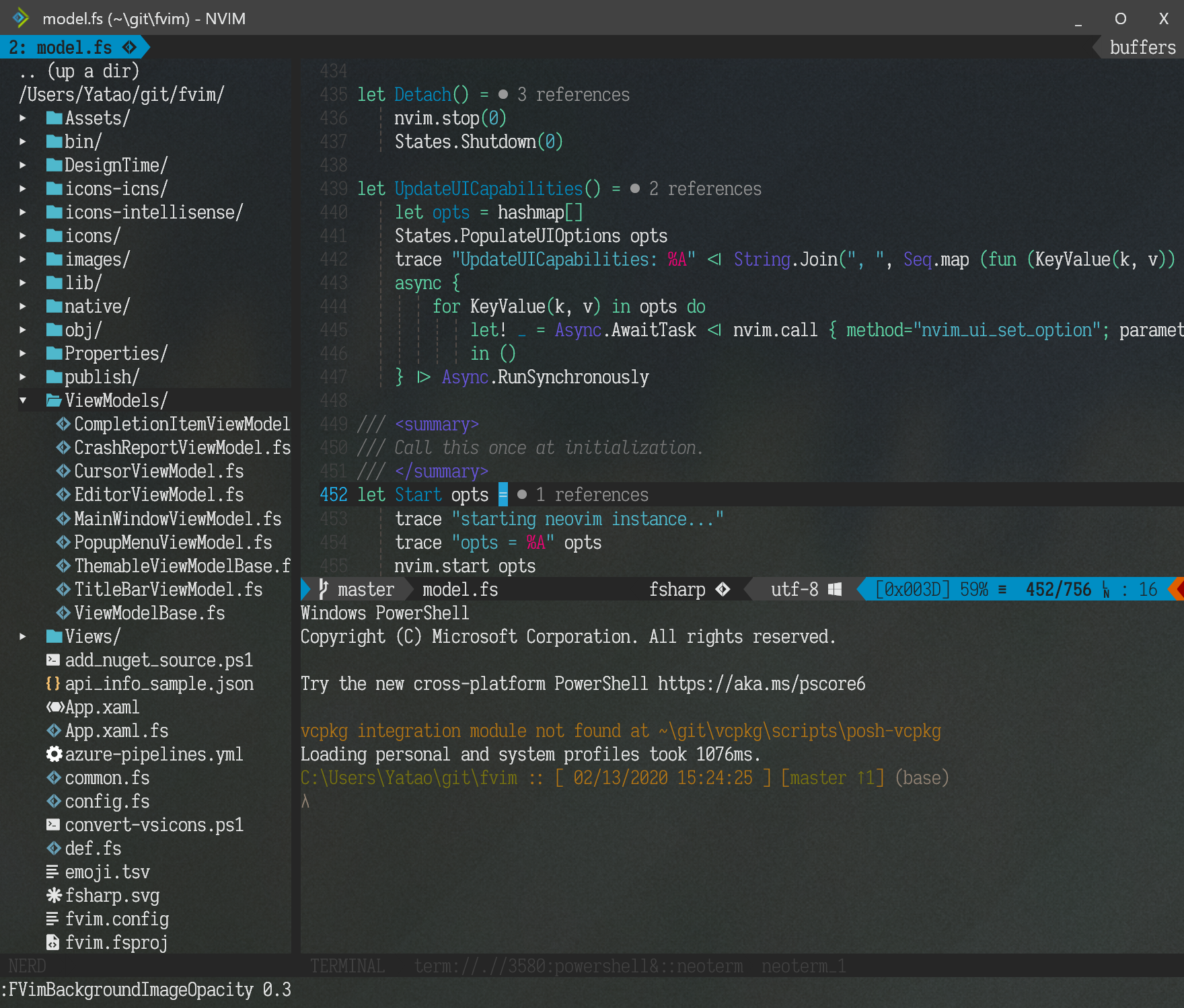
Download the latest release package for your system, extract and run FVim!
win7-x64 package.
win-x64 package -- this version has faster startup.dpkg -i fvim_package_name.debrpm -ivh fvim_package_name.rpmdnf install fvim_package_name.rpm git clone https://github.com/yatli/fvim && cd fvim && dotnet publish -f net6.0 -c Release -r linux-x64 --self-contained
colorscheme settingsCtrl-w ge to detach a window into a separate OS window!fvim --wslfvim --nvim ~/bin/nvim.appimagefvim --ssh user@hostfvim --connect localhost:9527fvim --fvr attach --ssh user@hostfvim --terminalTry these bindings (note, fvim-specific settings only work in ginit.vim, not init.vim!):
if exists('g:fvim_loaded')
    " good old 'set guifont' compatibility with HiDPI hints...
    if g:fvim_os == 'windows' || g:fvim_render_scale > 1.0
      set guifont=Iosevka Slab:h14
    else
      set guifont=Iosevka Slab:h28
    endif

    " Ctrl-ScrollWheel for zooming in/out
    nnoremap <silent> <C-ScrollWheelUp> :set guifont=+<CR>
    nnoremap <silent> <C-ScrollWheelDown> :set guifont=-<CR>
    nnoremap <A-CR> :FVimToggleFullScreen<CR>
endif
Some fancy cursor effects:
if exists('g:fvim_loaded')
    FVimCursorSmoothMove v:true
    FVimCursorSmoothBlink v:true
endif
Detaching a window into an external OS window with Ctrl-w ge:
Detach as many and span them over your monitors!
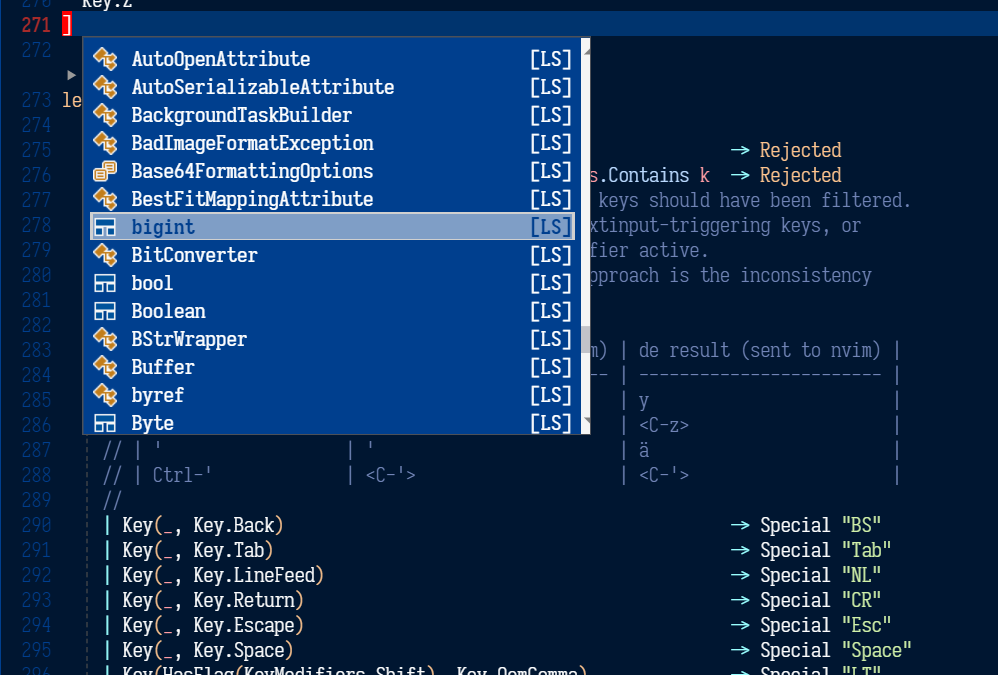
Custom popup menu entry icons (see below for how to configure):
We're now targeting net6.0 so make sure to install the latest preview SDK from the .NET site.
We're actively tracking the head of Avalonia, and fetch the nightly packages from myget (see NuGet.config).
Then, simply:
git clone https://github.com/yatli/fvim
cd fvim
dotnet build -c Release
dotnet run -c Release
The following new commands are available:
" Toggle between normal and fullscreen
FVimToggleFullScreen

" Cursor tweaks
FVimCursorSmoothMove v:true
FVimCursorSmoothBlink v:true

" Background composition
FVimBackgroundComposition 'acrylic'   " 'none', 'transparent', 'blur' or 'acrylic'
FVimBackgroundOpacity 0.85            " value between 0 and 1, default bg opacity.
FVimBackgroundAltOpacity 0.85         " value between 0 and 1, non-default bg opacity.
FVimBackgroundImage 'C:/foobar.png'   " background image
FVimBackgroundImageVAlign 'center'    " vertial position, 'top', 'center' or 'bottom'
FVimBackgroundImageHAlign 'center'    " horizontal position, 'left', 'center' or 'right'
FVimBackgroundImageStretch 'fill'     " 'none', 'fill', 'uniform', 'uniformfill'
FVimBackgroundImageOpacity 0.85       " value between 0 and 1, bg image opacity

" Title bar tweaks
FVimCustomTitleBar v:true             " themed with colorscheme

" Debug UI overlay
FVimDrawFPS v:true

" Font tweaks
FVimFontAntialias v:true
FVimFontAutohint v:true
FVimFontHintLevel 'full'
FVimFontLigature v:true
FVimFontLineHeight '+1.0' " can be 'default', '14.0', '-1.0' etc.
FVimFontSubpixel v:true
FVimFontNoBuiltinSymbols v:true " Disable built-in Nerd font symbols

" Try to snap the fonts to the pixels, reduces blur
" in some situations (e.g. 100% DPI).
FVimFontAutoSnap v:true

" Font weight tuning, possible valuaes are 100..900
FVimFontNormalWeight 400
FVimFontBoldWeight 700

" Font debugging -- draw bounds around each glyph
FVimFontDrawBounds v:true

" UI options (all default to v:false)
FVimUIPopupMenu v:true      " external popup menu
FVimUIWildMenu v:false      " external wildmenu -- work in progress

" Keyboard mapping options
FVimKeyDisableShiftSpace v:true " disable unsupported sequence <S-Space>
FVimKeyAutoIme v:true           " Automatic input method engagement in Insert mode
FVimKeyAltGr v:true             " Recognize AltGr. Side effect is that <C-A-Key> is then impossible

" Default options (workspace-agnostic)
FVimDefaultWindowWidth 1600     " Default window size in a new workspace
FVimDefaultWindowHeight 900

" Detach from a remote session without killing the server
" If this command is executed on a standalone instance,
" the embedded process will be terminated anyway.
FVimDetach

" =========== BREAKING CHANGES -- the following commands are disabled ============
" FVimUIMultiGrid v:true     -- per-window grid system -- done and enabled by default
" FVimUITabLine v:false      -- external tabline -- not implemented
" FVimUICmdLine v:false      -- external cmdline -- not implemented
" FVimUIMessages v:false     -- external messages -- not implemented
" FVimUITermColors v:false   -- not implemented
" FVimUIHlState v:false      -- not implemented
Usage: FVim [FVim-args] [NeoVim-args]

FVim-args:

    =========================== Client options ===================================

    --ssh user@host             Start NeoVim remotely over ssh
    --wsl                       Start NeoVim in WSL
    --nvim path-to-program      Use an alternative nvim program

    --nvr target                Connect to a remote NeoVim backend. The target
                                can be an IP endpoint (127.0.0.1:9527), or a
                                Unix socket address (/tmp/path/to/socket), or a
                                Windows named pipe (PipeName).

    --setup                     Registers FVim as a text editor, and updates
                                file association and icons. Requires UAC
                                elevation on Windows.
    --uninstall                 Unregisters FVim as a text editor, and removes
                                file association and icons. Requires UAC
                                elevation on Windows.

    =========================== FVim Remoting ====================================

    --daemon                    Start a FVR multiplexer server.
                                Can be used with --nvim for alternative program.

    --pipe name                 Override the named pipe address of the daemon.
                                When this option is not given, defaults to
                                '/tmp/fvr-main'

    --fvr id [FILES...]         Connects to a FVR server.
    --fvr a[ttach] [FILES...]    - id: an integer session id to connect
    --fvr n[ew] [args...]        - attach: attach to the first available session
                                 - new: create a new session with args passed to
                                   NeoVim.
                                Can be used with --ssh or --wsl for connecting a
                                remote server. If neither is specified, connects
                                to the local server.
                                Can be used with --pipe to override the server
                                address.

    =========================== Debug options ====================================

    --trace-to-stdout           Trace to stdout.
    --trace-to-file             Trace to a file.
    --trace-patterns            Filter trace output by a list of keyword strings

    =========================== Terminal emulator ================================

    --terminal                  Start as a terminal emulator.
    --terminal-cmd              Command to run instead of the default shell.


The FVim arguments will be consumed and filtered before the rest are passed to NeoVim.
| Category | PUM text | FVim | NERD equivalent |
|---|---|---|---|
| Text | t |  |
|
| Method | : |  |
|
| Function | f | |
|
| Constructor | c |  |
|
| Field | . |  |
ﰠ |
| Variable | v |  |
|
| Class | C |  |
ﴯ |
| Interface | I |  |
|
| Module | M |  |
|
| Property | p |  |
ﰠ |
| Unit | U |  |
塞 |
| Value | l |  |
|
| Enum | E |  |
|
| Keyword | k |  |
|
| Snippet | s |  |
|
| Color | K |  |
|
| File | F |  |
|
| Reference | r |  |
|
| Folder | d |  |
|
| EnumMember | m |  |
|
| Constant | 0 |  |
|
| Struct | S |  |
פּ |
| Event | e |  |
|
| Operator | o |  |
|
| TypeParameter | T |  |
T |
So instead of populating your symbol dictionary with the NERD-specific characters, use textual characters. FVim will pick them up and display graphical icons stored in Assets/intellisense instead.






