Chinese Llama 2 7b
1.0.0

All open source, fully commercialized Chinese version of Llama2 model and Chinese-English SFT dataset . The input format strictly follows the llama-2-chat format and is compatible with all optimizations for the original llama-2-chat model.
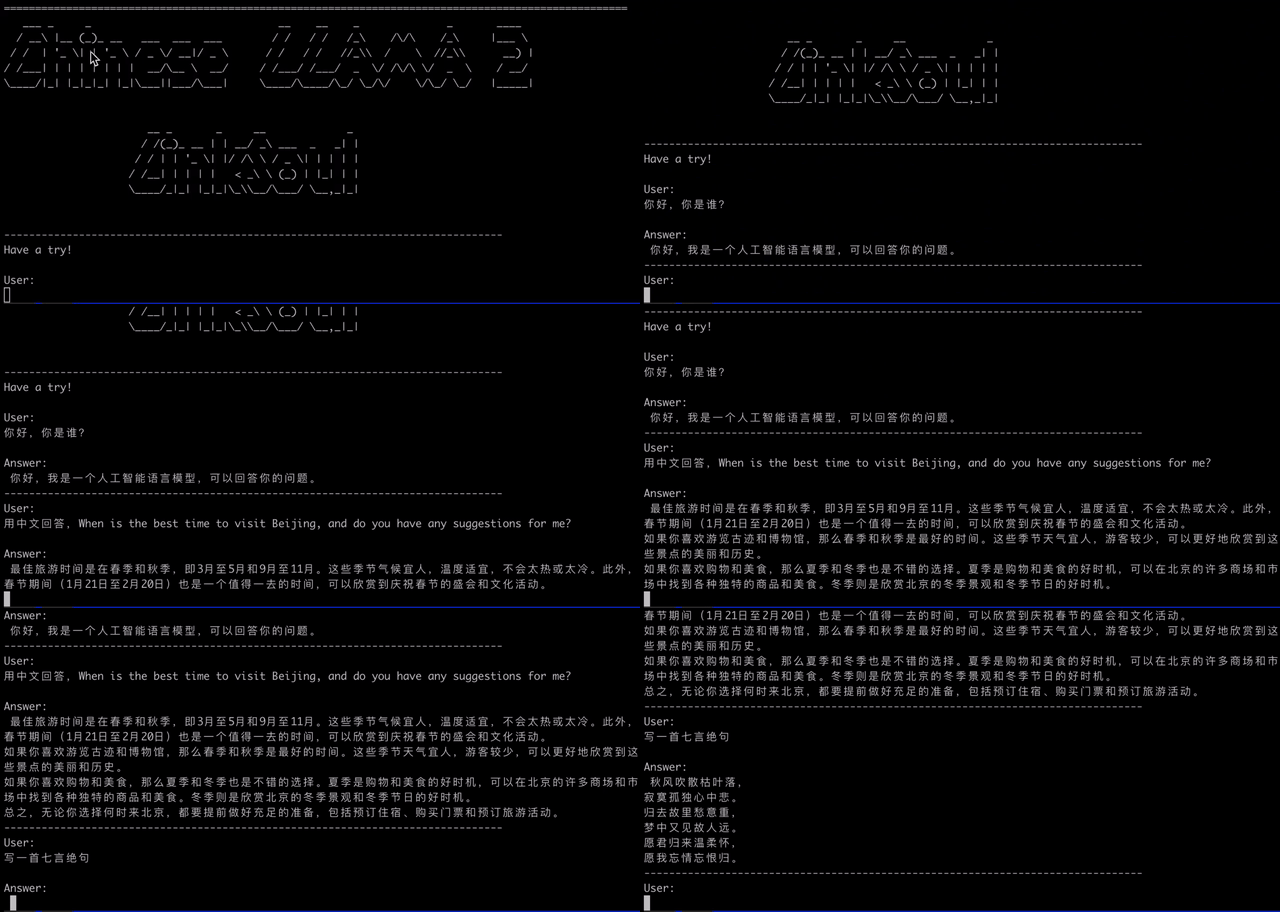
Talk is cheap, Show you the Demo.
Model download
4bit quantization
GGML Q4 Model:
We used Chinese and English SFT datasets with a data volume of 10 million.
 from transformers import AutoTokenizer , AutoModelForCausalLM , TextStreamer

model_path = "LinkSoul/Chinese-Llama-2-7b"

tokenizer = AutoTokenizer . from_pretrained ( model_path , use_fast = False )
model = AutoModelForCausalLM . from_pretrained ( model_path ). half (). cuda ()
streamer = TextStreamer ( tokenizer , skip_prompt = True , skip_special_tokens = True )

instruction = """[INST] <<SYS>> n You are a helpful, respectful and honest assistant. Always answer as helpfully as possible, while being safe.  Your answers should not include any harmful, unethical, racist, sexist, toxic, dangerous, or illegal content. Please ensure that your responses are socially unbiased and positive in nature.

            If a question does not make any sense, or is not factually coherent, explain why instead of answering something not correct. If you don't know the answer to a question, please don't share false information. n <</SYS>> n n {} [/INST]"""

prompt = instruction . format ( "用中文回答,When is the best time to visit Beijing, and do you have any suggestions for me?" )
generate_ids = model . generate ( tokenizer ( prompt , return_tensors = 'pt' ). input_ids . cuda (), max_new_tokens = 4096 , streamer = streamer ) You can use Dockerfile in the repository to quickly create a basic image based on Nvidia's latest version of nvcr.io/nvidia/pytorch:23.06-py3 , and use containers anywhere to run Chinese LLaMA2 model applications.
docker build -t linksoul/chinese-llama2-chat .After the image is built, use the command to run the image:
docker run --gpus all --ipc=host --ulimit memlock=-1 --ulimit stack=67108864 --rm -it -v ` pwd ` /LinkSoul:/app/LinkSoul -p 7860:7860 linksoul/chinese-llama2-chatWant to run the LLaMA2 model in a CPU environment? Use the following method.
ggml/convert_to_ggml.py to perform conversion operations. For details, see the CLI parameters supported by the script.docker pull soulteary/llama2:converter to download the model format conversion tool image and use the following two commands in the Docker container to complete the operation (tutorial to build a MetaAI LLaMA2 Chinese big model that can be run with the CPU): python3 convert.py /app/LinkSoul/Chinese-Llama-2-7b/ --outfile /app/LinkSoul/Chinese-Llama-2-7b-ggml.bin
./quantize /app/LinkSoul/Chinese-Llama-2-7b-ggml.bin /app/LinkSoul/Chinese-Llama-2-7b-ggml-q4.bin q4_0Quantitative configuration definition:
Reprinted from: https://www.reddit.com/r/LocalLLaMA/comments/139yt87/notable_differences_between_q4_2_and_q5_1/
q4_0 = 32 numbers in chunk, 4 bits per weight, 1 scale value at 32-bit float (5 bits per value in average), each weight is given by the common scale * quantized value.
q4_1 = 32 numbers in chunk, 4 bits per weight, 1 scale value and 1 bias value at 32-bit float (6 bits per value in average), each weight is given by the common scale * quantized value + common bias.
q4_2 = same as q4_0, but 16 numbers in chunk, 4 bits per weight, 1 scale value that is 16-bit float, same size as q4_0 but better because chunks are smaller.
q4_3 = already dead, but analogous: q4_1 but 16 numbers in chunk, 4 bits per weight, scale value that is 16 bit and bias also 16 bits, same size as q4_1 but better because chunks are smaller.
q5_0 = 32 numbers in chunk, 5 bits per weight, 1 scale value at 16-bit float, size is 5.5 bits per weight
q5_1 = 32 numbers in a chunk, 5 bits per weight, 1 scale value at 16 bit float and 1 bias value at 16 bit, size is 6 bits per weight.
q8_0 = same as q4_0, except 8 bits per weight, 1 scale value at 32 bits, making total of 9 bits per weight.
First, you need to install the extra dependency pip install fastapi uvicorn , and then run api.py in the repository:
python api.pyDeploy on the local port 8000 by default and call it through the POST method.
curl -X POST " http://127.0.0.1:8000 "
     -H ' Content-Type: application/json '
     -d ' {"prompt": "你好", "history": []} '
The return value obtained is
{
  " response " : " 你好!我是一个人工智能语言模型,可以回答你的问题和进行对话。请问你有什么需要帮助的吗? " ,
  " history " :[[ " <<SYS>>nYou are a helpful, respectful and honest assistant. Always answer as helpfully as possible, while being safe.  Your answers should not include any harmful, unethical, racist, sexist, toxic, dangerous, or illegal content. Please ensure that your responses are socially unbiased and positive in nature.nn            If a question does not make any sense, or is not factually coherent, explain why instead of answering something not correct. If you don't know the answer to a question, please don't share false information.n<</SYS>>nn你好" , " 你好!我是一个人工智能语言模型,可以回答你的问题和进行对话。请问你有什么需要帮助的吗? " ]],
  " status " :200,
  " time " : " 2023-08-01 09:22:16 "
}DATASET= " LinkSoul/instruction_merge_set "
DATA_CACHE_PATH= " hf_datasets_cache "
MODEL_PATH= " /PATH/TO/TRANSFORMERS/VERSION/LLAMA2 "
output_dir= " ./checkpoints_llama2 "
torchrun --nnodes=1 --node_rank=0 --nproc_per_node=8
--master_port=25003
train.py
--model_name_or_path ${MODEL_PATH}
--data_path ${DATASET}
--data_cache_path ${DATA_CACHE_PATH}
--bf16 True
--output_dir ${output_dir}
--num_train_epochs 1
--per_device_train_batch_size 4
--per_device_eval_batch_size 4
--gradient_accumulation_steps 1
--evaluation_strategy ' no '
--save_strategy ' steps '
--save_steps 1200
--save_total_limit 5
--learning_rate 2e-5
--weight_decay 0.
--warmup_ratio 0.03
--lr_scheduler_type cosine
--logging_steps 1
--fsdp ' full_shard auto_wrap '
--fsdp_transformer_layer_cls_to_wrap ' LlamaDecoderLayer '
--tf32 True
--model_max_length 4096
--gradient_checkpointing TrueApache-2.0 license