safebox
Safebox 2.0 stable

A PETCOMP Group Financial Management Webapp (UFMA). Its goal is to simply maintain a management of the entry and exit of financial resource of the teaching and extension group.
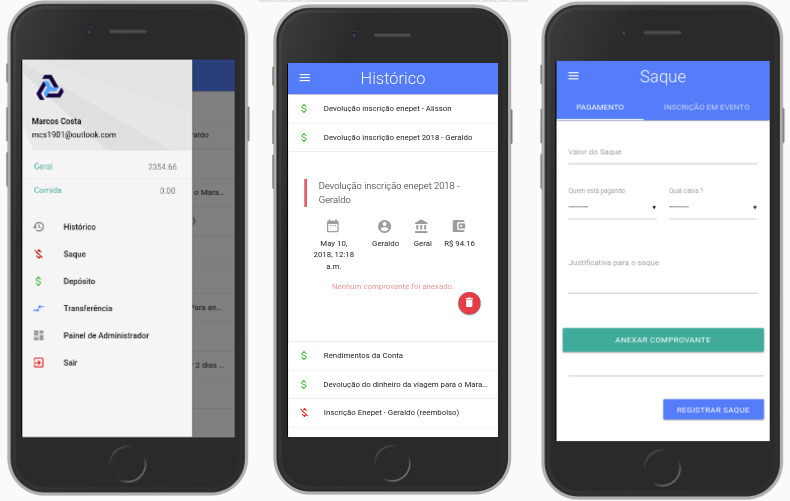
See also the desktop version
Install the prerequisites mentioned below, after that clone the project and enter the repository. Open your terminal in the project folder and run the command:
python manage.py runserver
A local server will be initial to close it press " Ctrl " + " C ".
Access address 127.0.0.1:8000 on your browser and have fun.
First you must install Python 3.0. Python is a high -level programming language, interpreted, script, imperative, object -oriented, functional, dynamic and strong typing.
sudo apt-get install python3
After that install the PIP. PIP is a package management system used to install and manage Python software packages.
sudo apt-get install python3-pip
Install the Virtual Sector.
sudo pip3 install virtualenv
Go as far as you want to save the project and create a folder with any name. In the case of this tutorial, the code was saved in the home folder of a Linux system.
mkdir ~/safebox-projeto
Enter the folder you just created.
cd ~/safebox-projeto
Then create a virtual environment so that the dependencies used in the project do not conflict with their facilities. This command will create a set of files that will allow you to isolate this webapp from the rest of your computer, preventing possible errors from bringing damage to your own projects. (Good practice)
virtualenv ambiente-virtual
To activate the virtual environment use the command:
source ambiente-virtual/bin/activate
Enter the Virtual Environment folder
cd ambiente-virtual/
Finally clone the Github repository
git clone https://github.com/Marcos-Costa/safebox.git
Finally, run the PIP so that it automatically installs the other dependencies.
pip install -r /safebox/requirements.txt
That is all, the project is installed.
To run it use it in the repository folder
cd safebox/
Run the following command:
python3 manage.py runserver
Visit the link to use Webapp. Or press Ctrl + C to your terminal to end Webapp.
Tests are automated and executed in the Circleci environment. If you have any knowledge about Unit Test you can perform the locally used tests the command
python3 manage.py test
The application deploy is also automated using circleci. Every time there is a Merge/Commit on Branch Master (which is a protected white), a webhok is executed and automated deploy happens on the server. To configure deploy on your server, read Circleci documentation on Yaml configuration files. The configuration file is in the .circleci/config.yml
Git was used for version.
See also the list of contributors who participated in the project.
This project uses the MIT license - see license license.md for more details.







