react test demo
1.0.0

 # 先说一下示例怎么运行,先确定本机安装好 node 环境

# 安装项目依赖
npm install

# 首先启动 webpack-dev-server
npm run start-dev

# 上一个运行完毕后不要关闭,开一个新的命令行,启动 node server 服务
npm run start-server

#上述两个启动好后打开浏览器访问 http://localhost:3000 即可

# 跑测试用例
npm test

# 生成测试覆盖报告,跑完后看 coverage 子目录下的内容
npm run test-coverage

# 以上脚本定义都在 package.json 中
As web applications become more and more complex, many companies pay more and more attention to front-end unit testing. Most of the tutorials we see will talk about the importance of unit testing and how to use some representative test framework APIs, but how to start unit testing in actual projects? What specific content should test cases include?
This article starts from a real application scenario, analyzes what unit tests should contain from the design pattern and code structure, and how to write specific test cases. I hope you can gain something from the children's shoes you see.
The project uses react technology stack, and the main frameworks used include: react , redux , react-redux , redux-actions , reselect , redux-saga , seamless-immutable , antd .
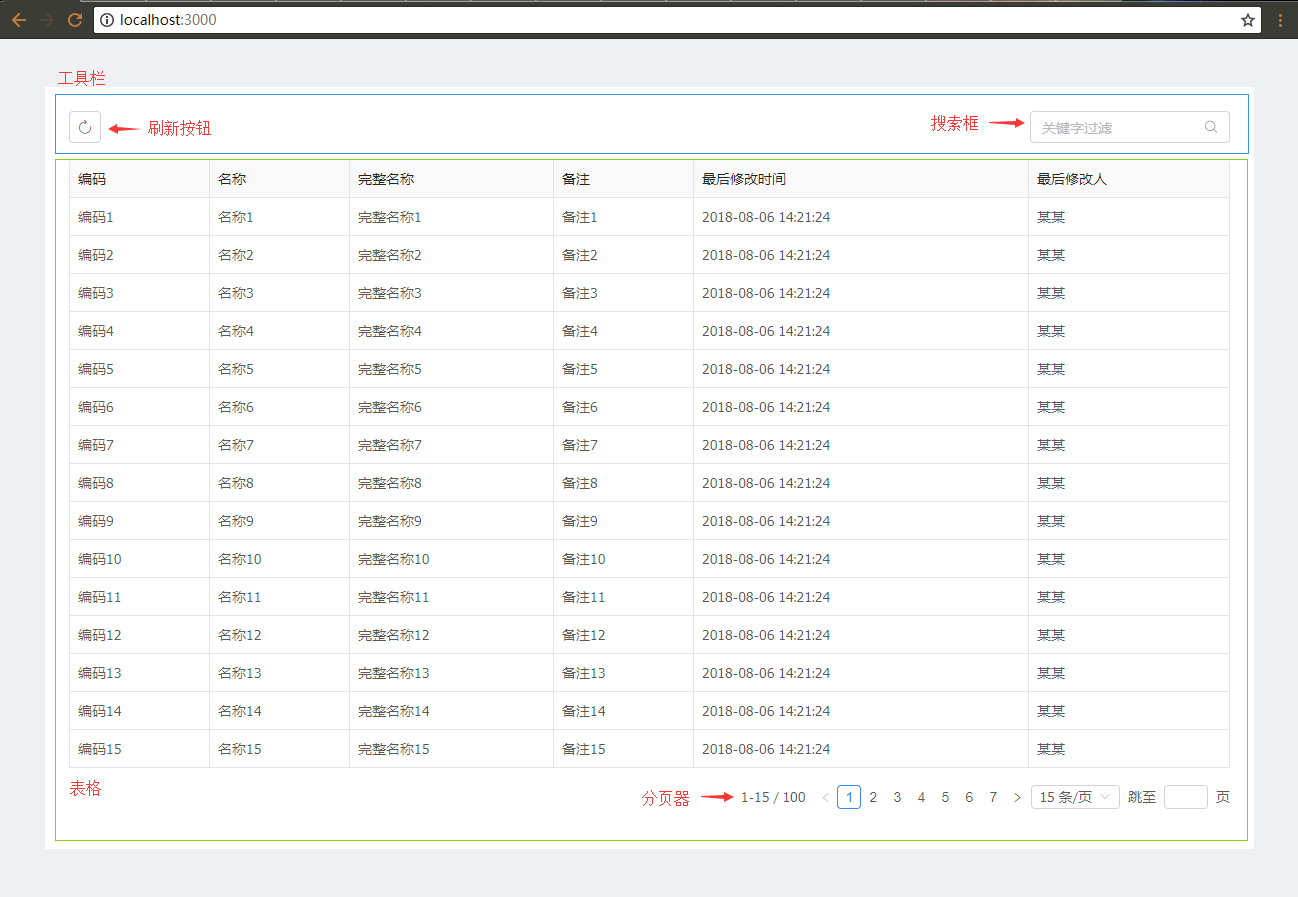
From the UI layer, this application scenario mainly consists of two parts:
When you see some children's shoes here, you may say: Cut! Is such a simple interface and business logic still a real scenario? Do you still need to write Shenma unit tests?
Don’t worry, in order to ensure the reading experience and length of the article, a simple scene that can explain the problem clearly is a good scene, right? Look down slowly.
In this scenario design and development, we strictly abide by the best practices of redux one-way data flow and react-redux , and use redux-saga to process business flow, reselect to process state cache, and call backend interfaces through fetch , which is no different from real projects.
The layered design and code organization are as follows:
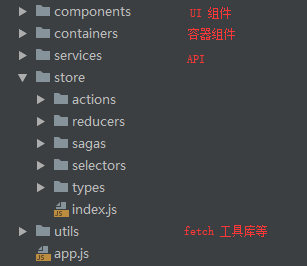
The contents in the middle store are all related to redux , and you should know the meaning by looking at the name.
For specific codes, please see here.
Let’s first talk about which testing frameworks and tools are used, the main contents include:
jest , test frameworkenzyme , specialize in testing react ui layersinon has independent library of fakes, spies, stubs, and mocksnock , simulate HTTP ServerIf you have children's shoes that are not familiar with the above use and configuration, just read the official documentation, which is better than any tutorial.
Next, we start writing specific test case code. The following will give code snippets and parses for each level. Then let's start with actions .
In order to make the article as short and clear as possible, the following code snippets are not the complete content of each file, and the complete content is here.
In the business, I used redux-actions to generate action . Here I use the toolbar as an example. Let’s first look at a piece of business code:
 import { createAction } from 'redux-actions' ;
import * as type from '../types/bizToolbar' ;

export const updateKeywords = createAction ( type . BIZ_TOOLBAR_KEYWORDS_UPDATE ) ;

// ...
For actions testing, we mainly verify whether the generated action object is correct:
 import * as type from '@/store/types/bizToolbar' ;
import * as actions from '@/store/actions/bizToolbar' ;

/* 测试 bizToolbar 相关 actions */
describe ( 'bizToolbar actions' , ( ) => {

    /* 测试更新搜索关键字 */
    test ( 'should create an action for update keywords' , ( ) => {
        // 构建目标 action
        const keywords = 'some keywords' ;
        const expectedAction = {
            type : type . BIZ_TOOLBAR_KEYWORDS_UPDATE ,
            payload : keywords
        } ;

        // 断言 redux-actions 产生的 action 是否正确
        expect ( actions . updateKeywords ( keywords ) ) . toEqual ( expectedAction ) ;
    } ) ;

    // ...
} ) ;
The logic of this test case is very simple. First, build a result we expect, then call the business code, and finally verify whether the operation result of the business code is consistent with the expectations. This is the basic routine of writing test cases.
We try to keep the use case single responsibility when writing test cases and do not cover too many different business scopes. There can be many test cases, but each should not be complicated.
Next is reducers , which still uses handleActions of redux-actions to write reducer . Here is a table for example:
 import { handleActions } from 'redux-actions' ;
import Immutable from 'seamless-immutable' ;
import * as type from '../types/bizTable' ;

/* 默认状态 */
export const defaultState = Immutable ( {
    loading : false ,
    pagination : {
        current : 1 ,
        pageSize : 15 ,
        total : 0
    } ,
    data : [ ]
} ) ;

export default handleActions (
    {
        // ...

        /* 处理获得数据成功 */
        [ type . BIZ_TABLE_GET_RES_SUCCESS ] : ( state , { payload } ) => {
            return state . merge (
                {
                    loading : false ,
                    pagination : { total : payload . total } ,
                    data : payload . items
                } ,
                { deep : true }
            ) ;
        } ,

        // ...
    } ,
    defaultState
) ;
The state object here uses
seamless-immutable
For reducer , we mainly test two aspects:
action.type , whether the current status can be returned.Here are the test codes for the above two points:
 import * as type from '@/store/types/bizTable' ;
import reducer , { defaultState } from '@/store/reducers/bizTable' ;

/* 测试 bizTable reducer */
describe ( 'bizTable reducer' , ( ) => {

    /* 测试未指定 state 参数情况下返回当前缺省 state */
    test ( 'should return the default state' , ( ) => {
        expect ( reducer ( undefined , { type : 'UNKNOWN' } ) ) . toEqual ( defaultState ) ;
    } ) ;

    // ...

    /* 测试处理正常数据结果 */
    test ( 'should handle successful data response' , ( ) => {
        /* 模拟返回数据结果 */
        const payload = {
            items : [
                { id : 1 , code : '1' } ,
                { id : 2 , code : '2' }
            ] ,
            total : 2
        } ;
        /* 期望返回的状态 */
        const expectedState = defaultState
            . setIn ( [ 'pagination' , 'total' ] , payload . total )
            . set ( 'data' , payload . items )
            . set ( 'loading' , false ) ;

        expect (
            reducer ( defaultState , {
                type : type . BIZ_TABLE_GET_RES_SUCCESS ,
                payload
            } )
        ) . toEqual ( expectedState ) ;
    } ) ;

    // ...
} ) ;
The logic of the test case here is also very simple, and it is still the routine of asserting the expected result above. Below is the part of selectors.
The function of selector is to obtain the status of the corresponding business. reselect is used here to cache to prevent recalculation when state is not changed. Let’s first look at the selector code of the table:
 import { createSelector } from 'reselect' ;
import * as defaultSettings from '@/utils/defaultSettingsUtil' ;

// ...

const getBizTableState = ( state ) => state . bizTable ;

export const getBizTable = createSelector ( getBizTableState , ( bizTable ) => {
    return bizTable . merge ( {
        pagination : defaultSettings . pagination
    } , { deep : true } ) ;
} ) ;
The parameters of the pager here are set uniformly in the project, so reselect does this job well: if the business status remains unchanged, it will directly return to the last cache. The default settings of the paging device are as follows:
 export const pagination = {
    size : 'small' ,
    showTotal : ( total , range ) => ` ${ range [ 0 ] } - ${ range [ 1 ] } / ${ total } ` ,
    pageSizeOptions : [ '15' , '25' , '40' , '60' ] ,
    showSizeChanger : true ,
    showQuickJumper : true
} ;
Then our tests are mainly two aspects:
The test code is as follows:
 import Immutable from 'seamless-immutable' ;
import { getBizTable } from '@/store/selectors' ;
import * as defaultSettingsUtil from '@/utils/defaultSettingsUtil' ;

/* 测试 bizTable selector */
describe ( 'bizTable selector' , ( ) => {

    let state ;

    beforeEach ( ( ) => {
        state = createState ( ) ;
        /* 每个用例执行前重置缓存计算次数 */
        getBizTable . resetRecomputations ( ) ;
    } ) ;

    function createState ( ) {
        return Immutable ( {
            bizTable : {
                loading : false ,
                pagination : {
                    current : 1 ,
                    pageSize : 15 ,
                    total : 0
                } ,
                data : [ ]
            }
        } ) ;
    }

    /* 测试返回正确的 bizTable state */
    test ( 'should return bizTable state' , ( ) => {
        /* 业务状态 ok 的 */
        expect ( getBizTable ( state ) ) . toMatchObject ( state . bizTable ) ;

        /* 分页默认参数设置 ok 的 */
        expect ( getBizTable ( state ) ) . toMatchObject ( {
            pagination : defaultSettingsUtil . pagination
        } ) ;
    } ) ;

    /* 测试 selector 缓存是否有效 */
    test ( 'check memoization' , ( ) => {
        getBizTable ( state ) ;
        /* 第一次计算,缓存计算次数为 1 */
        expect ( getBizTable . recomputations ( ) ) . toBe ( 1 ) ;

        getBizTable ( state ) ;
        /* 业务状态不变的情况下,缓存计算次数应该还是 1 */
        expect ( getBizTable . recomputations ( ) ) . toBe ( 1 ) ;

        const newState = state . setIn ( [ 'bizTable' , 'loading' ] , true ) ;
        getBizTable ( newState ) ;
        /* 业务状态改变了,缓存计算次数应该是 2 了 */
        expect ( getBizTable . recomputations ( ) ) . toBe ( 2 ) ;
    } ) ;
} ) ;
Is the test case still very simple? Just keep this pace. Let’s talk about the slightly complicated part, the sagas part.
Here I use redux-saga to process business flow, which is specifically called API to request data asynchronously, process successful results and error results, etc.
Some children's shoes may think it's so complicated. Isn't it over to use redux-thunk asynchronously requested? Don't worry, you will understand after reading it patiently.
Here it is necessary to briefly introduce the working method of redux-saga . saga is an es6 generator function - Generator , which we use to generate various declarative effects , which are digested and processed by redux-saga engine to drive business.
Here we take a look at the business code for obtaining table data:
 import { all , takeLatest , put , select , call } from 'redux-saga/effects' ;
import * as type from '../types/bizTable' ;
import * as actions from '../actions/bizTable' ;
import { getBizToolbar , getBizTable } from '../selectors' ;
import * as api from '@/services/bizApi' ;

// ...

export function * onGetBizTableData ( ) {
    /* 先获取 api 调用需要的参数:关键字、分页信息等 */
    const { keywords } = yield select ( getBizToolbar ) ;
    const { pagination } = yield select ( getBizTable ) ;

    const payload = {
        keywords ,
        paging : {
            skip : ( pagination . current - 1 ) * pagination . pageSize , max : pagination . pageSize
        }
    } ;

    try {
        /* 调用 api */
        const result = yield call ( api . getBizTableData , payload ) ;
        /* 正常返回 */
        yield put ( actions . putBizTableDataSuccessResult ( result ) ) ;
    } catch ( err ) {
        /* 错误返回 */
        yield put ( actions . putBizTableDataFailResult ( ) ) ;
    }
}
If you are not familiar with redux-saga don’t pay too much attention to the specific writing of the code. You should understand the specific steps of this business by looking at the comments:
state , and the selector just now is called here.So how should we write specific test cases? We all know that this kind of business code involves calls from API or other layers. If you want to write unit tests, you must do some mocks to prevent the API layer from being actually called. Let's take a look at how to write test cases for this saga:
 import { put , select } from 'redux-saga/effects' ;

// ...

/* 测试获取数据 */
test ( 'request data, check success and fail' , ( ) => {
    /* 当前的业务状态 */
    const state = {
        bizToolbar : {
            keywords : 'some keywords'
        } ,
        bizTable : {
            pagination : {
                current : 1 ,
                pageSize : 15
            }
        }
    } ;
    const gen = cloneableGenerator ( saga . onGetBizTableData ) ( ) ;

    /* 1. 是否调用了正确的 selector 来获得请求时要发送的参数 */
    expect ( gen . next ( ) . value ) . toEqual ( select ( getBizToolbar ) ) ;
    expect ( gen . next ( state . bizToolbar ) . value ) . toEqual ( select ( getBizTable ) ) ;

    /* 2. 是否调用了 api 层 */
    const callEffect = gen . next ( state . bizTable ) . value ;
    expect ( callEffect [ 'CALL' ] . fn ) . toBe ( api . getBizTableData ) ;
    /* 调用 api 层参数是否传递正确 */
    expect ( callEffect [ 'CALL' ] . args [ 0 ] ) . toEqual ( {
        keywords : 'some keywords' ,
        paging : { skip : 0 , max : 15 }
    } ) ;

    /* 3. 模拟正确返回分支 */
    const successBranch = gen . clone ( ) ;
    const successRes = {
        items : [
            { id : 1 , code : '1' } ,
            { id : 2 , code : '2' }
        ] ,
        total : 2
    } ;
    expect ( successBranch . next ( successRes ) . value ) . toEqual (
        put ( actions . putBizTableDataSuccessResult ( successRes ) ) ) ;
    expect ( successBranch . next ( ) . done ) . toBe ( true ) ;

    /* 4. 模拟错误返回分支 */
    const failBranch = gen . clone ( ) ;
    expect ( failBranch . throw ( new Error ( '模拟产生异常' ) ) . value ) . toEqual (
        put ( actions . putBizTableDataFailResult ( ) ) ) ;
    expect ( failBranch . next ( ) . done ) . toBe ( true ) ;
} ) ;
This test case is a bit more complicated than the previous one. Let’s talk about the principle of testing saga first. As mentioned earlier, saga actually returns various declarative effects and is then actually executed by the engine. Therefore, the purpose of our test is to see whether the generation of effects meets expectations. So is effect a magical thing? It's actually a literal object!
We can generate these literal objects in the same way in business code. Assertions of literal objects are very simple, and there is no need to mock without directly calling the API layer! The step of this test case is to use the generator function to generate the next effect step by step, and then assert and compare.
As can be seen from the comments 3 and 4 above,
redux-sagaalso provides some helper functions to easily handle branch breakpoints.
This is also why I chose redux-saga : it is powerful and conducive to testing.
Next is the API layer related. As mentioned earlier, I used fetch to call background requests. I encapsulated two methods to simplify call and result processing: getJSON() and postJSON() , corresponding to GET and POST requests respectively. Let’s take a look at the API layer code:
 import { fetcher } from '@/utils/fetcher' ;

export function getBizTableData ( payload ) {
    return fetcher . postJSON ( '/api/biz/get-table' , payload ) ;
}
The business code is simple, so the test cases are simple:
 import sinon from 'sinon' ;
import { fetcher } from '@/utils/fetcher' ;
import * as api from '@/services/bizApi' ;

/* 测试 bizApi */
describe ( 'bizApi' , ( ) => {

    let fetcherStub ;

    beforeAll ( ( ) => {
        fetcherStub = sinon . stub ( fetcher ) ;
    } ) ;

    // ...

    /* getBizTableData api 应该调用正确的 method 和传递正确的参数 */
    test ( 'getBizTableData api should call postJSON with right params of fetcher' , ( ) => {
        /* 模拟参数 */
        const payload = { a : 1 , b : 2 } ;
        api . getBizTableData ( payload ) ;

        /* 检查是否调用了工具库 */
        expect ( fetcherStub . postJSON . callCount ) . toBe ( 1 ) ;
        /* 检查调用参数是否正确 */
        expect ( fetcherStub . postJSON . lastCall . calledWith ( '/api/biz/get-table' , payload ) ) . toBe ( true ) ;
    } ) ;
} ) ;
Since the API layer directly calls the tool library, here we use sinon.stub() to replace the tool library to achieve testing purposes.
Next, test the fetch tool library that you encapsulated. Here I use isomorphic-fetch , so I chose nock to simulate the Server for testing, mainly testing the results of normal access and simulate server exceptions, etc. The example fragment is as follows:
 import nock from 'nock' ;
import { fetcher , FetchError } from '@/utils/fetcher' ;

/* 测试 fetcher */
describe ( 'fetcher' , ( ) => {

    afterEach ( ( ) => {
        nock . cleanAll ( ) ;
    } ) ;

    afterAll ( ( ) => {
        nock . restore ( ) ;
    } ) ;

    /* 测试 getJSON 获得正常数据 */
    test ( 'should get success result' , ( ) => {
        nock ( 'http://some' )
            . get ( '/test' )
            . reply ( 200 , { success : true , result : 'hello, world' } ) ;

        return expect ( fetcher . getJSON ( 'http://some/test' ) ) . resolves . toMatch ( / ^hello.+$ / ) ;
    } ) ;

    // ...

    /* 测试 getJSON 捕获 server 大于 400 的异常状态 */
    test ( 'should catch server status: 400+' , ( done ) => {
        const status = 500 ;
        nock ( 'http://some' )
            . get ( '/test' )
            . reply ( status ) ;

        fetcher . getJSON ( 'http://some/test' ) . catch ( ( error ) => {
            expect ( error ) . toEqual ( expect . any ( FetchError ) ) ;
            expect ( error ) . toHaveProperty ( 'detail' ) ;
            expect ( error . detail . status ) . toBe ( status ) ;
            done ( ) ;
        } ) ;
    } ) ;

   /* 测试 getJSON 传递正确的 headers 和 query strings */
    test ( 'check headers and query string of getJSON()' , ( ) => {
        nock ( 'http://some' , {
            reqheaders : {
                'Accept' : 'application/json' ,
                'authorization' : 'Basic Auth'
            }
        } )
            . get ( '/test' )
            . query ( { a : '123' , b : 456 } )
            . reply ( 200 , { success : true , result : true } ) ;

        const headers = new Headers ( ) ;
        headers . append ( 'authorization' , 'Basic Auth' ) ;
        return expect ( fetcher . getJSON (
            'http://some/test' , { a : '123' , b : 456 } , headers ) ) . resolves . toBe ( true ) ;
    } ) ;

    // ...
} ) ;
Basically, there is nothing complicated. The main thing is to note that fetch is a promise return, and various asynchronous testing solutions of jest can be easily met.
The rest is related to the UI.
The main purpose of the container component is to pass state and actions. Look at the container component code in the toolbar:
 import { connect } from 'react-redux' ;
import { getBizToolbar } from '@/store/selectors' ;
import * as actions from '@/store/actions/bizToolbar' ;
import BizToolbar from '@/components/BizToolbar' ;

const mapStateToProps = ( state ) => ( {
    ... getBizToolbar ( state )
} ) ;

const mapDispatchToProps = {
    reload : actions . reload ,
    updateKeywords : actions . updateKeywords
} ;

export default connect ( mapStateToProps , mapDispatchToProps ) ( BizToolbar ) ;
Then the purpose of the test cases is also to check these. Here we use redux-mock-store to simulate redux store:
 import React from 'react';
import { shallow } from 'enzyme';
import configureStore from 'redux-mock-store';
import BizToolbar from '@/containers/BizToolbar';

/* 测试容器组件 BizToolbar */
describe('BizToolbar container', () => {

    const initialState = {
        bizToolbar: {
            keywords: 'some keywords'
        }
    };
    const mockStore = configureStore();
    let store;
    let container;

    beforeEach(() => {
        store = mockStore(initialState);
        container = shallow(<BizToolbar store={store}/>);
    });

    /* 测试 state 到 props 的映射是否正确 */
    test('should pass state to props', () => {
        const props = container.props();

        expect(props).toHaveProperty('keywords', initialState.bizToolbar.keywords);
    });

    /* 测试 actions 到 props 的映射是否正确 */
    test('should pass actions to props', () => {
        const props = container.props();

        expect(props).toHaveProperty('reload', expect.any(Function));
        expect(props).toHaveProperty('updateKeywords', expect.any(Function));
    });
});
It's very simple, so there's nothing to say.
Here we take the table component as an example, and we will directly look at how the test case is written. Generally speaking, we mainly test the following aspects of UI components:
Here is the test case code:
 import React from 'react';
import { mount } from 'enzyme';
import sinon from 'sinon';
import { Table } from 'antd';
import * as defaultSettingsUtil from '@/utils/defaultSettingsUtil';
import BizTable from '@/components/BizTable';

/* 测试 UI 组件 BizTable */
describe('BizTable component', () => {

    const defaultProps = {
        loading: false,
        pagination: Object.assign({}, {
            current: 1,
            pageSize: 15,
            total: 2
        }, defaultSettingsUtil.pagination),
        data: [{id: 1}, {id: 2}],
        getData: sinon.fake(),
        updateParams: sinon.fake()
    };
    let defaultWrapper;

    beforeEach(() => {
        defaultWrapper = mount(<BizTable {...defaultProps}/>);
    });

    // ...

    /* 测试是否渲染了正确的功能子组件 */
    test('should render table and pagination', () => {
        /* 是否渲染了 Table 组件 */
        expect(defaultWrapper.find(Table).exists()).toBe(true);
        /* 是否渲染了 分页器 组件,样式是否正确(mini) */
        expect(defaultWrapper.find('.ant-table-pagination.mini').exists()).toBe(true);
    });

    /* 测试首次加载时数据列表为空是否发起加载数据请求 */
    test('when componentDidMount and data is empty, should getData', () => {
        sinon.spy(BizTable.prototype, 'componentDidMount');
        const props = Object.assign({}, defaultProps, {
            pagination: Object.assign({}, {
                current: 1,
                pageSize: 15,
                total: 0
            }, defaultSettingsUtil.pagination),
            data: []
        });
        const wrapper = mount(<BizTable {...props}/>);

        expect(BizTable.prototype.componentDidMount.calledOnce).toBe(true);
        expect(props.getData.calledOnce).toBe(true);
        BizTable.prototype.componentDidMount.restore();
    });

    /* 测试 table 翻页后是否正确触发 updateParams */
    test('when change pagination of table, should updateParams', () => {
        const table = defaultWrapper.find(Table);
        table.props().onChange({current: 2, pageSize: 25});
        expect(defaultProps.updateParams.lastCall.args[0])
            .toEqual({paging: {current: 2, pageSize: 25}});
    });
});
Thanks to the rationality of design stratification, it is easy for us to use construct props to achieve testing purposes. Combining enzyme and sinon , the test cases still maintain a simple rhythm.
The above is the complete test case writing ideas and sample code for this scenario. The ideas and methods mentioned in the article can also be used in Vue and Angular projects. The complete code content is here (I will say more important things, I think it is easy to help me).
Finally, we can use the coverage rate to see if the coverage level of the use case is sufficient (generally, there is no need to deliberately pursue 100%, depending on the actual situation):
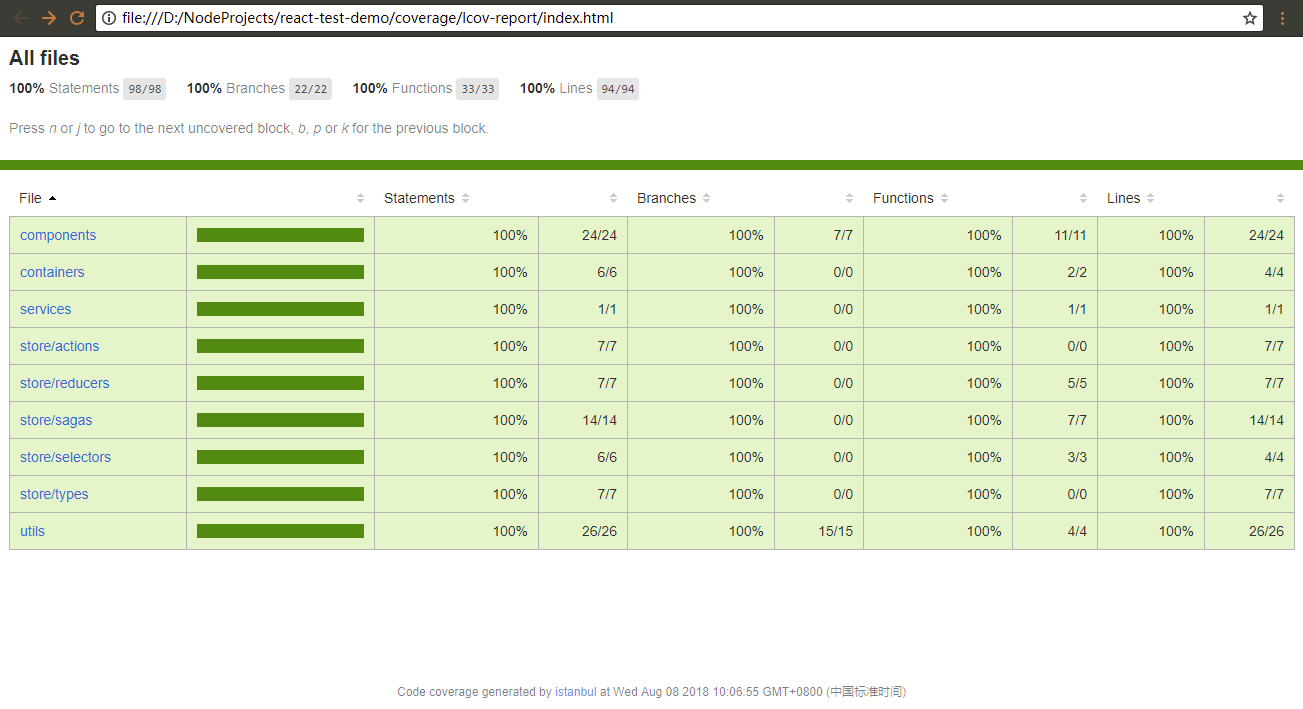
Unit testing is the basis of TDD test-driven development. From the above process, we can see that good design hierarchy is easy to write test cases, and unit testing is not just to ensure the quality of the code: will it force you to think about the rationality of code design and reject the noodle code?
To borrow the conclusion of Clean Code:
In 2005, while attending the Agility Conference in Denver, Elisabeth Hedrickson handed me a green wristband similar to the one sold by Lance Armstrong. The wristband says "Test Obsessed". I put it on with joy and proudly kept it on. I've really been obsessed with test-driven development since I learned about TDD from Kent Beck in 1999.
But something strange happened. I found myself unable to remove the strap. Not only because the wristband is very tight, but it is also a spiritual tightening spell. That wristband is a declaration of my work ethics and a tip for my commitment to do my best to write the best code. Take it off as if it was against these declarations and promises.
So it's still on my wrist. While writing code, I saw it from the bottom of my eye. It kept reminding me that I made a promise to write neat code.







