JournalGPT
1.0.0

Welcome to the JournalGPT, a powerful, multi-page Streamlit application that harnesses the capabilities of several cutting-edge technologies to revolutionize the way users write journal entries, ask questions about their journals, and interactively create journal entries.
The ultimate goal of this application is to serve as a self-improvement journal that can assist users in detecting debilitating thought patterns, weaknesses, procrastination patterns etc and provide necessary resources for improving overall well-being.
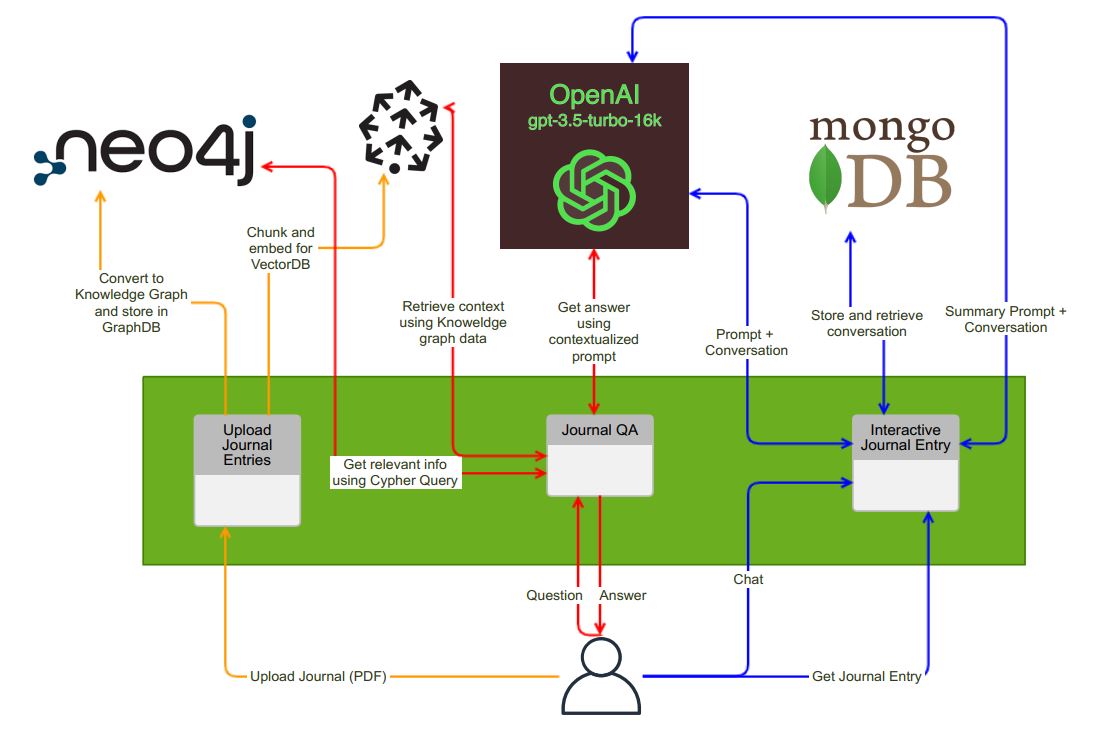
The Journal Entry Assistant consists of three distinct pages, each offering unique functionalities:
The first page allows users to upload their journal in PDF format. Upon upload, the application performs the following tasks:
Knowledge Graph Creation: The uploaded document is processed and transformed into a structured knowledge graph. This graph is then stored in a Neo4J database for efficient retrieval and analysis.
Text Chunking and Embeddings: The document is chunked and converted into embeddings. These embeddings are stored in a vector database, specifically Pinecone. This enables powerful search and retrieval of relevant information.
In the second page, users can ask questions related to the contents of their uploaded journal. The application provides the following features:
Context Extraction: The system identifies the relevant context words within the Neo4J knowledge graph to better understand the user's query.
Vector Database Query: The identified context words are sent to Pinecone for an efficient vector search. This step retrieves the necessary context for answering the user's question.
LLM-Powered Answering: The retrieved context is provided to an Large Language Model (in this case, OpenAI GPT-3.5) along with a suitable prompt. This ensures that the application delivers accurate and meaningful responses to the user's questions.
On the third page, users can interactively create journal entries with the assistance of an AI language model. The process is as follows:
Interactive Journaling: Users start typing their journal entries, and the AI language model engages in a conversation, asking thoughtful questions about their day. This helps users gather their thoughts and generate a more comprehensive journal.
MongoDB Storage: All interactions between the user and the AI model are stored in a MongoDB Atlas NoSQL database, creating a record of the conversation.
Journal Entry Generation: Once the user finishes their entry, they can click "Generate journal entry." The AI model is prompted with relevant information and a suitable title, and it returns a fully formed journal entry to the user. Optionally, users can download it in DOCX format.
.env.example file..env.example file..env.example file..env.example file.cp .env.example .env
docker build -t journal-gpt .
docker run -d --env-file .env -p 8501:8501 journal-gpt




