KOBE - Mobile Budget Application (Fronnd)

General description
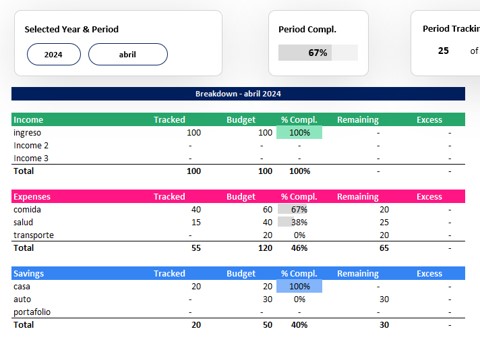
Application that allows to assemble a budget per month, where there are 3 types of movements: income, expenses and savings. For each type of movement, up to 10 categories can be defined. In a given month, the user can define the value that expects to designate each category (budget). Subsequently, during the month the user will register their movements and from these, in a statistics tab you can see how the plan that made for the month is being fulfilled.
Figma link
Reference image:
Development environment
To create a development environment of a web application with Flutter on the border and express.js in the backend, to install it you can follow these steps:
Border configuration
- Flutter installation - mobile development.
- First, download and install flutter from its official page: https://flutter.dev/docs/get-started/install. Follow the specific instructions for your operating system. Subsequently add the path to the environment variables.
- Android Studio configuration - an Android mobile emulator to test the application.
- Install Android Studio from the official website of Android Studio: https://developer.android.com/studio.
- Within Android Studio, install the Android SDK and configure an emulator on the AVD Manager to simulate a mobile device.
- Visual Studio Code - IDE configuration to use in the project.
- Download and install Visual Studio Code (VSCODE) from its official page: https://code.visualstudio.com/.
- The following plugins can be installed to facilitate coding in flutter:
- Flutter: To integrate support for VSCODE and include functionalities such as application execution and purification.
- Dart: necessary to work with Flutter, since it provides support for Dart programming language.
- Awesome Flutter Snippets: Provides useful code snippes to develop more quickly in Flutter.
- Flutter Widget Snippets: A collection of snippets for the most commonly used widgets in Flutter.
Backend configuration
- Node.js installation
- Download and install node.js from its official page: https://nodejs.org/. Node.js is necessary to work with Express.js. Subsequently add the path to the environment variables.
- Creation and configuration of an express.js project
- Open a terminal and use the following command to install the express applications generator: NPM Install -G Express -Generator
- Create a new express project with the command: Express Name-of-Tu-Project
- Development in Express.js
- Develop your backend application by modifying the files in the project directory. They can be installed additional as necessary, installing them with NPM Install Name.
- Tools such as postman or insomnia can be used to test the API Endpoints of your Express.js application.
Execution and tests
- For the Border, open vs Code, navigate to the directory of your FLUTTER project and execute your application using the emulator configured in Android Studio.
- For the Backend, in a terminal navigates to the directory of your Express Project and executes
npm start to start the server.
Requirements
Functional requirements
| |
|---|
| Identification of the requirement | RF1 |
| Requirement name | Creation of account |
| Characteristics | The user can create an account, defining a username and password. |
| Description of the requirement | The user can create an account giving the data: email, username, full name and password |
| Non -functional requirement | RNF1, RNF2, RNF5 |
| Priority of the requirement | High |
| |
|---|
| Identification of the requirement | RF2 |
| Requirement name | User authentication |
| Characteristics | The user to log in must enter account information |
| Description of the requirement | The user to log in must enter their username and password |
| Non -functional requirement | RNF1, RNF2, RNF5 |
| Priority of the requirement | Average |
| |
|---|
| Identification of the requirement | RF3 |
| Requirement name | Creation of categories |
| Characteristics | The user can create categories |
| Description of the requirement | The user will be able to create a maximum of 10 categories for their income, expenses and savings. |
| Non -functional requirement | RNF1, RNF2, RNF6 |
| Priority of the requirement | Average |
| |
|---|
| Identification of the requirement | RF4 |
| Requirement name | Creation of the Budget Plan |
| Characteristics | The user will be able to create a budget plan for each category of income, expenses and savings. |
| Description of the requirement | The user will be able to create a budget plan for each category of income, expenses and savings. |
| Non -functional requirement | RNF1, RNF2, RNF6, RNF7 |
| Priority of the requirement | Average |
| |
|---|
| Identification of the requirement | RF5 |
| Requirement name | Movement income |
| Characteristics | The user may enter their financial movements according to each category of income, expenses and savings. |
| Description of the requirement | The user may enter their financial movements according to each category of income, expenses and savings. |
| Non -functional requirement | RNF1, RNF2, RNF6, RNF7. |
| Priority of the requirement | High |
| |
|---|
| Identification of the requirement | RF6 |
| Requirement name | Viewing Budget and Movements History |
| Characteristics | The user can see their past budgets. |
| Description of the requirement | The user will be able to see their budgets of previous periods (month and year). |
| Non -functional requirement | RNF1, RNF2, RNF6, RNF7 |
| Priority of the requirement | Average |
| |
|---|
| Identification of the requirement | RF7 |
| Requirement name | Password change |
| Characteristics | The user can request a password change. |
| Description of the requirement | The user can request a password change providing your user or email name. |
| Non -functional requirement | RNF1, RNF2, RNF6, RNF7 |
| Priority of the requirement | Low |
Non -functional requirements
| |
|---|
| Identification of the requirement | RNF1 |
| Requirement name | Performance |
| Characteristics | Immediate response and processing efficiency. |
| Description of the requirement | The application must quickly respond to user inputs and effectively handle data processing. |
| Priority of the requirement | High |
| |
|---|
| Identification of the requirement | RNF2 |
| Requirement name | Availability |
| Characteristics | Constant access and minimum inactivity time. |
| Description of the requirement | The application must be available for use as many time as possible, with a minimum inactivity time. |
| Priority of the requirement | High |
| |
|---|
| Identification of the requirement | RNF3 |
| Requirement name | Usability |
| Characteristics | Intuitive and accessible to all users. |
| Description of the requirement | The user interface must be intuitive and easy to use for people without previous experience with the application. |
| Priority of the requirement | Average |
| |
|---|
| Identification of the requirement | RNF4 |
| Requirement name | Compatibility |
| Characteristics | It works on multiple devices and systems. |
| Description of the requirement | The application must be compatible with multiple versions of mobile operating systems, such as Android and iOS, and adapt well to different screen sizes and resolutions. |
| Priority of the requirement | High |
| |
|---|
| Identification of the requirement | RNF5 |
| Requirement name | Security |
| Characteristics | Data protection and encryption. |
| Description of the requirement | The application must protect the user's sensitive information, ensuring that all the data transmitted and stored are encrypted. |
| Priority of the requirement | High |
| |
|---|
| Identification of the requirement | RNF6 |
| Requirement name | Scalability |
| Characteristics | Effective user growth and data loading. |
| Description of the requirement | The application must be able to handle an increase in the number of users and in the data processing load without significantly degrading performance. |
| Priority of the requirement | Average |
| |
|---|
| Identification of the requirement | RNF7 |
| Requirement name | Maintainability |
| Characteristics | Organized and easily update code. |
| Description of the requirement | The application code must be well organized and documented to facilitate updates and maintenance by developers. |
| Priority of the requirement | Low |
| |
|---|
| Identification of the requirement | RNF8 |
| Requirement name | Battery consumption |
| Characteristics | Energy efficiency and optimized consumption. |
| Description of the requirement | The application must be efficient in terms of battery consumption, avoiding excessive drainage when it is in active or background use. |
| Priority of the requirement | Average |
| |
|---|
| Identification of the requirement | RNF9 |
| Requirement name | Database Manager |
| Characteristics | Reliability and advanced data management capabilities with PostgreSql. |
| Description of the requirement | The application will use Postgresql as a database management system. |
| Priority of the requirement | High |
| |
|---|
| Identification of the requirement | RNF10 |
| Requirement name | Development Code |
| Characteristics | Unified and multiplatform development with Flutter. |
| Description of the requirement | The application will use Flutter as a development code framework. |
| Priority of the requirement | High |
Diagrams
Relational diagram
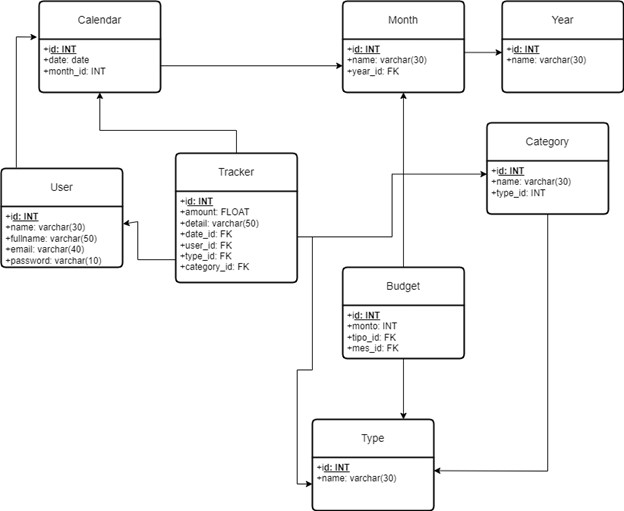
Table legend:
- Type: Refers to the 3 types of transactions there are: income, expense and savings.
- Category: Refers to the nature of income/expense/savings
- Type: income - category: salary, interest, payment for fees ...
- Type: Expenses - Category: Transport, food, utilities, health, education, entertainment ...
- Type: savings - category: house, car, trips, entrepreneurship ...
- Explanation: For example, in a record the type can be income and the category can be salary
- Calendar: This table will be composed of many dates and will be linked to a month table. This is mainly to facilitate the creation of filters within the application and allocation of dates to the registration in the Tracker table.
- Month: Table containing every year with a different id. This table will facilitate filter programming.
- Year: Table containing possible years within a specific time period. This table will facilitate filter programming.
- Budget: It is the amount of money planned for each category and month (since it can vary between months). It is a goal, it will not necessarily be fulfilled.
- Registration (tracking): It is the main table, where all income, expenses or savings are recorded, with their respective category, record and detail date.
- User: It is the table where the user's information is saved, mainly their names and surnames, in addition to their credentials to enter their application account (email and password).
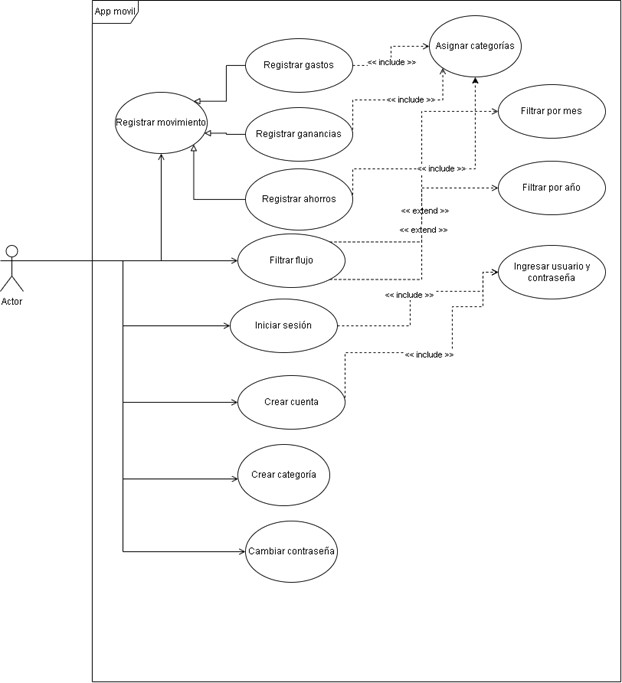
Use case diagram
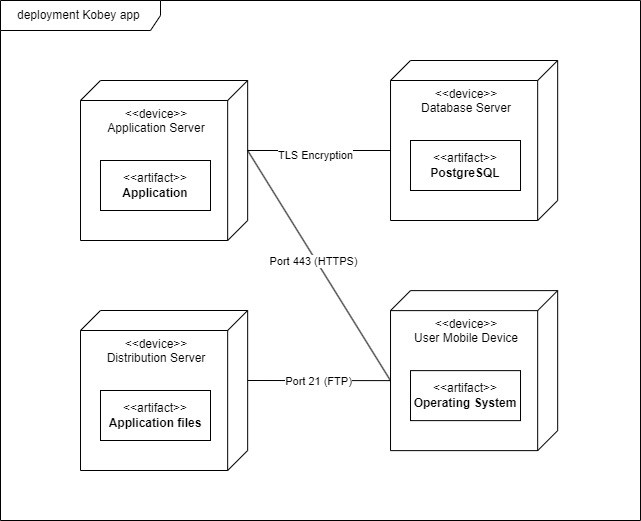
Deployment diagram