flash_emulateEEprom
1.0.0

Use flash to simulate the user experience of eeprom
void ee_flashInit() : Format flash, only the formatted flash can use the following two API functions.ee_uint8 ee_readDataFromFlash() : Read dataee_uint8 ee_writeDataToFlash(); : Write datavariableLists to read and write data in flash through this tableFirst enter the header file and fill in the four macros in full according to the comments
SECTOR_SIZE : The capacity size of a sector (the minimum storage unit of flash) at present flashee_flashWrite : flash write operation driver function nameee_flashRead : flash read operation driver function nameee_flashEraseASector : flash erase a sector (the minimum memory unit of flash) driver function nameFillable macros (no filling does not affect function operation)
BLOCk_SECTOR_NUM : How many sectors are there in a block of flash?Two special macros:
SECTORS(x) : Returns the total size of x sectorBLOCKS(x) : Returns the total size of x block. To use this macro, you need to fill in the macro BLOCk_SECTOR_NUM in advance. The above two macros are mainly used to transfer parameters of ee_flashInit() function to facilitate the use of flash addresses.
Example:
 // 首先在flash_MemMang.h枚举类型中添加数据名,用于管理数据
typedef enum
{
	// 用户将变量名添加到下面
	G_MYSENSORDATA ,
	G_FLOAT ,

	// DATA_NUM用于标识flash中一共存了多少个数据(不允许删改)
	DATA_NUM ,
} variableLists ;

//------------------主函数-------------
/* 创建flash管理句柄 */
ee_flash_t g_fm ;

/* 想要存入flash中的变量 */
int g_mySensorData = 16 ;
float g_float = 3.14 ;

char g_txt [ 20 ] = "change data test" ;

int main ( void )
{
	int dataTmp = 0 ;
	float ftmp = 0 ;
	char tt [ 20 ];

	/* 格式化传入地址的格式 */
	ee_flashInit ( & g_fm ,       /* 管理句柄 */
		     SECTORS ( 0 ),  /* 索引区起始地址 */
		     SECTORS ( 2 ),  /* 交换索引区起始地址 */
		     2 ,           /* 总索引区大小(单位:扇区) */
                     1 ,           /* 索引区大小(详见README图例,indexRegionSize) */
                     SECTORS ( 4 ),  /* 数据区起始地址 */
                     SECTORS ( 5 ),  /* 交换数据区起始地址 */
                     1 );          /* 数据区大小(单位:扇区) */

	/* 数据写入顺序错误,写入失败 */
	ee_writeDataToFlash ( & g_fm , & g_float , sizeof ( g_float ), G_FLOAT );
	ee_writeDataToFlash ( & g_fm , & g_mySensorData , sizeof ( g_mySensorData ), G_MYSENSORDATA );

	/* 正确将数据写入flash */
	ee_writeDataToFlash ( & g_fm , & g_mySensorData , sizeof ( g_mySensorData ), G_MYSENSORDATA );
	ee_writeDataToFlash ( & g_fm , & g_float , sizeof ( g_float ), G_FLOAT );

	/* 将数据读出 */
	ee_readDataFromFlash ( & g_fm , & dataTmp , G_MYSENSORDATA );
	ee_readDataFromFlash ( & g_fm , & ftmp , G_FLOAT );

	/* 将G_FLOAT管理的数据改成g_txt */
	ee_writeDataToFlash ( & g_fm , g_txt , strlen ( g_txt ) + 1 , G_FLOAT );

	/* 再读取一次数据 */
	dataTmp = 0 ;
	ee_readDataFromFlash ( & g_fm , & dataTmp , G_MYSENSORDATA );
	ee_readDataFromFlash ( & g_fm , & tt , G_FLOAT );

}flash can only turn 1 into 0, and can only turn 0 into 1 by erasing an entire sector (the minimum storage structure of flash). Therefore, if a written address is written, if it is written again, it will inevitably cause the bit that has become 0 to become 1, resulting in the data invalidation.
The idea of this program is to write the data you want to rewritten to the area that has not been written later. The data written before will be invalidated and the latest written data will be regarded as valid. Wait until the entire area is full, transfer the valid data to another area, and then erase all the current area.
The internal structure diagram of flash implemented by the program:
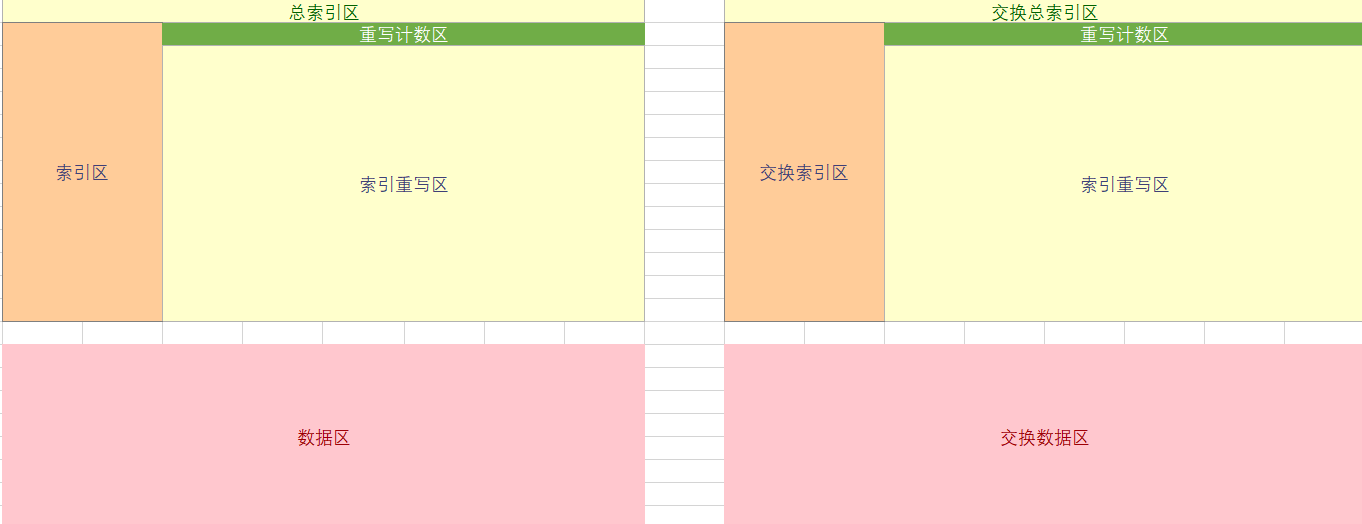
After performing void ee_flashInit() formatting flash, the formatted flash layout is shown in the figure above.
Total index area: contains two areas, index area and rewrite area
Index area : The index structure used to store each data. The address position of each index structure is fixed. For example, the address of data No. 1 is 0x00, then the address of data No. 2 is 0x08. The user can specify the size of the index area. For the size specification, please refer to the following formula: The number of data that can be stored in the index area = the total number of bytes in the index area/8
 /* 数据索引结构 */
typedef struct
{
	/* 当前数据状态 */
	ee_uint16 dataStatus ;
	/* 当前数据大小 */
	ee_uint16 dataSize ;
	/* 当前数据在数据区的地址(相对于dataStartAddr的偏移地址) */
	ee_uint16 dataAddr ;
	/* 当前数据被重写的地址(相对于overwriteAddr的偏移地址),默认为0xFFFF */
	ee_uint16 dataOverwriteAddr ;
} ee_dataIndex ;
Rewrite area : When the data in the data index area is rewritten, the rewrite index structure is saved in the current area
Rewrite counting area : automatically allocated by the program, and the user does not need to care. This area records how many times the current rewrite area has been written to, and is used to locate the free location of the rewrite area.
Data area: Save the actual value we store in flash. The size and read and write offset address of each value are managed by the index structure of the index area.
Exchange area : When the activity area is full, all valid data indexes of the activity area are transferred to this area as the activity area, and at the same time, clear the previous activity area and use it as the next activity area.
Status Management :
State management is used to deal with various abnormal phenomena of microcontrollers, such as the power outage of the microcontroller when operating flash.







