inventory control
1.0.0

Inventory Control is a web application developed using JSP and Microsoft SQL Server databases.
JSP is implemented in conjunction with Microsoft SQL Server database. A company wants to establish a database to control its inventory, and the products in the inventory are divided into several categories, such as clothing, food and stationery. When the product needs to be reordered from the supplier, the staff will need to submit a purchase order. Tracking records provide purchases and sells goods and other expenses.
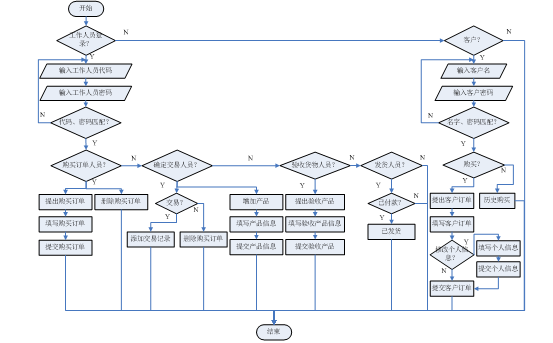
Main functional modules : staff login module, customer login module, propose purchase order module, fill in purchase order module, purchase order module, determine transaction module, add product module, accept goods module, fill in acceptance product module, shipment module, customer registration module, customer purchase module, fill in customer order module, historical purchase module, customer information modification module, etc.
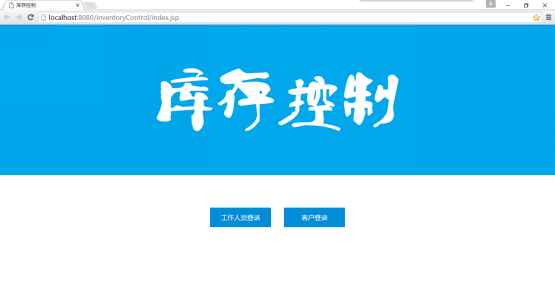
Home page of the website, click on staff login or customer login.
Operation results: Click on the staff login to enter the staff login page, and click on the customer login to enter the customer login page.
Staff login, enter staff number and password, and whether to remember the login status, click Login.
Operation result: Jump to emp-login-check.jsp to verify whether the staff login information is correct. Submit the staff number, password, and whether to remember the login status in the form.
Receive the staff number, password submitted by emp-login.jsp, and whether to remember the login status. Connect to the database inventory control worker table Employee.
Operation result: determine whether the staff number and password match. If it matches, determine the staff position and jump to a different page according to the staff position (the purchase order personnel jump to emp-purchase.jsp, confirm that the transaction personnel jump to emp-confirm.jsp, the acceptance of the goods personnel jump to emp-accept.jsp, and the shipment personnel jump to emp-deliver.jsp), otherwise redirect to emp-login.jsp.
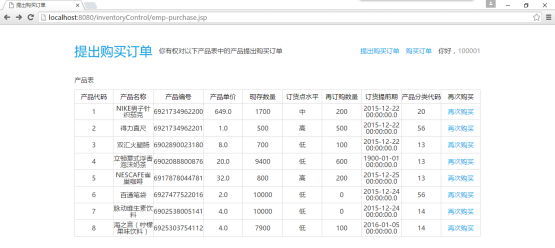
The purchase order personnel successfully logged in and jumped to this page. The purchase order personnel submit a purchase order based on the product ordering point level, and click to buy again.
Operation result: Jump to emp-purchase-add.jsp and pass the value of product code productNo through the URL.
Receive the value of product code productNo, fill in the purchase order description, order date, delivery date, delivery date, supplier (Supplier form) of the purchase order, and click Submit the purchase order.
Operation result: Jump to emp-purchase-place.jsp and add records to the PurchaseOrder. Submit purchase order description, order date, delivery date, delivery date, supplier in the form of a form.
Receive emp-purchase-add.jsp Submitted Purchase Order Description, Order Date, Delivery Date, Supplier. Connect to the database inventory control Purchase Order table PurchaseOrder.
Operation result: Add records to PurchaseOrder and redirect to emp-purchase-order.jsp.
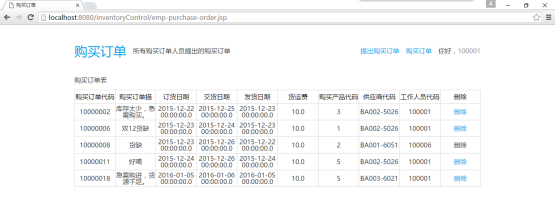
For all purchase order forms proposed by the purchase order personnel, the purchase order personnel can delete the purchase order operations they have proposed.
Operation result: Jump to emp-purchase-order-delete.jsp and pass the value of purchase order code purchaseOrderNo through the URL.
Receives the value of purchase order code purchaseOrderNo.
Operation result: Delete a row record of PurchaseOrder in the purchase order table and redirect to emp-purchase-order.jsp.
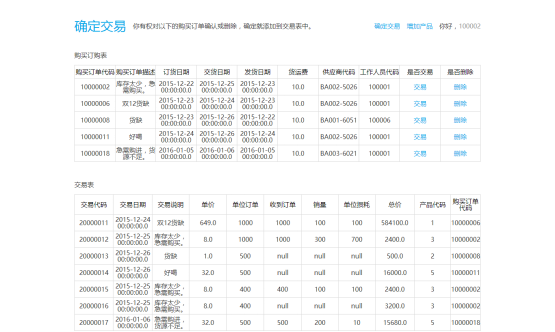
Make sure that the trader login is successfully redirected to this page, and make sure that the trader trades and deletes the purchase orders submitted by all purchase orders.
Operation result: Click the transaction to jump to emp-confirm-place.jsp, and pass the value of the purchase order code purchaseOrderNo and the value of the purchase product code purchaseProductNo; click Delete to jump to emp-confirm-place.jsp, and pass the value of the purchase order code purchaseOrderNo through the URL.
Receives the value of the purchase order code purchaseOrderNo and the value of the purchase product code purchaseProductNo.
Operation result: determine whether purchaseProductNo is null. If purchaseProductNo is null, delete a row record of PurchaseOrder. Otherwise, purchase order information will be added to the transaction table Transaction through the product table Product and PurchaseOrder. Redirect to emp-confirm.jsp.
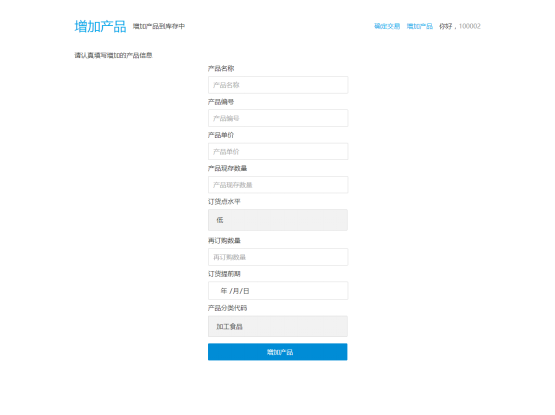
Add the product to the product table Product, fill in the product name, product number, product unit price, product existing quantity, order point level, repurchase quantity, order lead time, product classification code (ProductCategory table).
Operation result: Jump to the emp-product-place.jsp page and submit the product name, product number, product unit price, product existing quantity, order point level, repurchase quantity, order lead time, and product classification code in the form of a form.
Receive product name, product number, product unit price, product existing quantity, order point level, repurchase quantity, order lead time, product classification code.
Operation result: Add records to product table Product and redirect to emp-product-add.jsp.
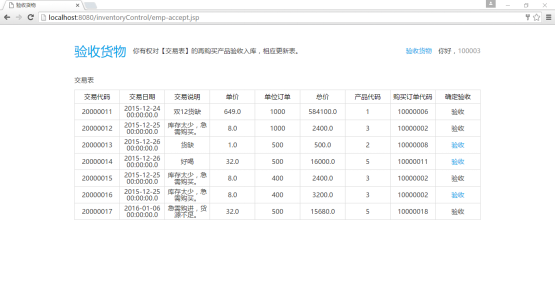
The cargo acceptance personnel successfully logged in and jumped to this page. The cargo acceptance personnel accepted the goods based on whether the purchased products were stored in the warehouse.
Operation result: Jump to emp-accept-place.jsp and pass the value of transaction code transactionNo through the URL.
Fill in the acceptance product, fill in the transaction form to receive orders, sales volume, unit losses, and click Submit.
Operation result: Jump to emp-accept-make.jsp and update the transaction table Transaction record. Submit in the form of a form and receive orders, sales volume, unit loss, and hide the submission of transaction codes, product unit price, unit order, and product code.
Receive orders, sales volume, unit loss, transaction code, product unit price, unit order, product code, and modify transaction table Transaction and product table Product.
Operation result: Update transaction table Transaction and product table Product record.
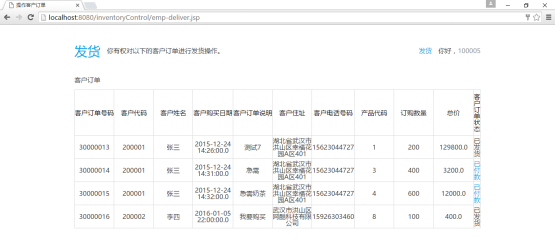
The shipper login successfully jumps to this page. The shipper performs a shipment operation on the customer's order and clicks to pay.
Operation result: Jump to emp-deliver-place.jsp and pass the value of the customer order code userOrderNo through the URL.
Modify customer order status.
Operation result: Update a row record of the customer order table UserOrder and set the customer order status to "Shipped".
Customer login, enter the customer name and password, and whether to remember the login status, click Login.
Operation result: Jump to user-login-check.jsp to verify whether the customer login information is correct. Submit the customer name, password, and whether to remember the login status in the form.
Receive the customer name, password submitted by user-login.jsp, and whether to remember the login status. Connect to the database inventory control customer table User.
Operation result: determine whether the customer name and password match. If it matches, jump to user-purchase.jsp, otherwise redirect to user-login.jsp.
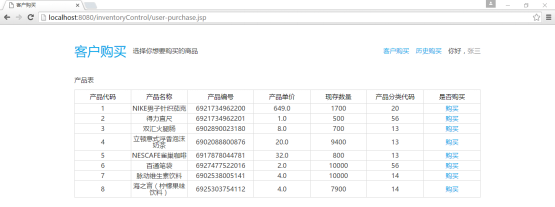
The customer login successfully jumps to this page. The customer can purchase the product and click to buy it.
Operation result: Jump to user-purchase-add.jsp and pass the value of product code productNo through the URL.
Receive the value of product code productNo, fill in the customer order description and order quantity of customer purchase order, click OK or click modify personal information.
Operation result: Click OK to jump to user-purchase-place.jsp, submit customer order description, order quantity, and hide the unit price and existing quantity of submitted products; click modify personal information to jump to user-information-modify.jsp, modify customer personal information.
Receive customer order description, order quantity, product unit price, existing quantity.
Operation result: Add records to the customer order table UserOrder, modify the existing quantity and order point level of the product table Product according to the order quantity, and redirect to user-purchase.jsp.
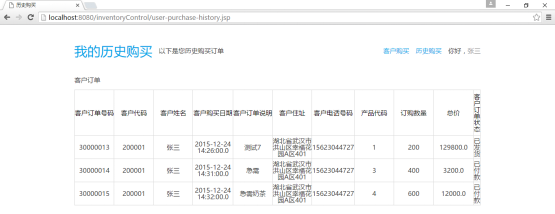
Customer history purchase.
Operation result: Customers view historical purchases.
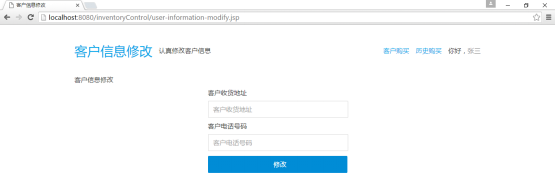
Modify customer information, fill in the customer's delivery address and customer phone number, and click to modify.
Operation result: Jump to user-information-modify-place.jsp and submit the customer's delivery address and customer phone number in the form.
Receive customer delivery address and customer phone number.
Operation result: Update the User row record in the customer table and redirect to user-purchase.jsp.
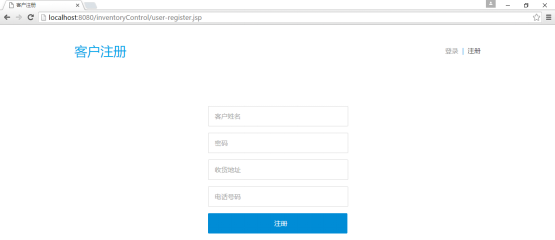
Customer registration, fill in customer information, password, delivery address, phone number, and click to register.
Operation result: Jump to user-register-make.jsp and submit customer information, password, delivery address, and phone number in the form of a form.
Receive customer information, password, delivery address, and phone number to determine whether the customer registration is legal.
Operation result: The customer registration is legal, add records to the customer table User, jump to user-login.jsp, otherwise redirect to user-register.jsp.
1. This project needs to be run in combination with the foreground development tool NetBeans IDE 8.0.2 and the backend database Microsoft SQL Server 2014.
2. When Microsoft SQL Server 2014 is connected to the server and the NetBeans IDE 8.0.2 service is connected to the database inventory control, in NetBeans IDE 8.0.2, click index.jsp in the project inventoryControl and right-click to select Run file. NetBeans IDE 8.0.2 can run the inventoryControl project. The following is the interface after the project is run. Click on the staff login or the customer login to enter the corresponding login page.
3. Complete the corresponding operations according to the prompts in each step.
4. Close the browser and exit.
1. Through the course design of "Database Principles and Applications", we have fully practiced the creation, data query, data update and other operations of database basic tables.
2. The purchase order personnel have the right to submit purchase orders for the products in the product table based on the order point level and delete the purchase orders they have submitted.
3. In addition to determining that the trader has the right to trade and delete purchase orders submitted by all purchase orders, the trader also has the right to add products to the product list.
4. The person who accepts the goods has the right to accept the goods based on whether the purchased products are stored in the warehouse.
5. The shipper has the right to ship customer orders.
6. Customers not only have the right to purchase products and view their historical purchases, but also have the right to modify personal information.
7. New customers obtain customers' permissions through registration.