itchgrep
1.0.0

? search through itch.io assets using text queries; find what you need without relying solely on tags.
Visit itchgrep.com to start exploring.
We have a ? Discord server! It's a place for sharing, learning, and talking about game development and the projects we're passionate about. Feel free to join us!
Your support fuels our passion and helps keep the servers running! If you appreciate what we do and want to contribute to our journey, consider:
These tools and technologies were chosen with care to provide a seamless and efficient experience for both developers and users of itchgrep.
If you want to contribute, or just run the project locally for your own use, follow the instructions below.
This project is built and maintained on Linux. While I don't think it's generally impossible to run on Windows, but the Taskfile is written using Linux commands.
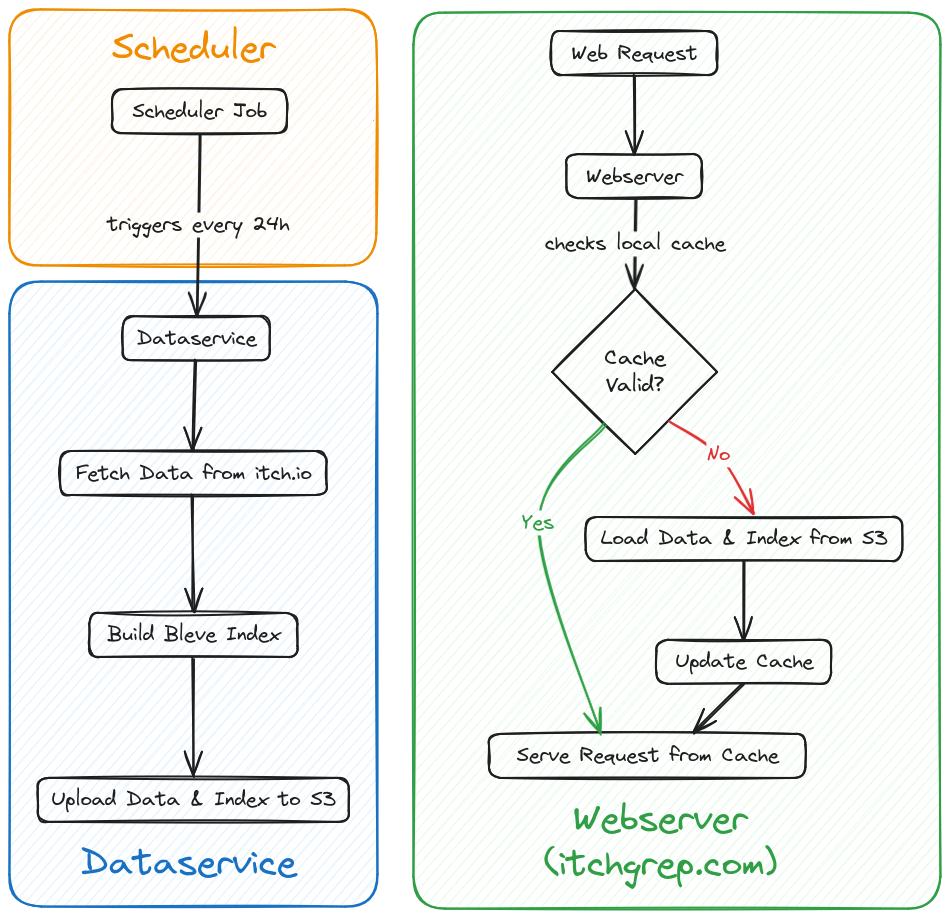
The project is split up into two services:
dataservice, responsible for fetching the list of assets from itch.iowebserver, presenting the stored data with search tools.Use the included Taskfile to run these services.
task local-dataservicewill launch thedataservicewith a local instance of GCS. Send aGETrequest to its trigger endpoint:curl -X GET "localhost:8080/trigger-fetch". This will cause the service to scrape the data from itch.io, index it and store both data and index on the local GCS.
task local-dataservice-temp-fix. This runs the
dataservice without docker.task local-webserver will build and run the web server in a Docker
container together with the local GCS in a separate container. Templ
templates are not copied during the build, but generated inside the
container.task templ will generate .go files from any .templ files. This is not
required for building/running, but to provide code completion and stop the
language server from complaining.The project was created with the intention of hosting both dataservice and
webserver on Google Cloud Run. The asset data is intended to be stored in
Google Cloud Store.
Google Cloud Run can be replaced with any serverless platform, and Google Cloud Store can be replaced with any object store, but some work will be required if this is your goal, and the following instructions will assume Google Cloud services.
To deploy the project on Google Cloud, follow the steps below.
gcloud
A couple of preparation steps:
itchgrep-data. (You
can also use another name here, but you must then change the const in the
file internal/storage/storage.go accordingly)Cloud Run Invoker. Later, we will attach this service account
to a scheduler job, to regularly trigger a run of the dataservice.task gcloud-setup to configure gcloud for use with this
project. Otherwise, make sure to properly configure manually.PROJECT_ID, REGION and LOCATION
found in the Taskfile to fit your Google Cloud project configuration.task deploy-dataservice to build and deploy the dataservice. At the end
you will receive a service URL for the newly deployed dataservice.DATASERVICE_URL=https://dataservice-ly6n5ozylq-od.a.run.app
SERVICE_ACCOUNT_EMAIL=cloud-run-invoker@itchgrep.iam.gserviceaccount.com
go-task create-dataservice-scheduler-jobRun task deploy-webserver. No further work should be required.
Tests can be run by using the included Taskfile.
task test: Runs all of the test tasks below.task test-storage: Tests the storage package, requires Docker to be running.go fmt to format your code.




