chatgpt python
1.0.0

المكتبة التي تسمح للمطورين بدمج ChatGPT بسهولة في مشاريع Python الخاصة بهم.
pip install -U chatgpt قم بإنشاء ملف config.json في دليل العمل الخاص بك:
{
    "email" : " [email protected] " ,
    "password" : " xxx "
}{
"email" : " [email protected] " ,
"password" : " xxx " ,
"proxy" : " socks5://user:pass@host:port "
}{
"email" : " [email protected] " ,
"password" : " xxx " ,
"timeout" : 300 ,
"cache_file_path" : " /path/filename " ,
"access_token_seconds_to_expire" : 1800
} يمكنك تحديد مجلد التكوين الافتراضي لـ ChatGPT من خلال تعيين متغير بيئة CHATGPT_HOME إلى مسار الدليل المطلوب.
export CHATGPT_HOME= " /home/ $USER /.config/chatgpt " يمكنك إطلاق CLI مع:
chatgptأو
python -m chatgptهذه هي الأوامر المتاحة:
reset : انسى سياق المحادثة الحالية.clear : مسح المحطة.exit : الخروج من CLI. 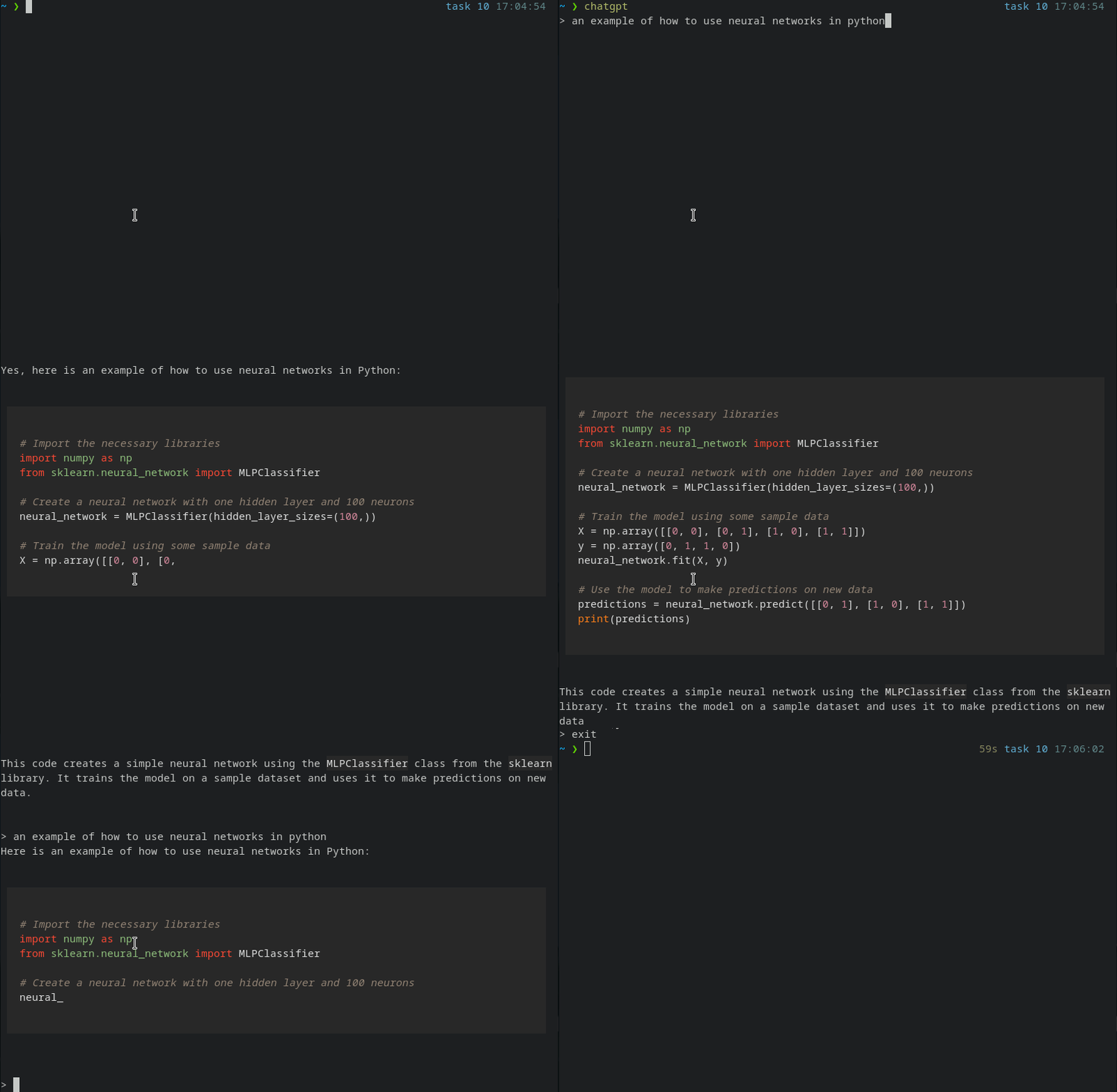
 #!/usr/bin/env python
# -*- coding: utf-8 -*-
import sys
from chatgpt import Conversation

conversation = Conversation ()

# Stream the message as it arrives.
for chunk in conversation . stream ( "We are going to start a conversation. I will speak English and you will speak Portuguese." ):
    print ( chunk , end = "" )
    sys . stdout . flush ()

# Wait until the message is fully received.
print ( conversation . chat ( "What's the color of the sky?" ))

# The AI will forget it was speaking Portuguese
conversation . reset ()
print ( conversation . chat ( "What's the color of the sun?" ))
يوصى باستخدام الدفق بدلاً من الدردشة .
 from chatgpt import ChatgptError , ChatgptErrorCodes

try :

    for chunk in conversation . stream ( "Hello, world!" ):
        print ( chunk , end = "" )
        sys . stdout . flush ()

except ChatgptError as chatgpt_error :

    message = chatgpt_error . message
    code = chatgpt_error . code

    if code == ChatgptErrorCodes . INVALID_ACCESS_TOKEN :
print ( "Invalid token" )INVALID_ACCESS_TOKEN : يشير رمز الخطأ هذا إلى أن الرمز المميز للوصول إلى واجهة برمجة تطبيقات chatbot غير صالح أو انتهت صلاحيته.CHATGPT_API_ERROR : يشير رمز الخطأ هذا إلى حدوث خطأ أثناء تقديم طلب إلى واجهة برمجة تطبيقات chatbot.CONFIG_FILE_ERROR : يشير رمز الخطأ هذا إلى وجود مشكلة في ملف التكوين لـ chatbot.UNKNOWN_ERROR : يتم استخدام رمز الخطأ هذا عندما يكون سبب الخطأ غير معروف أو لا يمكن تحديده.LOGIN_ERROR : يشير رمز الخطأ هذا إلى وجود مشكلة في عملية تسجيل الدخول ، مثل اسم مستخدم غير صحيح أو كلمة مرور.TIMEOUT_ERROR : يشير رمز الخطأ هذا إلى أن طلبًا إلى واجهة برمجة تطبيقات chatbot قد تم توقيته.CONNECTION_ERROR : يشير رمز الخطأ هذا إلى وجود مشكلة في اتصال واجهة برمجة تطبيقات chatbot.




