
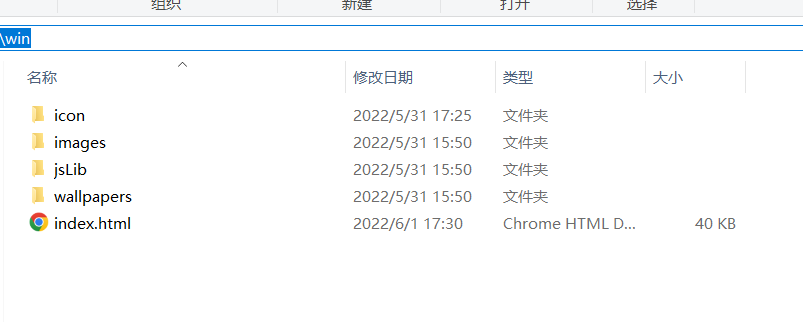
目錄結構如下:
 ├── jsLib
│ ├── jquery.winResize.js
│ ├── jquery-1.6.2.js
│ ├── jquery-1.6.2.min.js
│ ├── jquery-ui-1.8.16.custom.min.js
│ ├── myLib.js
│ ├── external
│ ├── jquery-smartMenu
│ ├── themes
│ └── ui
├── icon
├── images
├── wallpapers
└── index.html
HTML 程式碼
HTML 主要程式碼:
 <a href="https://haiyong.site" class="powered_by">Powered by haiyong.site 注意:雙擊桌面應用程式即可點開</a>
<ul id="deskIcon">
<li class="desktop_icon" id="win11" path="https://haiyong.site/"> <span class="icon"><img src="icon/icon14.png"/></span>
<div class="text">海擁 <div class="right_cron"></div>
</div>
</li>
<li class="desktop_icon" id="win11" path="https://haiyong.blog.csdn.net/"> <span class="icon"><img src="icon/csdn.png"/> </span>
<div class="text">CSDN
<div class="right_cron"></div>
</div>
</li>
<li class="desktop_icon" id="win11" path="https://juejin.cn/user/2040341402229751"> <span class="icon"><img src="icon/juejin.png"/>< /span>
<div class="text">掘金 <div class="right_cron"></div>
</div>
</li>
<li class="desktop_icon" id="win11" path="https://space.bilibili.com/63551025"> <span class="icon"><img src="icon/bilibili.png"/>< /span>
<div class="text">bilibili
<div class="right_cron"></div>
</div>
</li>
</ul>
<div id="taskBar">
<div id="leftBtn"><a href="#" class="upBtn"></a></div>
<div id="rightBtn"><a href="#" class="downBtn"></a> </div>
<div id="task_lb_wrap">
<div id="task_lb"></div>
</div>
</div>
<div id="lr_bar">
<ul id="default_app">
<li id="app0"><img src="icon/icon1.png" title="海擁" path="https://haiyong.site/"/></li>
<li id="app2"><img src="icon/icon0.png" title="工具" path="https://haiyong.site/tools"/></li>
<li id="app3"><img src="icon/icon2.png" title="交流群" path="https://app.yinxiang.com/fx/8aa8eb1b-7d45-4793-a160-b990d9da2e75" /></li>
<li id="app4"> <img src="icon/icon3.png" title="聯絡作者" path="https://haiyong.site/img/qrcode/weixin.png"/></li>
<li id="app1"><img src="icon/icon11.png" title="Jquery學堂" path="http://www.jq22.com/?Jquery.aspx"/></li>
</ul>
<div id="default_tools"> <span id="showZm_btn" title="顯示桌面"></span><span id="shizhong_btn" title="時鐘"></span><span id="weather_btn" title="天氣"></span> <span id="them_btn" title="主題"></span></div>
<div id="start_block"> <a title="開始" id="start_btn"></a>
<div id="start_item">
<ul class="item admin">
<li><span class="adminImg"></span> Admin</li>
</ul>
<ul class="item">
<li><span class="sitting_btn"></span>系統設定</li>
<li><span class="help_btn"></span>使用指南 <b></b></li>
<li><span class="about_btn"></span>關於我們</li>
<li><span class="logout_btn"></span>退出系統</li>
</ul>
</div>
</div>
</div>
</div>
? CSS 程式碼
CSS主要程式碼:
 body, div, dl, dt, dd, ul, ol, li, h1, h2, h3, h4, h5, h6, pre, form, fieldset, input, textarea, p, blockquote, th, td {
	margin:0;
	padding:0;
}
table {
	border-collapse:collapse;
	border-spacing:0;
}
fieldset, img {
	border:0;
}
address, caption, cite, code, dfn, em, strong, th, var {
	font-style:normal;
	font-weight:normal;
}
ol, ul, li {
	list-style:none;
}
caption, th {
	text-align:left;
}
h1, h2, h3, h4, h5, h6 {
	font-size:100%;
	font-weight:normal;
}
q:before, q:after {
	content:”;
}
abbr, acronym {
	border:0;
}
* {
	margin:0;
	padding:0
}
頁面基礎樣式
/*頁面基礎樣式*/
html {
	overflow:hidden;
}
body {
	font-size: 12px;
	background:#06C url(wallpapers/menglong2.jpg) repeat scroll center center;
	font-family: Tahoma, Geneva, sans-serif;
	margin:0;
	padding:0
}
a {
	font-size: 12px;
}
a:link {
	text-decoration: none;
	color: #FFF;
}
a:visited {
	text-decoration: none;
	color: #FFF;
}
a:hover {
	text-decoration: none;
	color: #FFF;
}
a:active {
	text-decoration: none;
	color: #FFF;
}
.corner {/*只在支援css3的高級瀏覽器起作用*/
	-moz-border-radius: 5px;
	-webkit-border-radius: 5px;
	border-radius: 5px;
	-moz-box-shadow: 2px 2px 8px #444;
	-webkit-box-shadow: 2px 2px 8px #444;
	box-shadow:2px 2px 8px #444;
}
.loading {
	background:url(images/loading.gif) no-repeat center center
}
介面佈局樣式
/*介面佈局樣式*/
.powered_by {
	width:160px;
	height:25px;
	line-height:25px;
	background:url(images/powered-by.png) no-repeat left center;
	color:#CCC;
	text-indent:26px;
	display:block;
	outline:none;
	position:absolute;
	right:20px;
	bottom:60px;
}
工作列樣式
#taskBar {
	width:100%;
	height:40px;
	line-height:40px;
	position:absolute;
	right:0;
	bottom:0;
}
#leftBtn {
	width:100px;
	height:40px;
	float:left;
	display:none;
}
#rightBtn {
	width:100px;
	height:40px;
	float:right;
	display:none;
}
#leftBtn a, #rightBtn a {
	display:block;
	width:100px;
	height:40px;
	outline:none;
	background-image:url(images/lr_btn.png);
	background-repeat:no-repeat;
}
#leftBtn a {
	background-position:left 頂;
}
#rightBtn a {
	background-position:right top;
}
#leftBtn a:hover {
	background-position:left bottom
}
#rightBtn a:hover {
	background-position:right bottom
}
#task_lb_wrap {
	height:40px;
	line-height:40px;
	overflow:hidden;
	position:relative;
}
#task_lb {
	width:auto;
	height:auto;
	position:absolute;
	top:0;
	right:0;
}
#task_lb a {
	display:inline-block;
	outline:none;
	width:100px;
	height:40px;
	background-image:url(images/taskHdBtn.png);
	background-repeat:no-repeat;
	text-align:center;
	line-height:40px;
	float:right
}
#task_lb .defaultTab {
	background-position:right top;
	color:#ccc
}
#task_lb .defaultTab:hover {
	background-position:right bottom;
}
#task_lb .selectTab {
	background-position:left 頂;
	color:#FFF
}
#task_lb .selectTab:hover {
	background-position:left bottom
}
#shizhong_btn {
	background:url(images/timer.png) no-repeat center center
}
#weather_btn {
	background:url(images/wheather.png) no-repeat center center
}
#sound_btn {
	background:url(images/sound_open.png) no-repeat center center
}
#showZm_btn {
	background:url(images/show-desktop.png) no-repeat center center
}
#them_btn {
	background:url(images/skin.png) no-repeat center center
}
側邊浮動欄
#lr_bar {
	width:73px;
	height:auto;
	position:absolute;
	left:0;
	top:30px;
	background:url(images/dock_top.png) repeat-y left top;
	z-index:90;
	-moz-box-shadow: 0px 3px 15px #444;
	-webkit-box-shadow: 0px 3px 15px #444;
	box-shadow:0px 3px 15px #444;
	padding-top:5px;
}
開始按鈕樣式
#start_block {
	width:73px;
	height:56px;
	position:absolute;
	left:0;
	bottom:-56px;
	background:url(images/dock_b.png) no-repeat left bottom;
	-moz-box-shadow: 0px 5px 15px #444;
	-webkit-box-shadow: 0px 5px 15px #444;
	box-shadow:0px 5px 15px #444;
}
#start_btn {
	display:block;
	width:48px;
	height:48px;
	background:url(images/start-btn.png) no-repeat center bottom;
	margin:4px auto 0 auto;
	outline:none;
	z-index:501;
	cursor:pointer;
}
#start_btn:hover {
	background-position:center top
}
開始選單樣式
#start_item {
	width:180px;
	height:auto;
	padding:5px 0;
	background: url(images/start_item_bg.png) repeat;
	position:absolute;
	z-index:500;
	left:75px;
	bottom:0px;
	display:none;
	-moz-border-radius: 5px;
	-webkit-border-radius: 5px;
	border-radius: 5px;
	-moz-box-shadow: 2px 2px 5px #444;
	-webkit-box-shadow: 2px 2px 5px #444;
	box-shadow:2px 2px 5px #444;
}
#start_item .item {
	width:100%;
	height:auto;
	border-top:1px solid #999
}
#start_item .item li {
	width:98%;
	height:24px;
	overflow:hidden;
	zoom:-1;
	padding:6px 0;
	line-height:24px;
	margin:0 auto;
	color:#FFF;
}
#start_item .item li:hover {
	background:url(images/start_item_over.png) repeat-x left bottom;
	cursor:pointer
}
#start_item .item li span {
	display:inline-block;
	width:24px;
	height:24px;
	background-image:url(images/start_itembtn.png);
	background-repeat:no-repeat;
	margin:0 10px;
	float:left;
}
#start_item .item li b {
	width:10px;
	height:24px;
	background:url(images/item-child.png) no-repeat center center;
	display:inline-block;
	float:right;
	margin-right:10px;
}
#start_item .sitting_btn {
	background-position:left -140px;
}
#start_item .help_btn {
	background-position:left -44px;
}
#start_item .about_btn {
	background-position:left -164px;
}
#start_item .logout_btn {
	background-position:left -20px;
}
#start_item .admin {
	border-bottom:1px solid #444;
	padding:5px 0;
	border-top:none;
}
#start_item .item li .adminImg {
	border:1px solid #E0E0E0;
	background-position:left -92px;
	background-color:#FFF;
}
預設小工具
#default_tools {
	width:71px;
	height:auto;
	overflow:hidden;
	zoom:-1;
	padding:5px 0;
	border-top:1px solid #555;
	margin:0 auto;
}
#default_tools span {
	width:30px;
	height:30px;
	display:inline-block;
	margin:0 0 0 3px;
	cursor:pointer;
	float:left;
}
預設應用程式
#default_app {
	width:73px;
	height:auto;
	padding:5px 0;
	position:relative;
}
#default_app li {
	width:48px;
	height:48px;
	overflow:hidden;
	margin:3px auto;
	padding:6px;
}
#default_app li img {
	width:48px;
	height:48px;
	cursor:pointer;
}
#default_app .btnOver {
	background:url(images/default_appbtn_bg.png) no-repeat center center
}
重寫右鍵選單樣式
.smart_menu_box .smart_menu_a {
	color:#333
}
.smart_menu_box .smart_menu_li_separate {
	border-bottom:1px solid #d6d5d5;
}
視窗樣式
.windows {
	min-width:240px;
	min-height:200px;
	width:700px;
	height:560px;
	position:absolute;
	display:none;
	background-color:#E0E0E0;
}
.win_title {
	width:100%;
	height:26px;
	line-height:26px;
	background:#E0E0E0 url(images/titlebar_bg_cur.png) repeat-x left center;
	-moz-border-radius: 5px;
	-webkit-border-radius: 5px;
	border-radius: 5px;
}
.win_title b {
	color:#333;
	margin-left:10px;
}
.win_title .win_btnblock {
	width:auto;
	padding:0 5px;
	float:right;
	height:17px;
	margin:4px 3px 0 0;
}
.win_title .win_btnblock a {
	display:inline-block;
	width:26px;
	height:17px;
	background-image:url(images/windowBtn.png);
	background-repeat:no-repeat;
	float:left;
	margin:0 1px;
	outline:none;
}
.winMaximize {
	background-position:right bottom;
}
.winMaximize:hover {
	background-position:right top;
}
.winHyimize {
	background-position:-26px bottom;
}
.winHyimize:hover {
	background-position:-26px top;
}
.winClose {
	background-position:-52px top;
}
.winClose:hover {
	background-position:-52px bottom;
}
.winMinimize {
	background-position:left bottom;
}
.winMinimize:hover {
	background-position:left 頂;
}
.winframe {
	width:100%;
	height:auto;
	margin:0 0 0 3px;
	padding:0
}
桌面圖示
#deskIcon {
	width:100%;
	height:auto;
	overflow:hidden;
	zoom:-1;
	position:relative;
}
.desktop_icon {
	width:86px;
	height:88px;
	cursor:pointer;
	margin-left:-1000px;
	text-align:center;
}
.desktop_icon span {
	display:block;
}
.desktop_icon .icon {
	width:50px;
	height:50px;
	margin:5px auto;
}
.desktop_icon .icon img {
	width:50px;
	height:50px;
}
.desktop_icon .text {
	display:inline-block;
	width:auto;
	height:22px;
	line-height:22px;
	text-align:center;
	color:#fff;
	background:url(images/iconTextbg.png) no-repeat left center;
	position:relative;
	padding-left:10px;
	margin-right:10px;
}
.desktop_icon .right_cron {
	width:10px;
	height:22px;
	position:absolute;
	right:-10px;
	top:0;
	background:url(images/iconTextbg_right.png) left center no-repeat;
}
.desktop_icon_over {
	background:url(images/icon_over.png) no-repeat center center;
}
? JS 代碼
JS程式碼較多這裡只展示部分JS程式碼,完整原始碼可在文末取得
//聲明desktop空間,封裝相關操作myLib.NS("desktop");
myLib.desktop={
	winWH:function(){
		$('body').data('winWh',{'w':$(window).width(),'h':$(window).height()});
},
	desktopPanel:function(){
		$('body').data('panel',{
					'taskBar':{
					'_this':$('#taskBar'),
					'task_lb':$('#task_lb')
										},
					'lrBar':{
					'_this':$('#lr_bar'),
					'default_app':$('#default_app'),
				'start_block':$('#start_block'),
				'start_btn':$('#start_btn'),
					'start_item':$('#start_item'),
					'default_tools':$('#default_tools')
							},
						'deskIcon':{
							'_this':$('#deskIcon'),
							'icon':$('li.desktop_icon')
							},
						'powered_by':$('a.powered_by')
						});
		},
	getMydata:function(){
		return $('body').data();
		},
	mouseXY:function(){
		var mouseXY=[];
		$(document).bind('mousemove',function(e){
			mouseXY[0]=e.pageX;
			mouseXY[1]=e.pageY;
});
		return mouseXY;
		},
	contextMenu:function(jqElem,data,menuName,textLimit){
		var _this=this
		,mXY=_this.mouseXY();

jqElem
		.smartMenu(data,{
name: menuName,
			textLimit:textLimit,
			afterShow:function(){
				var menu=$("#smartMenu_"+menuName);
				var myData=myLib.desktop.getMydata(),
		wh=myData.winWh;//取得目前document寬高 var menuXY=menu.offset(),menuH=menu.height(),menuW=menu.width();
				if(menuXY.top>wh['h']-menuH){
					menu.css('top',mXY[1]-menuH-2);
					}
				if(menuXY.left>wh['w']-menuW){
					menu.css('left',mXY[0]-menuW-2);
					}
				}
});
		$(document.body).click(function(event){
			event.preventDefault();
			$.smartMenu.hide();
						});
		}
}GitHub 網址:https://github.com/wanghao221/moyu
到這篇關於HTML實現仿Windows桌面主題特效的實現的文章就介紹到這了,更多相關HTML仿Windows桌面內容請搜索downcodes.com以前的文章或繼續瀏覽下面的相關文章,希望大家以後多多支援downcodes.com!