

JSON.stringify作為日常開發中常用的方法,你真的能靈活運用它嗎?
在學習本文之前,小包裝想讓大家帶著幾個問題,一起來深入學習stringify 。
stringify函數有幾個參數,每個參數分別有啥用啊?stringify序列化準則有哪些啊?null、undefined、NaN等特殊的值又會如何處理?ES6後增加的Symbol類型、 BigInt序列化過程中會有特別處理嗎?stringify為什麼不適合做深拷貝?stringify的妙用?整個文章的脈絡跟下面思維導圖一致,大家可以先留一下印象。
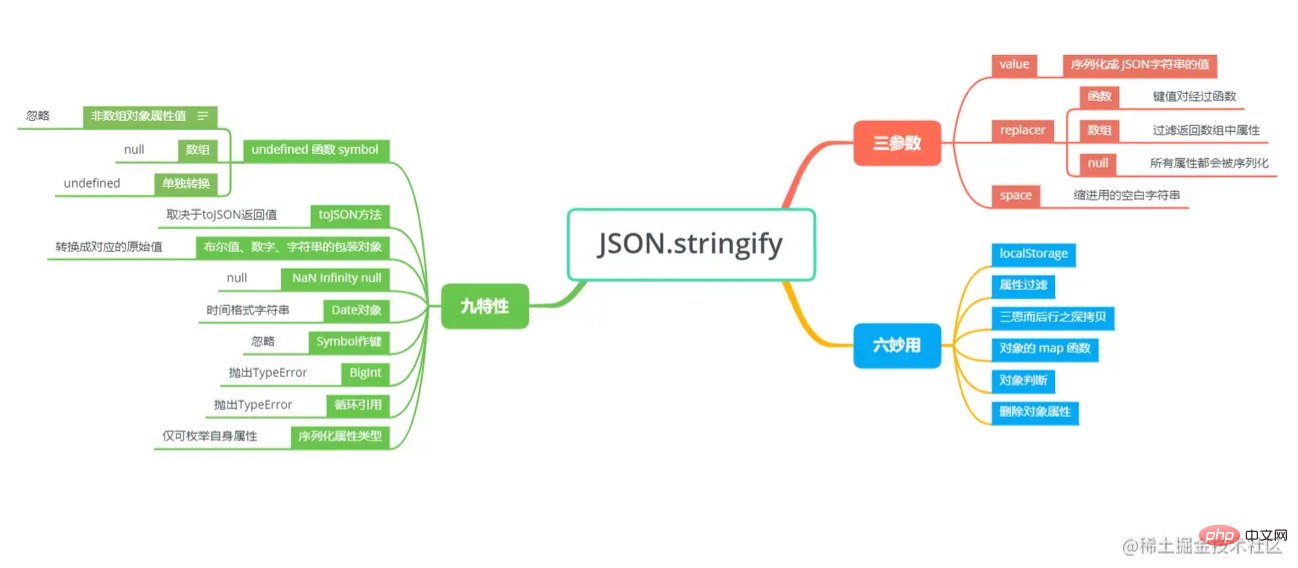
在日常程式設計中,我們經常JSON.stringify方法將某個物件轉換成JSON字串形式。
const stu = {
    name: 'zcxiaobao',
    age: 18
}

// {"name":"zcxiaobao","age":18}
console.log(JSON.stringify(stu));但stringify真的就這麼簡單嗎?我們先來看看MDN中對stringify的定義。
MDN 中指出: JSON.stringify()方法將一個JavaScript物件或值轉換為JSON字串,如果指定了一個replacer函數,則可以選擇性地替換值,或者指定的replacer是數組,則可選擇性地僅包含數組指定的屬性。
看完定義,小包就一驚, stringfy不只一個參數嗎?當然了, stringify有三個參數。
咱們來看一下stringify語法和參數介紹:
JSON.stringify(value[, replacer [, space]])
value : 將要序列後成JSON 字串的值。replacer (可選)如果該參數是一個函數,則在序列化過程中,被序列化的值的每個屬性都會經過該函數的轉換和處理;
如果該參數是一個數組,則只有包含在這個數組中的屬性名稱才會被序列化到最終的JSON字串中
如果該參數為null或未提供,則物件所有的屬性都會被序列化。
space (可選): 指定縮排用的空白字串,用於美化輸出如果參數是個數字,它代表有多少的空格。上限為10。
該值若小於1,則表示沒有空格
如果該參數為字串(當字串長度超過10個字母,取其前10個字母),該字串將被作為空格
如果該參數沒有提供(或者為null),將沒有空格
我們來嘗試replacer的使用。
replacer作為函數
replacer作為函數,它有兩個參數,鍵( key ) 和值( value ),並且兩個參數都會被序列化。
在開始時, replacer 函數會被傳入一個空字串作為key 值,代表著要被stringify 的這個物件。要理解這點很重要, replacer函數並非是上來就把物件解析成鍵值對形式,而是先傳入了待序列化物件。隨後每個物件或陣列上的屬性會被依序傳入。如果函數傳回值為undefined或函數時,則該屬性值會被篩選掉,其餘則依照傳回規則。
// repalcer 接受兩個參數key value
// key value 分別為物件的每個鍵值對// 因此我們可以根據鍵或值的型別進行簡單篩選function replacer(key, value) {
  if (typeof value === "string") {
    return undefined;
  }
  return value;
}
// function 可自行測試function replacerFunc(key, value) {
  if (typeof value === "string") {
    return () => {};
  }
  return value;
}
const foo = {foundation: "Mozilla", model: "box", week: 45, transport: "car", month: 7};
const jsonString = JSON.stringify(foo, replacer); JSON序列化結果為{"week":45,"month":7}
但如果序列化的是數組,若replacer函數傳回undefined或函數,當前值不會被忽略,而將會被null取代。
const list = [1, '22', 3]
const jsonString = JSON.stringify(list, replacer)
JSON序列化的結果為'[1,null,3]'
replacer作為數組
作為數組比較好理解,過濾數組中出現的鍵值。
const foo = {foundation: "Mozilla", model: "box", week: 45, transport: "car", month: 7};
const jsonString = JSON.stringify(foo, ['week', 'month']);
JSON 序列化結果為{"week":45,"month":7} , 只保留week和month屬性值。
出現在非陣列物件屬性值中: undefined 、任意函數、 Symbol值在序列化過程中將會被忽略
出現在陣列中: undefined 、任意函數、 Symbol值會被轉換為null
單獨轉換時: 會回傳undefined
// 1. 物件屬性值中存在這三種值會被忽略const obj = {
  name: 'zc',
  age: 18,
  // 函式會被忽略sayHello() {
    console.log('hello world')
  },
  // undefined會被忽略wife: undefined,
  // Symbol值會被忽略id: Symbol(111),
  // [Symbol('zc')]: 'zc',
}
// 輸出結果: {"name":"zc","age":18}
console.log(JSON.stringify(obj));

// 2. 數組中這三種值會轉換為null
const list = [
  'zc',
  18,
  // 函數轉換為null
  function sayHello() {
    console.log('hello world')
  },
  // undefined 轉換為null
  undefined,
  // Symbol 轉換為null
  Symbol(111)
]

// ["zc",18,null,null,null]
console.log(JSON.stringify(list))

// 3. 這三種值單獨轉換將會回傳undefined

console.log(JSON.stringify(undefined)) // undefined
console.log(JSON.stringify(Symbol(111))) // undefined
console.log(JSON.stringify(function sayHello() {
  console.log('hello world')
})) // undefined轉換值如果有toJSON()方法, toJSON()方法回傳什麼值,序列化結果就回傳什麼值,其餘值會被忽略。
const obj = {
  name: 'zc',
  toJSON(){
    return 'return toJSON'
  }
}
// return toJSON
console.log(JSON.stringify(obj));值、數字、字串的包裝物件布林值、數字、字串的包裝物件在序列化過程中會自動轉換成對應的原始值
JSON. stringify([new Number(1), new String("zcxiaobao"), new Boolean(true)]);
// [1,"zcxiaobao",true]特性四主要針對JavaScript裡面的特殊值,例如Number型別裡的NaN和Infinity及null 。此三種數值序列化過程中都會被當作null 。
// [null,null,null,null,null]
JSON.stringify([null, NaN, -NaN, Infinity, -Infinity])

// 特性三講過布林值、數字、字串的包裝物件在序列化過程中會自動轉換成對應的原始值// 隱式類型轉換就會呼叫包裝類,因此會先呼叫Number => NaN
// 之後再轉換成null
// 1/0 => Infinity => null
JSON.stringify([Number('123a'), +'123a', 1/0])Date物件上部署了toJSON方法(同Date.toISOString() )將其轉換為字串,因此JSON.stringify() 將會序列化Date 的值為時間格式字串。
// "2022-03-06T08:24:56.138Z"
JSON.stringify(new Date())
特性一提到, Symbol型別當作值來使用時,物件、陣列、單獨使用分別會被忽略、轉換為null 、轉換為undefined 。
同樣的,所有以Symbol 為屬性鍵的屬性都會被完全忽略掉,即便replacer 參數中強制指定包含了它們。
const obj = {
  name: 'zcxiaobao',
  age: 18,
  [Symbol('lyl')]: 'unique'
}
function replacer(key, value) {
  if (typeof key === 'symbol') {
    return value;
  }
}

// undefined
JSON.stringify(obj, replacer);透過上面案例,我們可以看出,雖然我們透過replacer強行指定了返回Symbol類型值,但最終還是會被忽略掉。
JSON.stringify規定:嘗試去轉換BigInt類型的值會拋出TypeError
const bigNumber = BigInt(1)
// Uncaught TypeError: Do not know how to serialize a BigInt
console.log(JSON.stringify(bigNumber))
特性八指出:對包含循環引用的物件(物件之間相互引用,形成無限循環)執行此方法,會拋出錯誤
日常開發中深拷貝最簡單暴力的方式就是使用JSON.parse(JSON.stringify(obj)) ,但此方法下的深拷貝存在巨坑,關鍵問題就在於stringify無法處理循環引用問題。
const obj = {
  name: 'zcxiaobao',
  age: 18,
}

const loopObj = {
  obj
}
// 形成循環引用obj.loopObj = loopObj;
JSON.stringify(obj)

/* Uncaught TypeError: Converting circular structure to JSON
    --> starting at object with constructor 'Object'
    | property 'loopObj' -> object with constructor 'Object'
    --- property 'obj' closes the circle
    at JSON.stringify (<anonymous>)
    在 <anonymous>:10:6
*/對於物件(包括Map/Set/WeakMap/WeakSet )的序列化,除了上文講到的一些情況, stringify也明確規定,只會序列化可枚舉的屬性
//不可列舉的屬性預設會被忽略// {"age":18}
JSON.stringify(
    Object.create(
        null,
        {
            name: { value: 'zcxiaobao', enumerable: false },
            age: { value: 18, enumerable: true }
        }
    )
);localStorage物件用於長久保存整個網站的數據,保存的數據沒有過期時間,直到手動去刪除。通常我們以物件形式進行儲存。
單純呼叫localStorage物件方法
const obj = {
  name: 'zcxiaobao',
  age: 18
}
// 單純呼叫localStorage.setItem()

localStorage.setItem('zc', obj);

// 最終回傳結果是[object Object]
// 可見單純呼叫localStorage是失敗的console.log(localStorage.getItem('zc')) localStorage配合JSON.stringify方法
localStorage.setItem('zc', JSON.stringify(obj));

// 最終回傳結果是{name: 'zcxiaobao', age: 18}
console.log(JSON.parse(localStorage.getItem('zc')))來假設這樣一個場景,後端返回了一個很長的對象,對象裡面屬性很多,而我們只需要其中幾個屬性,而這幾個屬性我們要儲存到localStorage 。
方案一: 解構賦值+ stringify
// 我們只需要a,e,f 屬性const obj = {
  a:1, b:2, c:3, d:4, e:5, f:6, g:7
}
// 解構賦值const {a,e,f} = obj;
// 儲存到localStorage
localStorage.setItem('zc', JSON.stringify({a,e,f}))
// {"a":1,"e":5,"f":6}
console.log(localStorage.getItem('zc'))使用stringify的replacer參數
// 借助replacer 作為數組形式進行過濾localStorage.setItem('zc', JSON.stringify(obj, ['a','e', 'f']))
// {"a":1,"e":5,"f":6}
console.log(localStorage.getItem('zc'))當replacer是數組時,可以簡單的過濾出我們所需的屬性,是一個不錯的小技巧。
使用JSON.parse(JSON.stringify)是實現物件的深拷貝最簡單暴力的方法之一。但也正如標題所言,使用該種方法的深拷貝要深思熟慮。
循環引用問題, stringify會報錯
函數、 undefined 、 Symbol會被忽略
NaN 、 Infinity和-Infinity會被序列化成null
...
因此在使用JSON.parse(JSON.stringify)做深拷貝時,一定要深思熟慮。如果沒有上述隱患, JSON.parse(JSON.stringify)是一個可行的深拷貝方案。
在使用陣列進行程式設計時,我們會經常使用到map函數。有了replacer參數後,我們就可以藉助此參數,實作物件的map函數。
const ObjectMap = (obj, fn) => {
  if (typeof fn !== "function") {
    throw new TypeError(`${fn} is not a function !`);
  }
  // 先呼叫JSON.stringify(obj, replacer) 實作map 功能// 然後呼叫JSON.parse 重新轉換成物件return JSON.parse(JSON.stringify(obj, fn));
};

// 例如下面給obj 物件的屬性值乘以2

const obj = {
  a: 1,
  b: 2,
  c: 3
}
console.log(ObjectMap(obj, (key, val) => {
  if (typeof value === "number") {
    return value * 2;
  }
  return value;
}))很多同學有可能會很奇怪,為什麼裡面還要多加一部判斷,直接return value * 2不可嗎?
上文講過, replacer函數首先傳入的是待序列化對象,對象* 2 => NaN => toJSON(NaN) => undefined => 被忽略,就沒有後續的鍵值對解析了。
藉助replacer函數,我們也可以刪除物件的某些屬性。
const obj = {
  name: 'zcxiaobao',
  age: 18
}
// {"age":18}
JSON.stringify(obj, (key, val) => {
  // 傳回值為undefined時,該屬性會被忽略if (key === 'name') {
    return undefined;
  }
  return val;
})JSON.stringify可以將物件序列化為字串,因此我們可以藉助字串的方法來實現簡單的物件相等判斷。
//判斷陣列是否包含某物件const names = [
  {name:'zcxiaobao'},
  {name:'txtx'},
  {name:'mymy'},
];
const zcxiaobao = {name:'zcxiaobao'};
// true
JSON.stringify(names).includes(JSON.stringify(zcxiaobao))

// 判斷物件是否相等const d1 = {type: 'div'}
const d2 = {type: 'div'}

// true
JSON.stringify(d1) === JSON.stringify(d2);借助上面的思想,我們也能實現簡單的陣列物件去重。
但由於JSON.stringify序列化{x:1, y:1}和{y:1, x:1}結果不同,因此在開始之前我們需要處理一下陣列中的物件。
方法一: 將陣列中的每個物件的鍵依字典序排列
arr.forEach(item => {
  const newItem = {};
  Object.keys(item) // 取得物件鍵值.sort() // 鍵值排序.map(key => { // 產生新物件newItem[key] = item[key];
        })
  // 使用newItem 進行去重操作})
但方法一有些繁瑣, JSON.stringify提供了replacer數組格式參數,可以過濾數組。
方法二: 借助replacer數組格式
function unique(arr) {
  const keySet = new Set();
  const uniqueObj = {}
  // 提取所有的鍵arr.forEach(item => {
    Object.keys(item).forEach(key => keySet.add(key))
  })
  const replacer = [...keySet];
  arr.forEach(item => {
    // 所有的物件都依照規定鍵值replacer 過濾unique[JSON.stringify(item, replacer)] = item;
  })
  return Object.keys(unique).map(u => JSON.parse(u))
}

// 測試一下unique([{}, {},
      {x:1},
      {x:1},
      {a:1},
      {x:1,a:1},
      {x:1,a:1},
      {x:1,a:1,b:1}
      ])

// 回傳結果[{},{"x":1},{"a":1},{"x":1,"a":1},{"x":1,"a":1 ,"b":1}]