lora svc
final model release

 Black technology based on the three giants of artificial intelligence:

OpenAI's whisper, 680,000 hours in multiple languages

Nvidia's bigvgan, anti-aliasing for speech generation

Microsoft's adapter, high-efficiency for fine-tuning
洛拉(Lora)在該項目中尚未完全實施,但可以在這裡找到:
使用預處理模型微調
必要的預處理:
然後根據以下文件結構將數據集放入data_raw目錄中
data_raw
├───speaker0
│   ├───000001.wav
│   ├───...
│   └───000xxx.wav
└───speaker1
    ├───000001.wav
    ├───...
└───000xxx.wav1個軟件依賴性
pip install -r要求.txt
2下載 @mueller91的timbre編碼器:揚聲器編碼器,將best_model.pth.tar放入speaker_pretrain/
3下載Whisper模型多語言媒介模型,請確保下載medium.pt ,將其放入whisper_pretrain/
提示:竊竊私語是內置的,不要再安裝,它將衝突並報告錯誤
4下載預告架模型maxgan_pretrain_32k.pth,並進行測試
python svc_inference.py--config configs/maxgan.yaml -model maxgan_pretrain_32k.pth -spk ./configs/singers/singers/singer0001.npy -wave -wave -wave test.wav
如果要自動化此命令,請使用此命令:
python3準備/easyprocess.py
或一步一步,如下:
1,重新採樣
以16000Hz的採樣率生成音頻
python準備/preprocess_a.py -w ./data_raw -o ./data_svc/waves-16k -s 16000
以32000Hz的採樣率生成音頻
Python準備/preprocess_a.py -w ./data_raw -o ./data_svc/waves-32k -s 32000
2,使用16k音頻提取音高
python準備/preprocess_f0.py -w data_svc/waves -16k/-p data_svc/pitch
3,使用16k音頻提取PPG
python準備/preprocess_ppg.py -w data_svc/waves -16k/-p data_svc/hisper
4,使用16k音頻提取音色代碼
Python準備/preprocess_speaker.py data_svc/waves-16k/data_svc/揚聲器
5,提取推理的歌手代碼
python準備/preprocess_speaker_ave.py data_svc/speaker/data_svc/singer
6,使用32K音頻生成培訓指數
python準備/preprocess_train.py
7,培訓文件調試
python準備/preprocess_zzz.py -c configs/maxgan.yaml
data_svc/
└── waves-16k
│    └── speaker0
│    │      ├── 000001.wav
│    │      └── 000xxx.wav
│    └── speaker1
│           ├── 000001.wav
│           └── 000xxx.wav
└── waves-32k
│    └── speaker0
│    │      ├── 000001.wav
│    │      └── 000xxx.wav
│    └── speaker1
│           ├── 000001.wav
│           └── 000xxx.wav
└── pitch
│    └── speaker0
│    │      ├── 000001.pit.npy
│    │      └── 000xxx.pit.npy
│    └── speaker1
│           ├── 000001.pit.npy
│           └── 000xxx.pit.npy
└── whisper
│    └── speaker0
│    │      ├── 000001.ppg.npy
│    │      └── 000xxx.ppg.npy
│    └── speaker1
│           ├── 000001.ppg.npy
│           └── 000xxx.ppg.npy
└── speaker
│    └── speaker0
│    │      ├── 000001.spk.npy
│    │      └── 000xxx.spk.npy
│    └── speaker1
│           ├── 000001.spk.npy
│           └── 000xxx.spk.npy
└── singer
    ├── speaker0.spk.npy
└── speaker1.spk.npy0,如果基於預訓練的模型進行微調,則需要下載預培訓的模型:Maxgan_pretrain_32k.pth
設置預告片:“ ./maxgan_pretrain_32k.pth”中的configs/maxgan.yaml,並適當調整學習率,例如1E-5
1,開始訓練
python svc_trainer.py -c configs/maxgan.yaml -n svc
2,簡歷培訓
python svc_trainer.py -c configs/maxgan.yaml -n svc -p chkpt/svc/***。
3,查看日誌
張板 - logdir logs/
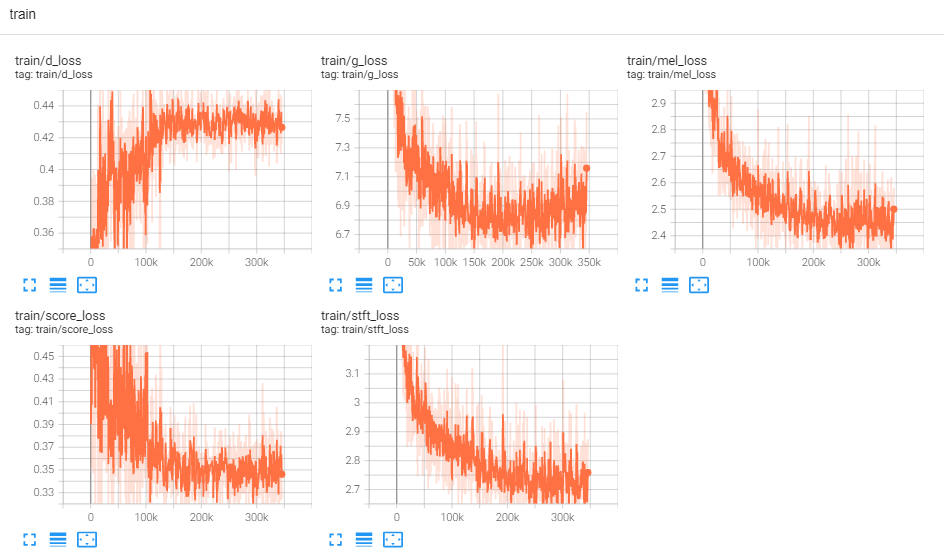
如果您想要在下面執行所有命令的GUI,請使用此命令:
python3 svc_gui.py
或一步一步,如下:
1,導出推理模型
python svc_export.py--config configs/maxgan.yaml -checkpoint_path chkpt/svc/***。
2,使用耳語來提取內容編碼,而無需使用一鍵推理,以減少GPU內存使用情況
python whisper/temprence.py -w test.wav -p test.ppg.npy
3,將F0參數提取到CSV文本格式
python pitch/terperion.py -w test.wav -p test.csv
4,指定參數並推斷
python svc_inference.py--config configs/maxgan.yaml -model maxgan_g.pth -spk./data_svc/singers/your_singer.npy.npy-wave-wave-wave-wave test.wav -pppg -pppg -ppt test.ppt test.ppt test.csv.csv.csv.csv.csv.csv.csv.csv.csv.csv.csv.csv.csv.csv.csv.csv.csv.csv
當指定-ppg時,當多次合理相同的音頻時,它可以避免重複提取音頻內容代碼;如果未指定,它將自動提取;
指定-pit時,可以加載手動調諧的F0參數;如果未指定,它將自動提取;
在當前目錄中生成文件:svc_out.wav
| args | -Config | - 模型 | - -Spk | - 海浪 | -ppg | - 坑 | - 轉移 |
|---|---|---|---|---|---|---|---|
| 姓名 | 配置路徑 | 模型路徑 | 揚聲器 | 波輸入 | 波PPG | 波螺距 | 俯仰變速 |
5,由VAD發布
python svc_inference_post.py -ref test.wav -svc svc_out.wav -out svc_post.wav
基於適配器的新揚聲器的多演講者文本到語音模型的擴展
Adaspeech:自適應文字到語音的語音語音
https://github.com/nii-yamagishilab/project-nn-pytorch-scripts/tree/master/master/project/01-nsf
https://github.com/mindslab-ai/univnet [Paper]
https://github.com/openai/whisper/ [紙]
https://github.com/nvidia/bigvgan [Paper]







