terraform aws next js
v0.13.2

筆記
主要分支當前包含原子部署Alpha預覽。
有關最新穩定版本,請查看v0.x分支。請參閱我們的博客文章“通往原子部署之路”
或觀看最新版本評論以獲取更多信息:
一個用於自我託管的零孔Terraform模塊Next.js站點在AWS lambda上無服務器。
某些功能仍在開發中,以下是當前支持的功能列表,以及我們打算與下一個版本一起提供的內容:
v0.15+Next.js Terraform模塊被設計為一個完整的AWS應用程序。它依靠多個AWS服務,並將它們連接起來作為一個應用程序:
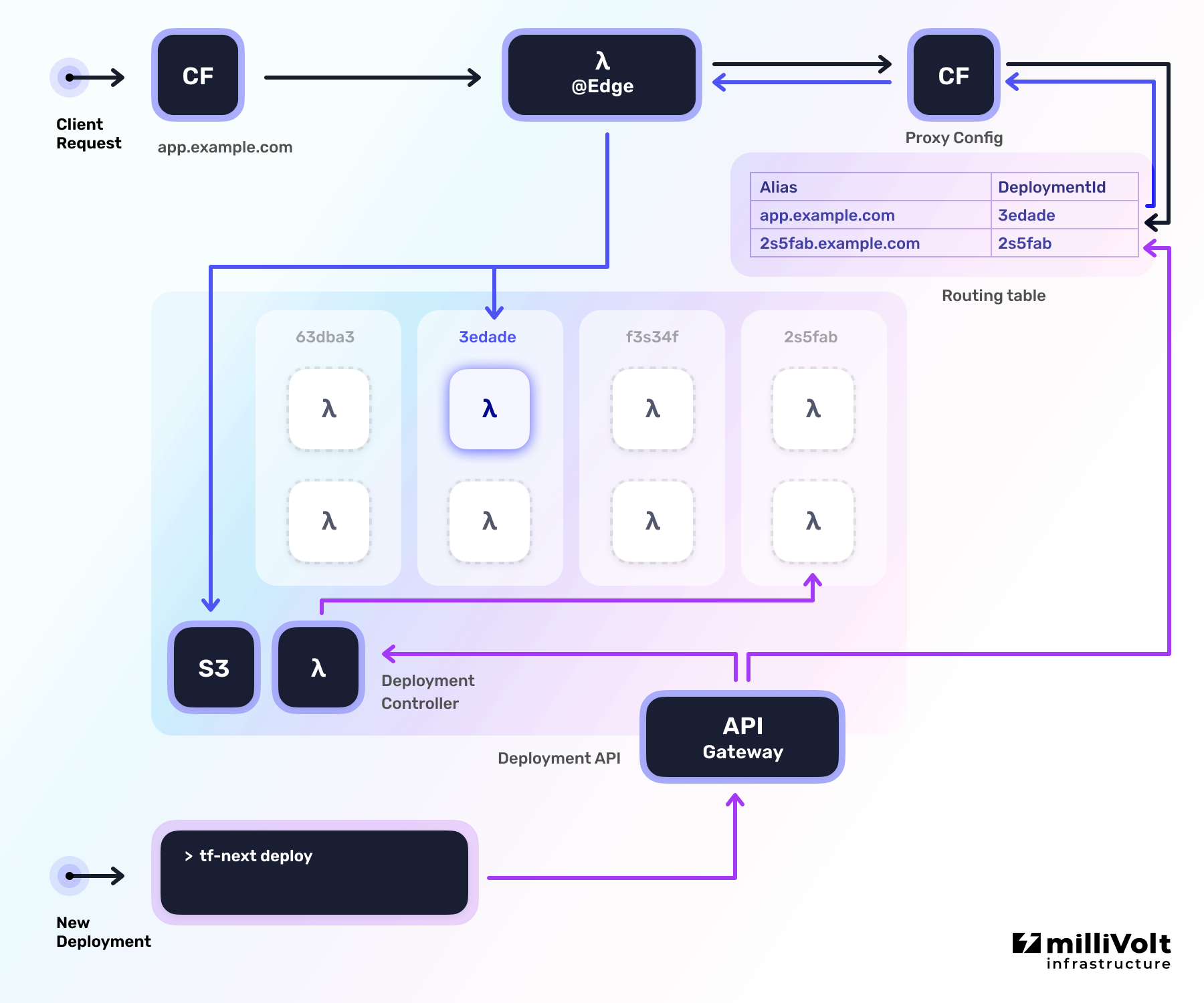
您應該安裝以下工具:
注意:此外,我們在這裡假設您已經有一個與您的AWS帳戶相關的公共Route53託管區域。
這是原子部署的預覽階段的要求,每個部署都將分配一個唯一的子域。一旦原子部署普遍可用,它將改變。
Terraform模塊包含該系統,該系統後來用於創建新的部署和管理您的下一個.js應用程序的別名(域)。創建Terraform堆棧僅在初始設置中需要創建,並創建用於將傳入請求處理到您的網站的全局資源(CloudFront Distributions,DynamoDB表,S3存儲)。
在空文件夾中創建一個新的main.tf文件(或將其添加到您現有的Terraform堆棧中),並添加以下內容:
 terraform {
  required_providers {
    aws = {
      source  = " hashicorp/aws "
      version = " ~> 4.0 "
    }
  }
}

# Main region where the resources should be created in
# Should be close to the location of your viewers
provider "aws" {
  region = " us-west-2 "
}

# Provider used for creating the Lambda@Edge function which must be deployed
# to us-east-1 region (Should not be changed)
provider "aws" {
  alias  = " global_region "
  region = " us-east-1 "
}

# ##########
# Variables
# ##########

variable "custom_domain" {
  description = " Your custom domain "
  type        = string
  default     = " example.com "
}

# Assuming that the ZONE of your domain is already available in your AWS account (Route 53)
# https://docs.aws.amazon.com/Route53/latest/DeveloperGuide/AboutHZWorkingWith.html
variable "custom_domain_zone_name" {
  description = " The Route53 zone name of the custom domain "
  type        = string
  default     = " example.com. "
}

# #######
# Locals
# #######

locals {
  # A wildcard domain(ex: *.example.com) has to be added when using atomic deployments:
  aliases = [ var . custom_domain , " *. ${ var . custom_domain } " ]
}

# ######################
# Route53 Domain record
# ######################

# Get the hosted zone for the custom domain
data "aws_route53_zone" "custom_domain_zone" {
  name = var . custom_domain_zone_name
}

# Create a new record in Route 53 for the domain
resource "aws_route53_record" "cloudfront_alias_domain" {
  for_each = toset (local . aliases )

  zone_id = data . aws_route53_zone . custom_domain_zone . zone_id
  name    = each . key
  type    = " A "

  alias {
    name                   = module . tf_next . cloudfront_domain_name
    zone_id                = module . tf_next . cloudfront_hosted_zone_id
    evaluate_target_health = false
  }
}

# #########
# SSL Cert
# #########

# Creates a free SSL certificate for CloudFront distribution
# For more options (e.g. multiple domains) see:
# https://registry.terraform.io/modules/terraform-aws-modules/acm/aws/
module "cloudfront_cert" {
  source  = " terraform-aws-modules/acm/aws "
  version = " ~> 3.0 "

  domain_name               = var . custom_domain
  zone_id                   = data . aws_route53_zone . custom_domain_zone . zone_id
  subject_alternative_names = slice (local . aliases , 1 , length (local . aliases ))

  wait_for_validation = true

  tags = {
    Name = " CloudFront ${ var . custom_domain } "
  }

  # CloudFront works only with certs stored in us-east-1
  providers = {
    aws = aws.global_region
  }
}

# #########################
# Terraform Next.js Module
# #########################

module "tf_next" {
  source  = " milliHQ/next-js/aws "
  version = " 1.0.0-canary.4 "

  cloudfront_aliases             = local . aliases
  cloudfront_acm_certificate_arn = module . cloudfront_cert . acm_certificate_arn

  deployment_name = " atomic-deployments "

  enable_multiple_deployments      = true
  multiple_deployments_base_domain = " *. ${ var . custom_domain } "

  providers = {
    aws.global_region = aws.global_region
  }
}

# ########
# Outputs
# ########

output "api_endpoint" {
  value = module . tf_next . api_endpoint
}

output "api_endpoint_access_policy_arn" {
  value = module . tf_next . api_endpoint_access_policy_arn
}
要在AWS帳戶中創建資源,請運行以下命令:
terraform init    # Only needed on the first time running Terraform

terraform plan    # (Optional) See what resources Terraform will create
terraform apply   # Create the resources in your AWS account

> Apply complete !
>
> Outputs:
>
> api_endpoint = " https://<api-id>.execute-api.us-west-2.amazonaws.com "
> api_endpoint_access_policy_arn = " arn:aws:iam::123456789012:policy/access-api "後來,CLI工具使用api_endpoint來創建新的部署。
使用api_endpoint_access_policy_arn AWS策略,您可以創建新用戶(並分配該策略),該策略只能使用CLI工具tf-next ,但無法訪問AWS帳戶中的其他資源。
成功部署後,您的下一個.js應用將在cloudfront_domain_name輸出的CloudFront子域上公開可用。
為了構建和部署Next.js應用程序到系統,我們創建了一個名為tf-next的CLI工具。
這是一個可以安裝的NPM軟件包:
npm i -g tf-next@canary接下來,我們需要構建下一個.js,以便它可以在無服務器環境(使用AWS lambda)中運行。通過在您的下一個應用程序所在的同一目錄中運行tf-next build來存檔(即package.json或next.config.js文件的位置):
 tf-next build

> All serverless functions created in: 20.791ms
> 1752924 total bytes
> Build successful!
現在,通過從同一目錄部署tf-next deploy next.js應用程序。部署命令通過帶有Terraform模塊的AWS憑據API通過有擔保的(並與您的AWS憑據進行身份驗證)通信。
要告訴命令在哪裡部署應用程序,必須提供一個附加的--endpoint標誌,該標誌應使用Terraform從terraform apply步驟中使用api_endpoint輸出的值:
 tf-next deploy --endpoint https://<api-id>.execute-api.us-west-2.amazonaws.com

> Available at: https://3edade7a2bf7bb0343699af6b851bbfa.example.com/
現在可以通過顯示的URL訪問預覽的部署。
為了使部署可從更可讀的URL提供,您可以使用tf-next alias命令:
 tf-next alias set my-app.example.com 3edade7a2bf7bb0343699af6b851bbfa.example.com

> Available at: https://my-app.example.com/
有關可與tf-next一起使用的可用命令的完整列表,請檢查命令參考。
| 姓名 | 版本 |
|---|---|
| Terraform | > = 0.15 |
| AWS | > = 4.8 |
| 姓名 | 版本 |
|---|---|
| AWS | > = 4.8 |
| 姓名 | 描述 | 類型 | 預設 | 必需的 |
|---|---|---|---|---|
| cloudfront_acm_certificate_arn | ACM證書Arn for Custom_domain | string | null | 不 |
| cloudfront_aliases | custom_domain的別名 | list(string) | [] | 不 |
| cloudfront_cache_key_headers | 應用於計算CloudFront中的高速緩存鍵的標頭鍵。 | list(string) | [ | 不 |
| cloudfront_create_distribution | 控制是否應創建主雲分佈。 | bool | true | 不 |
| cloudfront_external_arn | 當使用外部雲沿時,提供其ARN。 | string | null | 不 |
| cloudfront_external_id | 使用外部雲偏轉時提供其ID。 | string | null | 不 |
| cloudfront_minimum_protocol_version | 您希望CloudFront用於HTTPS連接的SSL協議的最小版本。 SSLV3,TLSV1,TLSV1_2016,TLSV1.1_2016,TLSV1.2_2018或TLSV1.2_2019之一。 | string | "TLSv1" | 不 |
| cloudfront_origin_request_policy | 覆蓋默認策略(AllViewer)的自定義請求策略的ID。可以自定義或管理。 | string | null | 不 |
| cloudfront_price_class | CloudFront Distribution的價格類(Main&Proxy Config)。 Priceclass_All之一,Priceclass_200,Priceclass_100。 | string | "PriceClass_100" | 不 |
| cloudfront_response_headers_policy | 響應標頭政策的ID。可以自定義或管理。默認值為空。 | string | null | 不 |
| cloudfront_webacl_id | 可選的WebACL2 ARN或WebACL ID,可以與CloudFront Distibstion相關聯 | string | null | 不 |
| create_image_optimization | 控制是否應創建用於圖像優化支持的資源。 | bool | true | 不 |
| debug_use_local_packages | 使用本地構建的軟件包,而不是從NPM下載它們。 | bool | false | 不 |
| deployment_name | 部署組的標識符(僅允許小寫字母數字和連字符)。 | string | "tf-next" | 不 |
| enable_multiple_deployments | 控制是否應該並行運行多個部署(需要多個deployments_base_domain)。 | bool | false | 不 |
| image_optimization_lambda_memory_size | MB中的內存量可以使用以進行圖像優化的Worker lambda功能。有效值在128 MB至10,240 MB之間,以1 MB增量為單位。 | number | 2048 | 不 |
| lambda_attach_policy_json | 是否要部署其他Lambda JSON政策。如果false,則不會將lambda_policy_json附加到lambda函數上。 (由於使用TerraForms Data.aws_iam_policy_document時,僅在申請後才知道策略字符串) | bool | false | 不 |
| lambda_attach_to_vpc | 如果應將Lambda功能附加到VPC,則設置為TRUE。如果應該通過Lambda功能訪問VPC資源,請使用此設置。將其設置為true時,請使用vpc_security_group_ids和vpc_subnet_ids指定VPC網絡。請注意,固定在VPC上會延遲到冷啟動 | bool | false | 不 |
| lambda_policy_json | 其他政策文件作為JSON,以附加到Lambda功能角色 | string | null | 不 |
| lambda_role_permissions_boundary | IAM策略的ARN範圍aws_iam_role訪問lambda | string | null | 不 |
| 多_deployments_base_domain | 默認的通配符域,應在其中可用新部署。應該以 *.example.com的形式。 | string | null | 不 |
| 標籤 | 標記元數據標記支持標籤的AWS資源。 | map(string) | {} | 不 |
| tags_s3_bucket | 標記元數據標記AWS S3存儲桶。輸入變量標籤中具有相同名稱的標籤。 | map(string) | {} | 不 |
| vpc_security_group_ids | Lambda功能將使用的安全組ID列表。應該將lambda_attach_to_vpc設置為true以應用這些。 | list(string) | [] | 不 |
| vpc_subnet_ids | VPC子網ID列表,用於附加lambda函數。應該將lambda_attach_to_vpc設置為true以應用這些。 | list(string) | [] | 不 |
| 姓名 | 描述 |
|---|---|
| api_endpoint | CLI使用的API端點。 |
| api_endpoint_access_policy_arn | 授予訪問API端點的政策的ARN。 |
| cloudfront_custom_error_response | 預先配置的自定義錯誤響應CloudFront Distribution應使用。 |
| cloudfront_default_cache_behavior | 預先配置的默認緩存行為CloudFront Distribution應使用。 |
| cloudfront_default_root_object | 預先配置的根對象應使用雲偏轉分佈。 |
| cloudfront_domain_name | 主雲偏轉分佈的域(創建時)。 |
| cloudfront_hosted_zone_id | 主雲沿分佈的區域ID(創建時)。 |
| cloudfront_ordered_cache_behaviors | 雲偏轉分佈應使用的預配置有序緩存行為。 |
| CloudFront_origins | 預先配置的起源應使用雲優率分佈。 |
| upload_bucket_id | N/A。 |
在引擎蓋下,該模塊使用了許多Vercel的構建管道。因此,Vercel上存在的問題也可能在該項目上發生。
首次運行(Terraform-Provider-aws#1721)堆棧刪除( terraform destroy )失敗
這是有意的,因為我們無法以同步方式刪除lambda@edge函數(代理模塊使用)。 AWS最多可能需要一個小時的時間才能從其云方向分佈中解脫lambda@edge函數,即使分佈已經被破壞。
解決方法:
在運行了最初的terraform destroy命令後(失敗)等待〜1小時,然後再次運行命令。這次,它應該成功運行並刪除其餘的堆棧。
初始應用失敗與錯誤消息Error: error creating Lambda Event Source Mapping (#138)
當為靜態部署lambda創建權限時,會有一定的種族條件。這只能發生在第一次部署。
解決方法:
您應該能夠再次terraform apply ,並且堆棧創建將在沒有此錯誤的情況下進行。
歡迎捐款!
如果您想改進此模塊,請查看我們開始的貢獻指南。
該項目由Millivolt基礎設施維護。
我們為任何云提供商構建自定義基礎架構解決方案。
Apache -2.0-有關詳細信息,請參見許可證。
注意:
examples/*均被許可為MIT,以符合官方的下一步。







