ngx inline editor
0.2.0-alpha.12

跟著我收到有關新版本的通知。
NGX-Inline-編輯器是一個角度(版本4+)的庫,可讓您創建可編輯的元素。這種技術也稱為點擊編輯或現場編輯。它基於在Angularjs中開發的Angular-Xededist的思想。

基本上,它不取決於Angular4本身以外的任何庫。對於主題,您可能需要包括Twitter Bootstrap CSS。
Angular 4現在穩定。因此,如果使用此LIB遇到錯誤,請確保您的Angular版本兼容。用於開發此lib的當前版本是Angular4 ^4.0.0 。
npm i @qontu/ngx-inline-editor --save
dist/themes/bootstrap.css
導入InlineEditorModule到您的應用程序模塊中:
 import { InlineEditorModule } from '@qontu/ngx-inline-editor' ;

@ NgModule ( {
  imports : [
    InlineEditorModule
  ]
} )這使得所有@qontu/ngx-inline-editor組件可用於應用程序組件。
您可以在這裡找到一個完整的示例
 import { Component } from '@angular/core' ;

@ Component ( {
    selector : 'my-component' ,
    template : `
    <div>
        <inline-editor type="text" [(ngModel)]="editableText" (onSave)="saveEditable($event)" name="editableText1" size="8"></inline-editor>
    </div>
    <div>
        <inline-editor type="password" [(ngModel)]="editablePassword" (onSave)="saveEditable($event)"></inline-editor>
    </div>
    <div>
        <inline-editor type="textarea" [(ngModel)]="editableTextArea" (onSave)="saveEditable($event)"> </inline-editor>
    </div>
    <div>
        <inline-editor type="select" [(ngModel)]="editableSelect" (onSave)="saveEditable($event)" [options]="editableSelectOptions"
        value="valor"></inline-editor>
  </div>`
} )
export class MyComponent {
  title = 'My component!' ;

  editableText = 'myText' ;
  editablePassword = 'myPassword' ;
  editableTextArea = 'Text in text area' ;
  editableSelect = 2 ;
  editableSelectOptions = [
    { value : 1 , text : 'status1' } ,
    { value : 2 , text : 'status2' } ,
    { value : 3 , text : 'status3' } ,
    { value : 4 , text : 'status4' }
  ] ;

  saveEditable ( value ) {
    //call to http service
    console . log ( 'http.service: ' + value ) ;
} < inline-editor
type =" text "
[(ngModel)] =" editableText "
(onSave) =" saveEditable($event) "
name =" editableText1 "
size =" 8 "
disabled =" true "
min =" 1 "
max =" 8 "
pattern =" ^[a-zA-Z]{1,3} "
(onError) =" myHandleError() " > </ inline-editor >type [ string ]指定要顯示的類型<input>元素。event handler ”按鈕保存表單時,指定的表達式將被onSave 。 $event參數將是輸入發送的值返回。event handler按鈕保存表單並引起錯誤時,指定的onError將被調用(例如:該值不在min和max之間)。name [ string ]定義了<input>元素的名稱。默認值undefined 。size [ number ]定義<input>元素的字符中的寬度。默認值為8 。disabled [ boolean ]如果設置為true ,則禁用的輸入元素是無法使用且無法使用的。默認值為false 。min [ number ]最小屬性指定<input>元素的最小值。默認值為1 。max [ number ]最大屬性指定<input>元素的最大值。默認值為Infinity 。 < inline-editor
type =" password "
[(ngModel)] =" editablePassword "
(onSave) =" saveEditable($event) "
name =" editablePassword "
size =" 8 "
disabled =" true "
min =" 1 "
max =" 8 "
(onError) =" myHandleError " > </ inline-editor >type [ string ]指定要顯示的類型<input>元素。event handler ”按鈕保存表單時,指定的表達式將被onSave 。 $event參數將是輸入發送的值返回。event handler按鈕保存表單並引起錯誤時,指定的onError將被調用(例如:該值不在min和max之間)。name [ string ]定義了<input>元素的名稱。默認值undefined 。size [ number ]定義<input>元素的字符中的寬度。默認值為8 。disabled [ boolean ]如果設置為true ,則禁用的輸入元素是無法使用且無法使用的。默認值為false 。min [ number ]最小屬性指定<input>元素的最小值。默認值為1 。max [ number ]最大屬性指定<input>元素的最大值。默認值為Infinity 。 < inline-editor
type =" textarea "
[(ngModel)] =" editableTextArea "
(onSave) =" saveEditable($event) "
name =" editableTextArea "
size =" 8 "
disabled =" true "
cols =" 50 "
rows =" 4 "
min =" 1 "
max =" 8 "
(onError) =" myHandleError " > </ inline-editor >type [ string ]指定要顯示的類型<input>元素。event handler ”按鈕保存表單時,指定的表達式將被onSave 。 $event參數將是輸入發送的值返回。event handler按鈕保存表單並引起錯誤時,指定的onError將被調用(例如:該值不在min和max之間)。name [ string ]定義了<input>元素的名稱。默認值undefined 。size [ number ]定義<input>元素的字符中的寬度。默認值為8 。disabled [ boolean ]如果設置為true ,則禁用的輸入元素是無法使用且無法使用的。默認值為false 。cols [ number ]指定文本區域的可見寬度。默認值為50 。rows [ number ]指定文本區域的可見高度。默認值為4 。min [ number ]最小屬性指定<input>元素的最小值。默認值為1 。max [ number ]最大屬性指定<input>元素的最大值。默認值為Infinity 。 < inline-editor
type =" select "
[(ngModel)] =" editableSelect "
(onSave) =" saveEditable($event) "
name =" editableSelect "
disabled =" false "
[options] =" editableSelectOptions " > </ inline-editor >type [ string ]指定要顯示的類型<input>元素。event handler ”按鈕保存表單時,指定的表達式將被onSave 。 $event參數將是輸入發送的值返回。name [ string ]定義了<input>元素的名稱。默認值undefined 。disabled [ boolean ]如果設置為true ,則禁用的輸入元素是無法使用且無法使用的。默認值為false 。options [ Array<optionItem> | Object:{ data: Array<optionItem, value:string, text: string } ]可以從中選擇的項目數組。應該是具有value和text屬性的對像數組。可以使用指定這些字段和數據的對象配置鍵值值參數。打字稿代碼:
  editableSelect = 2 ;
  editableSelectOptions = [
    { value : 1 , text : 'status1' } ,
    { value : 2 , text : 'status2' } ,
    { value : 3 , text : 'status3' } ,
    { value : 4 , text : 'status4' }
  ] ;

  saveEditable ( value ) {
    //call to http server
    console . log ( 'http.server: ' + value ) ;

} editableSelect [ number ]指定選擇的默認值。editableSelectOptions [ Array<optionItem> | Object: { data: Array<optionItem, value:string, text: string } ]指定要選擇的項目數組。應該是具有value和text屬性的對像數組。可以使用指定這些字段和數據的對象配置鍵值值參數。打字稿代碼:
  editableSelect = 2 ;
  editableSelectOptionsConfiguration = {
    data : [
      { id : 1 , field : 'status1' } ,
      { id : 2 , field : 'status2' } ,
      { id : 3 , field : 'status3' } ,
      { id : 4 , field : 'status4' }
    ] ,
    value : 'id' ,
    text : 'field'
  }

  saveEditable ( value ) {
    //call to http server
    console . log ( 'http.server: ' + value ) ;

} 可以使用稱為children的對象來配置巨型/子女來生成選擇。
打字稿代碼:
 editableSelectOptionsTwoLevelsDefault = 1 ;
  editableSelectOptionsTwoLevelsConfiguration = {
    data : [
      {
        id : 1 , field : 'status1' ,
        children : [
          { id : 5 , field : 'status1.1' } ,
          { id : 6 , field : 'status1.2' }
        ]
      } ,
      { id : 2 , field : 'status2' } ,
      { id : 3 , field : 'status3' } ,
      {
        id : 4 , field : 'status4' ,
        children : [ { id : 7 , field : 'status4.1' } ]
      }
    ] ,
    value : 'id' ,
    text : 'field'
} 
  < inline-editor
  type =" text "
  ngModel
  empty =" My custom message "
  (onSave) =" saveEditable($event) "
  (onError) =" handleError "
  name =" editableText1 "
  size =" 8 "
  min =" 3 "
  max =" 5 " > </ inline-editor >

  < inline-editor type =" select "
                [(ngModel)] =" editableSelectDoesntExist "
                (onSave) =" saveEditable($event) "
                [options] =" editableSelectOptionsConfiguration " > </ inline-editor >
empty [ string ]指定默認消息,以顯示組件沒有ngmodel。如果select類型,則默認選擇的元素是options陣列的第一個元素。inline-editor具有以下基本主題,您可以在dist/themes/bootstrap.css中找到這些主題:
 a . c-inline-editor {
  text-decoration : none;
  color : # 428bca ;
  border-bottom : dashed 1 px # 428bca ;
  cursor : pointer;
  line-height : 2 ;
  margin-right : 5 px ;
  margin-left : 5 px ;
}
. c-inline-editor . editable-empty ,
. c-inline-editor . editable-empty : hover ,
. c-inline-editor . editable-empty : focus ,
. c-inline-editor . a . editable-empty ,
. c-inline-editor . a . editable-empty : hover ,
. c-inline-editor . a . editable-empty : focus {
  font-style : italic;
  color : # DD1144 ;
  text-decoration : none;
}

. c-inline-editor . inlineEditForm {
  display : inline-block;
  white-space : nowrap;
  margin : 0 ;
}

# inlineEditWrapper {
  display : inline-block;
}

. c-inline-editor . inlineEditForm input ,
. c-inline-editor . select {
  width : auto;
  display : inline;
}

. c-inline-editor . inline-editor-button-group {
  display : inline-block;
}

. c-inline-editor . editInvalid {
  color : # a94442 ;
  margin-bottom : 0 ;
}

. c-inline-editor . error {
  border-color : # a94442 ;
}

[ hidden ]. c-inline-editor {
  display : none;
}使用Angular2-Data-Table(演示)的示例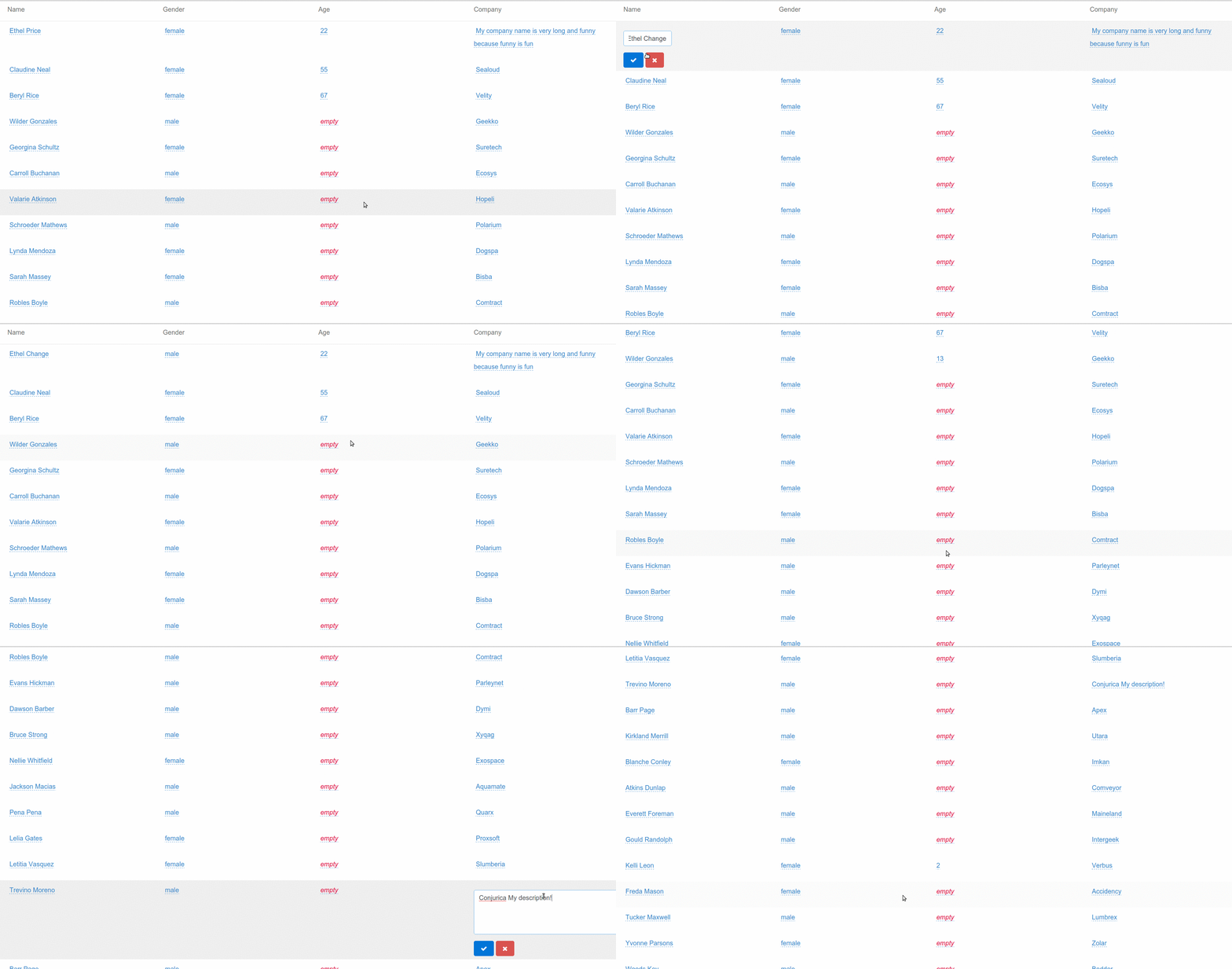
在報告錯誤和功能請求時,請遵循此準則:
感謝您的理解!
生成所有*.js , *.js.map和*.d.ts文件:
npm run build
偵錯:
npm run build:watch
Carlos Caballero -https://github.com/caballerog
Antonio Villena -https://github.com/xxxtonixxx
麻省理工學院許可證(有關全文請參閱許可證文件) -






