vue mathlive
1.0.0

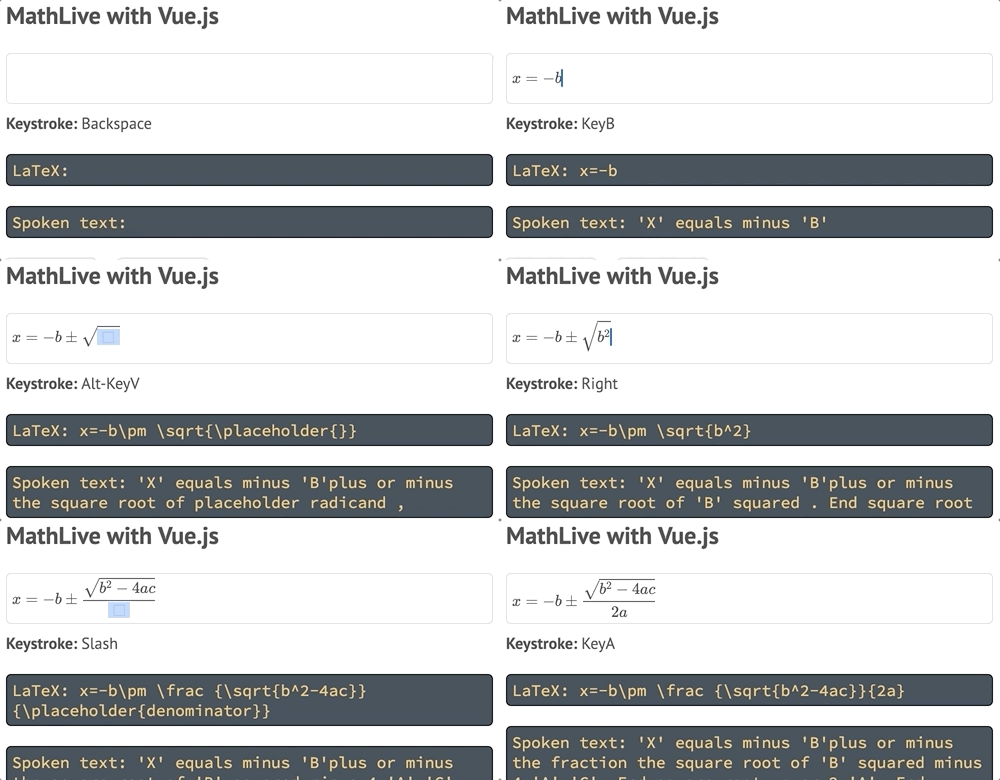
Mathlive Vue包裝器提供了實現<mathlive-mathfield> HTML標籤的VUE組件。
該組件可用於使用數學庫編輯公式。編輯器提供了豐富,易於訪問的編輯UI,包括移動設備的虛擬鍵盤,並可以將輸出作為乳膠,MathML或口語文本提供。
數學庫必須單獨加載。這提供了選擇包裝器使用的特定版本的特定版本。
接下來,應導入包裝器,然後使用Vue.use()連接兩個
注意:此存儲庫僅包含樣本。 Vue包裝器包裝在主數學庫中。
注意:如果您在實例化Mathfield組件時會遇到運行時錯誤,並從VUE中發出警告runtimeCompiler: true請注意“您正在使用vue的僅運行時構建...”。
 < script type =" module " >
  import * as MathLive from "https://unpkg.com/mathlive/dist/mathlive.min.mjs" ;
  import VueMathfield from "https://unpkg.com/mathlive/dist/vue-mathlive.mjs" ;

  Vue . use ( VueMathfield , MathLive ) ;
</ script > Mathfields的默認標籤是<mathlive-mathfield>可以使用以下方式定義自定義標籤:
Vue . component ( "custom-tag" , Mathfield ) ;該組件支持v-model屬性。
元素的文本內容用作編輯器的初始值。
可以使用:options屬性來配置Mathfield,例如指定字體目錄的位置。閱讀有關可用選項的更多信息。
 < mathlive-mathfield
  :options =" {smartFence:false} "
  @focus =" ping "
  :on-keystroke =" displayKeystroke "
  v-model =" formula "
>
  f(x)=
</ mathlive-mathfield >| 姓名 | 類型 | 描述 |
|---|---|---|
value | string | Mathfield的內容表示為乳膠字符串。 |
options | object | Mathfield的配置選項。 |
onKeystroke | (keystroke:string, ev:Event) => boolean | 按下鍵時調用回調。 keystroke是一個描述擊鍵的字符串, ev是本機鍵盤事件。返回false以停止處理活動 |
onMoveOutOf | (string) => boolean | 當鍵盤導航會導致插入點離開Mathfield時,調用了回調。該參數指示導航的方向,要么“向後”或“向後”。返回false以防止移動,將其置換到字段的開始。默認情況下,插入點會纏繞。 |
onTabOutOf | (string) => boolean | 按下選項卡(或換檔)時調用回調,會導致插入點離開Mathfield。該參數指示導航的方向,要么“向後”或“向後”。返回false以防止移動,將其置換到字段的開始。默認情況下,插入點會纏繞。 |
| 姓名 | 描述 |
|---|---|
focus | 編輯實例獲得了輸入焦點。 |
blur | 編輯器實例失去了輸入焦點。 |
input | Mathfield的內容已更改。事件的參數是新值作為字符串 |
selection-will-change | Mathfield的選擇即將改變 |
undo-state-will-change | 撤消狀態即將改變 |
undo-state-did-change | 撤消狀態已經改變 |
virtual-keyboard-toggle | 虛擬鍵盤的可見性發生了變化。第一個參數是布爾值,指示現在是否可見鍵盤。第二個參數是包含虛擬鍵盤的DOM元素。 |
read-aloud-status | 讀取操作的狀態已更改。第一個參數是指示新狀態的字符串。 |
| 姓名 | 描述 |
|---|---|
perform(selector:string) | 如選擇器所示,執行動作。 |
hasFocus(): boolean | 如果Mathfield專注於Mathfield |
focus() | 將重點放在Mathfield |
blur() | 從Mathfield中刪除焦點 |
text(format:string): string | 將Mathfield的內容返回指定格式的字符串: "latex" , "latex-expanded" (所有乳膠宏都擴展到其定義), "spoken" , "mathML" |
selectedText(format:string): string | 喜歡text() ,但僅用於當前選擇。 |
insert(content:string, options:object) | options.insertionMode = 'replaceSelection' (默認), 'replaceAll' , 'insertBefore' , 'insertAfter'options.selectionMode - Describes where the selection will be after the insertion: 'placeholder' : the selection will be the first available placeholder in the item that has been inserted) (default), 'after' : the selection will be an insertion point after the item that has been inserted, 'before' : the selection will be an insertion point before the item that has been inserted) or 'item' (the item that was inserted will be selected).options.placeholder持有人 - 佔位符,如有必要options.format字符串s : 'auto'的格式:字符串被解釋為乳膠片段或命令)(默認), 'latex' :該字符串嚴格解釋為乳膠片段options.smartFence如果是真的,請宣傳普通圍欄,例如(如left...right或mleft...mrightoptions.suppressChangeNotifications如果不確定,則不會調用ContentDidchange和selectionDidChange通知的處理程序。默認false 。 |
keystroke(keys:string, evt:Event) | 模擬用戶按鍵組合 |
typedText(text:string) | 模擬用戶鍵入一些文本。 |
selectionIsCollapsed():boolean | 如果選擇崩潰,則為the,即單插入點 |
selectionDepth():number | 返回選擇組的深度。如果選擇位於根級別,則返回0。如果選擇是分數的分子的一部分,則在根級別,返回1。請注意,在這種情況下,分子將是“選擇組” |
selectionAtStart():boolean | 如果選擇在選擇組的開頭開始,則返回true |
selectionAtEnd():boolean | 如果選擇擴展到選擇組的末尾,則返回true |
select() | 選擇Mathfield的內容 |
選擇器可以傳遞到[ Mathfield.executeCommand() ] {@link Mathfield#executecommand}以執行各種命令。它們也可以與虛擬鍵盤中的鍵關聯。
有關所有選擇器的列表,請參見{@tutorial Selectors}。






