system font i18n css
All in the font-family

一個美麗的現代本機系統字體堆棧,用於渲染多語言文本,在所有主要台式機,移動操作系統和瀏覽器中都保持一致。
system-font-i18n提供5個權重(薄,輕,規則,大膽,重),並為每個重量提供斜體變體。該字體堆棧在所有主要的現代台式機以及移動操作系統和瀏覽器上提供了更一致的每字形排版的每字形排版。
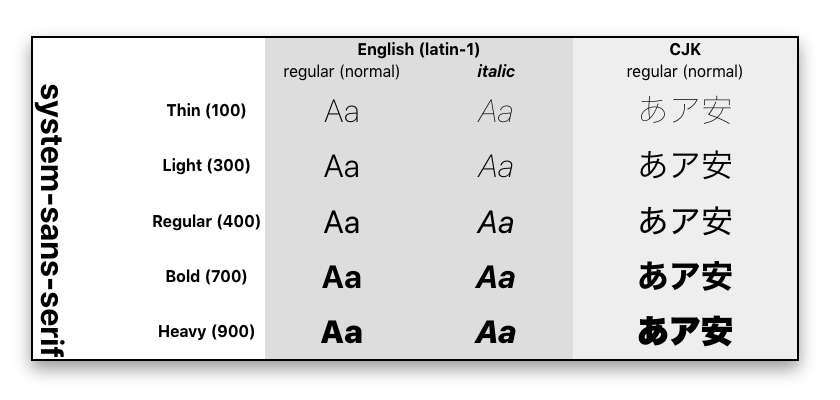
查看類型樣本和示例文本的文檔。
強大而首選的方法是在html文檔的<head>中引用system-sans-serif.css樣式表。然後將實用程序助手類添加到body class 。
 <!DOCTYPE html >
< html lang = en >
< head >
  < meta charset =" utf-8 " >
  < meta name =" viewport " content =" width=device-width,initial-scale=1 " >
  < link rel =" stylesheet " href =" system-sans-serif.css " >
</ head >
< body class =" system-sans-serif " >
  < p > this is now using the system font! </ p >
</ body >使用yarn或npm安裝軟件包。
yarn add system-font-i18n-css -D將包含路徑添加到您的ember-cli-build.js文件中。
 var app = new EmberApp ( defaults , {
    // …
    sassOptions : {
      includePaths : [
        // …
        'node_modules/system-font-i18n-css' ,
        // …
      ] ,
    } ,
    // …
} ) ;
將CSS導入您的Ember項目。
 @import " system-font-i18n-css " ;  /* This should be AT or near the top */
/* … other imports */將system-sans-serif CSS classname添加到要定型的元素中,例如:
 <!--- HTML head -->
< body class =" system-sans-serif " >
<!-- body --> 麻省理工學院
一個青心工機公司有限公司








