fontdue
1.0.0

Fontdue是一個簡單的no_std (不使用標準庫來便攜性),Pure Rust,TrueType( .ttf/.ttc )和Opentype( .otf )Font Rasterizer和Layout Tool。它努力與字體盡可能快地進行交互,目前具有字體rasterizer的最低端到端延遲。
fontdue設計為替代rusttype (鏈接), ab_glyph (鏈接), glyph_brush (link)的一部分和glyph_brush_layout (link)。這是一類無法應對塑形的字體庫。
我不太可能有時間與塑造庫集成。如果您需要更完整的字體引擎,則應查看出色的宇宙文本項目,這是一個非常完整的純銹文本庫。
該庫的非目標是免費分配,並具有快速的“零成本”初始負載。該庫確實進行了分配,並取決於alloc板條箱。字體已完全解析在創建上,相關信息以更方便的訪問格式存儲。與其他字體庫不同,字體結構沒有生命的依賴性,因為它分配了自己的空間。
現場演示。該演示是fontdue Rasterization的Web組裝構建構建到瀏覽器帆布。它提供了一個字符的並排化,並在fontdue和瀏覽器的Canvas Text API之間進行了柵格柵格化,並提供了相同的參數。
其他一些示例可以在./dev/examples下找到。
柵格化API在不久的將來不應看到重大變化。
 // Read the font data.
let font = include_bytes ! ( "../resources/Roboto-Regular.ttf" ) as & [ u8 ] ;
// Parse it into the font type.
let font = fontdue :: Font :: from_bytes ( font , fontdue :: FontSettings :: default ( ) ) . unwrap ( ) ;
// Rasterize and get the layout metrics for the letter 'g' at 17px.
let ( metrics , bitmap ) = font . rasterize ( 'g' , 17.0 ) ;佈局API不成熟,可能會看到破裂的變化。佈局fontdue提供的是幼稚的,僅設計與諸如glyph_brush之類的現有庫。
 // Read the font data.
let font = include_bytes ! ( "../resources/fonts/Roboto-Regular.ttf" ) as & [ u8 ] ;
// Parse it into the font type.
let roboto_regular = Font :: from_bytes ( font , fontdue :: FontSettings :: default ( ) ) . unwrap ( ) ;
// The list of fonts that will be used during layout.
let fonts = & [ roboto_regular ] ;
// Create a layout context. Laying out text needs some heap allocations; reusing this context
// reduces the need to reallocate space. We inform layout of which way the Y axis points here.
let mut layout = Layout :: new ( CoordinateSystem :: PositiveYUp ) ;
// By default, layout is initialized with the default layout settings. This call is redundant, but
// demonstrates setting the value with your custom settings.
layout . reset ( & LayoutSettings {
    .. LayoutSettings :: default ( )
} ) ;
// The text that will be laid out, its size, and the index of the font in the font list to use for
// that section of text.
layout . append ( fonts , & TextStyle :: new ( "Hello " , 35.0 , 0 ) ) ;
layout . append ( fonts , & TextStyle :: new ( "world!" , 40.0 , 0 ) ) ;
// Prints the layout for "Hello world!"
println ! ( "{:?}" , layout . glyphs ( ) ) ;

// If you wanted to attached metadata based on the TextStyle to the glyphs returned in the
// glyphs() function, you can use the TextStyle::with_metadata function. In this example, the
// Layout type is now parameterized with u8 (Layout<u8>). All styles need to share the same
// metadata type.
let mut layout = Layout :: new ( CoordinateSystem :: PositiveYUp ) ;
layout . append ( fonts , & TextStyle :: with_user_data ( "Hello " , 35.0 , 0 , 10u8 ) ) ;
layout . append ( fonts , & TextStyle :: with_user_data ( "world!" , 40.0 , 0 , 20u8 ) ) ;
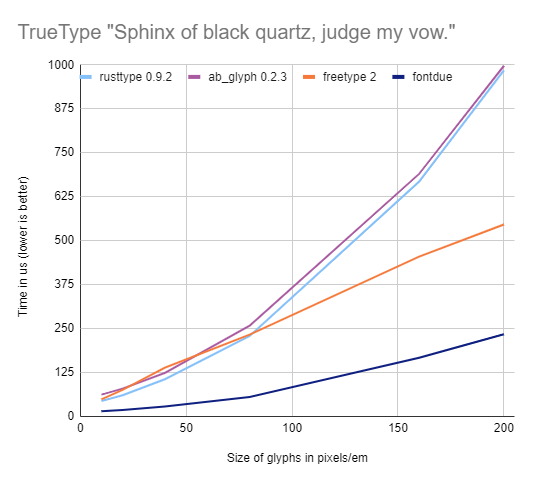
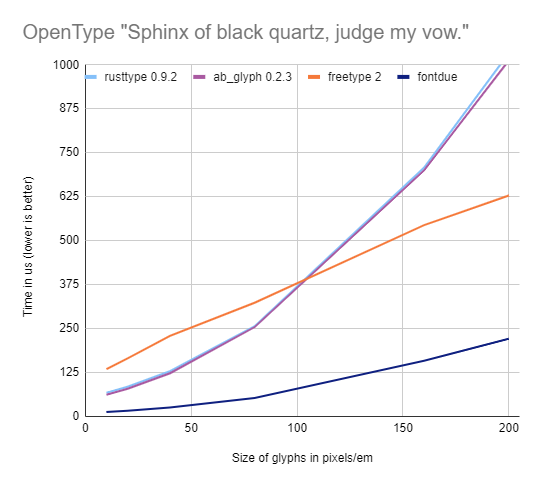
println ! ( "{:?}" , layout . glyphs ( ) ) ; 這些基準測量了生成字形指標和刻度圖所需的時間,該文本“黑色石英的獅身人面像,判斷我的誓言”。多種尺寸。圖表中的線越低越好。
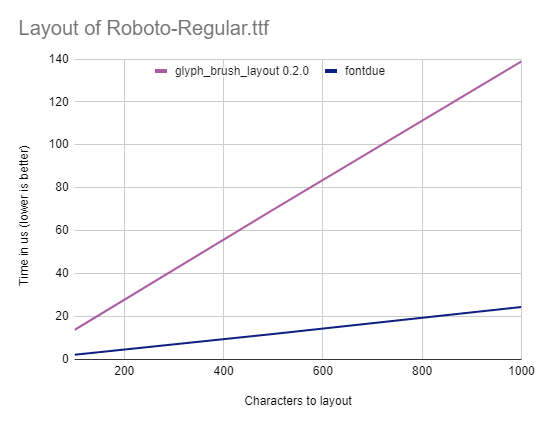
該基準測量了將示例文本的拉丁字符佈局所花費的時間,並包裝在單詞邊界上。
根據任何一個
可以選擇。
除非您另有明確說明,否則任何有意提交的捐款(如Apache-2.0許可證中定義的您的工作),應如上所述進行多許可,沒有任何其他條款或條件。
請與我一起發現您發現的新功能或怪癖。蟲子將優先考慮,但是我沒有我想在Fontdue上工作的時間那麼多,所以請耐心等待,這是一個個人項目。
字體取決於解析字體的ttf-parser (鏈接),該字體支持各種trueType和opentype功能。
Fontdue最初是一個模糊的font-rs (鏈接)生產叉,因為它使柵格化的外觀速度有多快,以及rusttype (link)Crate的簡單性使字體解析看起來。從那時起,我已經閱讀了許多字體規範和現代的柵格化技術,這些技術在此過程中從頭開始重寫fontdue為自己獨特的野獸。








