google autocomplete
vements

我之所以分享此組件,是因為我被複雜的示例所淹沒,以實現這一簡單的工作。因此,在解釋期間,我將盡我所能。
Google AutoCoctlete組件不過是官方Google Places API周圍的Vue.js包裝器。儘管使用Vue.js編寫的演示,但可以從任何JS框架中提取自動完成對象。
您將必須安裝Vue&Vuemit:
npm install vue -- save npm install vuemit -- saveVuemit庫用於管理Google組件與其父級之間的事件。
注意:如果您碰巧使用Vue 1.* ,則必須從VUE-1分支中拉出。
查看現場演示。
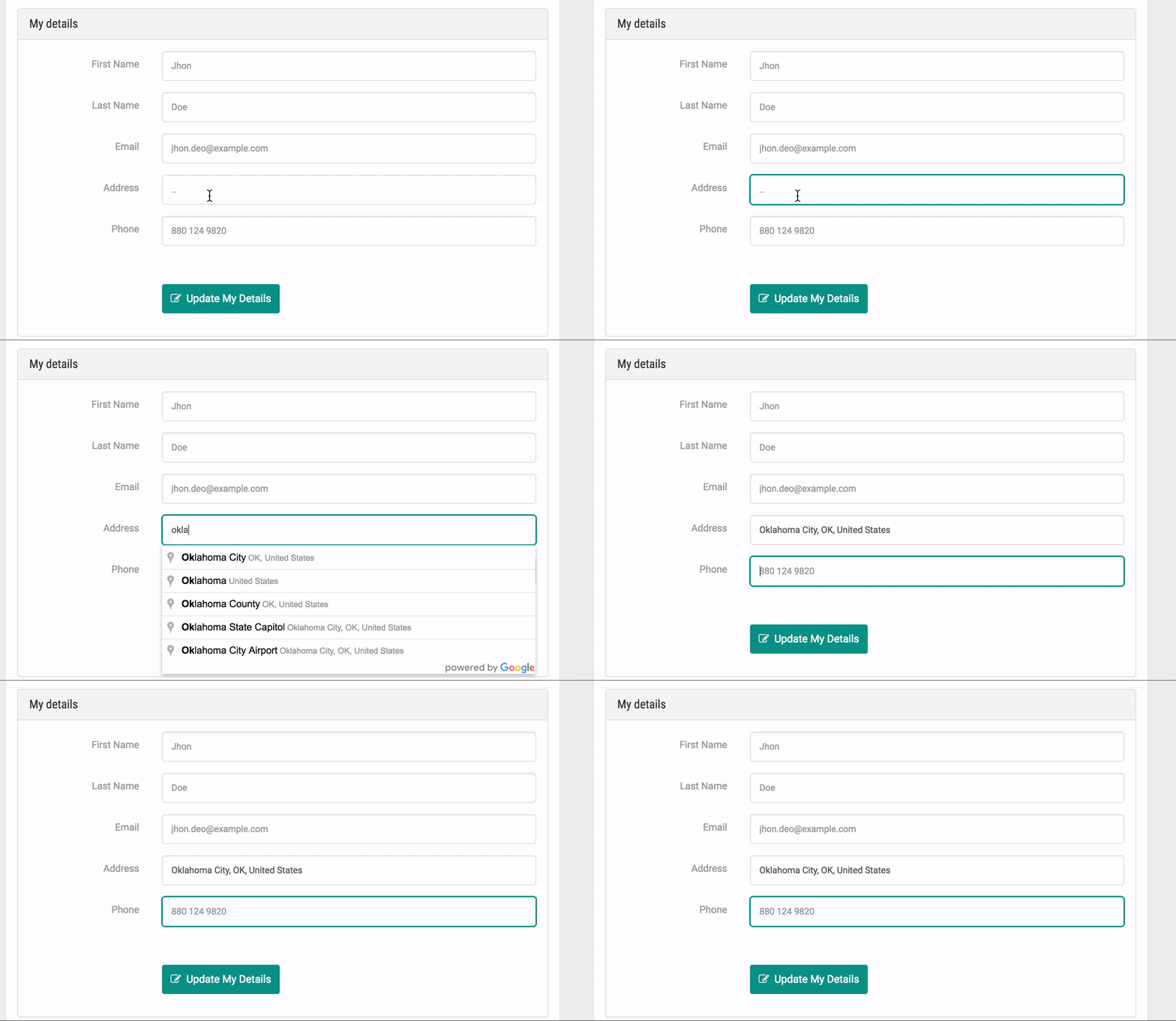
要安裝此軟件包,您只需要打開控制台,然後鍵入npm i google-autocomplete-vue --save 。 npm i -f google-autocomplete-vue --save安裝force中有任何問題
首先,您必須在Google API控制台上註冊以獲取API密鑰:https://console.developers.google.com一旦完成此操作,您將必須複製Google給出的API鍵並將其粘貼到JS文件輸入點中。例子:
Bootstrap文件:Bootstrap.js。您將必須在此文件中需要Vuemit才能使Events Handler設置Globaly。因此:例如
入口點文件:demo.js
注意:必須將重要的密鑰保存在.env文件中,因此請在將代碼推向GIT控制時注意這一點。
其次,您必須在應用程序輸入點中導入組件,因此您可以在需要時將其稱為全球。例子:
import GoogleAutocomplete from 'google-autocomplete-vue' ; Places驗證是一個Laravel庫,它將幫助您處理您的用戶地址。它的目的是確保用戶提交的地址通過第三方服務有效,為Google。
查看其存儲庫:位置驗證
首先,您必須創建一個入口點來編譯組件並生成捆綁文件。這裡有一個示例。
其次,您將必須創建您的VUE對像以控制組件:
 require ( './bootstrap' ) ;


new Vue ( {

    el : '#demo' ,


    data :
    {
        output : { } , address : { } , sent : false , response : { } , config : { }
    } ,


    mounted ( )
    {
        //Set an event listener for 'setAddress'.
        Vuemit . listen ( 'setAddress' , this . onAddressChanged ) ;
        Vuemit . listen ( 'addressWasCleared' , this . onAddressCleared ) ;
    } ,


    methods :
    {
        /**
         * Submit the data to be evaluated.
         *
         * @return {Void}
         */
        submit ( )
        {
            this . sent = true ;
            this . output = this . address ;
            this . address = { } ;
        } ,


        /**
         * Checks whether the output data is valid.
         *
         * @return {Bool}
         */
        isValid ( )
        {
            return Object . keys ( this . output ) . length > 0 ;
        } ,


        /**
         * Checks whether the output data is not valid.
         *
         * @return {Bool}
         */
        isNotValid ( )
        {
            return ! this . isValid ( ) ;
        } ,


        /**
         * The callback fired when the autocomplete address change event is fired.
         *
         * @param {Object}
         * @return {Void}
         */
        onAddressChanged ( payload )
        {
            if ( Object . keys ( paypload . place ) . length > 0 ) {
                this . address = payload . address ;
                this . response = payload . response ;
            }
        }

        /**
         * The callback fired when the autocomplete clear event is fired.
         *
         * @param {Object}
         * @return {Void}
         */
        onAddressCleared ( )
        {
            this . address = { } ;
            this . response = { } ;
        }
    }
} ) ;
請參閱此處的示例。
 require ( 'laravel-elixir-vue-2' ) ;
var elixir = require ( 'laravel-elixir' ) ;

elixir . config . sourcemaps = false ;
elixir . config . assetsPath = 'src' ;

elixir ( function ( mix )
{
    mix . webpack ( 'demo.js' , 'dist/demo.js' ) ;
} ) ;
在這裡查看示例
 < google-autocomplete
    class = " input "
    input_id = " txtAutocomplete "
    :config = " {type: ['geocode']} "
    placeholder = " type your address "
>
</ google-autocomplete > :config是傳遞給place api的自動完成構造函數的配置。請參閱文檔。配置對應於文檔中的options參數。
請參閱此處的示例。
另外,您可以通過“類”道具通過任何css class 。
請隨時訂購此軟件包,並通過提交拉動請求來增強功能來做出貢獻。
麻省理工學院許可證(麻省理工學院)。請參閱許可證文件以獲取更多信息。
為什麼不主演github倉庫?在Twitter上共享此存儲庫的鏈接?傳播!
別忘了在Twitter上關注我!
謝謝!
古斯塔沃·奧坎托(Gustavo Ocanto)。 [email protected]








