nvdiffrec
1.0.0

從圖像提取三角形3D模型,材料和照明的拓撲,材料和照明的聯合優化,材料和照明。
對於可區分的四面行曲,我們從NVIDIA的Kaolin:Pytorch圖書館進行了改編的代碼,用於加速3D深度學習研究。
2023-10-20 :我們添加了用slangpy編寫的Renderutils庫的版本,以利用語的Autodiff功能,而不是手工製作的前進和向後傳球的CUDA擴展功能。這實質上簡化了代碼,其運行時性能與以前相同。此版本可在此存儲庫的slang分支中找到。
2023-09-15 :我們增加了對FlexiCubes等側面技術的支持。請參閱Config configs/bob_flexi.json以獲取用法示例,並請參閱Flexicubes文檔以獲取詳細信息。
 @inproceedings{Munkberg_2022_CVPR,
    author    = {Munkberg, Jacob and Hasselgren, Jon and Shen, Tianchang and Gao, Jun and Chen, Wenzheng
                    and Evans, Alex and M"uller, Thomas and Fidler, Sanja},
    title     = "{Extracting Triangular 3D Models, Materials, and Lighting From Images}",
    booktitle = {Proceedings of the IEEE/CVF Conference on Computer Vision and Pattern Recognition (CVPR)},
    month     = {June},
    year      = {2022},
    pages     = {8280-8290}
}
版權所有©2022,NVIDIA Corporation。版權所有。
這項工作可根據NVIDIA源代碼許可提供。
有關業務查詢,請訪問我們的網站並提交表格:NVIDIA研究許可。
需要Python 3.6+,VS2019+,CUDA 11.3+和Pytorch 1.10+
用Python 3.9和Pytorch 1.10在Anaconda3中測試
安裝CUDA工具包(需要構建Pytorch擴展程序)。我們支持CUDA 11.3及以上。選擇與已安裝的CUDA工具包兼容Pytorch的適當版本。以下是CUDA 11.6的示例
 conda create -n dmodel python=3.9
activate dmodel
conda install pytorch torchvision torchaudio cudatoolkit=11.6 -c pytorch -c conda-forge
pip install ninja imageio PyOpenGL glfw xatlas gdown
pip install git+https://github.com/NVlabs/nvdiffrast/
pip install --global-option="--no-networks" git+https://github.com/NVlabs/tiny-cuda-nn#subdirectory=bindings/torch
imageio_download_bin freeimage
activate dmodel
我們的方法是為具有大量內存的高端NVIDIA GPU設計的。要在中端GPU上運行,請減少.json文件中的批處理大小參數。
簡單屬1重建示例:
python train.py --config configs/bob.json
可視化培訓進度(僅在Windows上支持):
python train.py --config configs/bob.json --display-interval 20
多GPU示例(僅Linux。實驗:使用單個GPU生成論文中的所有結果),使用Pytorch DDP生成
torchrun --nproc_per_node=4 train.py --config configs/bob.json
在下面,我們顯示起點和最終結果。右邊的引用。
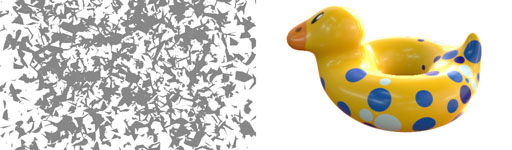

結果將存儲在out文件夾中。 Keenan Crane創建並釋放到了公共領域。
包括示例
spot.json提取點模型的3D模型。圖像觀測值的幾何形狀,材料和照明。spot_fixlight.json與上述相同,但假設已知的環境照明。spot_metal.json材料聯合學習和高頻環境照明的示例,以展示拆分效果。bob.json屬1屬模型的簡單示例。我們還包括配置( nerf_*.json , nerd_*.json )來複製論文的主要結果。我們依靠第三方數據集,這些數據集由其各自的作者提供。請注意,單個許可證適用於每個數據集。要自動下載和預處理所有數據集,請運行download_datasets.py腳本:
 activate dmodel
cd data
python download_datasets.py
下面遵循有關如何手動安裝數據集的更多信息和說明(如果自動腳本失敗)。
NERF合成數據集我們的視圖插值結果使用原始NERF紙中的合成數據集。要手動安裝它,請下載NERF合成數據集存檔,然後將其解壓縮到nvdiffrec/data文件夾中。這是運行任何nerf_*.json配置所必需的。
書呆子數據集我們使用的是書呆子紙中的數據集,該數據集具有現實世界的攝影測量法和不准確(手動註釋)分割掩碼。使用git克隆書呆子數據集,然後使用script scale_images.py將它們重新列為512 x 512像素分辨率。這是運行任何nerd_*.json配置所必需的。
 activate dmodel
cd nvdiffrec/data/nerd
git clone https://github.com/vork/ethiopianHead.git
git clone https://github.com/vork/moldGoldCape.git
python scale_images.py
 cd docker
./make_image.sh nvdiffrec:v1
啟動一個交互式Docker容器: docker run --gpus device=0 -it --rm -v /raid:/raid -it nvdiffrec:v1 bash
獨立的Docker: docker run --gpus device=1 -d -v /raid:/raid -w=[path to the code] nvdiffrec:v1 python train.py --config configs/bob.json








