mogwai
v0.6.8 Copy on write element names

m , bvious , g raphical w eb a pplication i nterface
mogwai是用於創建GUI應用程序的視圖庫。它用Rust編寫,並在您的瀏覽器中運行,並具有足夠的功能服務器端來進行渲染。它是反應,骨幹,灰燼,榆樹,純淨等的替代方法。
mogwai背後的主要概念是
水槽和流而不是回調
查看諸如Click,MouseOver等的事件是通過流發送的,而不是調用回調。可以映射,過濾和折疊流。
小部件的視圖很愚蠢
視圖只是從流中接收消息後突變UI樹的結構。視圖是使用普通的Rust功能或RSX宏來構造和嵌套的。
窗口小部件邏輯是一個或多個異步任務,可以循環通過事件消息
小部件使用從視圖接收事件的異步任務循環,並向視圖發送更新。
這是一個按鈕的示例,該按鈕計算單擊它的次數:
 use mogwai_dom :: prelude :: * ;

# [ derive ( Default ) ]
struct Button {
    clicks : usize ,
    click : Output < ( ) > ,
    text : Input < String > ,
}

impl Button {
    /// Convert into a `ViewBuilder`
    fn builder ( mut self ) -> ViewBuilder {
        rsx ! (
            button ( on : click= self . click . sink ( ) . contra_map ( |_ : JsDomEvent | ( ) ) ) {
                // Using braces we can embed rust values in our UI tree.
                // Here we're creating a text node that starts with the
                // string "Clicked 0 times" which updates every time a
                // message is received on the stream.
                { ( "Clicked 0 times" , self . text . stream ( ) . unwrap ( ) ) }
            }
        ) . with_task ( async move {
            while let Some ( ( ) ) = self . click . get ( ) . await {
                self . clicks += 1 ;
                self . text . set ( if self . clicks == 1 {
                    "Clicked 1 time" . to_string ( )
                } else {
                    format ! ( "Clicked {} times" , self . clicks )
                } ) . await . unwrap ( ) ;
            }
        } )
    }
}

let btn = Button :: default ( ) ;
// Get a sink to manually send events.
let mut click_sink = btn . click . sink ( ) ;
// Build the view to render in the browser
let view = Dom :: try_from ( btn . builder ( ) ) . unwrap ( ) ;
// Attach it to the browser's DOM tree
view . run ( ) . unwrap ( ) ;

// Spawn asyncronous updates
wasm_bindgen_futures :: spawn_local ( async move {
    // Queue some messages for the view as if the button had been clicked:
    click_sink . send ( ( ) ) . await . unwrap ( ) ;
    click_sink . send ( ( ) ) . await . unwrap ( ) ;
    // view's html is now "<button>Clicked 2 times</button>"
} ) ; 如果您有興趣了解更多信息 - 請閱讀介紹和文檔。
ViewBuilder允許在多個平台(Web,iOS,Android,Desktop等)上運行mogwai使用流,水槽,聲明視圖構建器和異步邏輯來定義組件以及它們如何隨時間變化。
視圖突變是顯式的,並且是由於接收消息的視圖而發生的,因此vdom擴散沒有性能開銷。
如果您喜歡具有大量地圖和折疊的功能性編程風格 - 或者您想去vroom!那也許mogwai適合您:)
請記住, mogwai仍在Alpha中,API正在積極改變 - PR,問題和問題受到歡迎。截至0.6發行版,我們期望API相對向後兼容。
mogwai是一個生鏽的第一庫。不需要您有npm或node 。在不編寫任何JavaScript的情況下啟動和運行您的項目就足夠容易了。
mogwai很活潑!這是一些非常手動和粗略的todomvc指標:
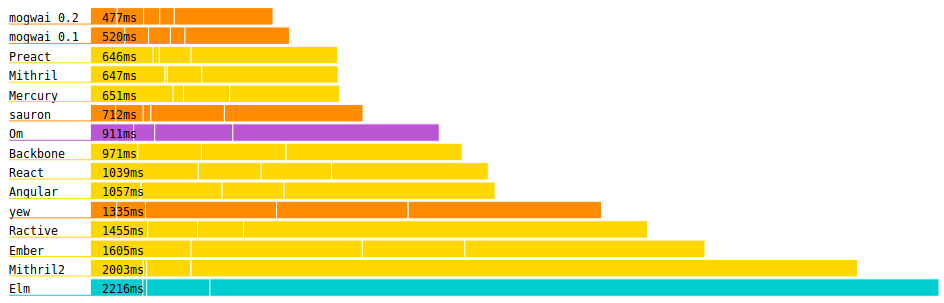
首先,您需要Rust Toolchain的新版本。為此,您可以訪問https://rustup.rs/並遵循安裝說明。
然後,您需要WASM-PACK。
為了啟動一個新的Mogwai項目,我們將使用出色的cargo-generate ,可以使用cargo install cargo-generate 。
然後運行
cargo generate --git https://github.com/schell/mogwai-template.git並給命令行一個項目名稱。然後cd進入您閃閃發光的新項目,
wasm-pack build --target web然後,如果您還沒有它, cargo install basic-http-server或使用您喜歡的替代方案為您的應用提供服務:
basic-http-server -a 127.0.0.1:8888快樂黑客! ☕☕
?使用Mogwai烹飪是針對各種UI問題的一系列示例解決方案。它的目的是成為一個很好的參考文檔,但不是分步教程。
在支持頻道中閒逛並談論mogwai :
示例可以在示例文件夾中找到。
構建示例使用:
wasm-pack build --target web examples/{the example}其他外部示例包括:
請考慮贊助此圖書館的開發!







