fridare
v3.1.7

English | 中文

Fridare 是一個用於iOS frida 插件、Android,linux,Windows 等平台frida-server 的自動化魔改工具。它允許用戶更改名稱和端口,以增強安全性和靈活性。免除了很多越獄檢測frida的情況。
Windows 下使用|Android 文檔|iOS 文檔|frida-tools 文檔|安裝指北|CHANGELOG
歡迎大家入QQ群討論:QQ 555354813 ,如本項目對你有所幫助,記得給作者加星鼓勵哦!
歡迎使用新的一鍵安裝功能快速開始使用Fridare!
curl -s https://raw.githubusercontent.com/suifei/fridare/main/fridare.sh | bash -s installpatch-frida.cmd腳本,用於在Windows 環境下修改frida-serverpatch-frida-tools.cmd腳本,用於在Windows 環境下修改frida-toolspatch-tools命令,用於修補frida-tools 模塊render_markdown函數,用於在終端中渲染簡單的Markdown 格式generate_random_name函數,用於生成隨機的Frida 魔改名move_file函數,用於處理文件移動時的"are identical" 錯誤list_frida_versions函數,現在能夠渲染Markdown 格式的版本說明build_frida函數,支持使用本地deb 文件進行構建patch_frida_tools和restore_frida_tools函數的功能和錯誤處理modify_frida_tools函數,提高修改frida-tools 的可靠性download_frida_module函數,增加對特定操作系統和架構的支持show_main_usage和其他使用說明函數,以反映新增的功能parse_arguments函數,支持新增的patch-tools命令FRIDA_NAME的支持macOS 、 iOS 、 Android 、 Linux和Windowsupgrade命令:用於自動更新Fridare 腳本upgrade命令,用於自動更新Fridare 腳本patch命令,用於修補指定的Frida 模塊安卓frida-server ./fridare.sh p -m frida-server -latest -os android -arch arm64 -o ./patchedpatch命令的幫助信息build 、 download等命令的用法說明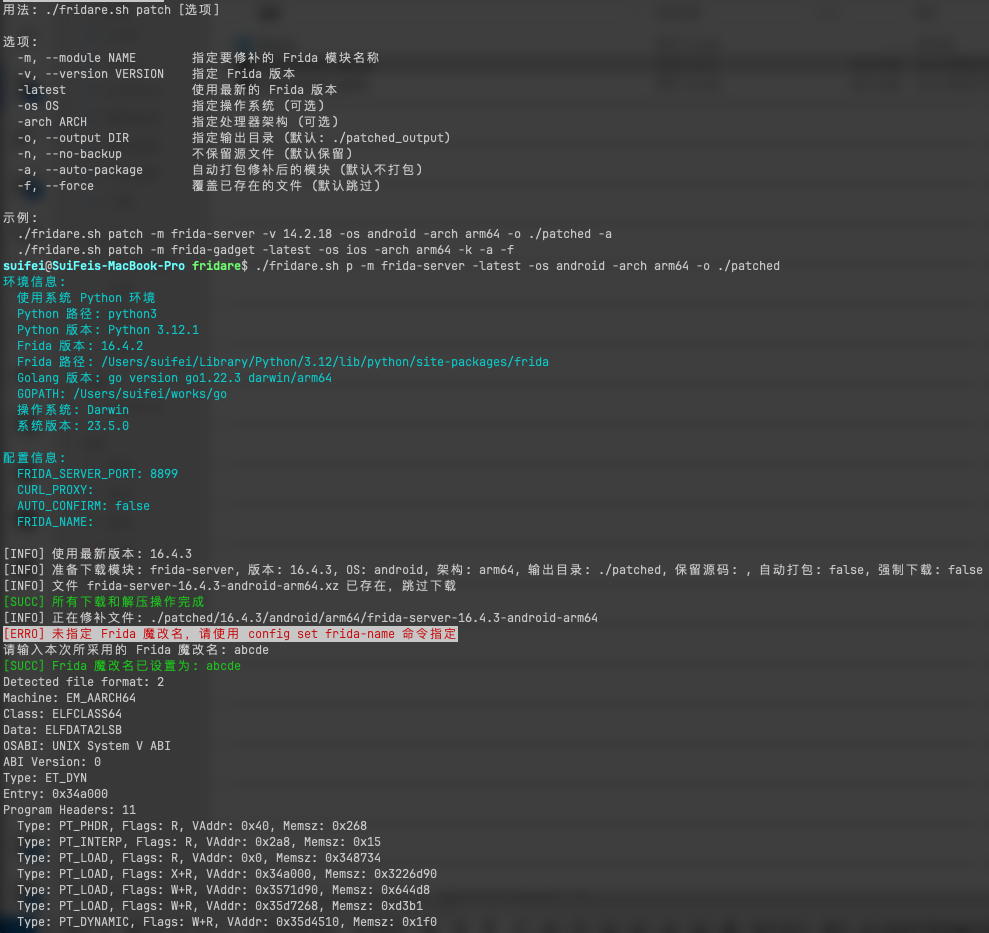
fridare.sh腳本,整合所有功能,提供更完整的命令行界面build , ls , download , lm , setup , config , 和help命令frida:rpc特徵魔改core.py文件進行魔改,對_frida.abi3.so文件進行魔改autoinstall.sh腳本,實現Frida 插件的自動部署。Makefile ,簡化項目的構建和部署流程。配置issh 的ssh 免密登陸
 # 生成 keygen 密钥,如果已生成可以跳过
ssh-keygen -t rsa -b 4096 -C " <EMAIL> "
# 配置手机IP,如果USB连接可以不配置
issh ip set < iPhone-IP >
# 拷贝公钥到手机 /var/root ,需要 root 密码 alpine
issh scp ~ /.ssh/id_rsa.pub
# 远程服务器添加公钥到 authorized_keys 文件
issh run " mkdir -p ~/.ssh && cat /var/root/id_rsa.pub >> ~/.ssh/authorized_keys && chmod 600 ~/.ssh/authorized_keys && chmod 700 ~/.ssh " fridare.sh - Frida 魔改脚本
│
├── 主要功能
│ ├── 构建魔改版 Frida (build)
│ │ ├── 支持指定版本或最新版本
│ │ ├── 自动生成随机5字符名称
│ │ ├── 自定义端口设置
│ │ └── 支持 arm 和 arm64 架构
│ ├── 列出可用 Frida 版本 (ls, list)
│ │ └── 从 GitHub API 获取版本信息
│ ├── 下载特定版本 Frida (download)
│ │ ├── 支持下载单个或所有模块
│ │ └── 可选的自动解压功能
│ ├── 列出可用 Frida 模块 (lm, list-modules)
│ ├── 检查并安装系统依赖 (setup)
│ │ ├── 自动检测缺失依赖
│ │ └── 使用包管理器安装依赖
│ └── 配置选项设置 (config)
│ ├── 设置 HTTP 代理
│ ├── 设置 Frida 服务器端口
│ └── 设置 Frida 魔改名称
│
├── 脚本结构
│ ├── 初始化配置 (initialize_config)
│ │ └── 读取和创建配置文件
│ ├── 参数解析 (parse_arguments)
│ │ └── 支持多种命令行选项
│ ├── 命令处理
│ │ ├── build: 构建魔改版 Frida
│ │ ├── patch: 修补指定的 Frida 模块
│ │ ├── setup: 设置环境
│ │ ├── config: 管理配置
│ │ ├── list: 列出版本
│ │ ├── download: 下载模块
│ │ └── list-modules: 列出模块
│ └── 主函数 (main)
│ └── 整合所有功能的入口点
│
├── 构建过程 (build_frida)
│ ├── 版本检查
│ │ └── 支持最新版本自动检测
│ ├── 环境准备
│ │ ├── 检查 Python 环境 (包括 Conda)
│ │ └── 检查 Golang 环境
│ ├── 下载 Frida (download_frida)
│ ├── 解包 deb 文件
│ ├── 修改文件
│ │ ├── 修改启动守护程序 (modify_launch_daemon)
│ │ │ └── 更新 plist 文件
│ │ ├── 修改 Debian 文件 (modify_debian_files)
│ │ │ ├── 更新 control 文件
│ │ │ ├── 更新 extrainst_ 文件
│ │ │ └── 更新 prerm 文件
│ │ └── 修改二进制文件 (modify_binary)
│ │ ├── 修改 frida-server
│ │ ├── 修改 frida-agent.dylib
│ │ └── 使用 hexreplace 工具
│ ├── 重新打包 deb 文件 (repackage_deb)
│ └── 修改 frida-tools (modify_frida_tools)
│ ├── 修改 Python 库文件
│ └── 更新 core.py 中的字符串
│
├── 辅助功能
│ ├── 日志输出 (log_info, log_success, log_warning, log_error)
│ │ └── 支持彩色输出
│ ├── 用户确认 (confirm_execution)
│ │ └── 可选的自动确认模式
│ ├── 依赖检查 (check_dependencies)
│ ├── 依赖安装 (install_dependencies)
│ ├── 配置管理 (set_config, unset_config, list_config)
│ └── Frida 版本和模块列表 (list_frida_versions, list_frida_modules)
│
├── 下载功能 (download_frida_module)
│ ├── 版本选择 (最新版或指定版本)
│ ├── 模块选择 (单个模块或全部模块)
│ ├── 下载过程
│ │ └── 支持 HTTP 代理
│ └── 解压处理
│ └── 可选的自动解压功能
│
└── 安全和权限
├── sudo 权限保持 (sudo_keep_alive)
└── 清理过程 (cleanup)git clone https://github.com/suifei/fridare.git
cd fridare./fridare.sh setup此命令將檢查並安裝所需的依賴項。
./fridare.sh help Fridare 提供了多個命令來滿足不同的需求:
build : 重新打包Fridals或list : 列出可用的Frida 版本download : 下載特定版本的Fridalm或list-modules : 列出可用的Frida 模塊setup : 檢查並安裝系統依賴config : 設置配置選項help : 顯示幫助信息./fridare.sh build -v 16.0.19 -p 8899 -y這個命令會構建版本16.0.19 的Frida,設置端口為8899,並自動確認所有提示。
./fridare.sh ls./fridare.sh download -v 16.0.19 -m frida-server ./output這個命令會下載版本16.0.19 的frida-server 模塊到./output 目錄。
./fridare.sh download -latest -all ./output./fridare.sh lm./fridare.sh setup這個命令會檢查並安裝所需的系統依賴。
./fridare.sh config set proxy http://127.0.0.1:7890
./fridare.sh config set port 9999
./fridare.sh config set frida-name abcde
這些命令分別設置代理、端口和Frida 魔改名。
./fridare.sh config ls./fridare.sh help build這個命令會顯示build 命令的詳細用法。
./fridare.sh build -latest -p 9999 -y這個命令會使用最新版本的Frida 進行構建,設置端口為9999,並自動確認所有提示。
./fridare.sh download -latest -m frida-gadget --no-extract ./output這個命令會下載最新版本的frida-gadget 模塊到./output 目錄,但不會自動解壓。
./fridare.sh config frida-tools這個命令會安裝或更新frida-tools。
scp ./dist/frida_16.3.3_iphoneos-arm_tcp.deb root@ < iPhone-IP > :/var/root/ssh root@ < iPhone-IP >
dpkg -i /var/root/frida_16.3.3_iphoneos-arm_tcp.deb這些示例涵蓋了腳本的主要功能和常見使用場景。可幫助您快速上手使用。
為確保兼容性,請安裝與修改後的服務器版本相匹配的Frida 工具:
pip install frida-tools==12.4.3對於Node.js 用戶:
npm install [email protected]如果您的設備通過USB 訪問,您可以使用以下命令連接到本地frida-server:
frida -U -f < target-process > 如果不使用usb數據線時,可以使用以下命令連接到遠程frida-server :
frida -H < iPhone-IP > :8899 -U
frida-trace -H < iPhone-IP > :8899 ...
frida-ps -H < iPhone-IP > :8899
frida-inject -H < iPhone-IP > :8899 ...Fridare 項目的核心原理:
Fridare 的核心思想是修改frida-server ,使其更難被檢測。這主要通過以下幾個方面實現:
重命名服務器文件: 將frida-server重命名為隨機生成的名稱(如abcde ),這樣可以避免簡單的名稱檢測。
修改啟動配置: 更新LaunchDaemons plist 文件,使其使用新的服務器名稱和自定義端口。這樣可以改變服務器的啟動方式和監聽端口。
二進製文件修改: 使用二進制替換技術,將服務器二進製文件中的"frida" 相關字符串替換為自定義字符串。這可以避免通過掃描二進製文件來檢測Frida。
項目使用dpkg-deb 工具解包和重新打包deb 文件。這允許我們修改包的內容,包括:
fridare.sh 腳本自動化了整個過程:
腳本同時處理arm 和arm64 架構的包,確保在不同的iOS 設備上的兼容性。
通過更改服務器名稱、端口和內部字符串,這個項目使得通過常規方法檢測Frida 的存在變得更加困難。這對於在某些可能會主動檢測和阻止Frida 的應用中使用Frida 非常有用。
通過允許用戶指定Frida 版本和端口,該工具提供了很大的靈活性,可以適應不同的需求和環境。
使用hexreplace 來執行二進制替換,在不重新編譯Frida 的情況下修改二進製文件。這種方法雖然有效,但也有局限性,因為它只能替換固定長度的字符串。
歡迎提交問題和拉取請求。對於重大更改,請先開issue討論您想要更改的內容。
MIT LICENSE
Fridare is a modification tool designed for customizing Frida-server, specifically for jailbroken iOS devices. It allows users to change names and ports, enhancing security and flexibility. It eliminates many jailbreak detection scenarios for Frida. CHANGELOG
Here's the English version of the changelog:
patch-tools command for modifying the frida-tools modulerender_markdown function to display simple Markdown formatting in the terminalgenerate_random_name function to create random Frida modification namesmove_file function to handle "are identical" errors during file moveslist_frida_versions function to render Markdown-formatted version descriptionsbuild_frida function to support building from local deb filespatch_frida_tools and restore_frida_tools functionsmodify_frida_tools function for more reliable frida-tools modificationsdownload_frida_module function with support for specific OS and architectureshow_main_usage and other usage instruction functions to reflect new featuresparse_arguments function to accommodate the new patch-tools commandFRIDA_NAMEfridare.sh script, integrating all functionalities and providing a more complete command-line interfacebuild , ls , download , lm , setup , config , and help commandsfrida:rpc feature modificationcore.py file, and modifies the _frida.abi3.so fileautoinstall.sh script for automatic deployment of Frida plugins.Makefile to simplify the project build and deployment process.Configure password-free SSH login for issh
 # Generate keygen, skip if already generated
ssh-keygen -t rsa -b 4096 -C " <EMAIL> "
# Configure iPhone IP, can be skipped if using USB connection
issh ip set < iPhone-IP >
# Copy public key to /var/root on the phone, requires root password alpine
issh scp ~ /.ssh/id_rsa.pub
# Add public key to authorized_keys file on remote server
issh run " mkdir -p ~/.ssh && cat /var/root/id_rsa.pub >> ~/.ssh/authorized_keys && chmod 600 ~/.ssh/authorized_keys && chmod 700 ~/.ssh " fridare.sh - Frida Modification Script
│
├── Main Functions
│ ├── Build Modified Frida (build)
│ │ ├── Support for specified version or latest version
│ │ ├── Auto-generate random 5-character name
│ │ ├── Custom port setting
│ │ └── Support for arm and arm64 architectures
│ ├── List Available Frida Versions (ls, list)
│ │ └── Fetch version info from GitHub API
│ ├── Download Specific Frida Version (download)
│ │ ├── Support for downloading single or all modules
│ │ └── Optional auto-extraction feature
│ ├── List Available Frida Modules (lm, list-modules)
│ ├── Check and Install System Dependencies (setup)
│ │ ├── Auto-detect missing dependencies
│ │ └── Install dependencies using package manager
│ └── Configure Options (config)
│ ├── Set HTTP proxy
│ ├── Set Frida server port
│ └── Set Frida modification name
│
├── Script Structure
│ ├── Initialize Configuration (initialize_config)
│ │ └── Read and create configuration file
│ ├── Parse Arguments (parse_arguments)
│ │ └── Support various command-line options
│ ├── Command Processing
│ │ ├── build: Build modified Frida
│ │ ├── setup: Set up environment
│ │ ├── config: Manage configuration
│ │ ├── list: List versions
│ │ ├── download: Download modules
│ │ └── list-modules: List modules
│ └── Main Function (main)
│ └── Entry point integrating all functionalities
│
├── Build Process (build_frida)
│ ├── Version Check
│ │ └── Support for latest version auto-detection
│ ├── Environment Preparation
│ │ ├── Check Python environment (including Conda)
│ │ └── Check Golang environment
│ ├── Download Frida (download_frida)
│ ├── Unpack deb File
│ ├── Modify Files
│ │ ├── Modify Launch Daemon (modify_launch_daemon)
│ │ │ └── Update plist file
│ │ ├── Modify Debian Files (modify_debian_files)
│ │ │ ├── Update control file
│ │ │ ├── Update extrainst_ file
│ │ │ └── Update prerm file
│ │ └── Modify Binary Files (modify_binary)
│ │ ├── Modify frida-server
│ │ ├── Modify frida-agent.dylib
│ │ └── Use hexreplace tool
│ ├── Repackage deb File (repackage_deb)
│ └── Modify frida-tools (modify_frida_tools)
│ ├── Modify Python library files
│ └── Update strings in core.py
│
├── Auxiliary Functions
│ ├── Log Output (log_info, log_success, log_warning, log_error)
│ │ └── Support for colored output
│ ├── User Confirmation (confirm_execution)
│ │ └── Optional auto-confirm mode
│ ├── Dependency Check (check_dependencies)
│ ├── Dependency Installation (install_dependencies)
│ ├── Configuration Management (set_config, unset_config, list_config)
│ └── Frida Version and Module Lists (list_frida_versions, list_frida_modules)
│
├── Download Functionality (download_frida_module)
│ ├── Version Selection (latest or specified version)
│ ├── Module Selection (single module or all modules)
│ ├── Download Process
│ │ └── Support for HTTP proxy
│ └── Extraction Processing
│ └── Optional auto-extraction feature
│
└── Security and Permissions
├── Maintain sudo Privileges (sudo_keep_alive)
└── Cleanup Process (cleanup)git clone https://github.com/suifei/fridare.git
cd fridare./fridare.sh setupThis command will check and install the required dependencies.
./fridare.sh help Fridare provides multiple commands to meet different needs:
build : Repackage Fridals or list : List available Frida versionsdownload : Download a specific version of Fridalm or list-modules : List available Frida modulessetup : Check and install system dependenciesconfig : Set configuration optionshelp : Display help information./fridare.sh build -v 16.0.19 -p 8899 -yThis command will build Frida version 16.0.19, set the port to 8899, and automatically confirm all prompts.
./fridare.sh ls./fridare.sh download -v 16.0.19 -m frida-server ./outputThis command will download the frida-server module of version 16.0.19 to the ./output directory.
./fridare.sh download -latest -all ./output./fridare.sh lm./fridare.sh setupThis command will check and install the required system dependencies.
./fridare.sh config set proxy http://127.0.0.1:7890
./fridare.sh config set port 9999
./fridare.sh config set frida-name abcde
These commands set the proxy, port, and Frida modification name respectively.
./fridare.sh config ls./fridare.sh help buildThis command will display detailed usage for the build command.
./fridare.sh build -latest -p 9999 -yThis command will build using the latest version of Frida, set the port to 9999, and automatically confirm all prompts.
./fridare.sh download -latest -m frida-gadget --no-extract ./outputThis command will download the latest version of the frida-gadget module to the ./output directory but won't automatically extract it.
./fridare.sh config frida-toolsThis command will install or update frida-tools.
scp ./dist/frida_16.3.3_iphoneos-arm_tcp.deb root@ < iPhone-IP > :/var/root/ssh root@ < iPhone-IP >
dpkg -i /var/root/frida_16.3.3_iphoneos-arm_tcp.debThese examples cover the main functionalities and common usage scenarios of the script. They can help you quickly get started with using it.
To ensure compatibility, please install Frida tools that match the modified server version:
pip install frida-tools==12.4.3For Node.js users:
npm install [email protected]If your device is accessed via USB, you can use the following command to connect to the local frida-server:
frida -U -f < target-process > If not using a USB data cable, you can use the following commands to connect to the remote frida-server:
frida -H < iPhone-IP > :8899 -U
frida-trace -H < iPhone-IP > :8899 ...
frida-ps -H < iPhone-IP > :8899
frida-inject -H < iPhone-IP > :8899 ...Core principles of the Fridare project:
The core idea of Fridare is to modify frida-server to make it harder to detect. This is mainly achieved through the following aspects:
Renaming the server file: Rename frida-server to a randomly generated name (eg, abcde ), which avoids simple name detection.
Modifying startup configuration: Update the LaunchDaemons plist file to use the new server name and custom port. This changes the way the server starts and the port it listens on.
Binary file modification: Use binary replacement techniques to replace "frida" related strings in the server binary file with custom strings. This can avoid detection of Frida by scanning the binary file.
The project uses the dpkg-deb tool to unpack and repack deb files. This allows us to modify the contents of the package, including:
The fridare.sh script automates the entire process:
The script handles packages for both arm and arm64 architectures, ensuring compatibility on different iOS devices.
By changing the server name, port, and internal strings, this project makes it more difficult to detect the presence of Frida through conventional methods. This is particularly useful for using Frida in applications that might actively detect and block Frida.
By allowing users to specify the Frida version and port, the tool provides great flexibility to adapt to different needs and environments.
Using hexreplace to perform binary replacements, modifying binary files without recompiling Frida. While effective, this method has limitations as it can only replace fixed-length strings.
Issues and pull requests are welcome. For major changes, please open an issue first to discuss what you would like to change.
MIT LICENSE







