qodana action
v2024.3.4

Qodana是一種代碼質量監視工具,可以識別並建議修復錯誤,安全漏洞,重複和瑕疵。
目錄
Qodana掃描github操作使您可以在github存儲庫上運行qodana。
要配置Qodana掃描,請保存.github/workflows/code_quality.yml文件包含工作流配置:
 name : Qodana
on :
  workflow_dispatch :
  pull_request :
  push :
    branches :
      - main
      - ' releases/* '

jobs :
  qodana :
    runs-on : ubuntu-latest
    permissions :
      contents : write
      pull-requests : write
      checks : write
    steps :
      - uses : actions/checkout@v3
        with :
          ref : ${{ github.event.pull_request.head.sha }}  # to check out the actual pull request commit, not the merge commit
          fetch-depth : 0  # a full history is required for pull request analysis
      - name : ' Qodana Scan '
        uses : JetBrains/[email protected]
        env :
QODANA_TOKEN : ${{ secrets.QODANA_TOKEN }} # read the steps about it below在構建配置中設置QODANA_TOKEN環境變量:
QODANA_TOKEN加密的秘密,並將項目令牌保存為其值。QODANA_TOKEN變量添加到Qodana Scan步驟的env部分:使用此工作流程,Qodana將在主分支,釋放分支和拉動請求上運行。
注意:如果Qodana在拉請請求模式下工作(報告僅在該拉的請求中出現的問題),則需要fetch-depth: 0是必需的。
我們建議您有一個單獨的Qodana工作流量文件,因為不同的作業並行運行
要使Qodana自動解決發現的問題並將更改推向您的存儲庫,您需要
qodana.yaml文件中指定fixesStrategyargs屬性使用快速固定策略: --apply-fixes或--cleanuppush-fixes屬性設置為pull-request :創建一個具有修復程序的新分支,並為原始分支創建拉動請求branch :將固定固定到原始分支。另外,將pr-mode設置為false :當前,應用程序不支持此模式。contents: write , pull-requests: write , checks: write )pull-request值進行push-fixes屬性:允許GitHub操作創建和批准拉動請求示例配置:
- name : Qodana Scan
  uses : JetBrains/[email protected]
  with :
    pr-mode : false
    args : --apply-fixes
    push-fixes : pull-request
  env :
GITHUB_TOKEN : ${{ secrets.GITHUB_TOKEN }}注意Qodana不僅可以自動修改代碼,還可以自動修改
.idea中的配置:如果您不想推動這些更改,請將.idea添加到.gitignore文件中。
如果您想在同一份工作中進行其他git操作,可以禁用push-fixes並手動執行想要的操作
 name : Qodana
on :
  workflow_dispatch :
  pull_request :
  push :
    branches :
      - master
      - ' releases/* '

jobs :
  qodana :
    runs-on : ubuntu-latest
    permissions :
      contents : write
      pull-requests : write
      checks : write
    steps :
      - uses : actions/checkout@v3
        with :
          ref : ${{ github.event.pull_request.head.sha }}
          fetch-depth : 0
      - name : ' Qodana Scan '
        uses : JetBrains/[email protected]
        with :
          args : --cleanup
      - run : |
          git config user.name github-actions
          git config user.email [email protected]
          git checkout -b quick-fixes-$GITHUB_RUN_ID
          git add -- . ':!.idea'
          git commit -m "I fixed some issues"
          git push origin quick-fixes-$GITHUB_RUN_ID
          gh pr create --repo $GITHUB_REPOSITORY --base $GITHUB_REF_NAME --head quick-fixes-$GITHUB_RUN_ID --title "Pull requests" --body "I fixed some issues"
        env:
GH_TOKEN: ${{ github.token }}您可以使用Qodana為您的項目設置GitHub代碼掃描。為此,請將這些行添加到code_quality.yml工作流文件,直到Qodana掃描的基本配置下方:
      - uses : github/codeql-action/upload-sarif@v2
        with :
sarif_file : ${{ runner.temp }}/qodana/results/qodana.sarif.json該示例調用codeql-action用於將SARIF格式的Qodana報告上傳到GitHub,並使用sarif_file密鑰指定報告文件。
GitHub代碼掃描不會將檢查結果導出到第三方工具,這意味著您不能將這些數據用於Qodana的進一步處理。在這種情況下,您必須在向GitHub代碼掃描提交檢查結果之前,在Qodana方面設置基線和質量門處理,有關詳細信息,請參見質量門和基線部分。
如果Qodana質量門失敗,您可以強制執行GitHub阻止拉請求的合併。為此,如下所述,創建一個分支保護規則:
main分支的pull_request事件上運行。 on :
pull_request :
branches :
- main您可以在此處指定您的分支,而不是main 。
fail-threshold選項設置問題數(整數)。main添加到分支名稱模式。Qodana狀態檢查,然後檢查。您可以將質量門和基線功能結合起來,以管理您的技術債務,僅報告新問題,並包含太多問題的阻力請求。
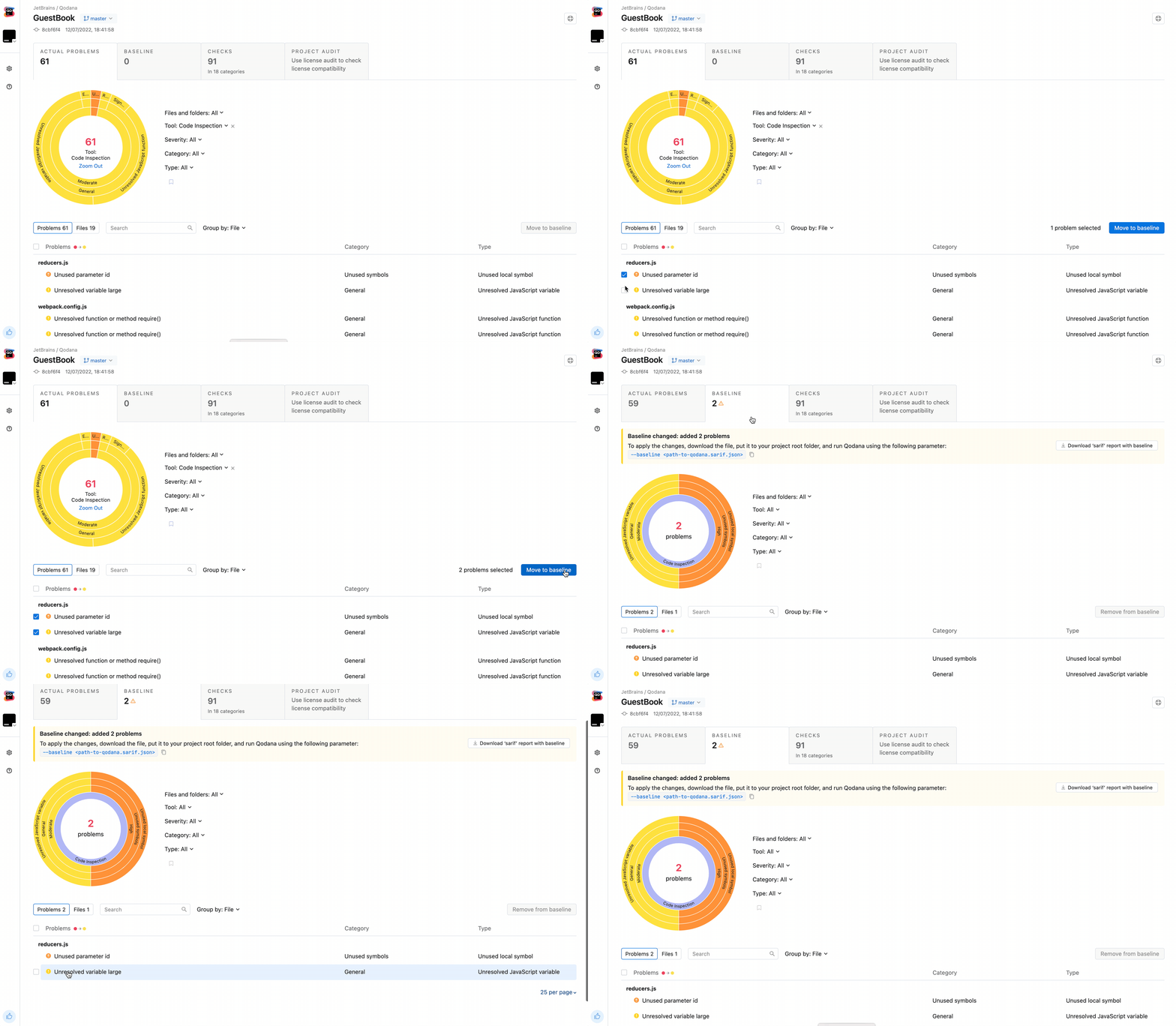
請按照以下步驟為您的項目建立基準:
 cd project
qodana scan --show-report在http://localhost:8080/ ,在基準中添加檢測到的問題,然後下載qodana.sarif.json文件,打開您的報告。
將qodana.sarif.json文件上傳到GitHub上的項目根文件夾。
append --baseline,qodana.sarif.json參數to qodana掃描操作配置args參數code_quality.yml文件:
- name : Qodana Scan
  uses : JetBrains/qodana-action@main
  with :
    args : --baseline,qodana.sarif.json
如果要更新基線,則需要再次重複這些步驟。
從此開始,GitHub將僅針對未添加到基線的問題而產生變化。
要在基線上建立質量門,請在baseline-path線之後將此行添加到code_quality.yml :
fail-threshold : <number-of-accepted-problems>基於此,您將能夠僅檢測到超出基線的拉請請求中的新問題。同時,將阻止具有超過fail-threshold限制的新問題的拉動請求,並且工作流將失敗。
您可以在存儲庫中設置Qodana工作流徽章,以執行以下步驟:
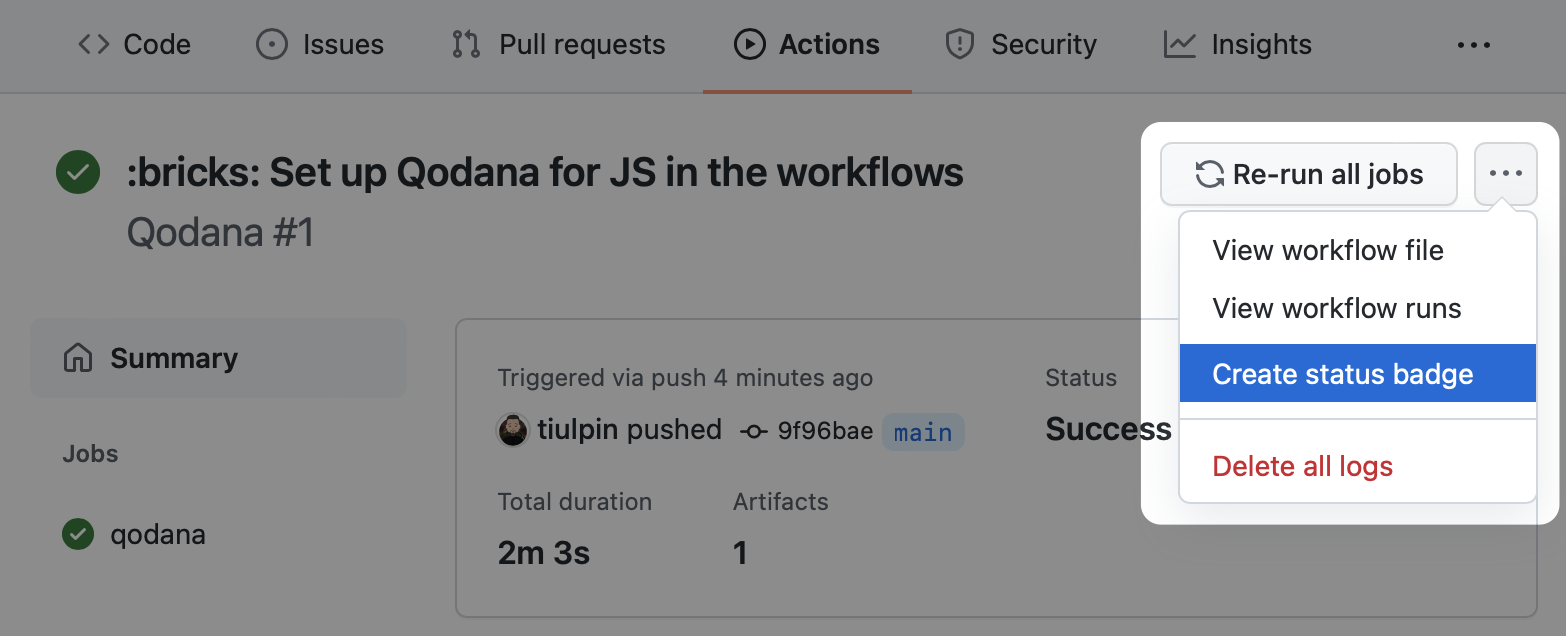
最有可能的是,除了args以外,您不需要其他選項:如果您在一個工作流中配置多個Qodana掃描作業,所有其他選項都會有所幫助。
with定義任何動作參數:
 with :
  args : --baseline,qodana.sarif.json
cache-default-branch-only : true| 姓名 | 描述 | 預設值 |
|---|---|---|
args | 附加的Qodana CLI scan命令參數,用逗號( , )分配參數,例如-i,frontend,--print-problems 。選修的。 | - |
results-dir | 目錄存儲分析結果。選修的。 | ${{ runner.temp }}/qodana/results |
upload-result | 將Qodana結果(SARIF,其他文物,日誌)上傳為工作。選修的。 | false |
artifact-name | 指定Qodana結果偽像名稱,用於上傳結果。選修的。 | qodana-report |
cache-dir | 存儲Qodana緩存的目錄。選修的。 | ${{ runner.temp }}/qodana/caches |
use-caches | 利用github緩存進行Qodana運行。選修的。 | true |
primary-cache-key | 設置主緩存鍵。選修的。 | qodana-2024.3-${{ github.ref }}-${{ github.sha }} |
additional-cache-key | 設置附加的緩存鍵。選修的。 | qodana-2024.3-${{ github.ref }} |
cache-default-branch-only | 僅上傳默認分支的緩存。選修的。 | false |
use-annotations | 使用註釋標記GitHub用戶界面中的結果。選修的。 | true |
pr-mode | 分析僅在拉請請求中更改文件。選修的。 | true |
post-pr-comment | 發表評論,其中Qodana結果摘要摘要。選修的。 | true |
github-token | github令牌訪問存儲庫:後註釋,評論。選修的。 | ${{ github.token }} |
push-fixes | 將Qodana固定在存儲庫中,可以是none , branch到當前分支或pull-request 。選修的。 | none |
與Qodana有關的所有問題,功能請求和支持都在YouTrack上處理。
如果您想提交新問題,請使用鏈接YouTrack |新問題。







