pep8speaks
pep8speaks is back again!

一個github應用程序,可以自動查看Python代碼樣式,而不是拉請請求

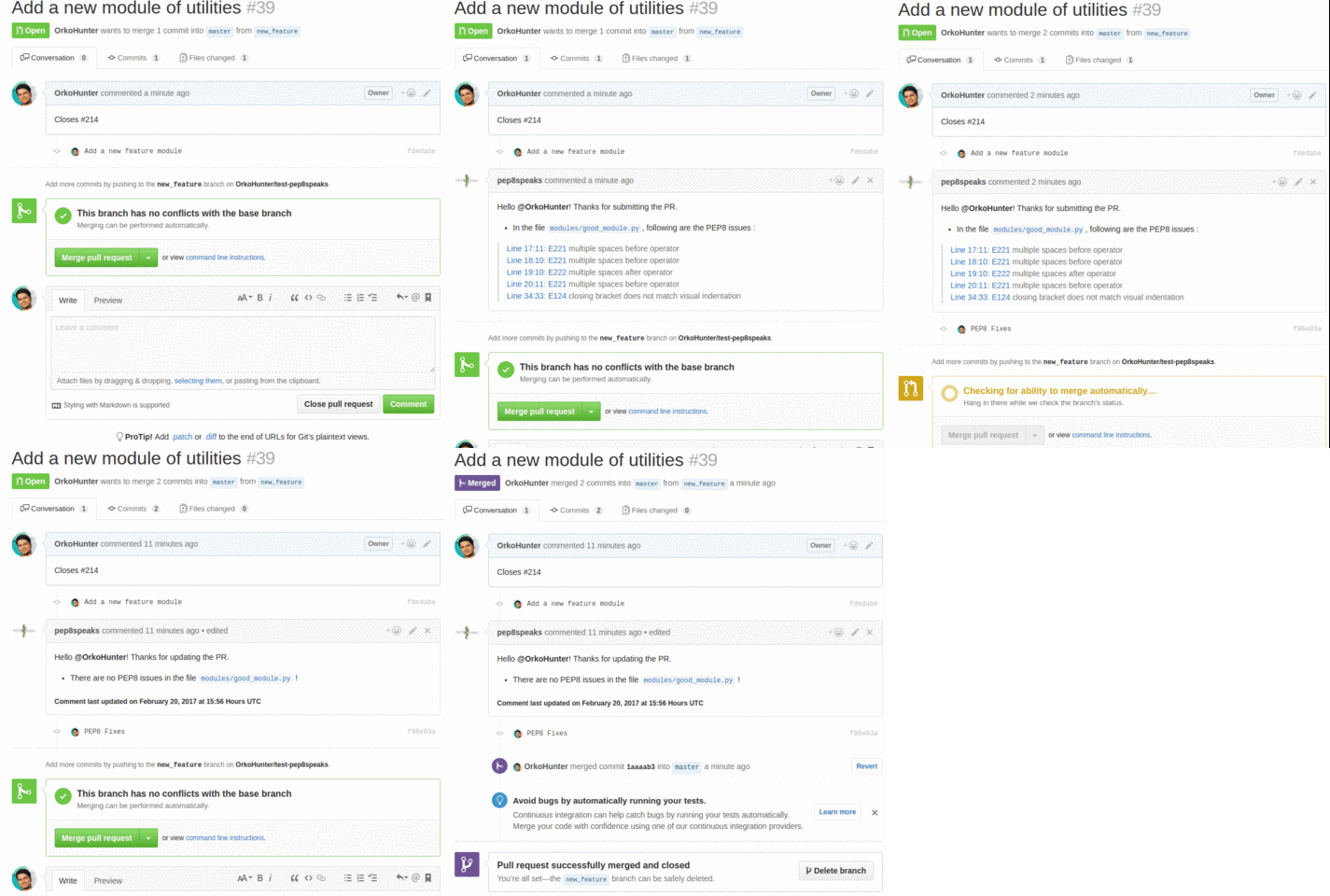
pycodestyle或flake8之間選擇作為襯裡。該機器人可以讀取兩者的配置。[pycodestyle]機器人可以讀取您的setup.cfg [flake8]查看下面的Configuration部分。集成工作不需要配置文件。但是,可以通過在項目的根部中添加.pep8speaks.yml文件來另外配置。這是一個示例:
 # File : .pep8speaks.yml

scanner :
  diff_only : True # If False, the entire file touched by the Pull Request is scanned for errors. If True, only the diff is scanned.
  linter : pycodestyle # Other option is flake8

pycodestyle : # Same as scanner.linter value. Other option is flake8
  max-line-length : 100 # Default is 79 in PEP 8
  ignore : # Errors and warnings to ignore
    - W504 # line break after binary operator
    - E402 # module level import not at top of file
    - E731 # do not assign a lambda expression, use a def
    - C406 # Unnecessary list literal - rewrite as a dict literal.
    - E741 # ambiguous variable name

no_blank_comment : True # If True, no comment is made on PR without any errors.
descending_issues_order : False # If True, PEP 8 issues in message will be displayed in descending order of line numbers in the file

message : # Customize the comment made by the bot
  opened : # Messages when a new PR is submitted
    header :
      " Hello @{name}! Thanks for opening this PR. "
      # The keyword {name} is converted into the author's username
    footer :
      " Do see the [Hitchhiker's guide to code style](https://goo.gl/hqbW4r) "
      # The messages can be written as they would over GitHub
  updated : # Messages when new commits are added to the PR
    header : " Hello @{name}! Thanks for updating this PR. "
    footer : " " # Why to comment the link to the style guide everytime? :)
  no_errors : " There are currently no PEP 8 issues detected in this Pull Request. Cheers! :beers: "
筆記:
.pep8speaks.yml將覆蓋這些值。base分支(現有的)中查找.pep8speaks.yml 。如果找不到文件,則將搜索head分支(傳入更改)。scanner.linter的價值。沿pycodestyle或flake8ignore或max-line-length ),Pep8Speaks將按以下順序進行外觀和優先級配置:pycodestyle:或flake8: .pep8speaks.yml的部分。scanner.linter值。[pycodestyle]或[flake8] setup.cfg文件的部分在項目的根部。scanner.linter 。因此, [flake8] setup.cfg的部分也將用於pycodestyle。| 組織 | 描述 | |
|---|---|---|
| 貓熊 | Python強大的數據操縱工具 | |
| Adobe | Adobe的開源 | |
| Opensuse | Linux分佈 | |
| Pytorch閃電 | ML研究人員的輕量級Pytorch包裝紙。 | |
| NetworkX | 圖理論和復雜網絡的Python庫 | |
| StatsModels | Python的統計建模和計量經濟學 | |
| Xarray(Pydata) | nd在Python中標記為陣列和數據集(Python for Data) | |
 | 太陽 | 太陽能物理學的Python |
| 天體 | Python的天文學 | |
| Scikit學習貢獻 | Scikit-Learn兼容項目 | |
| Scikit圖像 | Python中的圖像處理 | |
| Spyder IDE | 科學的Python開發環境 | |
 | 催化劑 | Pytorch深度學習研發框架 |
請參閱組織和用戶的完整列表。
@pep8speaks suggest diff ,它將評論DIFF的要點,建議對PR進行修復。例子@pep8speaks pep8ify在PR上,它將創建一個拉動請求,其更改autopep8建議對PR的作者分支。 autopep8解決了pycodestyle報告的大多數錯誤。[skip pep8]提交消息,PR標題或PR描述中的任何位置,以禁止PEP8Speaks對拉的請求發表評論。該應用程序僅適用於公開託管的存儲庫。因此,如果您想部署叉子或將應用程序用於私人存儲庫,則是說明。
pep8 )檢查本地錯誤。使用GITHUB Release功能在此處宣布對應用程序的更新。隨著社區的增長,進行了許多重大變化。單擊Watch - > Releases only ,以獲取有關新配置或功能更新的通知。
通常,在存儲庫中合併了拉動請求後,主部將立即部署。但是,在每個星期五,我都會發布一個版本,並確保部署了最新的代碼。您無需採取任何行動即可使用最新版本。如果您使用Pep 8的叉子說話,請查看發布空間。
成為金牌贊助商,獲取您的徽標和名稱,並在我們的Readme和我們的網站上鍊接到您的網站。
薩馬格拉治理 |  samagrax |
成為金牌贊助商,獲取您的徽標和名稱,並在我們的Readme和我們的網站上鍊接到您的網站。
Python軟件基金會 | 魏布拉特 |
成為銀牌贊助商,獲取您的徽標和名稱,並在我們的Readme和我們的網站上鍊接到您的網站。
ccextractor | Sudhanshu Mishra |
您可以通過為其開發做出貢獻來支持該項目。如果您對新功能或改進有任何建議,請創建一個問題。拉動請求是最歡迎的!閱讀貢獻文檔以了解項目的工作原理以及如何進行更改。
該項目需要在服務器上託管,因此,它也需要財務支持。
請閱讀案例,以說明Pep 8的資金。
如果您使用此項目並且喜歡它,請告訴我。謝謝!
❤️
該項目不認可原始PEP 8的所有規則,因此相信定制PyCodestyle。
。







