aspnetcore angular universal
1.0.0

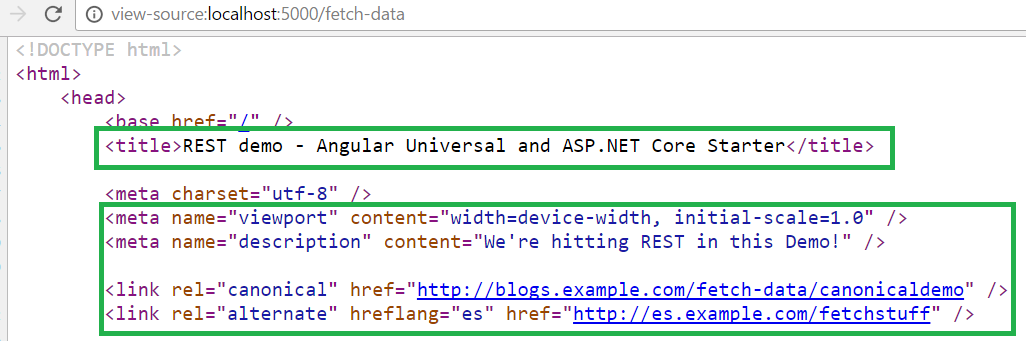
Angular SEO在作用:
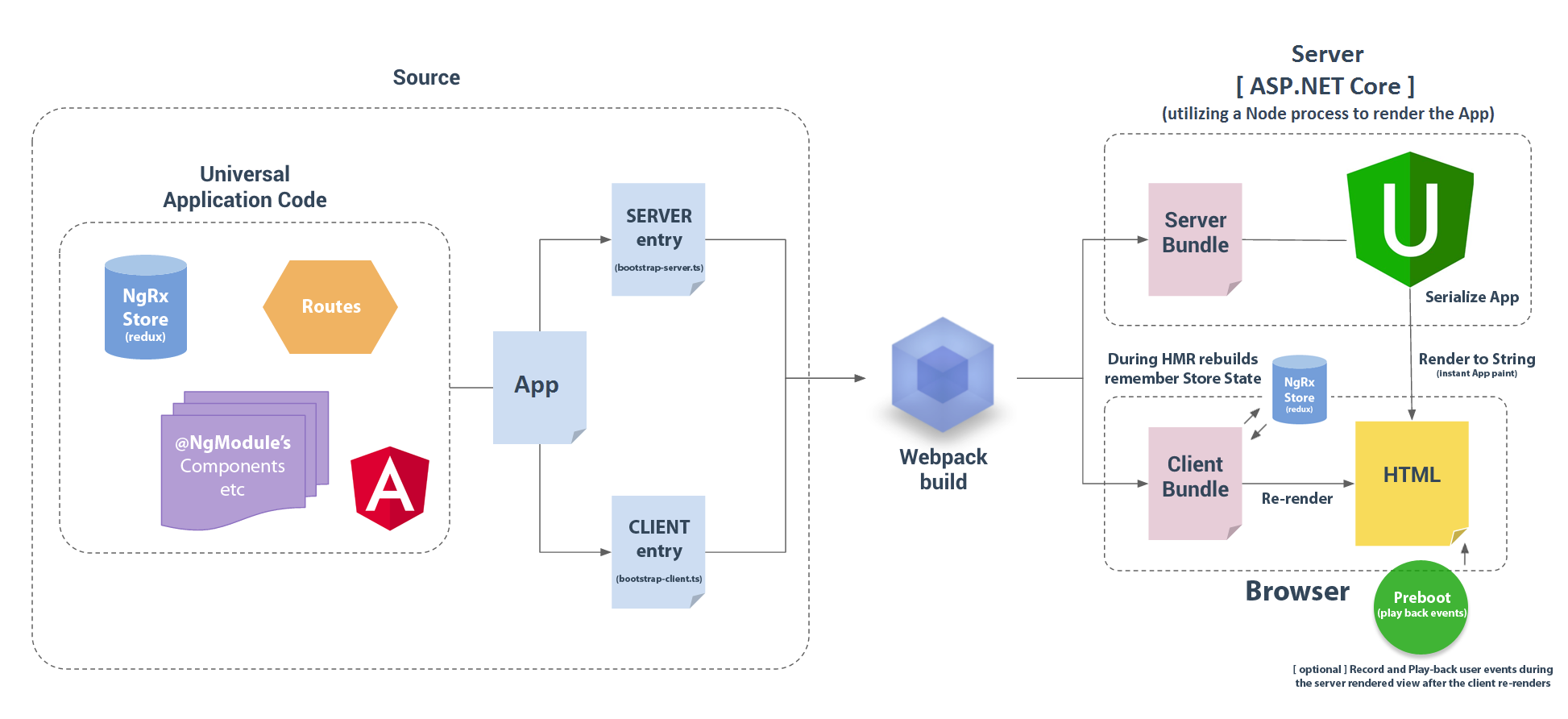
該存儲庫由Trilon.io和Angular Universal Team維護,本來可以使用ASP.NET Core 2.1使用Angular 7.0+的高級開始,不僅用於客戶端,而且要在服務器上渲染以進行即時應用程序塗料(請注意:如果您不需要在此處使用SSR讀取如何拒絕它)。
這是一個包含所有最新技術,最佳構建系統的功能啟動應用程序,並包括當今單頁應用程序(SPA)中所需的許多真實示例和庫。
這利用了所有最新標準,沒有毛孔,沒有鮑爾,沒有打字,沒有手動“構建”任何東西。 NPM,WebPack和.NET為您處理一切!
這些只是此入門者中發現的一些功能!
ASP.NET 2.1 -VS2017支持!
Angular 7.0.0 :
ng gc components/example-componentng gs shared/some-serviceWebPack構建系統(WebPack 4)
測試框架
生產率
ASP.NET Core 2.1
azure
npm i -S @markpieszak/ng-application-insights作為依賴項即可。 // Add the Module to your imports
ApplicationInsightsModule . forRoot ( {
instrumentationKey : 'Your-Application-Insights-instrumentationKey'
} )Docker
確保已安裝.NET Core 2.1和/或VS2017 15.3。打開項目時,VS2017將自動安裝所有必要的NPM&.NET依賴關係。
只需推動F5即可開始調試!
Docker-Support :更改啟動項目以Docker-Compose並按F5
注意:如果在此之後遇到任何錯誤,例如module not found: boot.server (或類似),打開命令行並運行npm run build:dev確保所有資產已由WebPack正確構建。
注意:確保安裝了C#擴展和.NET Core調試器。
該項目帶有配置的啟動。 JSON文件,讓您只需按F5即可啟動項目。
 # cd into the directory you cloned the project into
npm install && npm run build:dev && dotnet restore
# or yarn install如果您正在使用dotnet run行運行項目,請確保將環境變量設置為開發(否則HMR可能無法使用)。
 # on Windows:
set ASPNETCORE_ENVIRONMENT=Development
# on Mac/Linux
export ASPNETCORE_ENVIRONMENT=Development 使用dotnet publish後,將生成的文件夾放在服務器上並使用IIS啟動所有內容。
git remote add azure https://[email protected]:443/my-angular2-site.git
                     // ^ get this from Azure (Web App Overview section - Git clone url)

git push --set-upstream azure master 注意:此應用程序在同一項目中具有WebAPI(我們的REST API)設置,但是當然,所有這些都可以將所有這些都提取為一個完全獨立的項目('S)。為了簡單起見,.net核心工作全部完成了同一項目。
根級文件
在這裡,我們有在根層發現的通常的嫌疑人。
面向前端的文件:
package.json -NPM項目依賴項和腳本.tsconfig打字稿配置(在這裡我們也設置路徑)webpack配置文件(模塊化捆綁 +更多)karma - 配置文件(單位測試)protractor - 配置文件(E2E測試)tslint打字稿代碼覆蓋規則讓我們看一下這是如何結構化的,以便我們可以對此有所了解!
使用Angular Universal,我們需要將每個平台的應用程序邏輯分開,因此,如果我們在此文件夾中查看,您將看到兩個root文件,分別為瀏覽器和服務器分別分支整個邏輯。
在這裡,我們設置了幾件事,客戶端角啟動。
您幾乎不需要觸摸此文件,但是要注意的是,這是您只想在瀏覽器中使用的庫。 (只知道您必須在執行此操作時為服務器提供模擬實現)。
請注意此處的文件夾結構在./ClientApp/ :
 + /ClientApp/

+   /app/
    App NgModule - our Root NgModule (you'll insert Components/etc here most often)
    AppComponent / App Routes / global css styles

    * Notice that we have 2 dividing NgModules:
        app.module.browser & app.module.server
    You'll almost always be using the common app.module, but these 2 are used to split up platform logic
    for situations where you need to use Dependency Injection / etc, between platforms.

Note: You could use whatever folder conventions you'd like, I prefer to split up things in terms of whether they are re-usable
     "components" or routeable / page-like components that group together and organize entire sections.
+ + > ++ > /components/
          Here are all the regular Components that aren't "Pages" or container Components

+ + > ++ > /containers/
          These are the routeable or "Page / Container" Components, sometimes known as "Dumb" Components

+ + > ++ > /shared/
          Here we put all shared Services / Directives / Pipes etc
在應用程序中添加新功能/組件/等時,您通常會將內容添加到root ngmodule (位於/ClientApp/app/app.module.ts中),但是為什麼此文件夾中還有其他兩個ngmodules?
這是因為我們想將每個平台的邏輯分開,但是請注意,它們都共享名為app.module.ts的通用ngmodule。當將大多數內容添加到應用程序時,這是您唯一必須在新組件 /指示 /管道 /管道中添加的地方。您只需要偶爾需要手動在平台特定的特定內容中添加到一個app.module.browser || app.module.server 。
為了用示例說明這一點,您可以看到我們如何使用依賴注入來注入瀏覽器和服務器不同的StorageService 。
 // For the Browser (app.module.browser)
{ provide : StorageService , useClass : BrowserStorage }

// For the Server (app.module.server)
{ provide : StorageService , useClass : ServerStorage }
請記住,通常您通常只需要擔心
app.module.ts,因為那是您將添加大多數應用程序的新方面!
正如我們指出的那樣,這些都是為簡單起見的,實際上,您可能需要用於所有微服務 / REST API Projects /等的單獨項目。
我們在此應用程序中使用MVC,但是我們只需要一個控制器,名為HomeController 。在這裡,我們的整個Angular應用程序都將其序列化為字符串,發送到瀏覽器,以及所有需要在客戶端上引導的資產,然後成為一個成熟的水療中心。
短期是我們調用該節點過程,傳遞我們的請求對象並調用boot.server文件,然後回到一個不錯的對像中,我們將其傳遞到.NETS ViewData對像中,然後瀏覽我們的Views/Shared/_Layout.cshtml /Views/Home/index.cshtml文件!
可以在此處找到一個更詳細的解釋:
 // Prerender / Serialize application
var prerenderResult = await Prerenderer . RenderToString (
    /* all of our parameters / options / boot.server file / customData object goes here */
) ;

ViewData [ "SpaHtml" ] = prerenderResult . Html ;
ViewData [ "Title" ] = prerenderResult . Globals [ "title" ] ;
ViewData [ "Styles" ] = prerenderResult . Globals [ "styles" ] ;
ViewData [ "Meta" ] = prerenderResult . Globals [ "meta" ] ;
ViewData [ "Links" ] = prerenderResult . Globals [ "links" ] ;

return View ( ) ; // let's render the MVC View例如,查看_Layout.cshtml文件,請注意我們如何讓.NET處理並註入所有SEO魔術(我們從Angular本身提取)!
 <!DOCTYPE html >
< html >
    < head >
        < base href =" / " />
        <!-- Title will be the one you set in your Angular application -->
        < title > @ViewData["Title"] - AspNET.Core Angular 7.0.0 (+) starter </ title >

        < meta charset =" utf-8 " />
        < meta name =" viewport " content =" width=device-width, initial-scale=1.0 " />
        @Html.Raw(ViewData["Meta"]) <!-- <meta /> tags -->
        @Html.Raw(ViewData["Links"]) <!-- <link /> tags -->

        < link rel =" stylesheet " href =" ~/dist/vendor.css " asp-append-version =" true " />

        @Html.Raw(ViewData["Styles"]) <!-- <style /> tags -->

    </ head >
... etc ...我們的Views/Home/index.cshtml簡單地呈現應用程序,並在其中提供捆綁的webpack文件。
@Html.Raw(ViewData["SpaHtml"])

< script src =" ~/dist/vendor.js " asp-append-version =" true " > </ script >
@section scripts {
    < script src =" ~/dist/main-client.js " asp-append-version =" true " > </ script >
}好了,您的客戶端角將接管,您將擁有一個功能齊全的水療中心。 (但是我們獲得了所有這些巨大的SEO效果,可以通過服務器渲染)!
在Angular 7中構建組件時,請記住一些事情。
確保在調用任何API時提供絕對URL。 (服務器無法理解相對路徑,所以/api/whatever將會失敗的)。
API調用將在服務器期間進行,並在客戶端渲染期間再次進行,因此請確保您使用的是對您重要的數據,以免看到閃爍。
window , document , navigator和其他瀏覽器類型 -服務器上不存在- 因此使用它們或使用它們的任何庫(例如jQuery)將不起作用。您確實有一些選擇,如果您確實需要一些此類功能:
 import { PLATFORM_ID } from '@angular/core' ;
 import { isPlatformBrowser , isPlatformServer } from '@angular/common' ;

 constructor ( @ Inject ( PLATFORM_ID ) private platformId : Object ) { ... }

 ngOnInit ( ) {
   if ( isPlatformBrowser ( this . platformId ) ) {
      // Client only code.
      ...
   }
   if ( isPlatformServer ( this . platformId ) ) {
     // Server only code.
     ...
   }
}setTimeout 。它將減慢服務器端渲染過程。確保將它們刪除成組件中的ngOnDestroy 。不要直接操縱母語。使用Renderer2 。我們這樣做是為了確保在任何環境中都能改變自己的看法。
 constructor ( element : ElementRef , renderer : Renderer2 ) {
  this . renderer . setStyle ( element . nativeElement , 'font-size' , 'x-large' ) ;
}sass-loader需要node-sass > = 4:在Docker容器或Localhost中運行NPM NPM重建節點sass -f只需在homecontroller中評論邏輯,然後用您的應用程序root appcomponent tag(在我們的情況下,“ app-root”)替換@Html.Raw(ViewData["SpaHtml"]) : <app-root></app-root> 。
您還可以刪除任何
isPlatformBrowser/etc邏輯,並刪除boot.server,app.module.module.browser&app.module.server文件,只需確保您的boot.browserfile Points toapp.module即可。
檢查有關如何使用isPlatformBrowser()陷阱。
您要么要目前要刪除SSR,要么等待支持應該來處理平台服務器渲染。現在可以隨著最近更新的角材料的變化而進行的。我們還沒有一個教程。
注意:如果可能的話,請嘗試避免使用依賴於它的jQuery或庫,因為有更好的,更抽象的方法可以在Angular(5+)(例如使用渲染器)中處理DOM,例如使用渲染器等。
是的,當然,但是在執行此操作之前,您需要設置一些事情。首先,確保jQuery包含在WebPack供應商文件中,並為其具有WebPack插件。 new webpack.ProvidePlugin({ $: 'jquery', jQuery: 'jquery' })
現在,確保您擁有的任何“插件”等僅包含在boot.browser.ts文件中。 (即: import 'slick-carousel'; )在您要使用jQuery的組件中,請確保將其導入到頂部附近:
import * as $ from 'jquery' ;始終確保在Angular的isPlatformBrowser()條件下包裹任何面向jQuery的東西!
通過IE11在polyfills文件夾中打開polyfills.ts文件,並根據需要將“導入polyfills”取消。另外 - 確保您的webpack.config和webpack.config.vendor更改TerserPlugin從ecma: 6到ecma: 5 。
非常感謝Microsoft的Steve Sanderson(@stevesandersonms)以及他在JavaScriptServices上的出色工作,並將Node的世界與ASP.NET Core整合在一起。
還要感謝許多貢獻者!
在這裡查看我們的簡單問題
沒有什麼是完美的,但是請通過創建一個問題讓我知道(確保還沒有現有問題),我們將嘗試為此解決一個問題!如果您有任何好主意或想做出貢獻,請隨意對該提案提出問題,或者只是從叉子中造成公關。
版權(C)2016-2019 Mark Pieszak
查看Trilon.io以獲取更多信息! Twitter @trilon_io
通過[email protected]與我們聯繫,讓我們談談您的項目需求。
Twitter:@trilon_io





