revive
v1.5.1

快速,可配置,可擴展,靈活和美麗的襯裡。滴定golint。 Revive提供了製定自定義規則的框架,並讓您定義一個嚴格的預設,以增強開發和代碼審查過程。
var-namingrevive作為圖書館go install github.com/mgechev/revive@latest或從“版本”頁面中獲取可執行文件的可執行文件。
您可以使用:
go install github.com/mgechev/revive@master由於revive的默認行為與golint兼容,而無需提供任何其他標誌,因此您注意到的唯一區別是更快地執行。
revive支持一個-config標誌,其值應與TOML文件相對應,該文件描述了用於revive的裁剪的哪些規則。如果沒有提供, revive將嘗試使用全局配置文件(假定位於$HOME/revive.toml )。否則,如果找不到配置TOML文件,則revive使用內置的一組默認覆蓋規則。
必須安裝卷才能與容器共享當前存儲庫。請參考綁定安裝碼頭文檔
docker run -v " $( pwd ) " :/var/ < repository > ghcr.io/mgechev/revive:v1.3.7 -config /var/ < repository > /revive.toml -formatter stylish ./var/kidle/...-v用於卷ghcr.io/mgechev/revive:v1.3.7是圖像名稱,其版本對應於revive命令如果您想與Bazel一起使用Revive,請查看Atlassian堅持的規則。
在VSCODE-GO中支持VSCODE。
通過文件觀察者支持Goland。
通過Linter-Revive支持原子。
通過密集分析/啤酒支持VIM。
 let g: ale_linters = {
   ' go ' : [ ' revive ' ],
}
通過null-ls.nvim支持Neovim。
 require ( " null-ls " ). setup ({
    sources = {
        require ( " null-ls " ). builtins . diagnostics . revive
    },
})CODEAC.IO-自動代碼審查服務與GitHub,Bitbucket和Gitlab(甚至是自我託管)集成在一起,並幫助您抵抗技術債務。自動檢查您的拉值重新要求。 (免費用於開源項目)
要在golangci-lint中啟用revive ,您需要將revive添加到已啟用的Linters列表中:
 # golangci-lint configuration file
linters :
   enable :
- revive然後,可以通過將條目添加到配置的linters-settings部分來配置revive ,例如:
 # golangci-lint configuration file
linters-settings :
  revive :
    ignore-generated-header : true
    severity : warning
    rules :
      - name : atomic
      - name : line-length-limit
        severity : error
        arguments : [80]
      - name : unhandled-error
arguments : ["fmt.Printf", "myFunction"]上面的配置實現了三個revive規則:原子,線長度限制和未經處理的錯誤,並將一些參數傳遞給最後兩個參數。本文檔的配置部分提供了有關如何配置revive的詳細信息。請注意,雖然revive配置是在TOML中, golangci-lint的配置位於YAML中。
請注意,如果沒有提供特定的配置, revive將像go-lint一樣行事,即啟用了所有go-lint規則(可用規則表詳細信息詳細信息是什麼是go-lint規則)。提供配置後,僅啟用配置中的規則。
revive接受以下命令行參數:
-config [PATH] - 以toml格式的配置文件的路徑,默認為$HOME/revive.toml (如果存在)。
-exclude [PATTERN] - 文件/目錄/軟件包的模式被排除在外。您可以指定要排除的文件作為包裝名稱(即github.com/mgechev/revive ),將它們列為單個文件(即file.go ),目錄(即./foo/... )或三個組合的任何組合。如果未指定排除模式,則默認情況下將排除vendor/...
-formatter [NAME] - 用於輸出的格式。當前可用的格式是:
default - 將以與golint相同的方式輸出故障。json以JSON格式輸出故障。ndjson將故障輸出為Newline劃界JSON(NDJSON)格式的流。friendly - 發現時輸出故障。顯示了所有失敗的摘要。stylish - 格式化桌子中的故障。請記住,它不會流式傳輸輸出,因此與其他輸出相比,它可能被認為較慢。checkstyle輸出與Java CheckStyle兼容的XML格式的故障。 -max_open_files同時開放文件的最大數量。默認為無限。
-set_exit_status將退出狀態設置為1,如果發現任何問題,則在配置中覆蓋errorCode和warningCode 。
- -version獲取Revive版本。
revive -config revive.toml -exclude file1.go -exclude file2.go -formatter friendly github.com/mgechev/revive package/...revive.toml的配置revive將忽略file1.go和file2.gofriendly格式格式github.com/mgechev/revive和package中的文件使用註釋,您可以禁用整個文件或一系列行的襯裡:
 //revive:disable

func Public () {}
//revive:enable上面的片段將禁用複興之間的revive revive:disable和revive:enable評論。如果跳過revive:enable ,則將禁用文件的其餘部分。
通過revive:disable-next-line和revive:disable-line您可以在特定代碼線上禁用revive 。
您可以在規則級別上執行相同的操作。如果您只想禁用特定規則,則可以使用:
 //revive:disable:unexported-return
func Public () private {
  return private
}
//revive:enable:unexported-return
這樣, revive就不會警告您您正在從導出功能中返回未出現類型的對象。
您可以通過在指令中添加尾隨文本來記錄為什麼禁用Linter的原因,例如
//revive:disable Until the code is stable //revive:disable:cyclomatic High complexity score but easy to understand您還可以通過添加revive
[ directive . specify-disable-reason ]在配置中。您可以設置違反此指令的嚴重性(默認警告)
[ directive . specify-disable-reason ]
severity = " error "revive可以使用TOML文件配置。這是一個示例配置,並說明了各個屬性:
 # When set to false, ignores files with "GENERATED" header, similar to golint
ignoreGeneratedHeader = true

# Sets the default severity to "warning"
severity = " warning "

# Sets the default failure confidence. This means that linting errors
# with less than 0.8 confidence will be ignored.
confidence = 0.8

# Sets the error code for failures with the "error" severity
errorCode = 0

# Sets the error code for failures with severity "warning"
warningCode = 0

# Configuration of the `cyclomatic` rule. Here we specify that
# the rule should fail if it detects code with higher complexity than 10.
[ rule . cyclomatic ]
  arguments = [ 10 ]

# Sets the severity of the `package-comments` rule to "error".
[ rule . package-comments ]
  severity = " error "
默認情況下, revive將僅啟用配置文件中命名的覆蓋規則。例如,以前的配置文件使得revive以啟用循環和包裝刺激規則。
為了啟用所有可用規則,您需要添加:
enableAllRules = true無論配置文件中命名哪些規則,這都將啟用所有可用的規則。
要禁用規則,您只需將其標記為在配置中的禁用。例如:
[ rule . line-length-limit ]
    Disabled = true
啟用所有規則時,您仍然需要/可以為規則提供特定的配置。以下文件是啟用所有規則的示例配置,除了明確禁用的規則外,並且某些規則配置了特定參數:
 severity = " warning "
confidence = 0.8
errorCode = 0
warningCode = 0

# Enable all available rules
enableAllRules = true

# Disabled rules
[ rule . blank-imports ]
    Disabled = true
[ rule . file-header ]
    Disabled = true
[ rule . max-public-structs ]
    Disabled = true
[ rule . line-length-limit ]
    Disabled = true
[ rule . function-length ]
    Disabled = true
[ rule . banned-characters ]
    Disabled = true

# Rule tuning
[ rule . argument-limit ]
    Arguments = [ 5 ]
[ rule . cyclomatic ]
    Arguments = [ 10 ]
[ rule . cognitive-complexity ]
    Arguments = [ 7 ]
[ rule . function-result-limit ]
    Arguments = [ 3 ]
[ rule . error-strings ]
Arguments = [ " mypackage.Error " ]revive的默認配置可以在defaults.toml上找到。這將啟用golint中可用的所有規則,並使用其默認配置(即它們在golint中的硬編碼方式)。
revive -config defaults.toml github.com/mgechev/revive這將使用配置文件defaults.toml , default格式,並將通過github.com/mgechev/revive軟件包運行。
revive -config config.toml -formatter friendly github.com/mgechev/revive這將使用config.toml , friendly格式化器,並將通過github.com/mgechev/revive軟件包運行lint。
以下片段包含您可以在項目中使用的建議的revive配置:
 ignoreGeneratedHeader = false
severity = " warning "
confidence = 0.8
errorCode = 0
warningCode = 0

[ rule . blank-imports ]
[ rule . context-as-argument ]
[ rule . context-keys-type ]
[ rule . dot-imports ]
[ rule . error-return ]
[ rule . error-strings ]
[ rule . error-naming ]
[ rule . exported ]
[ rule . increment-decrement ]
[ rule . var-naming ]
[ rule . var-declaration ]
[ rule . package-comments ]
[ rule . range ]
[ rule . receiver-naming ]
[ rule . time-naming ]
[ rule . unexported-return ]
[ rule . indent-error-flow ]
[ rule . errorf ]
[ rule . empty-block ]
[ rule . superfluous-else ]
[ rule . unused-parameter ]
[ rule . unreachable-code ]
[ rule . redefines-builtin-id ]您還可以為每個規則設置自定義排除。
這是全局-exclude程序ARG的替代方法。
 ignoreGeneratedHeader = false
severity = " warning "
confidence = 0.8
errorCode = 0
warningCode = 0

[ rule . blank-imports ]
   Exclude =[ " **/*.pb.go " ]
[ rule . context-as-argument ]
   Exclude =[ " src/somepkg/*.go " , " TEST " ]
您可以使用以下排除模式
src/pkg/mypkg/some.gosrc/**/*.pb.go~.(pb|auto|generated).go$TEST (與**/*_test.go相同)*和~模式排除所有文件(與禁用規則相同的效果)b。 "" (空)模式不包括什麼注意:不要弄亂可在TOML文件的最高級別使用的
exclude,這意味著“排除軟件包模式”,而不是“排除文件模式”
所有可用規則的列表。 golint移植的規則在golint列中保持不變並指示。
| 姓名 | config | 描述 | golint | 打字 |
|---|---|---|---|---|
context-keys-type | N/A。 | 在context.WithValue中刪除基本類型的用法。 | 是的 | 是的 |
time-equal | N/A。 | 建議使用time.Time.Equal而不是==和!=用於平等檢查時間。 | 不 | 是的 |
time-naming | N/A。 | 圍繞時間變量命名的約定。 | 是的 | 是的 |
unchecked-type-assertions | N/A。 | 在不檢查結果的情況下取消類型斷言。 | 不 | 是的 |
var-declaration | N/A。 | 減少圍繞變量聲明的冗餘。 | 是的 | 是的 |
unexported-return | N/A。 | 警告公眾回報是從未出現的類型的。 | 是的 | 是的 |
errorf | N/A。 | 應該用errors.New(fmt.Sprintf()) fmt.Errorf() | 是的 | 是的 |
blank-imports | N/A。 | 取消空白導入 | 是的 | 不 |
context-as-argument | N/A。 | context.Context應該是函數的第一個參數。 | 是的 | 不 |
dot-imports | N/A。 | 禁止.進口。 | 是的 | 不 |
error-return | N/A。 | 錯誤返回參數應該是最後的。 | 是的 | 不 |
error-strings | []細繩 | 圍繞錯誤字符串的約定。 | 是的 | 不 |
error-naming | N/A。 | 誤差變量的命名。 | 是的 | 不 |
exported | []細繩 | 對出口符號的命名和評論慣例。 | 是的 | 不 |
if-return | N/A。 | 如果返回錯誤時,則冗餘。 | 不 | 不 |
increment-decrement | N/A。 | 使用i++和i--代替i += 1而i -= 1 。 | 是的 | 不 |
var-naming | 允許列表和初始主義的區塊列表 | 命名規則。 | 是的 | 不 |
package-comments | N/A。 | 包裹評論慣例。 | 是的 | 不 |
range | N/A。 | 在集合上迭代時,可以防止冗餘變量。 | 是的 | 不 |
receiver-naming | 地圖(可選) | 圍繞接收者的命名。 | 是的 | 不 |
indent-error-flow | []細繩 | 防止冗餘語句。 | 是的 | 不 |
argument-limit | int(默認為8) | 指定函數可以接收的最大參數數量 | 不 | 不 |
cyclomatic | int(默認為10) | 設置限制最大循環複雜性。 | 不 | 不 |
max-public-structs | int(默認為5) | 文件中的最大公共結構數量。 | 不 | 不 |
file-header | 字符串(默認為無) | 每個文件應具有的標題。 | 不 | 不 |
empty-block | N/A。 | 警告空代碼塊 | 不 | 是的 |
superfluous-else | []細繩 | 防止冗餘語句(擴展indent-error-flow ) | 不 | 不 |
confusing-naming | N/A。 | 警告使用只有大寫不同的名稱的方法 | 不 | 不 |
get-return | N/A。 | 警告沒有產生任何結果的Getters | 不 | 不 |
modifies-parameter | N/A。 | 警告分配到功能參數 | 不 | 不 |
confusing-results | N/A。 | 建議命名可能令人困惑的功能結果 | 不 | 不 |
deep-exit | N/A。 | 在main()或init()以外的其他功能中尋找程序退出 | 不 | 不 |
unused-parameter | N/A。 | 建議重命名或刪除未使用的功能參數 | 不 | 不 |
unreachable-code | N/A。 | 警告無法到達的代碼 | 不 | 不 |
add-constant | 地圖 | 建議使用常數用於魔術數字和字符串文字 | 不 | 不 |
flag-parameter | N/A。 | 警告創建控件耦合的布爾參數 | 不 | 不 |
unnecessary-stmt | N/A。 | 建議刪除或簡化不必要的陳述 | 不 | 不 |
struct-tag | []細繩 | 檢查常見的結構標籤,例如json , xml , yaml | 不 | 不 |
modifies-value-receiver | N/A。 | 警告分配給有價值的方法接收器 | 不 | 是的 |
constant-logical-expr | N/A。 | 警告不斷邏輯表達 | 不 | 不 |
bool-literal-in-expr | N/A。 | 建議從邏輯表達中刪除布爾文字 | 不 | 不 |
redefines-builtin-id | N/A。 | 警告內置標識符的重新定義 | 不 | 不 |
function-result-limit | int(默認為3) | 指定函數可以返回的最大結果數 | 不 | 不 |
imports-blocklist | []細繩 | 禁止導入指定的軟件包 | 不 | 不 |
range-val-in-closure | N/A。 | 警告是否在閉合中使用範圍值作為goroutine | 不 | 不 |
range-val-address | N/A。 | 警告範圍值的地址是否危險地使用 | 不 | 是的 |
waitgroup-by-value | N/A。 | 警告函數將同步組作為副價值參數 | 不 | 不 |
atomic | N/A。 | 檢查sync/atomic包的常見錯誤用法 | 不 | 不 |
empty-lines | N/A。 | 警告何時在一個街區中出現新線或落後 | 不 | 不 |
line-length-limit | int(默認為80) | 指定行中的最大字符數 | 不 | 不 |
call-to-gc | N/A。 | 警告明確致電垃圾收集器 | 不 | 不 |
duplicated-imports | N/A。 | 尋找兩次或多次導入的軟件包 | 不 | 不 |
import-shadowing | N/A。 | 斑點標識符遮蔽了導入的 | 不 | 不 |
bare-return | N/A。 | 警告裸露的回報 | 不 | 不 |
unused-receiver | N/A。 | 建議重命名或刪除未使用的方法接收器 | 不 | 不 |
unhandled-error | []細繩 | 警告函數呼叫返回的未手動錯誤 | 不 | 是的 |
cognitive-complexity | int(默認為7) | 設置限制以達到最大認知複雜性。 | 不 | 不 |
string-of-int | N/A。 | 警告從int到string的可疑鑄件 | 不 | 是的 |
string-format | 地圖 | 警告特定的字符串文字,這些文字失敗了一個或多個用戶配置的正則表達式 | 不 | 不 |
early-return | []細繩 | 斑點如果是然後傾斜謂詞以減少嵌套的陳述 | 不 | 不 |
unconditional-recursion | N/A。 | 警告功能電話,這些呼叫將導致(直接)無限遞歸 | 不 | 不 |
identical-branches | N/A。 | 景點如果是與相同的分支then的else語句 | 不 | 不 |
defer | 地圖 | 警告一些延期gotchas | 不 | 不 |
unexported-naming | N/A。 | 警告錯誤命名的未出口符號 | 不 | 不 |
function-length | int,int(默認為50個語句,75行)) | 警告超出語句或行最大線的功能 | 不 | 不 |
nested-structs | N/A。 | 警告結構內的結構 | 不 | 不 |
useless-break | N/A。 | 警告無用的break陳述,以防萬一 | 不 | 不 |
banned-characters | []字符串(默認為[]字符串{}) | 檢查標識符中禁止的字符 | 不 | 不 |
optimize-operands-order | N/A。 | 檢查效率低下的條件表達式 | 不 | 不 |
use-any | N/A。 | 建議將interface{}替換為any | 不 | 不 |
datarace | N/A。 | 斑點潛在數據 | 不 | 不 |
comment-spacings | []細繩 | 警告畸形的評論 | 不 | 不 |
redundant-import-alias | N/A。 | 警告導入別名與導入的軟件包名稱匹配 | 不 | 不 |
import-alias-naming | 字符串或地圖[String] String(默認值允許REGEX模式 ^[AZ] [A-Z0-9] {0,} $) | 圍繞進口別名的命名。 | 不 | 不 |
enforce-map-style | 字符串(默認為“任何”) | 強制使用make(map[type]type)或map[type]type{}以進行映射初始化。不影響make(map[type]type, size)結構。 | 不 | 不 |
enforce-slice-style | 字符串(默認為“任何”) | 強制使用make([]type, 0)或[]type{}的一致用法用於切片初始化。不影響make(map[type]type, non_zero_len, or_non_zero_cap)構造。 | 不 | 不 |
enforce-repeated-arg-type-style | 字符串(默認為“任何”) | 為重複參數和/或返回值類型強制執行一致的樣式。 | 不 | 不 |
max-control-nesting | int(默認為5) | 設置限制控制結構的最大嵌套。 | 不 | 不 |
comments-density | int(默認為0) | 執行最低評論 /代碼關係 | 不 | 不 |
file-length-limit | 地圖(可選) | 每個文件執行最大數量的行 | 不 | 不 |
filename-format | 正則表達(可選) | 執行文件名的格式 | 不 | 不 |
redundant-build-tag | N/A。 | 警告冗餘// +build評論行 | 不 | 不 |
use-errors-new | N/A。 | 可以通過errors.New替換的fmt.Errorf調用點。 | 不 | 不 |
在這裡,您可以找到如何配置一些現有規則:
var-naming該規則接受兩片字符串,一個允許列表和初始主義的區塊列表。默認情況下,該規則的行為完全像golint中的替代方案,但您可以選擇放鬆(請參閱Golint/lint/essess/89)
[ rule . var-naming ]
arguments = [[ " ID " ], [ " VM " ]]這樣,Revive不會警告稱為customId標識符,但會警告customVm應稱為customVM 。
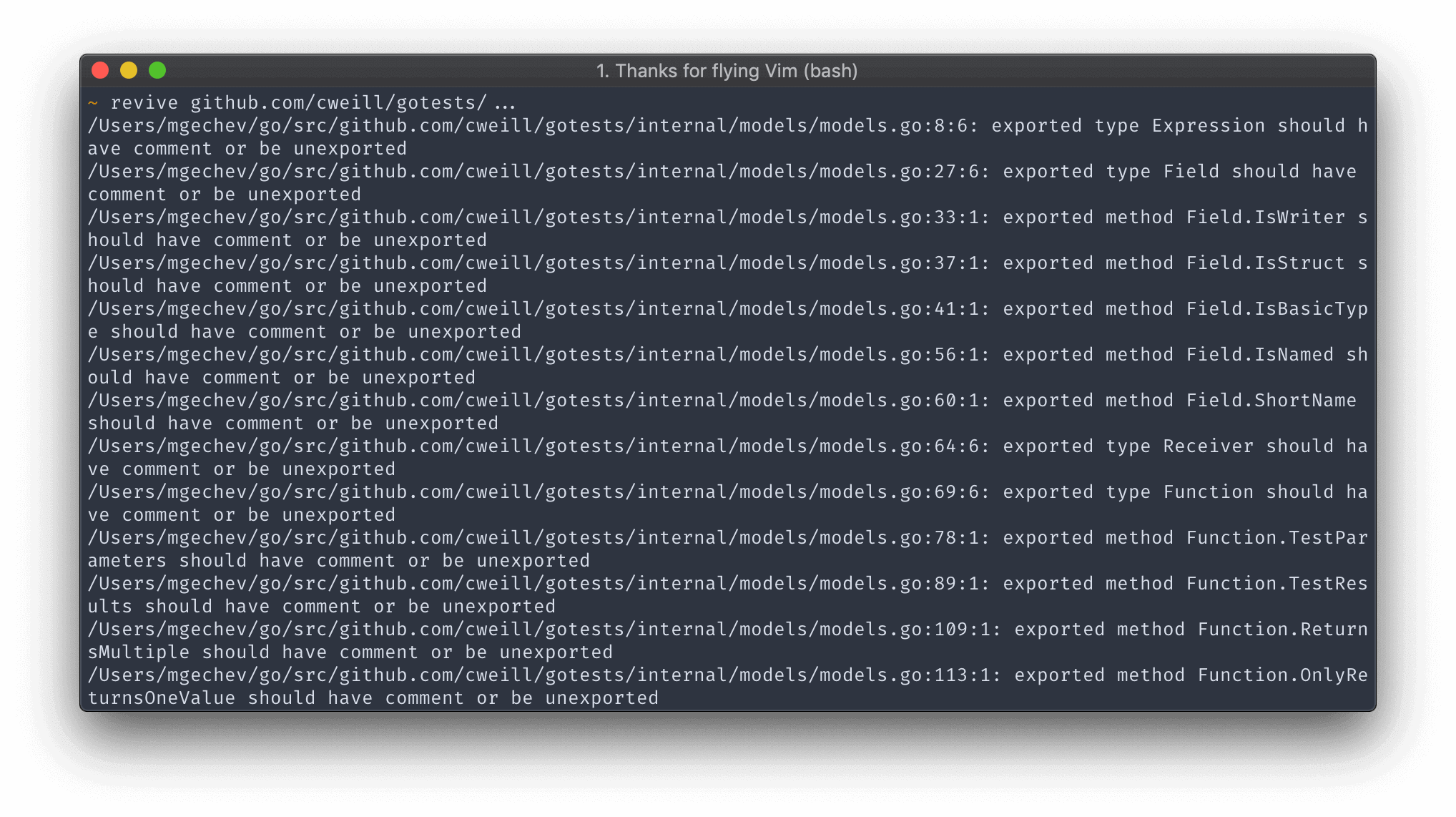
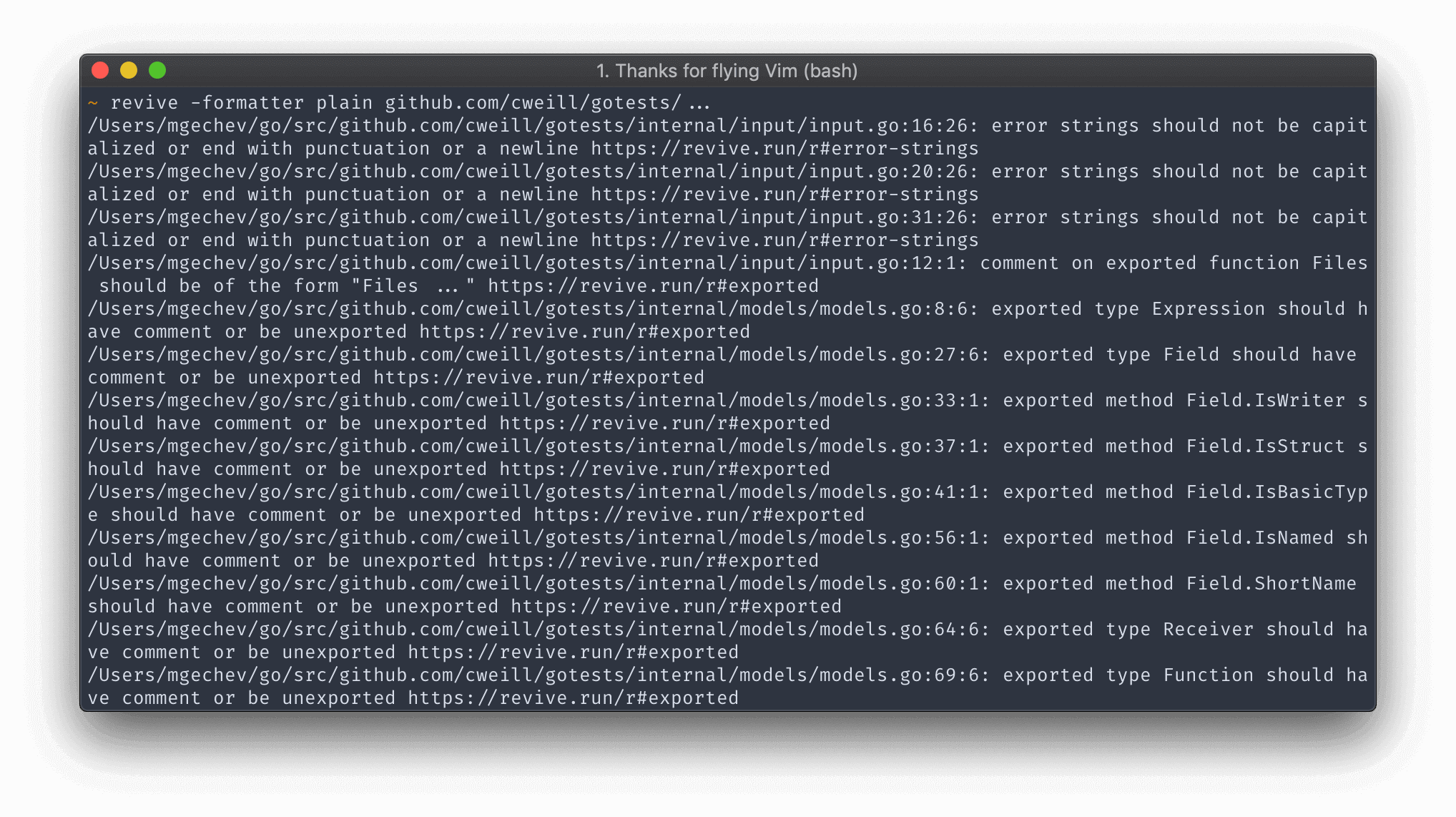
本節列出了所有可用的格式化器,並為每個格式提供了一個屏幕截圖。
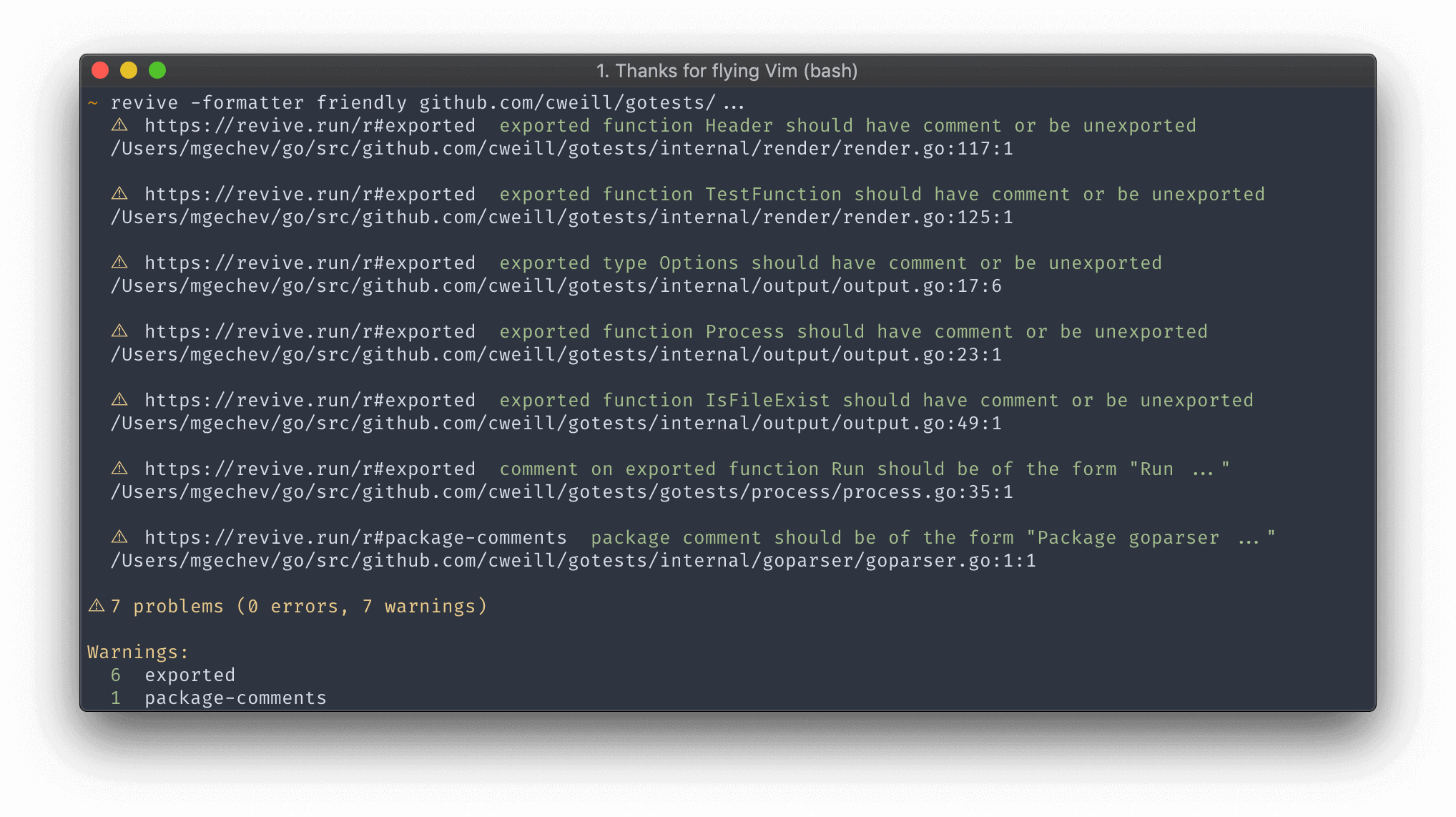
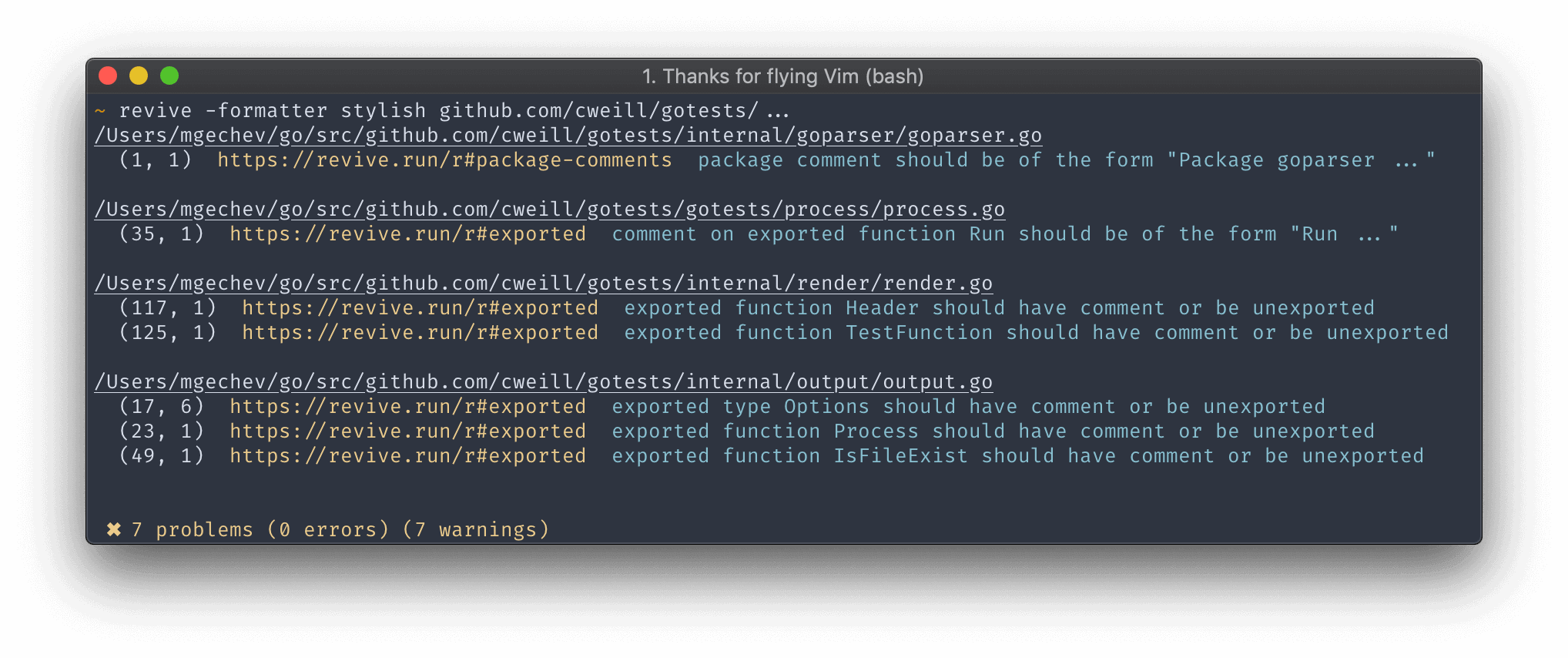
默認的格式器與golint產生相同的輸出。
普通的格式器產生與默認格式的輸出相同的輸出,並將URL附加到規則描述上。
UNIX格式器產生與默認格式化器相同的輸出,但圍繞[]中的規則。
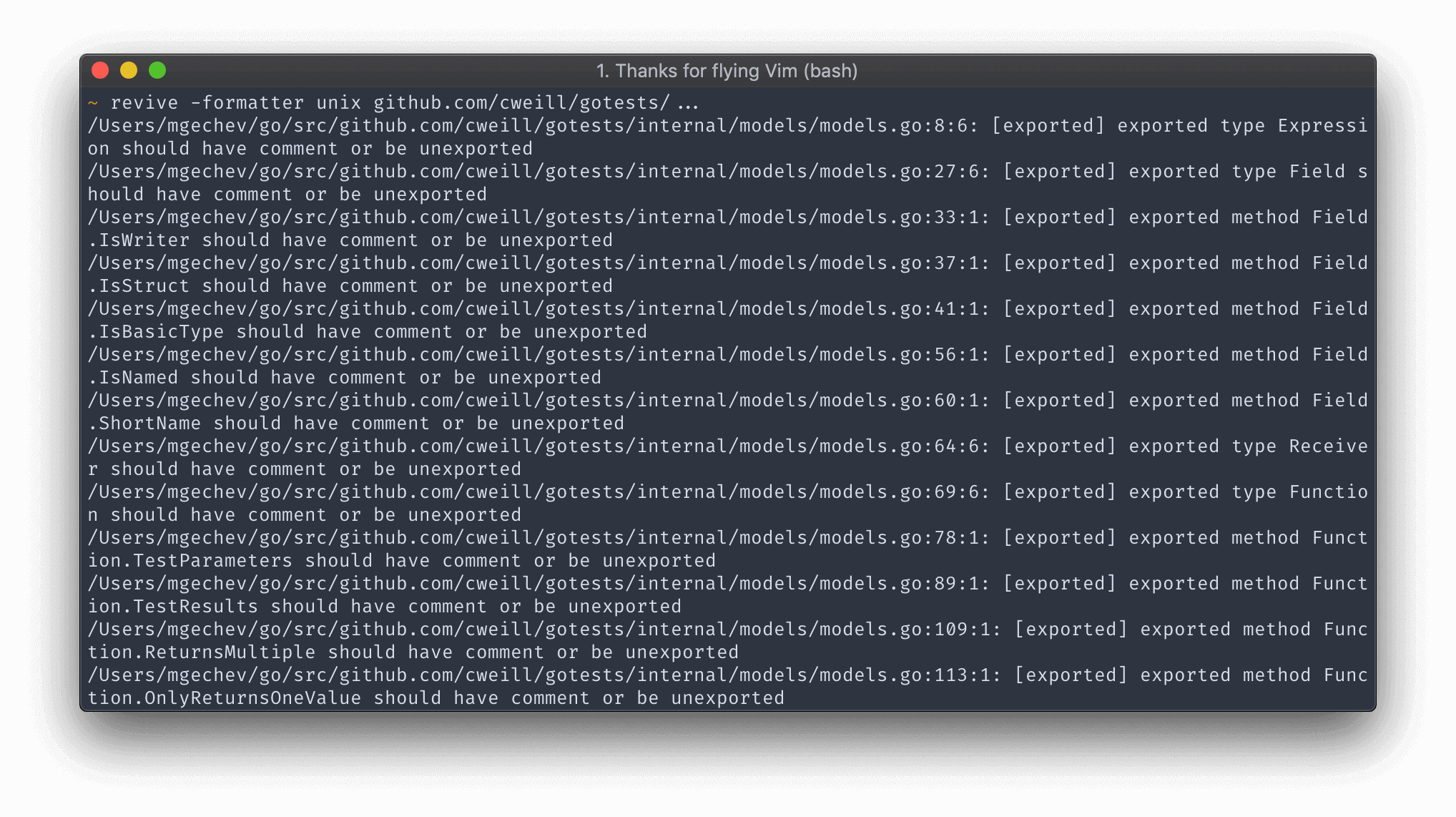
json格式以JSON格式產生輸出。
ndjson Formatter以Newline Delimited JSON格式產生輸出。
checkstyle格式以類似校驗的格式產生輸出。
sarif格式化器在SARIF中產生輸出,以供靜態分析結果互換格式,這是一種基於JSON的標準格式,用於由OASIS定義和促進的靜態分析工具的輸出。
標準的當前支持版本為Sarif-V2.1.0。
該工具可以使用自定義規則或格式化器擴展。本節包含有關如何實施此類信息的其他信息。
要使用自定義規則擴展Linter,您可以將其推到此存儲庫或將revive用作庫(請參見下文)
要添加一個自定義格式器,您必須將其推入此存儲庫或叉。這是由於有限的-buildmode=plugin支持僅適用於Linux(帶有已知問題)。
每個規則需要實現lint.Rule接口:
 type Rule interface {
	Name () string
	Apply ( * File , Arguments ) [] Failure
} Arguments類型是類型[]interface{}的類型。規則的參數從配置文件傳遞。
假設我們已經制定了一個稱為BanStructNameRule的規則,該規則不允許我們命名具有給定標識符的結構。我們可以使用TOML配置文件來設置違禁標識符:
[ rule . ban-struct-name ]
  arguments = [ " Foo " ]
在上面的摘要中,我們:
ban-struct-name規則。我們規則的Name()方法應返回與ban-struct-name匹配的字符串。Foo配置規則。參數列表將通過我們目前要申請的目標文件Apply(*File, Arguments) 。可以在此處找到樣本規則實現。
revive作為圖書館如果規則是特定於您的用例的(即添加到revive的規則集不是一個好的候選人),則可以使用revive作為絨毛引擎將其添加到Linter中。
以下代碼顯示瞭如何在應用程序中使用revive 。在示例中,只添加一個規則( myRule ),當然,您可以添加盡可能多的數量。您的規則可以通過編程方式進行配置,也可以使用標準的revive配置文件進行配置。 revive的完整規則集也可以通過您的應用程序來實現。
 package main

import (
	"github.com/mgechev/revive/cli"
	"github.com/mgechev/revive/lint"
	"github.com/mgechev/revive/revivelib"
)

func main () {
	cli . RunRevive ( revivelib . NewExtraRule ( & myRule {}, lint. RuleConfig {}))
}

type myRule struct {}

func ( f myRule ) Name () string {
	return "myRule"
}

func ( f myRule ) Apply ( * lint. File , lint. Arguments ) []lint. Failure { ... }您仍然可以走得更遠,不用其CLI作為圖書館的一部分或CLI使用revive :
 package mylib

import (
	"github.com/mgechev/revive/cli"
	"github.com/mgechev/revive/revivelib"
	"github.com/mgechev/revive/lint"
)

// Error checking removed for clarity
func LintMyFile ( file string ) {
	conf , _ := config . GetConfig ( "../defaults.toml" )

	revive , _ := revivelib . New (
		conf ,  // Configuration file
		true ,  // Set exit status
		2048 ,  // Max open files

		// Then add as many extra rules as you need
		revivelib . NewExtraRule ( & myRule {}, lint. RuleConfig {}),
	)

	failuresChan , err := revive . Lint (
 		revivelib . Include ( file ),
 		revivelib . Exclude ( "./fixtures" ),
 		// You can use as many revivelib.Include or revivelib.Exclude as required
 	)
  	if err != nil {
  	 	panic ( "Shouldn't have failed: " + err . Error ())
  	}

  	// Now let's return the formatted errors
	failures , exitCode , _ := revive . Format ( "stylish" , failuresChan )

  	// failures is the string with all formatted lint error messages
  	// exit code is 0 if no errors, 1 if errors (unless config options change it)
  	// ... do something with them
}

type myRule struct {}

func ( f myRule ) Name () string {
	return "myRule"
}

func ( f myRule ) Apply ( * lint. File , lint. Arguments ) []lint. Failure { ... }每個格式化器都需要實現以下接口:
 type Formatter interface {
	Format ( <- chan Failure , Config ) ( string , error )
	Name () string
} Format方法接受Failure實例的通道和啟用規則的配置。 Name()方法應返回一個與已經存在的規則的名稱不同的字符串。在調用revive CLI工具時指定格式化器時使用此字符串。
對於示例格式,請查看此文件。
與golint相比, revive性能更好,因為它將每個單獨規則的文件凸出到一個單獨的Goroutine中。這是MacBook Pro 2013年初在Kubernetes上進行的基本性能基準:
 time golint kubernetes/... > /dev/null

real    0m54.837s
user    0m57.844s
sys 0m9.146s # no type checking
time revive -config untyped.toml kubernetes/... > /dev/null
real 0m8.471s
user 0m40.721s
sys 0m3.262s請記住,如果您使用需要類型檢查的規則,則性能可能比golint快2倍:
 # type checking enabled
time revive kubernetes/... > /dev/null

real    0m26.211s
user    2m6.708s
sys     0m17.192s
當前,默認情況下啟用了類型檢查。如果您想在沒有類型檢查的情況下運行襯裡,請從配置文件中刪除所有鍵入規則。
默認情況下, revive確定是否基於其連接到TTY是否將其輸出著色。這適用於大多數用例,但是如果您在命令管道中使用revive ,則可能會表現出預期的,在該命令中,將Stdout運送到另一個命令。
要強制著色,請將REVIVE_FORCE_COLOR=1添加到您正在運行的環境中。例如:
REVIVE_FORCE_COLOR=1 revive -formatter friendly ./... | tee revive.log| Mgechev | Chavacava | Denisvmedia | Mfederowicz | xuri | Alexandear |
| ldez | 多餘的 | 克利夫恩 | morphy2k | Bernhardreisenberger | dshemin |
| Butuzov | Comdiv | 海尼曼 | gsamokovarov | 姆德拉 | tymonx |
| 西那台 | RAWEN17 | Dominiquelefevre | git-hulk | SHMSR | ytnsym |
| Zimmski | MapReal19 | CCE | Skaji | Ccoveille | Tamird |
| 馬克洛格 | Mihaitodor | dvejmz | Abeltay | DAMIF94 | Groxx |
| Stephenbuttolph | Stephenbrown2 | lsytj0413 | Qascade | RIDVANSUMSET | Rliebz |
| rdeusser | rmarku | rnikoopour | Rafamadriz | paco0x | PA-M |
| cinar | 納特金 | Nunnatsa | Michalhisim | Zeripath | Y-YAGI |
| TechKnowlogick | Okhowang | Meanguy | Likeh | 內核 | jmckenzieark |
| Haya14busa | 弗萊金 | 耶達 | 威拉布斯 | heyvito | Vincentbaron |
| SCOP | vkrol | Kirillsluchaev | Jarema | 塔爾塔爾 | tmzane |
| Felipedavid | Euank | 綜合狂想 | Juneezee | Echoix | 敦促 |
| Petethepig | dirk007 | Yangdiangzb | Derekperkins | 貝貝勒姆 | 阿蒂斯 |
| hatamiarash7 | 阿拉古爾 | amincheloh | 庫爾蒂 | ablycfly | Abhinav |
| R-RICCI | mmcloughlin | Mathieu-Aubin | 馬丁西爾 | 阿沃里瑪 | Mouklounen |
| 非常謹慎 | Johnrichardrinehart | 牆壁 | Jefersonf | 詹姆斯女僕 | jalaziz |
| 格隆多 | 領帶 | Quasilyte | Davidhsingyuchen | Gfariasalves-ionos | Gburanov |
| ginglis13 | 弗萊瑟 |
麻省理工學院





