brain.js
Expose leakyReluAlpha as NeuralNetwork option

瀏覽器和node.js的JavaScript中GPU加速了神經網絡
brain.js是用JavaScript編寫的神經網絡的GPU加速庫。
這是哈瑟/大腦的延續,不再維護。更多信息
RNNTimeStep , LSTMTimeStep和GRUTimeStep進行培訓RNN , LSTM和GRU進行培訓AE培訓likelytoSVG如果您可以使用npm安裝brain.js :
npm install brain.js < script src =" //unpkg.com/brain.js " > </ script >下載最新的brain.js瀏覽器
Brain.js取決於本機模塊headless-gl來支持GPU。在大多數情況下,從NPM中安裝brain.js應該只能使用。但是,如果您遇到問題,這意味著預建的二進製文件無法從GitHub存儲庫中下載,您可能需要自己構建它。
請確保已安裝以下依賴項並最新,然後運行:
npm rebuildapt上的build-essential軟件包獲得)sudo apt-get install -y build-essential libglew-dev libglu1-mesa-dev libxi-dev pkg-confignpm config set msvs_version 2022注意:這不再在現代版本的NPM中起作用。npm config set python python3注意:這不再適用於NPM的現代版本。 *如果您使用的是Build Tools 2017 ,則運行npm config set msvs_version 2017注意:這不再適用於NPM的現代版本。
這是一個示例,展示瞭如何使用brain.js近似XOR函數。
大腦的有趣而實用的介紹
 // provide optional config object (or undefined). Defaults shown.
const config = {
  binaryThresh : 0.5 ,
  hiddenLayers : [ 3 ] , // array of ints for the sizes of the hidden layers in the network
  activation : 'sigmoid' , // supported activation types: ['sigmoid', 'relu', 'leaky-relu', 'tanh'],
  leakyReluAlpha : 0.01 , // supported for activation type 'leaky-relu'
} ;

// create a simple feed-forward neural network with backpropagation
const net = new brain . NeuralNetwork ( config ) ;

net . train ( [
  { input : [ 0 , 0 ] , output : [ 0 ] } ,
  { input : [ 0 , 1 ] , output : [ 1 ] } ,
  { input : [ 1 , 0 ] , output : [ 1 ] } ,
  { input : [ 1 , 1 ] , output : [ 0 ] } ,
] ) ;

const output = net . run ( [ 1 , 0 ] ) ; // [0.987]
或有關config的更多信息。
 // provide optional config object, defaults shown.
const config = {
  inputSize : 20 ,
  inputRange : 20 ,
  hiddenLayers : [ 20 , 20 ] ,
  outputSize : 20 ,
  learningRate : 0.01 ,
  decayRate : 0.999 ,
} ;

// create a simple recurrent neural network
const net = new brain . recurrent . RNN ( config ) ;

net . train ( [
  { input : [ 0 , 0 ] , output : [ 0 ] } ,
  { input : [ 0 , 1 ] , output : [ 1 ] } ,
  { input : [ 1 , 0 ] , output : [ 1 ] } ,
  { input : [ 1 , 1 ] , output : [ 0 ] } ,
] ) ;

let output = net . run ( [ 0 , 0 ] ) ; // [0]
output = net . run ( [ 0 , 1 ] ) ; // [1]
output = net . run ( [ 1 , 0 ] ) ; // [1]
output = net . run ( [ 1 , 1 ] ) ; // [0]
但是,沒有理由使用神經網絡來找出XOR。 ( - :因此,這是一個更具參與,現實的例子:演示:訓練神經網絡以識別顏色對比。
brain.js示例回購
您可以查看此出色的屏幕截圖,該屏幕列表說明瞭如何使用現實世界數據集訓練簡單的神經網絡:如何使用Brain.js在瀏覽器中創建神經網絡。
使用train()使用一系列培訓數據來訓練網絡。必須在一次呼叫train()中對網絡進行批量培訓。更多的培訓模式可能需要更長的時間來訓練,但通常會更好地使網絡更好地分類新模式。
培訓在計算上是昂貴的,因此您應該嘗試將網絡離線培訓(或在工人上)培訓網絡,並使用toFunction()或toJSON()選項將預訓練的網絡插入您的網站。
NeuralNetwork培訓每個訓練模式都應具有input和output ,這兩者都可以是從0到1數字數組,也可以是0到1的數字。對於顏色對比演示,它看起來像這樣:
 const net = new brain . NeuralNetwork ( ) ;

net . train ( [
  { input : { r : 0.03 , g : 0.7 , b : 0.5 } , output : { black : 1 } } ,
  { input : { r : 0.16 , g : 0.09 , b : 0.2 } , output : { white : 1 } } ,
  { input : { r : 0.5 , g : 0.5 , b : 1.0 } , output : { white : 1 } } ,
] ) ;

const output = net . run ( { r : 1 , g : 0.4 , b : 0 } ) ; // { white: 0.99, black: 0.002 }
這是上述示例的另一個變體。 (請注意,輸入對像不需要相似。)
 net . train ( [
  { input : { r : 0.03 , g : 0.7 } , output : { black : 1 } } ,
  { input : { r : 0.16 , b : 0.2 } , output : { white : 1 } } ,
  { input : { r : 0.5 , g : 0.5 , b : 1.0 } , output : { white : 1 } } ,
] ) ;

const output = net . run ( { r : 1 , g : 0.4 , b : 0 } ) ; // { white: 0.81, black: 0.18 } RNNTimeStep , LSTMTimeStep和GRUTimeStep進行培訓每個訓練模式都可以:
使用數字數組的示例:
 const net = new brain . recurrent . LSTMTimeStep ( ) ;

net . train ( [ [ 1 , 2 , 3 ] ] ) ;

const output = net . run ( [ 1 , 2 ] ) ; // 3
示例使用數字數組數量:
 const net = new brain . recurrent . LSTMTimeStep ( {
  inputSize : 2 ,
  hiddenLayers : [ 10 ] ,
  outputSize : 2 ,
} ) ;

net . train ( [
  [ 1 , 3 ] ,
  [ 2 , 2 ] ,
  [ 3 , 1 ] ,
] ) ;

const output = net . run ( [
  [ 1 , 3 ] ,
  [ 2 , 2 ] ,
] ) ; // [3, 1] RNN , LSTM和GRU進行培訓每個訓練模式都可以:
input和output注意:當使用一個值數組時,您可以使用任何值,但是,該值通過單個輸入在神經網絡中表示。因此,越不同的值的輸入層越大。如果您有數百,數千或數百萬的浮點值,那麼這不是適合工作的合適類。另外,當偏離字符串時,這將進入Beta
示例使用直接字符串:Hello World使用brainjs
  const net = new brain . recurrent . LSTM ( ) ;

  net . train ( [ 'I am brainjs, Hello World!' ] ) ;

  const output = net . run ( 'I am brainjs' ) ;
  alert ( output ) ;
const net = new brain . recurrent . LSTM ( ) ;
net . train ( [
'doe, a deer, a female deer' ,
'ray, a drop of golden sun' ,
'me, a name I call myself' ,
] ) ;
const output = net . run ( 'doe' ) ; // ', a deer, a female deer'使用帶有輸入和輸出的字符串的示例:
 const net = new brain . recurrent . LSTM ( ) ;

net . train ( [
  { input : 'I feel great about the world!' , output : 'happy' } ,
  { input : 'The world is a terrible place!' , output : 'sad' } ,
] ) ;

const output = net . run ( 'I feel great about the world!' ) ; // 'happy' AE培訓每個訓練模式都可以:
訓練自動編碼器以壓縮XOR計算的值:
 const net = new brain . AE (
  {
    hiddenLayers : [ 5 , 2 , 5 ]
  }
) ;

net . train ( [
  [ 0 , 0 , 0 ] ,
  [ 0 , 1 , 1 ] ,
  [ 1 , 0 , 1 ] ,
  [ 1 , 1 , 0 ]
] ) ;
編碼/解碼:
 const input = [ 0 , 1 , 1 ] ;

const encoded = net . encode ( input ) ;
const decoded = net . decode ( encoded ) ;
Denoise嘈雜數據:
 const noisyData = [ 0 , 1 , 0 ] ;

const data = net . denoise ( noisyData ) ;
測試數據樣本中的異常:
 const shouldBeFalse = net . includesAnomalies ( [ 0 , 1 , 1 ] ) ;
const shouldBeTrue = net . includesAnomalies ( [ 0 , 1 , 0 ] ) ;train()將選項作為其第二個論點:
 net . train ( data , {
  // Defaults values --> expected validation
  iterations : 20000 , // the maximum times to iterate the training data --> number greater than 0
  errorThresh : 0.005 , // the acceptable error percentage from training data --> number between 0 and 1
  log : false , // true to use console.log, when a function is supplied it is used --> Either true or a function
  logPeriod : 10 , // iterations between logging out --> number greater than 0
  learningRate : 0.3 , // scales with delta to effect training rate --> number between 0 and 1
  momentum : 0.1 , // scales with next layer's change value --> number between 0 and 1
  callback : null , // a periodic call back that can be triggered while training --> null or function
  callbackPeriod : 10 , // the number of iterations through the training data between callback calls --> number greater than 0
  timeout : number , // the max number of milliseconds to train for --> number greater than 0. Default --> Infinity
} ) ;每當滿足兩個標準之一時,網絡都會停止訓練:訓練錯誤已低於閾值(默認為0.005 ),或達到了最大迭代次數(默認20000 )。
默認情況下,培訓不會讓您知道直到結束時的狀況,而是將log設置為true ,以獲取有關網絡當前培訓錯誤的定期更新。訓練錯誤應每次減少。更新將打印到控制台。如果將log設置為函數,則將使用更新來調用此函數,而不是將其打印到控制台。但是,如果要使用自己的輸出中的更新值,則可以將callback設置為函數。
學習率是影響網絡訓練速度的參數。這是0到1數字。如果學習率接近0 ,則訓練需要更長的時間。如果學習率接近1 ,它將更快地訓練,但是培訓結果可能會限制為本地最低限度並在新數據上執行不良。 (過擬合)默認學習率為0.3 。
動量類似於學習率,也期望值從0到1值,但是它乘以下一級別的變更值。默認值為0.1
這些培訓選項中的任何一個都可以傳遞到構造函數中,也可以傳遞到updateTrainingOptions(opts)方法中,它們將保存在網絡上並在培訓時間使用。如果將網絡保存到JSON,這些培訓選項也將保存和還原(除了回調和日誌,將忘記回調,並使用Console.log恢復日誌)。
默認情況下,一個稱為invalidTrainOptsShouldThrow的布爾屬性設置為true 。雖然該選項為true ,但如果您輸入超出正常範圍的培訓選項,則會出現有關異常選項的消息。當選項設置為false時,將不會發送錯誤,但是仍然將一條消息發送到console.warn帶有相關信息。
trainAsync()採用與火車(數據和選項)相同的參數。它沒有從培訓中返回結果對象,而是回報一個承諾,即解決後,將返回訓練結果對象。不使用:
brain.recurrent.RNNbrain.recurrent.GRUbrain.recurrent.LSTMbrain.recurrent.RNNTimeStepbrain.recurrent.GRUTimeStepbrain.recurrent.LSTMTimeStep const net = new brain . NeuralNetwork ( ) ;
net
. trainAsync ( data , options )
. then ( ( res ) => {
// do something with my trained network
} )
. catch ( handleError ) ;使用多個網絡,您可以像這樣並並行訓練:
 const net = new brain . NeuralNetwork ( ) ;
const net2 = new brain . NeuralNetwork ( ) ;

const p1 = net . trainAsync ( data , options ) ;
const p2 = net2 . trainAsync ( data , options ) ;

Promise . all ( [ p1 , p2 ] )
  . then ( ( values ) => {
    const res = values [ 0 ] ;
    const res2 = values [ 1 ] ;
    console . log (
      `net trained in ${ res . iterations } and net2 trained in ${ res2 . iterations } `
    ) ;
    // do something super cool with my 2 trained networks
  } )
. catch ( handleError ) ;交叉驗證可以為較大的數據集提供較不脆弱的培訓方式。 Brain.js API在此示例中提供了交叉驗證:
 const crossValidate = new brain . CrossValidate ( ( ) => new brain . NeuralNetwork ( networkOptions ) ) ;
crossValidate . train ( data , trainingOptions , k ) ; //note k (or KFolds) is optional
const json = crossValidate . toJSON ( ) ; // all stats in json as well as neural networks
const net = crossValidate . toNeuralNetwork ( ) ; // get top performing net out of `crossValidate`

// optionally later
const json = crossValidate . toJSON ( ) ;
const net = crossValidate . fromJSON ( json ) ;在這些類中使用CrossValidate :
brain.NeuralNetworkbrain.RNNTimeStepbrain.LSTMTimeStepbrain.GRUTimeStep可以在Cross-Validate.ts中找到使用交叉驗證的示例
train(trainingData) - >訓練斯塔圖斯train()的輸出是有關培訓如何進行的信息:
 {
  error : 0.0039139985510105032 ,  // training error
  iterations : 406                // training iterations
}
run(input) - >預測在課堂上支持:
brain.NeuralNetworkbrain.NeuralNetworkGPU > brain.NeuralNetwork的所有功能brain.recurrent.RNNbrain.recurrent.LSTMbrain.recurrent.GRUbrain.recurrent.RNNTimeStepbrain.recurrent.LSTMTimeStepbrain.recurrent.GRUTimeStep例子:
 // feed forward
const net = new brain . NeuralNetwork ( ) ;
net . fromJSON ( json ) ;
net . run ( input ) ;

// time step
const net = new brain . LSTMTimeStep ( ) ;
net . fromJSON ( json ) ;
net . run ( input ) ;

// recurrent
const net = new brain . LSTM ( ) ;
net . fromJSON ( json ) ;
net . run ( input ) ;
forecast(input, count) - >預測可提供以下課程。輸出一系列預測。預測是輸入的延續。
brain.recurrent.RNNTimeStepbrain.recurrent.LSTMTimeStepbrain.recurrent.GRUTimeStep例子:
 const net = new brain . LSTMTimeStep ( ) ;
net . fromJSON ( json ) ;
net . forecast ( input , 3 ) ;
toJSON() -> json序列化神經網絡到JSON
fromJSON(json)來自JSON的神經網絡的選擇
如果網絡未能訓練,則錯誤將高於錯誤閾值。如果培訓數據太嘈雜(很可能),則可能會發生這種情況,網絡沒有足夠的隱藏層或節點來處理數據的複雜性,或者沒有接受足夠的迭代培訓。
如果訓練錯誤仍然是20000年迭代後的0.4範圍,那麼這是一個好兆頭,表明網絡無法理解給定的數據。
可以將Net屬性maxPredictionLength的實例設置為調整NET的輸出;
例子:
 const net = new brain . recurrent . LSTM ( ) ;

// later in code, after training on a few novels, write me a new one!
net . maxPredictionLength = 1000000000 ; // Be careful!
net . run ( 'Once upon a time' ) ; 與JSON的訓練網絡的狀態下序列化或加載:
 const json = net . toJSON ( ) ;
net . fromJSON ( json ) ; 您還可以從訓練有素的網絡中獲得自定義的獨立函數,該網絡像run()一樣。
 const run = net . toFunction ( ) ;
const output = run ( { r : 1 , g : 0.4 , b : 0 } ) ;
console . log ( run . toString ( ) ) ; // copy and paste! no need to import brain.js NeuralNetwork()採用了許多選擇:
 const net = new brain . NeuralNetwork ( {
  activation : 'sigmoid' , // activation function
  hiddenLayers : [ 4 ] ,
  learningRate : 0.6 , // global learning rate, useful when training using streams
} ) ;此參數使您可以指定神經網絡應使用的激活功能。當前有四個支持的激活功能, sigmoid是默認值:
這是一張表(謝謝,Wikipedia!),總結了大量激活功能 - 激活功能
您可以使用它來指定網絡中隱藏圖層的數量和每一層的大小。例如,如果您想要兩個隱藏的層 - 第一個帶有3個節點,第二個節點帶有4個節點,則會給出:
hiddenLayers: [ 3 , 4 ] ;默認情況下, brain.js使用一個隱藏的層,大小與輸入數組的大小成比例。
使用https://www.npmjs.com/package/train-stream將數據流到神經網絡
likely const likely = require ( 'brain/likely' ) ;
const key = likely ( input , net ) ;可能的示例請參見:簡單的字母檢測
toSVG < script src = "../../src/utilities/svg.js" > </ script >渲染前饋網絡的網絡拓撲
 document . getElementById ( 'result' ) . innerHTML = brain . utilities . toSVG (
  network ,
  options
) ;
TOSVG示例請參見:網絡渲染
使用的用戶界面: 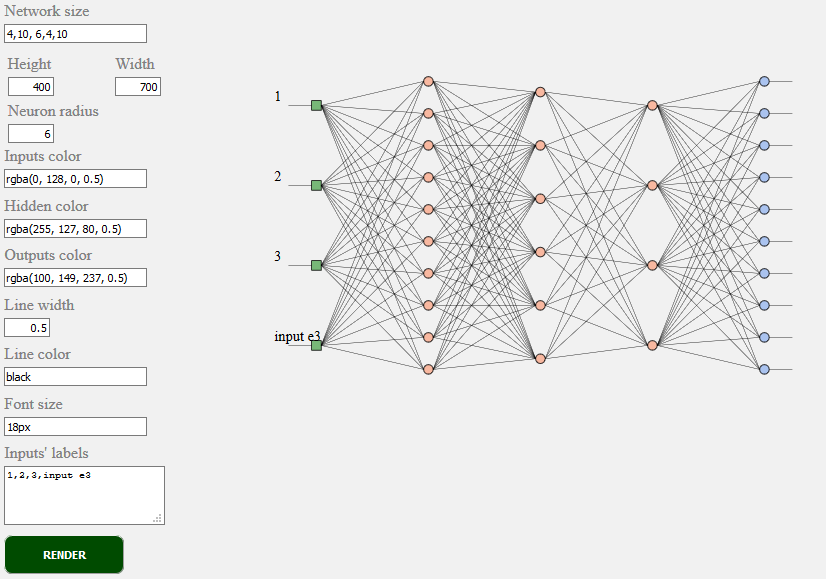
brain.NeuralNetwork - 反向傳播的前饋神經網絡brain.NeuralNetworkGPU帶反射的前饋神經網絡,GPU版本brain.AE帶有反射和GPU支持的自動編碼器或“ AE”brain.recurrent.RNNTimeStep時間步長復發性神經網絡或“ RNN”brain.recurrent.LSTMTimeStep時間步長長期記憶神經網絡或“ LSTM”brain.recurrent.GRUTimeStep時間步進門控復發單元或“ gru”brain.recurrent.RNN復發性神經網絡或“ RNN”brain.recurrent.LSTM長期短期記憶神經網絡或“ LSTM”brain.recurrent.GRU封閉式複發單元或“ gru”brain.FeedForward高度可自定義的前饋神經網絡,帶有反向傳播brain.Recurrent高度可定制的反复神經網絡,帶有反向傳播不同的神經網做得很好。例如:
如果您是開發人員,或者您只是在乎ML API的外觀 - 請參與並加入W3C社區並分享您的意見或只是支持您喜歡或同意的意見。
Brain.js是JavaScript世界中廣泛採用的開源機器學習庫。有幾個原因,但最值得注意的是使用的簡單性,而不是犧牲性能。我們希望在W3C標準方面保持簡單的學習,易於使用和表現。我們認為當前的大腦API非常接近我們可能成為標準的api。而且,由於支持不需要太多努力,而且仍然可以帶來巨大的不同,可以隨意加入W3C社區團體,並使用像API這樣的Brain.js支持我們。
在此處參與W3C機器學習正在進行的標準化過程。您也可以在此處加入我們關於標準化的公開討論。
如果您有問題,則認為您認為有益於您的項目的錯誤或功能,我們將盡力而為。
在此處創建問題並遵循模板。
brain.js.org存儲庫可用Brain.js.org的來源。使用Awesome vue.js & bulma構建。總是歡迎捐款。
由於所有貢獻的人,該項目的存在。 [貢獻]。
感謝我們所有的支持者! [成為支持者]
通過成為贊助商來支持這個項目。您的徽標將在此處顯示您網站的鏈接。 [成為贊助商]





