HydraLab
ver connection with removing username

建立自己的雲測試基礎架構
中文(完善中)
什麼是Hydra實驗室? |入門|貢獻|聯繫我們| Wiki
如上面的視頻中所述,Hydra Lab是一個框架,可以幫助您輕鬆地利用手頭的測試設備/機器構建雲測試平台。
Hydra實驗室的功能包括:
有關更多詳細信息,您可以參考:
請訪問我們的GitHub項目Wiki,以了解開發環境設置程序:貢獻指南。
Hydra實驗室代理的支持環境:Windows,Mac OSX和Linux(Docker)。
支持的平台和框架矩陣:
| Appium(Java) | 濃縮咖啡 | xctest | 大師 | Python Runner | |
|---|---|---|---|---|---|
| 安卓 | ✔ | ✔ | x | ✔ | ✔ |
| ios | ✔ | x | ✔ | ✔ | ✔ |
| 視窗 | ✔ | x | x | x | ✔ |
| Web(瀏覽器) | ✔ | x | x | x | ✔ |
Hydra Lab提供了Docker映像的離式體驗,我們稱其為Uber 。您可以按照以下步驟操作,並使用中心實例和代理實例啟動Docker容器:
步驟1。下載並安裝Docker
步驟2。下載最新的Uber Docker圖像
docker pull ghcr.io/microsoft/hydra-lab-uber:latest此步驟是必要的。沒有此步驟並跳到步驟3,如果存在,則可以在本地latest的Docker映像上進行定位。
步驟3。在機器上運行
默認情況下,Hydra Lab將使用本地文件系統作為存儲解決方案,您可以在終端中輸入以下內容以運行它:
docker run -p 9886:9886 --name=hydra-lab ghcr.io/microsoft/hydra-lab-uber:latest我們強烈建議將Azure Blob存儲服務作為文件存儲解決方案,Hydra Lab具有本機,一致和驗證的支持。
步驟3。訪問網頁並查看您的連接設備
URL:http:// localhost:9886/portal/index.html#/(或您的自定義端口)。
享受開始探索旅程!
步驟4。用最小設置執行測試步驟
注意:對於Android,Uber圖像僅支持濃縮咖啡/儀器測試。有關更多功能,請參見此頁面上的“用戶手冊”部分:Hydra Lab Wiki。
使用Uber圖像和本地存儲進行測試:
Runner選項卡,然後選擇HydraLab Client 。Run ,然後更改“濃縮咖啡測試範圍”以Test app ,請單擊Next 。Next ,然後單擊Run以開始測試。Task選項卡中查看測試結果。 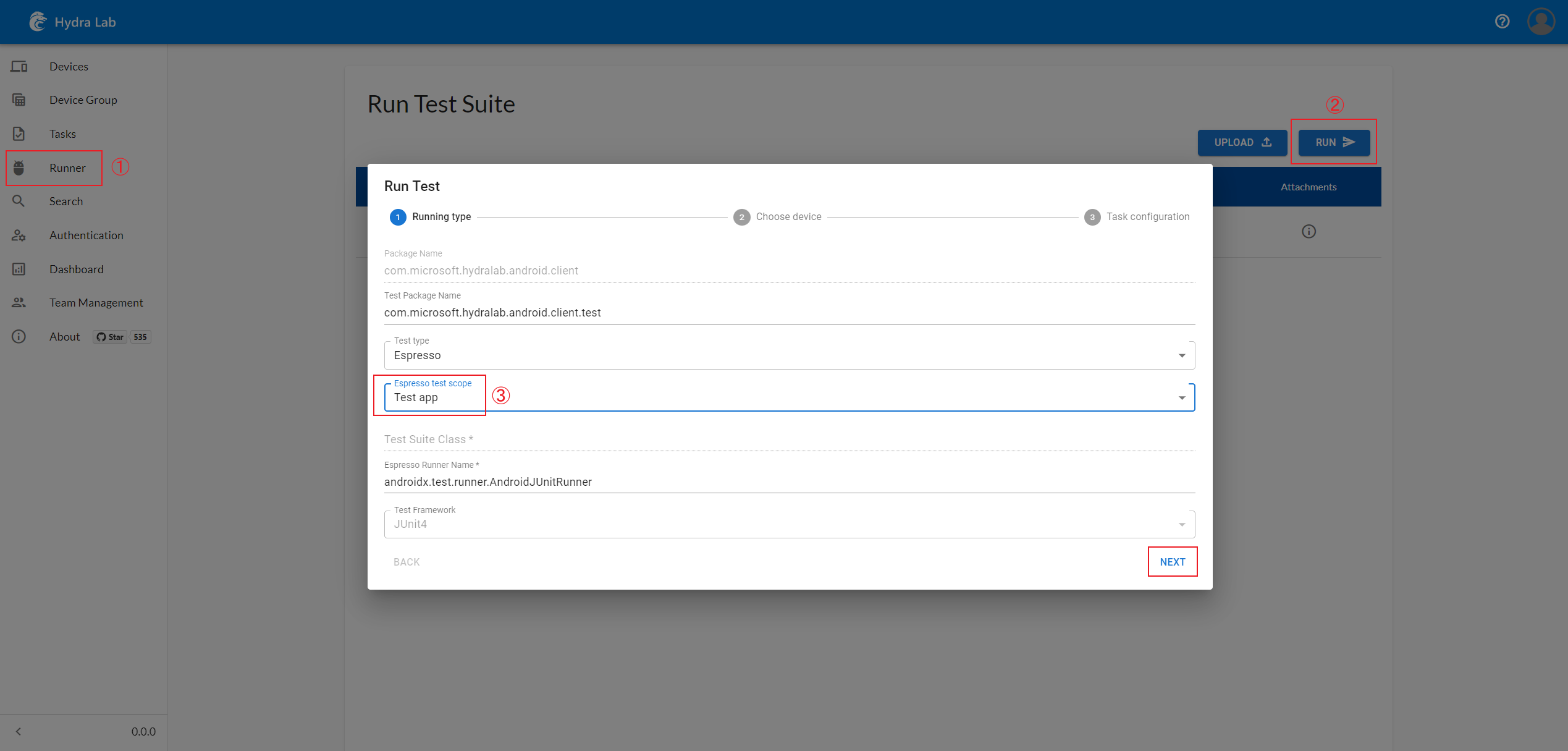
您還可以通過以下命令分別運行Center Java Spring Service(可運行的JAR):
構建和運行過程將需要JDK11 | npm | Android SDK平台工具位置。
步驟1。運行Hydra Lab Center服務
 # In the project root, switch to the react folder to build the Web front.
cd react
npm ci
npm run pub
# Get back to the project root, and build the center runnable Jar.
cd ..
# For the gradlew command, if you are on Windows please replace it with `./gradlew` or `./gradlew.bat`
gradlew :center:bootJar
# Run it, and then visit http://localhost:9886/portal/index.html#/
java -jar center/build/libs/center.jar
# Then visit http://localhost:9886/portal/index.html#/auth to generate a new agent ID and agent secret.
如果遇到錯誤:
Error: error:0308010C:digital envelope routines::unsupported,請將系統變量NODE_OPTIONS設置為--openssl-legacy-provider,然後重新啟動終端。
步驟2。運行Hydra Lab Agent服務
 # In the project root
cd android_client
# Build the Android client APK
./gradlew assembleDebug
cp app/build/outputs/apk/debug/app-debug.apk ../common/src/main/resources/record_release.apk
# If you don't have the SDK for Android ,you can download the prebuilt APK in https://github.com/microsoft/HydraLab/releases
# Back to the project root
cd ..
# In the project root, copy the sample config file and update the:
# YOUR_AGENT_NAME, YOUR_REGISTERED_AGENT_ID and YOUR_REGISTERED_AGENT_SECRET.
cp agent/application-sample.yml application.yml
# Then build an agent jar and run it
gradlew :agent:bootJar
java -jar agent/build/libs/agent.jar
步驟3。請訪問http:// localhost:9886/portal/index.html#/並查看您的連接設備
您對Hydra實驗室的貢獻將對整個測試自動化生態系統產生影響。有關說明,請參考貢獻。
您可以通過打開問題或發送我們的郵件來與我們聯繫。
感謝您以Hydra Lab的名義為Microsoft員工提供計劃的貢獻:
@germey(崔慶才),@spongeonline(王創), @ellie-mac(陳佳佩),@yawn(劉俊欽), @white(劉子凡), @597(姜志鵬),@hcg(尹照宇)
整個代碼庫均在MIT許可下。
該項目可能包含用於項目,產品或服務的商標或徽標。 Microsoft商標或徽標的授權使用受到了Microsoft的商標和品牌準則的約束。在此項目的修改版本中使用Microsoft商標或徽標不得引起混亂或暗示Microsoft贊助。任何使用第三方商標或徽標都遵守這些第三方政策。
我們將Microsoft Clarity Analysis平台用於前端客戶數據儀表板,請參閱Clarity概述和https://clarity.microsoft.com/了解更多信息。
關閉清晰度的說明:
打開主動脈,請評論稱initclarity()的行,並重建Hydra Lab Client APK,重新添加Agent Resources文件夾中的一個。
遙測/數據收集通知





