VSUA Captioning
1.0.0

VSUA模型將圖像表示為結構圖,其中節點是所謂的視覺語義單元(VSUS):對象,屬性和關係單元。我們的VSUA模型利用了字幕單詞和VSU之間的對齊性質。
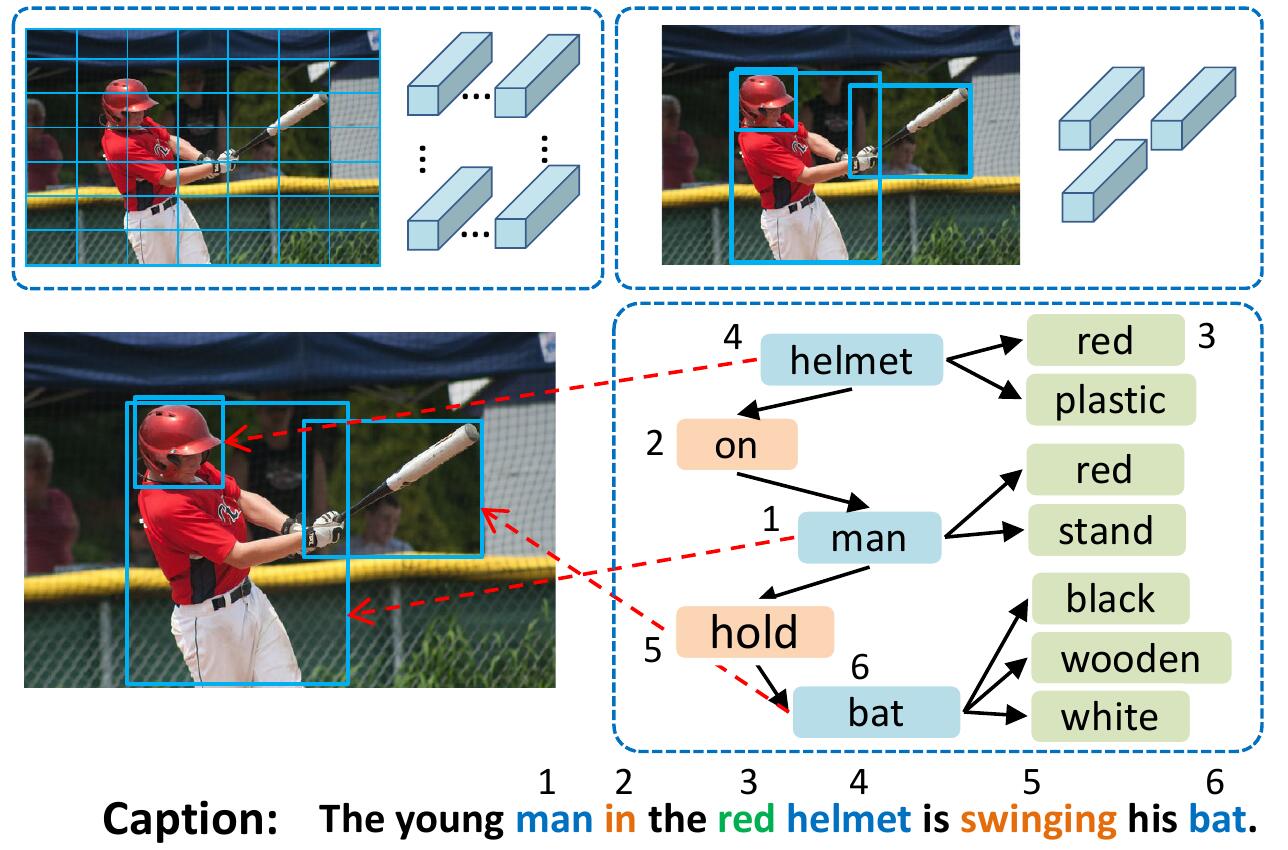
如果您發現此代碼對您的研究有用,請引用
 @inproceedings{guo2019vsua,
 title={Aligning Linguistic Words and Visual Semantic Units for Image Captioning},
 author={Longteng Guo, Jing Liu, Jinhui Tang, Jiangwei Li, Wei Luo, and Hanqing Lu},
 booktitle={ACM MM},
 year={2019}}
要安裝所有子模型: git clone --recursive https://github.com/ltguo19/VSUA-Captioning.git
有關更多詳細信息和其他數據集,請參見Ruotianluo/pycritical.pytorch
從karpathy的主頁下載鏈接中的可可標題。從zip文件中提取dataset_coco.json ,然後將其複製到data/中。該文件提供了預處理的字幕以及標準的火車 - val測試拆分。
然後做:
$ python scripts/prepro_labels.py --input_json data/dataset_coco.json --output_json data/cocotalk.json --output_h5 data/cocotalk prepro_labels.py將將發生的所有單詞映射到特殊的UNK令牌,並為所有其餘單詞創建詞彙。圖像信息和詞彙被傾倒到data/cocotalk.json和離散的字幕數據被傾倒到data/cocotalk_label.h5中。
我們使用預先提取的自下而上圖像功能。從鏈接下載預提取功能(我們在實驗中使用自適應功能)。例如:
mkdir data/bu_data ; cd data/bu_data
wget https://storage.googleapis.com/bottom-up-attention/trainval.zip
unzip trainval.zip
然後:
python script/make_bu_data.py --output_dir data/cocobu這將創建data/cocobu_fc , data/cocobu_att和data/cocobu_box 。
我們使用Yangxuntu/sgae的場景圖數據。從此鏈接下載文件coco_img_sg.zip和coco_pred_sg_rela.npy ,然後將它們放入文件夾data中,然後將其解壓縮。 coco_img_sg.zip包含每個圖像的場景圖數據,包括自適應自下而上數據中每個框的對象標籤和屬性標籤,以及框之間的語義關係標籤。 coco_pred_sg_rela.npy包含對象,屬性和關係標籤的詞彙。
從此鏈接下載文件vsua_box_info.pkl ,其中包含每個框的大小以及每個圖像的寬度/高度。然後做:
python scripts/cal_geometry_feats.py
python scripts/build_geometry_graph.py提取幾何關係特徵並構建幾何圖。這將創建data/geometry_feats-undirected.pkl和data/geometry-iou0.2-dist0.5-undirected 。
總體而言,數據文件夾應包含這些文件/文件夾:
cocotalk.json         	# additional information about images and vocab
cocotalk_label.h5       # captions
coco-train-idxs.p       # cached token file for cider
cocobu_att              # bottom-up feature
cocobu_fc               # bottom-up average feature
coco_img_sg             # scene graph data
coco_pred_sg_rela.npy   # scene graph vocabularies
vsua_box_info.pkl       # boxes and width and height of images
geometry-iou0.2-dist0.5-undirected # geometry graph data python train.py --gpus 0 --id experiment-xe --geometry_relation True火車腳本將將檢查點轉儲到由--checkpoint_root和--id指定的文件夾中。
python train.py --gpus 0 --id experiment-rl --geometry_relation True --learning_rate 5e-5 --resume_from experiment-xe --resume_from_best True --self_critical_after 0 --max_epochs 50--gpu指定用於運行模型的GPU。 --id是該實驗的名稱,所有信息和檢查點將被傾倒到checkpoint_root/id文件夾。--geometry_relation指定要使用的關係類型。正確:使用幾何關係,錯誤:使用語義關係。--resume_from選項是您要從中恢復的實驗ID,並使用--resume_from_best來選擇是從表現最好的檢查點還是最新的檢查點恢復。checkpoint_root/id中,並且可以使用sh script/tensorboard.sh使用Tensorboard可視化。--language_eval 1選項,但不要忘記將可可托代碼下載到coco-caption目錄中。opts.py並參見自我批判性。 該代碼是根據Ruotian Luo出色的圖像字幕ruotianluo/pycritical.pytorch修改的。我們使用自下而上的Peteanderson80/自下而上註意的視覺功能,以及Yangxuntu/sgae提供的場景圖數據。感謝他們的工作!如果您發現此代碼有幫助,請考慮引用其相應的論文和我們的論文。





