sales order system
1.0.0

項目不再積極維護,請參閱:銷售訂單系統2.0而不是
這是一個非常小的全堆棧Web應用程序,用於樣本,用於純演示目的。
git clone https://github.com/colinbut/sales-order-system.git
mvn clean package
...將編譯來源,打包戰爭文件
進入在線應用程序目錄並執行以下命令:
mvn tomcat7:run-war
使用Maven Tomcat7插件在嵌入式Apache Tomcat Web容器中運行該應用程序
加載應用程序後,導航到:
http://localhost:8080/online-application/login
可以在Spring的application-security.xml配置文件中找到一些示例憑據。
mvn test
...這將在測試套件中運行所有單元測試
或者
從您的IDE導航到單元測試類,然後單擊IDE的“運行”按鈕
mvn verify
...這將在測試套件中運行所有集成測試。
或者
從您的IDE中,只需導航到集成測試類,然後單擊IDE的“運行”按鈕
[TBD]
使用Sonar(Sonarqube)對項目進行代碼質量分析。提供了聲納項目。提供的Properties文件。將需要Sonarqube服務器和Sonar Runner,因此需要從Sonarqube網站下載它們並遵循安裝說明。
假設安裝了聲納(在環境路徑上使用Sonar Runner),在CLI Run上:
sonar-runner
也可以使用MySQL運行。您需要安裝mySQL。從MySQL網站下載並遵循安裝說明。
如下規定的未註釋:
    <!-- uncomment out for use with MySQL database -->
    < bean id = " dataSource " class = " org.springframework.jdbc.datasource.DriverManagerDataSource " >
        < property name = " driverClassName " value = " com.mysql.jdbc.Driver " />
        < property name = " url " value = " jdbc:mysql://localhost:3306/sales_order_system " />
        < property name = " username " value = " root " />
        < property name = " password " value = " " />
    </ bean >

    < jdbc : initialize-database ignore-failures = " DROPS " >
        < jdbc : script location = " file:src/main/resources/scripts/db-drop-tables.sql " />
        < jdbc : script location = " file:src/main/resources/scripts/db-create.sql " />
</ jdbc : initialize-database >屁股MongoDB已安裝在系統上。如果沒有,可以從MongoDB網站下載並遵循安裝說明。
啟動MongoDB數據庫服務器:
./mongod
打開MongoDB數據庫客戶端:
./mongo
加載MongoDB JavaScript文件,該文件填充一些示例數據
load("mongodb.js")
該應用程序只是一個簡單的整體應用程序,該應用程序構建了幾層。總之,後端用Java編寫,該Java連接到後端內存關係數據庫(HSQL)。也可以連接到其他關係數據庫(MySQL)。應用程序通過春季框架進行了SCAFOLD。模型視圖控制器(MVC)架構模式用於將前端與後端區分開。這是通過Spring Web MVC實現的。然後,該應用程序將部署在嵌入式Web容器(Apache Tomcat)上。
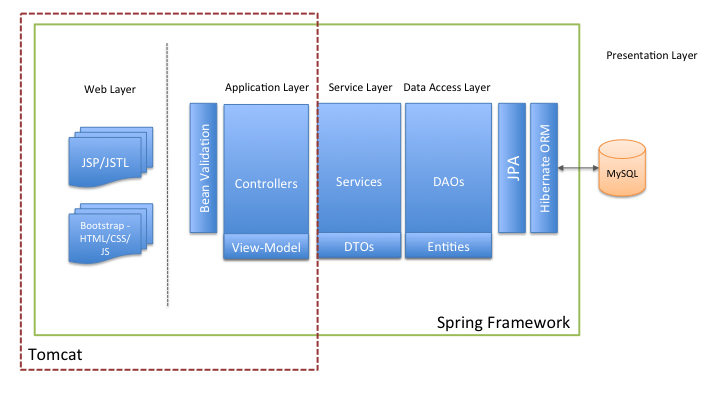
前端顯然是JSP,在這里和那裡有一點JSTL。蒲公英數據庫也用於在UI中實現表。基本CSS樣式。 Bootstrap為此提供了前端框架。
[TBD]
此應用程序非常簡單。這是一個當前提供基本CRUD操作的Web應用程序。所有操作都被視為通過各個層次執行的業務交易。因此,與純面向對象的域模型相反,使用了貧血模型。這是足夠和理想的,因為目前,所需的複雜業務邏輯處理並不多。
定義應用程序的邊界並從接口客戶層(前端)的角度設置可用操作。它封裝了應用程序的業務邏輯,在實施其運營時控制交易和COOR調整響應。
例如
 @ Service ( "itemServiceImpl" )
@ Transactional
public class ItemServiceImpl implements ItemService {

	@ Autowired
	private ItemRepository itemRepository ;

	...

}下面的數據存儲的面向對象的視圖,在數據映射模式的數據訪問功能的前面提供了額外的抽象(Spring Data JPA)。對象關係映射框架(Hibernate)用於實現映射關係數據庫表與域模型之間的差異的效果。 JPA的Entity Manager封裝了數據訪問元素(數據訪問對像模式)。
例如彈簧數據JPA存儲庫
 @ Repository
public interface ItemRepository extends JpaRepository < Item , Integer > {

}彈簧框架的註釋支持(組件掃描)是為了利用Spring Framework的核心能力 - 依賴性注入控制(IOC)容器提供的依賴性注入。
 @ Controller
public class OrderController {

	private static final Logger logger = LoggerFactory . getLogger ( OrderController . class );

	@ Autowired
	@ Qualifier ( "orderServiceImpl" )
	private OrderService orderService ;

	@ Autowired
	@ Qualifier ( "customerServiceImpl" )
	private CustomerService customerService ;

	@ Autowired
	@ Qualifier ( "itemServiceImpl" )
	private ItemService itemService ;

	@ Autowired
	@ Qualifier ( "orderFormValidator" )
	private OrderFormValidator orderFormValidator ;
客戶模型對象的另一個示例:
 @ Entity
@ Table ( name = "customer" )
@ Getter
@ Setter
@ NoArgsConstructor
@ EqualsAndHashCode ( exclude = "orders" )
@ ToString
public class Customer {

    @ Id
    @ GeneratedValue ( strategy = GenerationType . IDENTITY )
    @ Column ( name = "customer_id" )
    private int customerId ;

	@ NotNull ( message = "{error.null.firstname}" )
	@ NotBlank ( message = "{error.blank.firstname}" )
	@ NotEmpty ( message = "{error.empty.firstname}" )
	@ Pattern ( regexp = "[a-zA-Z]*" , message = "{error.invalid.firstname}" )
    @ Column ( name = "customer_firstname" , nullable = false , length = 50 )
	private String firstName ;

	@ NotNull ( message = "{error.null.lastname}" )
	@ NotBlank ( message = "{error.blank.lastname}" )
	@ NotEmpty ( message = "{error.empty.lastname}" )
	@ Pattern ( regexp = "[a-zA-Z]*" , message = "{error.invalid.lastname}" )
    @ Column ( name = "customer_lastname" , nullable = false , length = 50 )
	private String lastName ;
Lombok項目用於生成Getters/setters/tostring/equals和Hashcode刪除樣板代碼
該應用程序啟用了使用Spring Framework的Spring Security模塊的基本功能實現的登錄/註銷功能。
以下應用程序security.xml Spring配置文件顯示關鍵安全配置:
< beans : beans xmlns = " http://www.springframework.org/schema/security "
             xmlns : beans = " http://www.springframework.org/schema/beans "
             xmlns : xsi = " http://www.w3.org/2001/XMLSchema-instance "
             xsi : schemaLocation = " http://www.springframework.org/schema/beans
	http://www.springframework.org/schema/beans/spring-beans-3.0.xsd
	http://www.springframework.org/schema/security
	http://www.springframework.org/schema/security/spring-security-3.2.xsd " >

    < http auto-config = " true " >

        <!-- items -->
        < intercept-url pattern = " /items " access = " ROLE_TEST_USER,ROLE_ADMIN " />
        < intercept-url pattern = " /items/create " access = " ROLE_TEST_USER,ROLE_ADMIN " />
        < intercept-url pattern = " /items/createItem " access = " ROLE_TEST_USER,ROLE_ADMIN " />

        ....

        < form-login
            login-page = " /login "
            default-target-url = " /customers "
            authentication-failure-url = " /login?error "
            username-parameter = " username "
            password-parameter = " password "
        />

        < logout logout-success-url = " /login?logout " />

        < csrf />

    </ http >

    < authentication-manager >
        < authentication-provider >
            < user-service >
                <!-- hard coding application user credentials - switch to DB or LDAP -->
                < user name = " testUser " password = " password " authorities = " ROLE_TEST_USER " />
                < user name = " admin " password = " password " authorities = " ROLE_ADMIN " />
            </ user-service >
        </ authentication-provider >
    </ authentication-manager >

</ beans : beans >使用Spring的測試上下文框架實施集成測試。使用內存數據庫(HSQL)。
端2結束測試(接受測試)是使用Cucumber-JVM進行的。這是在測試自動化子模塊下可用的。這樣做的目的是提供完整堆棧Web應用程序的端到端自動化。也許將來可以集成硒,這將允許在Web瀏覽器上自動化Web應用程序。但是目前,黃瓜測試以後端代碼編寫。接受標準使用Gherkin語言寫在.feature文件中。該區域需要改進。請注意,該項目的End 2結束測試仍然是WIP。
[TBD]
| 前端 | 後端 | 資料庫 | 測試 | 其他 |
|---|---|---|---|---|
| html | Java 8 | HSQL(HypersQL) | 朱尼特 | slf4j -log4j |
| CSS | 彈簧核 | mysql | assertj | 小牛 |
| JS | 春季Web MVC | mongodb | 嘲笑 | tomcat |
| 引導程序 | 春季數據JPA | 黃瓜-JVM | Sonarqube | |
| JSP | 春季安全性 | 春季測試上下文 | 倫波克 | |
| JSTL | JPA-休眠 | |||
| 蒲公英數據表 | JTA | |||
| 豆驗證 |







