aibitat
v0.0.3

該項目是原始Autogen的叉子,但在打字稿中完成。
AIBITAT是一個無國狀且可擴展的框架,旨在在允許人參與的同時在多個代理之間進行互動。
將其視為鬆弛,但對於AI代理商。創建代理,將它們添加到頻道中,然後讓他們相互聊天。您還可以在頻道中添加頑固的代理商,並讓他們參加對話。
有關更完整的示例,請查看示例文件夾。
您可以安裝軟件包:
 # to install bun go to https://bun.sh and follow the instructions
# then run to start a new project:
mkdir my-project
cd my-project
bun init

# then install aibitat
bun install aibitat創建.env文件並添加您的OPENAI_API_KEY :
OPENAI_API_KEY=...然後創建一個稱為index.ts的文件,並添加以下內容:
 import { AIbitat } from 'aibitat'
import { cli } from 'aibitat/plugins'

const aibitat = new AIbitat ( )
  . use ( cli ( ) )
  . agent ( 'client' , {
    interrupt : 'ALWAYS' ,
    role : 'You are a human assistant. Reply "TERMINATE" when there is a correct answer or there`s no answer to the question.' ,
  } )
  . agent ( 'mathematician' , {
    role : `You are a Mathematician and only solve math problems from @client` ,
  } )
  . agent ( 'reviewer' , {
    role : `You are a Peer-Reviewer and you do not solve math problems.
    Check the result from @mathematician and then confirm. Just confirm, no talk.` ,
  } )
  . channel ( 'management' , [ 'mathematician' , 'reviewer' , 'client' ] )

// aibitat.onMessage(console.log)

await aibitat . start ( {
  from : 'client' ,
  to : 'management' ,
  content : 'How much is 2 + 2?' ,
} )

console . log ( aibitat . chats )
然後運行:
bun run index.ts| 特徵 | 它做什麼 | 地位 |
|---|---|---|
| 直接消息 | 代理商直接交談。 | ✅ |
| 回饋 | 保持聊天活力,直到某些代理商中斷聊天為止。 | ✅ |
| 頻道 | 代理商與許多其他人交談,例如在鬆弛頻道中。 | ✅ |
| 錯誤處理 | 平穩地管理速率限製而不會崩潰。 | ✅ |
| 函數執行 | 代理可以執行任務並了解結果。 | ✅ |
| 網絡瀏覽 | 在互聯網上導航。 | ? |
| 快取 | 保存聊天歷史記錄以獲取更快的API通話。 | ? |
| 文件交互 | 通過讀/寫/執行與本地文件進行交互 | ? |
| 代碼執行 | 代理可以運行代碼並共享結果。 | ? |
| 成本限制 | 按成本限制互動數量。 | ? |
| 提供者 | 地位 |
|---|---|
| Openai | ✅ |
| 人類 | ✅ |
| 共同 | ? |
| Fireworks.ai | ? |
| 擁抱臉 | ? |
| 複製 | ? |
本文檔中使用的一些術語:
interrupt : NEVER , ALWAYS 。當NEVER ,代理人將永遠不會中斷對話。 ALWAYS ,代理商將始終中斷對話。 (注意:如果他們回复“中斷”或在回复“終止”時終止聊天,他們中的任何一個都可以中斷對話。)role :代理人的角色。它用於描述代理商將在聊天中扮演的角色。maxRounds :代理商或組的最大聊天數量將回復對話。它用於防止循環。new AIbitat(config)創建一個新的AIBITAT實例。 config對象可用於配置實例。默認情況下,AIBITAT使用OpenAI和GPT-3.5-Turbo作為對話的提供商,以及GPT-4來預測下一個代理人會說話。您可以通過將provider和model傳遞給AIbitat構造函數或將其設置在特定代理/頻道配置上來更改它。默認配置:
 {
  providers : 'openai' ,
  model : 'gpt-3.5-turbo' ,
  interrupt : 'NEVER' ,
  maxRounds : 100 ,
  chats : [
    // {
    //   from: '?',
    //   to: '?',
    //   content: `Talk about something`,
    //   state: 'success',
    // },
  ] ,
}
.agent(name, config)創建一個新代理。 config對象可用於配置代理。默認情況下,代理使用來自AIbitat配置的interrupt 。
.channel(name, agents, config)創建一個新頻道。 config對象可用於配置通道。默認情況下, maxRounds設置為100 。
.function(config)功能用於執行代碼並將結果返回到對話中。要使用它,請調用傳遞該函數的定義的function方法,並將其名稱添加到functions屬性中:
 const aibitat = new AIbitat ( )
  . agent ( '...' , { functions : [ 'doSomething' ] } )
  . function ( {
    name : 'doSomething' ,
    description : 'Let me do something for you.' ,
    parameters : {
      type : 'object' ,
      properties : { } ,
    } ,
    async handler ( ) {
      return '...'
    } ,
  } )
結果將發送給提供商並返回對話。
.use(plugin)插件用於擴展AIBITAT的功能。它們可用於添加新功能或與其他服務集成。您可以通過實現AIbitatPlugin接口來創建自己的插件。
要使用插件,請調用use方法:
...
import { cli } from 'aibitat/plugins'

const aibitat = new AIbitat ( ) . use ( cli ( ) )您還可以通過實現AIbitatPlugin接口來創建自己的插件:
 import { AIbitatPlugin } from 'aibitat'

export function myPlugin ( ) : AIbitatPlugin {
  return {
    name : 'my-plugin' ,
    setup ( aibitat ) {
      console . log ( `setting up my plugin` )

      aibitat . onMessage ( ( { from , to , content } ) => {
        console . log ( ` ${ from } : ${ content } ` )
      } )
    } ,
  }
}
可用插件列表:
cli :在聊天中添加CLI交互。fileHistory :將聊天歷史記錄保存到JSON文件中。默認為history記錄文件夾”experimental_webBrowsing :在聊天中添加了web-browsing功能,使代理可以在Internet上進行搜索和導航。注意:此插件是實驗性的,可能無法正常工作。AIBITAT支持生命週期事件,這在特定時刻觸發。下圖顯示了對話的生命週期:
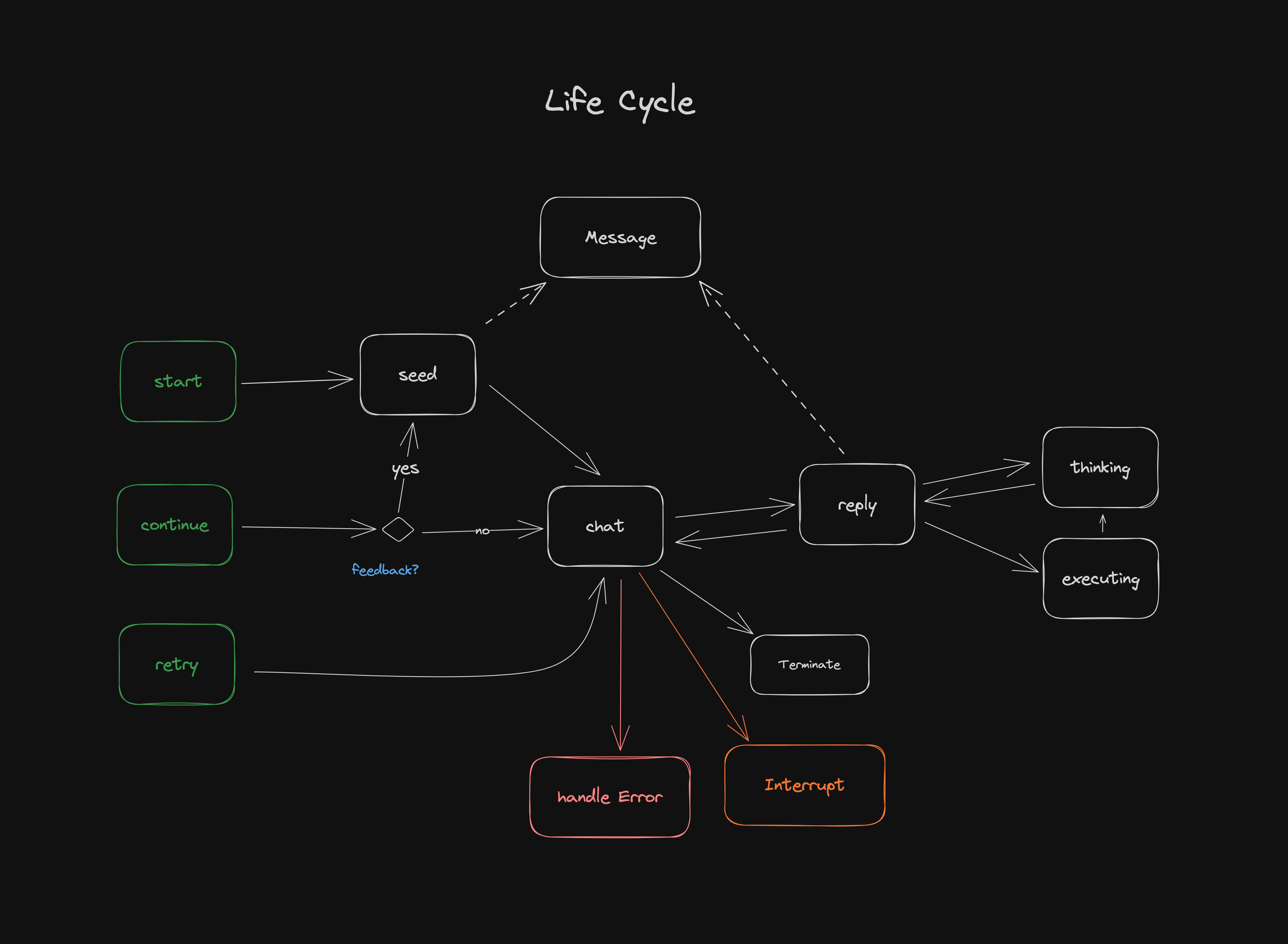
AIBITAT中的生命週期事件包括:
start :聊天開始時打電話。error :當存在已知錯誤時調用(請參閱src/error.ts )。要重試,請致電.retry() 。message :將消息添加到聊天歷史記錄時打電話。terminate :對話終止時打電話。通常意味著沒有其他事情要做,應該開始新的對話。interrupt :當對話被代理商中斷時打電話。通常意味著代理有問題或需要幫助。可以通過致電.continue(feedback)來恢復對話。 將.env.example文件複製到.env ,然後在其中添加您的鍵/令牌。
安裝依賴項:
bun install運行:
bun run examples/beginner-chat.ts查看示例文件夾以獲取更多示例。
該項目是在BUN V1.0.3中使用bun init創建的。 BUN是一個快速的多合一JavaScript運行時。
麻省理工學院





