autogen ui
1.0.0

重要的
該存儲庫已更新以使用基於新的Autogen 0.4倍代理API的Autogen AgentChat界面。另外,API可能會發生變化,因此預計將來會發生一些破裂的變化。
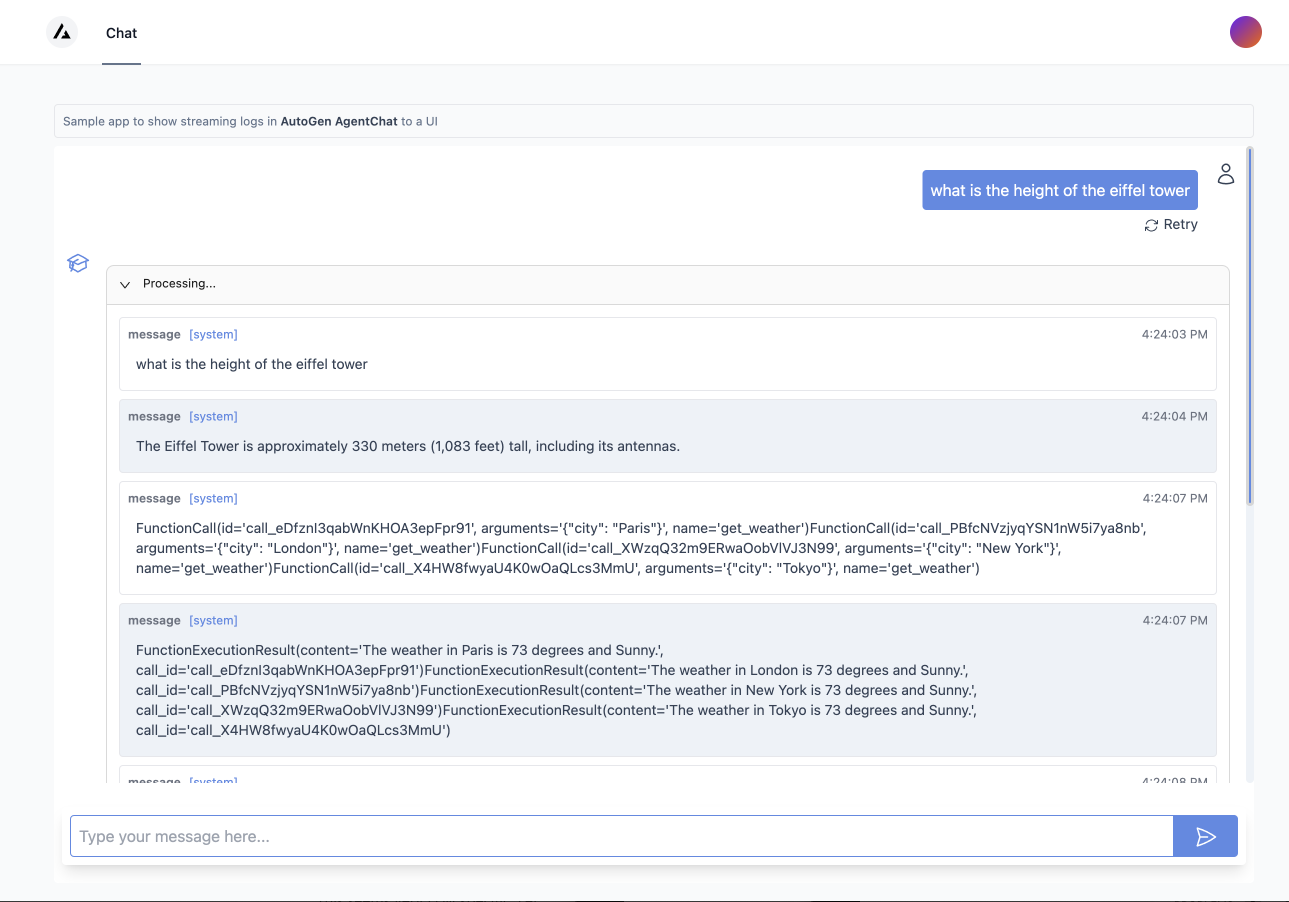
Hello World使用Autogen AgentChat API構建UI界面。
示例UI演示瞭如何使用Autogen AgentChat API構建接口。 UI是使用Next.js和Web API構建的。
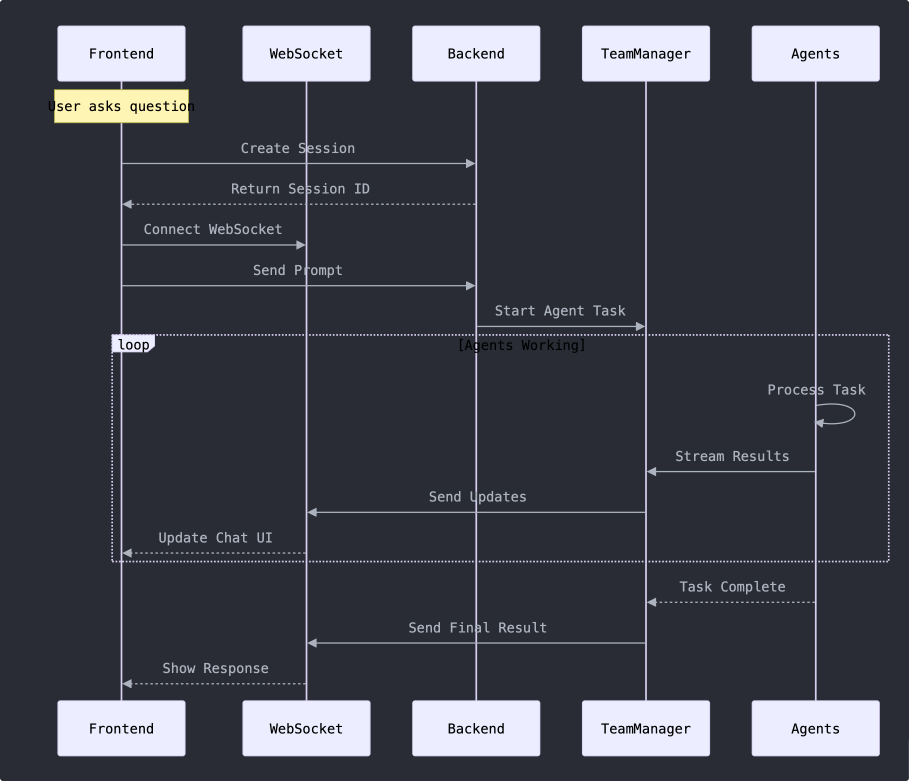
autogenui.manager提供了一種簡單的運行方法,該方法採取了提示,並返回了預定義代理團隊的響應。查看Agent Team JSON配置文件,以查看如何配置代理。它對支持哪些類型的代理等有一個一般的想法。查看教程筆記本,以獲取有關如何使用提供類加載團隊規格的示例。
autogenui.web.app.py FastApi後端提供一個簡單/generate端點,該端點要提示並返回預定義代理團隊的響應。
frontend -Next.js Frontend提供了一個簡單的聊天接口與後端交互。
這個應用顯然只是一個起點。以下是有關如何擴展它的一些想法:
[!提示]請注意,Autogen Studio已在AgentChat API上重寫,以解決上述大多數點。看看那裡的實現,以獲取更完整的示例。
請注意,您必須設置OpenAI_API_KEY才能運行該應用。
export OPENAI_API_KEY= < your key >安裝依賴項。需要python 3.9+。您可以使用PIP從PYPI安裝。
pip install autogenui或從源安裝
git clone [email protected]:victordibia/autogen-ui.git
cd autogenui
pip install -e .
運行UI服務器。
設置env vars OPENAI_API_KEY
export OPENAI_API_KEY= < your_key > autogenui # or with --port 8081打開http:// localhost:8081在您的瀏覽器中。
要修改源文件,請在前端源文件中進行更改,然後運行npm run build以重建前端。
要以開發模式運行該應用程序,您需要單獨運行後端和前端。
autogenui --reload[!tip]通過運行前端構建命令顯示blow,在預先符合的版本中加載了該CLI加載的UI。這意味著,如果您更改前端代碼或更改主機名或端口,則需要對後端更新的前端代碼運行,以通過此命令進行加載。
cd frontend安裝依賴項
yarn install在開發模式下運行 - 帶有熱線電加載
在命令行上設置NEXT_PUBLIC_API_SERVER 。
export NEXT_PUBLIC_API_SERVER=http:// < your_backend_hostname > /api或在前端文件夾中創建一個.env文件,其中包含以下內容。
NEXT_PUBLIC_API_SERVER=http:// < your_backend_hostname > /api your_backend_hostname-是Autogenui在EG localhost:8081
yarn dev(重建
請記住要安裝依賴項並在構建前設置NEXT_PUBLIC_API_SERVER 。
yarn build這個項目確實沒有太多路線圖。這是一個簡單的例子,可以開始使用Autogen AgentChat API。有關一個更完整的例子,請查看Autogen Studio項目。
 @inproceedings{dibia2024autogen,
  title={AutoGen Studio: A No-Code Developer Tool for Building and Debugging Multi-Agent Systems},
  author={Dibia, Victor and Chen, Jingya and Bansal, Gagan and Syed, Suff and Fourney, Adam and Zhu, Erkang and Wang, Chi and Amershi, Saleema},
  journal={EMNLP 2024},
  year={2024}
}
 @inproceedings{wu2023autogen,
      title={AutoGen: Enabling Next-Gen LLM Applications via Multi-Agent Conversation Framework},
      author={Qingyun Wu and Gagan Bansal and Jieyu Zhang and Yiran Wu and Shaokun Zhang and Erkang Zhu and Beibin Li and Li Jiang and Xiaoyun Zhang and Chi Wang},
      year={2023},
      eprint={2308.08155},
      archivePrefix={arXiv},
      primaryClass={cs.AI}
}





