pysiaf
Update to PRDOPSSOC-067

處理太空望遠鏡的科學儀器孔徑文件(SIAF)。 SIAF文件包含科學工具的詳細幾何焦點描述和關係。它們保留在JWST/HST PRD(項目參考數據庫)中。
Pysiaf是一個python軟件包,可訪問,解釋,維護和生成SIAF,尤其是JWST。提供用於應用幀轉換,繪圖,比較和驗證的工具。
檢查使用哪種PRD版本:
print(pysiaf.JWST_PRD_VERSION)
幀轉換( det , sci , idl , tel受支持):
    import pysiaf
    instrument = 'NIRISS'

    # read SIAFXML
    siaf = pysiaf.Siaf(instrument)

    # select single aperture by name
    nis_cen = siaf['NIS_CEN']

    # access SIAF parameters
    print('{} V2Ref = {}'.format(nis_cen.AperName, nis_cen.V2Ref))
    print('{} V3Ref = {}'.format(nis_cen.AperName, nis_cen.V3Ref))

    for attribute in ['InstrName', 'AperShape']:
        print('{} {} = {}'.format(nis_cen.AperName, attribute, getattr(nis_cen, attribute)))


    # coordinates in Science frame
    sci_x = np.array([0, 2047, 2047, 0])
    sci_y = np.array([0, 0, 2047, 2047])

    # transform from Science frame to Ideal frame
    idl_x, idl_y = nis_cen.sci_to_idl(sci_x, sci_y)
繪製(僅說明了一小部分選項):
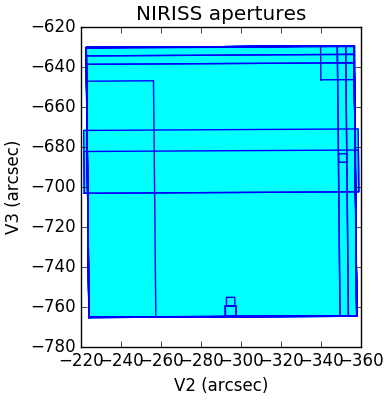
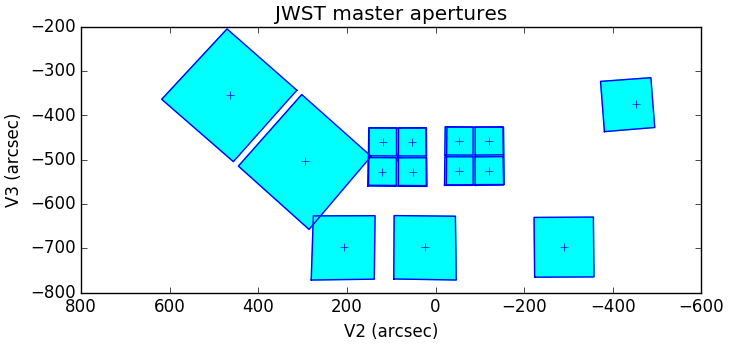
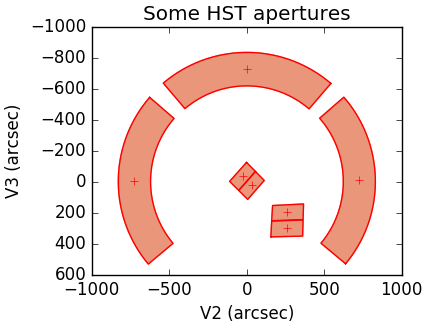
    import matplotlib.pyplot as plt

    plt.figure(figsize=(4, 4), facecolor='w', edgecolor='k'); plt.clf()

    # plot single aperture
    nis_cen.plot()

    # plot all apertures in SIAF
    for aperture_name, aperture in siaf.apertures.items():
        aperture.plot()
    plt.show()
    # plot 'master' apertures
    from pysiaf.siaf import plot_master_apertures
    plt.figure(figsize=(8, 8), facecolor='w', edgecolor='k'); plt.clf()
    plot_master_apertures(mark_ref=True)
    plt.show()
    # plot HST apertures
    siaf = pysiaf.Siaf('HST')
    aperture_names = ['FGS1', 'FGS2', 'FGS3', 'IUVIS1FIX', 'IUVIS2FIX', 'JWFC1FIX', 'JWFC2FIX']

    plt.figure(figsize=(4, 4), facecolor='w', edgecolor='k')
    for aperture_name in aperture_names:
        siaf[aperture_name].plot(color='r', fill_color='darksalmon', mark_ref=True)
    ax = plt.gca()
    ax.set_aspect('equal')
    ax.invert_yaxis()
    plt.show()
JWST SIAF描述的主要參考是Cox&Lallo,2017年,JWSTSCI-001550: JWST Science Instrument Instrument Aperture文件的說明和使用,可在https://jwst.stsci.edu/documentation/technical-dechnical-documents上獲得。 。
Pysiaf在https://pysiaf.readthedocs.io/上進行了記錄。
如果發現此軟件包有用,請考慮使用上面的DOI徽章引用Zenodo記錄。請在引用中找到其他引用說明。
PYSIAF中的所有參數值都可能發生變化。 JWST值是初步的,直到JWST天文台調試得出結論。
Pysiaf中的扭曲和其他轉換對於操作的精度足夠準確,但不一定具有科學級的質量。例如,每個孔徑通常只攜帶一個濾波器解決方案。有關科學級轉換,請諮詢科學管道及其參考文件(請參閱https://jwst-docs.stsci.edu/jwst-data-reduction-pipeline)
對於科學觀察計劃,最新APT(http://www.stsci.edu/hst/proposing/apt)中實現的焦平面幾何形狀優先。
STSCI望遠鏡分支只為S&OC操作系統提供了PYSIAF的全部支持。
請打開您希望看到的錯誤,反饋或新功能的新期刊或新的拉動請求。如果您想解決問題,請發表評論,我們很樂意協助。新的貢獻和貢獻者非常歡迎!
您有反饋和功能請求嗎?您想看一些東西嗎?請打開問題或向維護者發送電子郵件。該軟件包遵循《太空望遠鏡行為守則》努力為我們的所有用戶和貢獻者提供歡迎社區。
以下描述了為Pysiaf項目做出貢獻的典型工作流(根據JWQL進行了改編):0。請勿提交任何敏感信息(例如STSCI內部路徑結構,機器名稱,用戶名,密碼等) 。 GIT歷史無法刪除。
spacetelescope pysiaf存儲庫中創建一個叉子。upstream指向https://github.com/spacetelescope/pysiafspacetelescope pysiaf上打開一個問題,該問題描述了您計劃進行的更改的需求和性質。對於微小的更改和修復,這不是必需的。origin 。spacetelescope pysiaf存儲庫上,創建一個拉動請求,將分支合併為spacetelescope:master 。該軟件包在Python 3.10+中支持
pip install pysiaf
克隆存儲庫:
git clone https://github.com/spacetelescope/pysiaf
安裝pysiaf:
cd pysiaf
pip install .
在開發模式pip install -e .
如果您有錯誤import pysiaf
這追溯到import lxml.etree as ET
和國家ImportError [...] Library not loaded: libxml2.2.dylib Reason: Incompatible library version: etree.[...] requires version 12.0.0 or later, but libxml2.2.dylib provides version 10.0.0 ,
可以通過降級LXML的版本來解決這,例如pip uninstall lxml
pip install lxml==3.6.4
PYQT5安裝問題:如果使用Macos Mojave,則會導致Matplotlib在沒有PYQT5的情況下失敗。請採取適當的措施,以確保安裝了Pyqt5





