scrcpy
scrcpy

此 GitHub 儲存庫 (https://github.com/Genymobile/scrcpy) 是該專案的唯一官方來源。不要從隨機網站下載版本,即使它們的名稱包含scrcpy 。

發音為“ scr een co py ”
該應用程式鏡像透過 USB 或 TCP/IP 連接的 Android 裝置(視訊和音訊),並允許使用電腦的鍵盤和滑鼠控制裝置。它不需要任何根存取權限。它適用於Linux 、 Windows和macOS 。
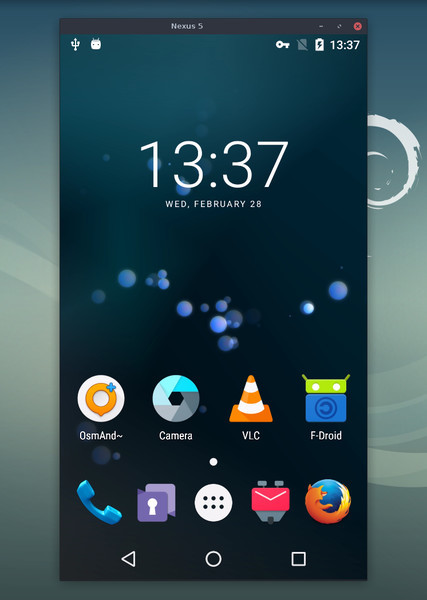
它的重點是:
lightness :本機,僅顯示裝置螢幕
性能:30~120fps,取決於設備
畫質:1920×1080以上
低延遲:35~70ms
啟動時間短:約 1 秒即可顯示第一張影像
非侵入性:Android 裝置上沒有安裝任何內容
用戶優勢:無需帳戶、無廣告、無需互聯網
自由:自由與開源軟體
其特點包括:
音訊轉發(Android 11+)
記錄
Android 裝置螢幕關閉時進行鏡像
雙向複製貼上
可配置的品質
相機鏡像(Android 12+)
鏡像為網路攝影機 (V4L2)(僅限 Linux)
實體鍵盤和滑鼠模擬 (HID)
遊戲手把支持
OTG模式
還有更多…
Android 裝置至少需要 API 21 (Android 5.0)。
API >= 30 (Android 11+) 支援音訊轉發。
確保您在裝置上啟用了 USB 偵錯。
在某些設備(尤其是小米)上,您可能會收到以下錯誤:
java.lang.SecurityException: Injecting input events requires the caller (or the source of the instrumentation, if any) to have the INJECT_EVENTS permission.
在這種情況下,您需要啟用一個附加選項USB debugging (Security Settings) (這是與USB debugging不同的項目)來使用鍵盤和滑鼠進行控制。設定此選項後,需要重新啟動裝置。
請注意,在 OTG 模式下運行 scrcpy 不需要 USB 偵錯。
Linux
視窗
macOS
有很多選項,記錄在單獨的頁面中。這裡只是一些常見的例子。
以H.265(品質更好)捕捉螢幕,將尺寸限制為1920,將幀速率限制為60fps,禁用音頻,並透過模擬實體鍵盤控制設備:
 scrcpy --video-codec=h265 --max-size=1920 --max-fps=60 --no-audio --keyboard=uhid
scrcpy --video-codec=h265 -m1920 --max-fps=60 --no-audio -K # 簡短版本
將設備攝影機以 1920x1080 的 H.265(和麥克風)錄製到 MP4 檔案:
scrcpy --video-source=camera --video-codec=h265 --camera-size=1920x1080 --record=file.mp4
擷取裝置前置鏡頭並將其顯示為電腦上的網路攝影機(在 Linux 上):
scrcpy --video-source=camera --camera-size=1920x1080 --camera-faceing=front --v4l2-sink=/dev/video2 --no-playback
透過模擬實體鍵盤和滑鼠來控制設備,無需鏡像(無需USB調試):
scrcpy--otg
使用插入電腦的遊戲手把控制器控制設備:
 scrcpy --gamepad=uhid
scrcpy -G # 簡短版本
該應用程式提供了很多功能和配置選項。它們記錄在以下頁面中:
聯繫
影片
聲音的
控制
鍵盤
老鼠
遊戲手把
裝置
窗戶
記錄
隧道
OTG
相機
Video4Linux
快速方式
常問問題
翻譯(不一定是最新的)
建構說明
開發商
介紹 scpy
Scrcpy 現在可以無線工作
Scrcpy 2.0,附音頻
您可以針對錯誤報告、功能請求或一般問題提出問題。
對於錯誤報告,請先閱讀常見問題解答,您可能會立即找到問題的解決方案。
您也可以使用:
Reddit: r/scrcpy
推特: @scrcpy_app
我是 @rom1v, scrcpy的作者和維護者。
如果您喜歡這個應用程序,您可以支持我的開源工作:
GitHub 贊助商
自由支付
貝寶
Copyright (C) 2018 Genymobile
Copyright (C) 2018-2024 Romain Vimont

Licensed under the Apache License, Version 2.0 (the "License");
you may not use this file except in compliance with the License.
You may obtain a copy of the License at

    http://www.apache.org/licenses/LICENSE-2.0

Unless required by applicable law or agreed to in writing, software
distributed under the License is distributed on an "AS IS" BASIS,
WITHOUT WARRANTIES OR CONDITIONS OF ANY KIND, either express or implied.
See the License for the specific language governing permissions and
limitations under the License.





