next translate
2.6.2

轻松的I18N适用于Next.js +10
下一个插件+ i18n API
笔记
我们正在使用Next-Translate版本3.0.0版。近几个月来,我们非常专注于Brisa 。因此,自上次发行以来已经很长时间了,但是我们并没有忘记下一译。我们正在制作一个新版本,该版本将带来许多改进和新功能。我们很高兴与大家分享。
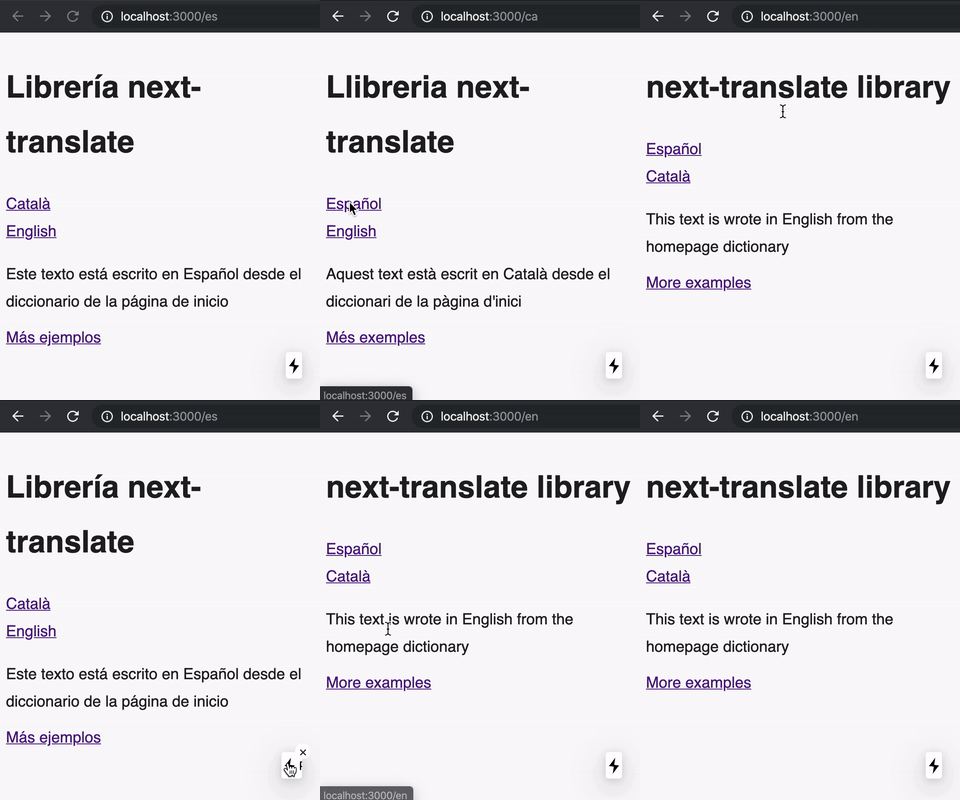
该库的主要目的是在下一个js环境中保持翻译尽可能简单。
Next-Translate有两个部分: Next.js插件+ I18N API 。
特征
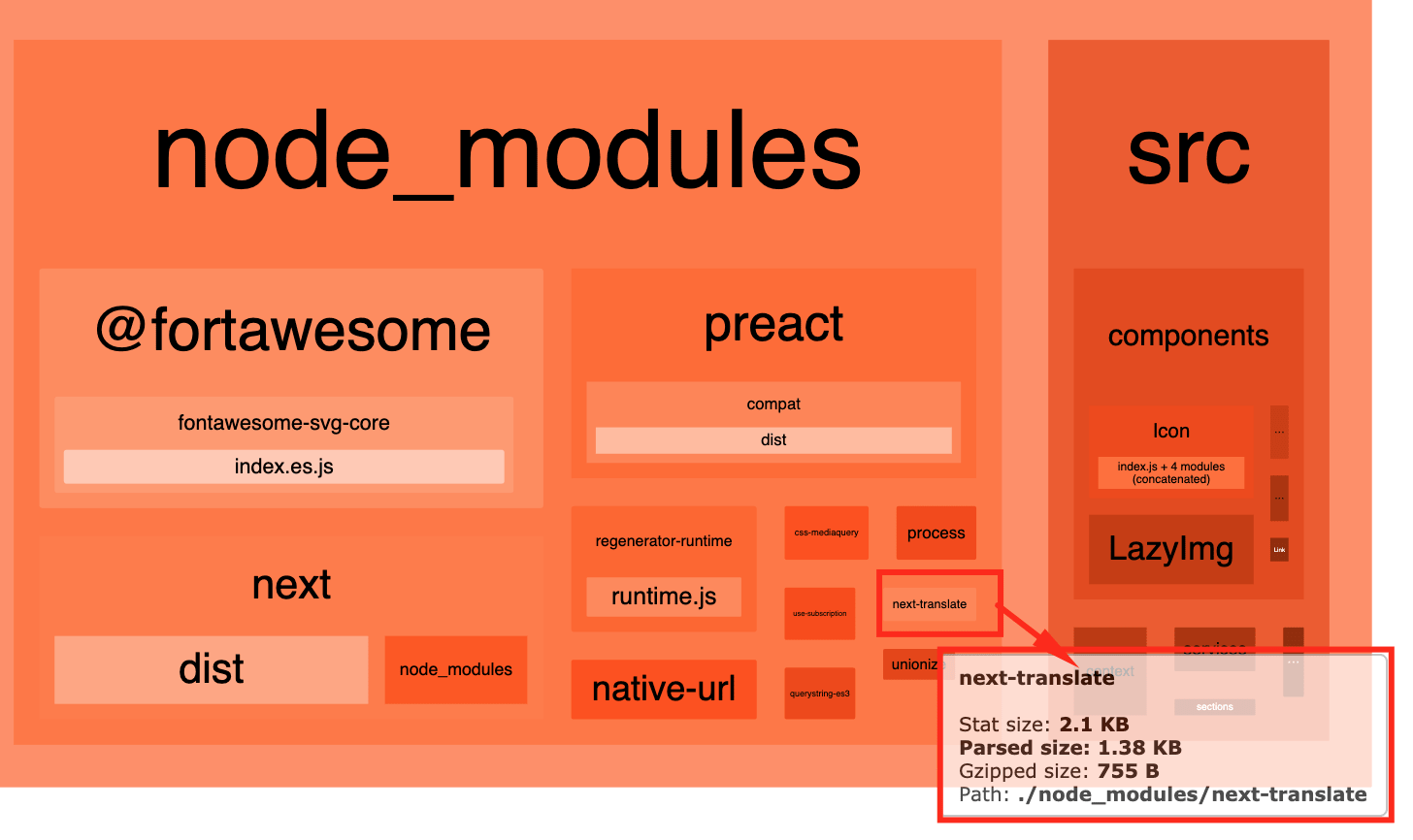
在配置文件中,您指定了名称空间需要的每个页面:
i18n.json
 {
  "pages" : {
    "*" : [ "common" ] ,
    "/" : [ "home" ] ,
    "/cart" : [ "cart" ] ,
    "/content/[slug]" : [ "content" ] ,
    "rgx:^/account" : [ "account" ]
  }
  // rest of config here...
}
在此处阅读有关如何添加命名空间JSON文件的信息。
Next-Translate可确保每个页面仅具有当前语言的名称空间。因此,如果我们有100个地区,则只会加载1个。
为此,我们使用一个WebPack加载程序,该WebPack加载程序在Next.js方法( GetStaticProps , GetServersideProps或GetInitialProps )中加载必要的翻译文件。如果您的页面上已经有这些方法之一,则WebPack加载程序将使用您自己的方法,但是它将使用的默认值是:
getStaticProps 。这是大多数页面上使用的默认方法,除非它是接下来两个点中指定的页面。这是用于性能的,因此计算是在构建时间而不是请求时间进行的。getServerSideProps 。这是[slug].js或[...catchall].js等动态页面的默认方法。这是因为对于这些页面,有必要定义getStaticPaths ,并且不知道每个语言环境应如何sl。同样,默认情况下,只有您编写getstaticpaths,它才会使用GetStaticProps来加载翻译。getInitialProps 。这是使用HOC的这些页面的默认方法。这是为了避免冲突,因为HOC可以覆盖getInitialProps 。整个过程都是透明的,因此在您的页面中,您可以直接消耗使用useTranslation Hook来使用这些名称空间,而您无需做任何其他事情。
如果由于某种原因您在_app.js文件中使用getInitialProps ,则翻译只会从_app.js加载到getInitialProps中。我们建议出于优化原因,除非绝对必要,否则您不使用这种方法。
yarn add next-translatenext-translate-plugin是一种工具,它允许开发人员在构建过程中逐页有效地处理翻译。它与next-translate软件包不同,该软件包允许开发人员访问所需的代码中的翻译。该插件通过解析所有页面,搜索翻译并重写页面文件,将翻译添加到其中。这使该插件成为更有效,更灵活的解决方案,用于处理下一个js应用程序中的翻译。建议将插件作为DevDectionenty安装。
yarn add next-translate-plugin -D在您的next.config.js文件中:
 const nextTranslate = require ( 'next-translate-plugin' )

module . exports = nextTranslate ( )或者,如果您已经有Next.config.js文件并要保留其更改,请将配置对象传递到nextTranslate() 。例如,对于WebPack,您可以这样做:
 const nextTranslate = require ( 'next-translate-plugin' )

module . exports = nextTranslate ( {
  webpack : ( config , { isServer , webpack } ) => {
    return config ;
  }
} )将配置文件i18n.json (或带有module.exports的i18n.js )在项目的根部中添加。每个页面都应具有其名称空间。在“配置”部分中查看它以获取更多详细信息。
{
  "locales" : [ " en " , " ca " , " es " ],
  "defaultLocale" : " en " ,
  "pages" : {
    "*" : [ " common " ],
    "/" : [ " home " , " example " ],
    "/about" : [ " about " ]
  }
}
在配置文件中,您可以同时使用我们在此处指定的配置,也可以使用有关Next.js 10的国际化功能。
默认情况下,命名空间以这种方式在/erentes root Directory上指定:
/地区
 .
├── ca
│   ├── common.json
│   └── home.json
├── en
│   ├── common.json
│   └── home.json
└── es
    ├── common.json
└── home.json每个文件名匹配pages配置属性上指定的名称空间,而每个文件内容应与此相似:
{
  "title" : " Hello world " ,
  "variable-example" : " Using a variable {{count}} "
}
但是,您可以使用另一个目的地使用LoadLocaleflom配置属性来保存命名空间文件:
i18n.js
 {
  // ...rest of config
  "loadLocaleFrom" : ( lang , ns ) =>
    // You can use a dynamic import, fetch, whatever. You should
    // return a Promise with the JSON file.
    import ( `./myTranslationsFiles/ ${ lang } / ${ ns } .json` ) . then ( ( m ) => m . default ) ,
}然后,使用页面及其组件中的翻译:
页/示例
 import useTranslation from 'next-translate/useTranslation'

export default function ExamplePage ( ) {
  const { t , lang } = useTranslation ( 'common' )
  const example = t ( 'variable-example' , { count : 42 } )

  return < div > { example } </ div > // <div>Using a variable 42</div>
}
您可以直接在页面上消耗翻译,不必担心每个页面上手动加载名称空间文件。 Next-Translate插件仅加载页面所需的名称空间,仅使用当前语言。
在配置文件中,您可以同时使用我们在此处指定的配置,也可以使用有关Next.js 10的国际化功能。
| 选项 | 描述 | 类型 | 默认 |
|---|---|---|---|
defaultLocale | 默认场所的ISO(默认为“ en”)。 | string | "en" |
locales | 一个带有所有语言在项目中使用的数组。 | string[] | [] |
loadLocaleFrom | 更改加载命名空间的方式。 | 返回JSON Promise function 。 | 默认情况下,正在加载来自Locales root目录的命名空间。 |
pages | 定义每个页面中使用的名称空间的对象。对象的示例: {"/": ["home", "example"]} 。要在所有页面中添加名称空间,您应该使用键"*" ,ex: {"*": ["common"]} 。也可以使用rgx:在前面: {"rgx:/form$": ["form"]} 。您还可以使用函数而不是数组来提供一些命名空间,具体取决于某些规则,例如: { "/": ({ req, query }) => query.type === 'example' ? ['example'] : []} | Object<string[] or function> | {} |
logger | 功能以记录开发和生产中缺少的密钥。如果您使用的是i18n.json作为配置文件,则应将其更改为i18n.js | function | 默认情况下,该记录器是执行console.warn函数。仅在开发中进行战争。 |
loggerEnvironment | 字符串以定义记录器是否应在浏览器,节点或两者中运行 | "node" | "browser" | "both" | "browser" |
logBuild | 每个页面都有一个日志指示:名称空间,当前语言和用于加载名称空间的方法。有了这个,您可以将其禁用。 | Boolean | true |
loader | 如果您希望禁用WebPack加载程序并在每个页面上手动加载名称空间,我们为您提供了通过禁用此选项来执行此操作的机会。 | Boolean | true |
interpolation | 更改用于插值的定界符。 | {prefix: string; suffix: string, formatter: function } | {prefix: '{{', suffix: '}}'} |
keySeparator | 更改用于嵌套键的分离器。设置为false到禁用JSON翻译文件中的键嵌套。如果您想将天然文本用作键,可能会很有用。 | string | false | '.' |
nsSeparator | char从键分开名称空间。如果要使用自然文本作为键,则应将其设置为false 。 | string | false | ':' |
defaultNS | 如果未传递给useTranslation或翻译键,则使用默认名称空间。 | string | undefined |
staticsHoc | 我们在API(AppWithi18N)中拥有的HOC,请勿使用NOIST-NON-NON-REACTSTATICS,以免包含超过必要的KB (与页面中的GetInitialProps不同的静态值很少使用) 。如果您与静态有任何冲突,则可以在此处添加NOIND-NON-REACT统计(或任何其他选择)。见一个示例。 | Function | null |
extensionsRgx | 更改WebPack加载程序使用的正则拨号,以查找Next.js页面。 | Regex | /.(tsx|ts|js|mjs|jsx)$/ |
revalidate | 如果您想在每个页面上有一个默认的重新验证,我们会通过传递数字重新验证来为您提供这样做的机会。您仍然可以在具有不同的重新估计金额的页面上定义GetStaticProp,并覆盖此默认值覆盖。 | Number | 如果您不定义它,默认情况下,页面将没有重新估计。 |
pagesInDir | 如果您next ./my-app以更改页面所在的位置,则可以在这里定义my-app/pages以便下一个翻译可以猜测它们在哪里。 | String | 如果您不定义它,默认情况下,页面将在pages和src/pages等经典位置中搜索。 |
localesToIgnore | 指出这些地方使用中间件将默认场所前缀(在Next +12中,了解如何做)时,要忽略这些地区。 | Array<string> | ['default'] |
allowEmptyStrings | 更改应如何处理翻译的空字符串。如果省略或以true的方式传递,它将返回一个空字符串。如果以false的方式传递,请返回密钥名称本身(包括NS)。 | Boolean | true |
尺寸:〜150B?
此挂钩是在您的页面 /组件中使用翻译的推荐方法。
例子:
 import React from 'react'
import useTranslation from 'next-translate/useTranslation'

export default function Description ( ) {
  const { t , lang } = useTranslation ( 'ns1' ) // default namespace (optional)
  const title = t ( 'title' )
  const titleFromOtherNamespace = t ( 'ns2:title' )
  const description = t `description` // also works as template string
  const example = t ( 'ns2:example' , { count : 3 } ) // and with query params
  const exampleDefault = t ( 'ns:example' , { count : 3 } , { default : "The count is: {{count}}." } ) // and with default translation

  return (
    < >
      < h1 > { title } </ h1 >
      < p > { description } </ p >
      < p > { example } </ p >
    < >
  )
} t函数:
i18nKey中时使用的名称空间。与用useTranslation相似,但没有钩子。该助手仅在App Dir中起作用。
  const { t , lang } = createTranslation ( 'ns1' ) // default namespace (optional)
const title = t ( 'title' )尺寸:〜560B?
这是用useTranslation钩的替代品,但在这些无功能的这些组件的事件中。 (不建议使用useTranslation Hook。) 。
withTranslation hoc返回一个组件,其中一个名为i18n的额外道具(object {t:function,lang:string})。
例子:
 import React from 'react'
import withTranslation from 'next-translate/withTranslation'

class Description extends React . Component {
  render ( ) {
    const { t , lang } = this . props . i18n
    const description = t ( 'common:description' )

    return < p > { description } </ p >
  }
}

export default withTranslation ( NoFunctionalComponent )与useTranslation("common")类似,您可以使用第二个参数withTranslation定义默认名称空间的第二个参数:
export default withTranslation(NoFunctionalComponent, "common")
尺寸:〜1.4kb?
有时,我们需要在文本内部使用HTML进行一些翻译(粗体,链接等), Trans组件正是您所需要的。我们建议仅在这种情况下仅使用此组件,在其他情况下,我们强烈建议使用useTranslation钩。
例子:
 // The defined dictionary entry is like:
// "example": "<0>The number is <1>{{count}}</1></0>",
< Trans
  i18nKey = "common:example"
  components = { [ < Component /> , < b className = "red" /> ] }
  values = { { count : 42 } }
/>或使用components支柱作为对象:
 // The defined dictionary entry is like:
// "example": "<component>The number is <b>{{count}}</b></component>",
< Trans
  i18nKey = "common:example"
  components = { {
    component : < Component /> ,
    b : < b className = "red" /> ,
  } }
  values = { { count : 42 } }
  defaultTrans = "<component>The number is <b>{{count}}</b></component>"
/>i18nKey字符串 - i18n条目的键(命名空间:键)components - 数组|对象 - 在数组的情况下,每个索引对应于定义的标签<0> / <1> 。如果对象,每个键对应于定义的标签<example> 。values - 对象 - 查询参数fallback - 字符串|字符串[] - 可选。后备I18NKEY如果I18NKEY不匹配。defaultTrans字符串 - 键的默认翻译。如果使用后备密钥,则仅在用尽所有后备后才使用。ns当没有嵌入i18nKey中时使用的名称空间returnObjects -boolean-获得所有翻译的JSON的一部分。查看更多。如果我们需要Trans组件的功能,但需要一个插值字符串,而不是t(props.i18nKey)函数的输出,也有一个TransText组件,该组件采用text prop而不是i18nKey 。
text - 字符串 - (选项)包含需要插值的标签的字符串components - 数组|对象 - 这与Trans完全相同(见上文)。用returnObjects: true映射t()的输出:true:true:
 // The defined dictionary entry is like:
// "content-list": ["List of <link>things</link>", "with <em>tags</em>"]
const contentList = t ( 'someNamespace:content-list' , { } , { returnObjects : true } ) ;

{ contentList . map ( ( listItem : string ) => (
  < TransText
    text = { listItem }
    components = { {
      link : < a href = "some-url" /> ,
      em : < em /> ,
    } }
  />
) }尺寸:〜1.5kb?
DynamicNamespaces组件可用于加载动态名称空间,例如以模态。
例子:
 import React from 'react'
import Trans from 'next-translate/Trans'
import DynamicNamespaces from 'next-translate/DynamicNamespaces'

export default function ExampleWithDynamicNamespace ( ) {
  return (
    < DynamicNamespaces namespaces = { [ 'dynamic' ] } fallback = "Loading..." >
      { /* ALSO IS POSSIBLE TO USE NAMESPACES FROM THE PAGE */ }
      < h1 >
        < Trans i18nKey = "common:title" />
      </ h1 >

      { /* USING DYNAMIC NAMESPACE */ }
      < Trans i18nKey = "dynamic:example-of-dynamic-translation" />
    </ DynamicNamespaces >
  )
}
请记住, ['dynamic']名称空间不应在pages上列出:
 pages: {
    '/my-page' : [ 'common' ] , // only common namespace
}namespaces - 字符串[] - 要下载的动态名称空间列表 -必需。fallback - ReactNode-递减显示名称空间正在加载的后备。 -选修的。dynamic - 函数 - 默认情况下,它使用配置中的LoadLocalelocale flos loadlocaleth in Configuration加载名称空间,但是您可以指定另一个目标。 -选修的。尺寸:〜1.3kb?
异步函数以加载t函数外部组件 /页面。它在服务器端和客户端都可以使用。
与Usetranslation Hook不同,我们可以在此处使用任何名称空间,它不必是“页面”配置中定义的名称空间。它下载了指示为运行时参数的名称空间。
您可以通过将数组作为参数加载多个名称空间,在这种情况下,默认名称空间将是拳头。
getStaticProps中的示例:
 import getT from 'next-translate/getT'
// ...
export async function getStaticProps ( { locale } ) {
  const t = await getT ( locale , 'common' )
  const title = t ( 'title' )
  return { props : { title } }
}
示例在API路线:
 import getT from 'next-translate/getT'

export default async function handler ( req , res ) {
  const t = await getT ( req . query . __nextLocale , 'common' )
  const title = t ( 'title' )

  res . statusCode = 200
  res . setHeader ( 'Content-Type' , 'application/json' )
  res . end ( JSON . stringify ( { title } ) )
}
加载多个名称空间的示例:
 import getT from 'next-translate/getT'

export default async function handler ( req , res ) {
  const t = await getT ( req . query . __nextLocale , [ 'common' , 'errors' ] )
  const title = t ( 'title' ) // The default namespace is the first one.
  const errorMessage = t ( 'errors:app_error' ) // The default namespace is the first one.

  res . statusCode = 200
  res . setHeader ( 'Content-Type' , 'application/json' )
  res . end ( JSON . stringify ( { title } ) )
}尺寸:〜3kb?
I18nProvider是下文提供者Next-Translate内部使用的上下文提供商,以提供当前的lang和页面名称空间。所以也许您永远不需要这个。
但是,它暴露于API,因为它在某些情况下可能很有用。例如,在页面中使用多语言翻译。
I18nProvider正在积累这些名称空间,因此您可以重命名新的名称空间,以保留旧的名称空间。
 import React from 'react'
import I18nProvider from 'next-translate/I18nProvider'
import useTranslation from 'next-translate/useTranslation'

// Import English common.json
import commonEN from '../../locales/en/common.json'

function PageContent ( ) {
  const { t , lang } = useTranslation ( )

  console . log ( lang ) // -> current language

  return (
    < div >
      < p > { t ( 'common:example' ) /* Current language */ } </ p >
      < p > { t ( 'commonEN:example' ) /* Force English */ } </ p >
    </ div >
  )
}

export default function Page ( ) {
  const { lang } = useTranslation ( )

  return (
    < I18nProvider lang = { lang } namespaces = { { commonEN } } >
      < PageContent />
    </ I18nProvider >
  )
}尺寸:〜3.7kb?
appWithI18n由Next-Translate内部使用。所以也许您永远不需要这个。但是,如果您禁用WebPack Loader选项并决定手动加载名称空间,我们将其公开。
如果您不想使用WebPack加载程序,则应将其放入_app.js文件中(如果没有,则创建_app.js文件)。
例子:
_app.js
 import appWithI18n from 'next-translate/appWithI18n'
import i18nConfig from '../i18n'

function MyApp ( { Component , pageProps } ) {
  return < Component { ... pageProps } />
}

// Wrapping your _app.js
export default appWithI18n ( MyApp , {
  ... i18nConfig ,
  // Set to false if you want to load all the namespaces on _app.js getInitialProps
  skipInitialProps : true ,
} )如果skipInitialProps=true ,则还应使用LoadNamespaces助手来手动加载每个页面上的名称空间。
尺寸:〜1.9kb?
Next-Translate内部使用了loadNamespaces 。所以也许您永远不需要这个。但是,如果您禁用WebPack Loader选项并决定手动加载名称空间,我们将其公开。
要加载名称空间,您必须在页面中返回助手提供的道具。
 import loadNamespaces from 'next-translate/loadNamespaces'

export function getStaticProps ( { locale } ) {
  return {
    props : {
      ... ( await loadNamespaces ( { locale , pathname : '/about' } ) ) ,
    }
  }
}为了好的工作,您的_app.js必须用AppWithi18n包装。此外,必须将loadLocaleFrom属性属性定义。
我们通过将其添加到此后缀的键(或在没有_前缀的密钥下嵌套)来支持6个复数形式(取自CLDR复数页面):
_zero_one (单数)_two (双)_few (paucal)_many (如果有单独的类,也用于分数)_other (必需 - 一般复数形式 - 如果语言只有单个形式)也使用在此处查看有关复数的更多信息。
只需要最后_other ,因为它是所有语言环境中唯一使用的常见复数形式。
所有其他复数形式都取决于语言环境。例如,英语只有两个: _one和_other (1猫与2只猫)。有些语言还有更多,例如俄罗斯和阿拉伯语。
此外,我们还通过指定数字( _0 , _999 )来支持确切的匹配,这适用于所有地区。这是一个示例:
代码:
 // **Note**: Only works if the name of the variable is {{count}}.
t ( 'cart-message' , { count } )
名称空间:
 {
  "cart-message_0" : "The cart is empty" , // when count === 0
  "cart-message_one" : "The cart has only {{count}} product" , // singular
  "cart-message_other" : "The cart has {{count}} products" , // plural
  "cart-message_999" : "The cart is full" , // when count === 999
}
或者
 {
  "cart-message" : {
     "0" : "The cart is empty" , // when count === 0
     "one" : "The cart has only {{count}} product" , // singular
     "other" : "The cart has {{count}} products" , // plural
     "999" : "The cart is full" , // when count === 999
  }
}
intl.pluralrules API仅适用于现代浏览器,如果您想在旧式浏览器中使用它,则应添加一个polyfill。
您可以以这种方式定义翻译中的HTML:
{
  "example-with-html" : " <0>This is an example <1>using HTML</1> inside the translation</0> "
}
例子:
 import Trans from 'next-translate/Trans'
// ...
const Component = ( props ) => < p { ... props } />
// ...
< Trans
  i18nKey = "namespace:example-with-html"
  components = { [ < Component /> , < b className = "red" /> ] }
/ >
渲染结果:
< p > This is an example < b class =" red " > using HTML </ b > inside the translation </ p > components数组的每个索引与定义的<index></index>对应。
在components阵列中,不必通过每个元素的孩子。将计算儿童。
在名称空间中,可以定义这样的嵌套键:
{
  "nested-example" : {
    "very-nested" : {
      "nested" : " Nested example! "
    }
  }
}
为了使用它,您应该使用“”。作为ID分离器:
t `namespace:nested-example.very-nested.nested`也可以用作数组:
{
  "array-example" : [
    { "example" : " Example {{count}} " },
    { "another-example" : " Another example {{count}} " }
  ]
}并使用选项returnObjects获取所有数组翻译:
 t ( 'namespace:array-example' , { count : 1 } , { returnObjects : true } )
/*
[
  { "example": "Example 1" },
  { "another-example": "Another example 1" }
]
*/另外,可以通过使用keySeparator作为密钥来获取所有翻译,默认为'.' :
 t ( 'namespace:.' , { count : 1 } , { returnObjects : true } )
/*
{
  "array-example": [
    { "example": "Example 1" },
    { "another-example": "Another example 1" }
  ]
}
*/如果不存在翻译,则可以定义后备( string|string[] )以搜索其他翻译:
 const { t } = useTranslation ( )
const textOrFallback = t (
  'ns:text' ,
  { count : 1 } ,
  {
    fallback : 'ns:fallback' ,
  }
)
后备名单:
 const { t } = useTranslation ( )
const textOrFallback = t (
  'ns:text' ,
  { count : 42 } ,
  {
    fallback : [ 'ns:fallback1' , 'ns:fallback2' ] ,
  }
)
在反式组件中:
 < Trans
  i18nKey = "ns:example"
  components = { [ < Component /> , < b className = "red" /> ] }
  values = { { count : 42 } }
  fallback = { [ 'ns:fallback1' , 'ns:fallback2' ] } // or string with just 1 fallback
/> 您可以使用interpolation.format配置函数格式化参数。
在i18n.js中:
 const formatters = {
  es : new Intl . NumberFormat ( "es-ES" ) ,
  en : new Intl . NumberFormat ( "en-EN" ) ,
}

return {
  // ...
  interpolation : {
    format : ( value , format , lang ) => {
      if ( format === 'number' ) return formatters [ lang ] . format ( value )
      return value
    }
  }
}
在英文名称空间中:
{
  "example" : " The number is {{count, number}} "
}
在西班牙名称空间中:
{
  "example" : " El número es {{count, number}} "
}
使用:
t ( 'example' , { count : 33.5 } )返回:
The number is 33.5El número es 33,5 为了更改当前语言,您可以使用Next.js导航(链接和路由器)通过locale环境道具。
使用Next.js的useRouter Hook的一个可能的ChangeLanguage组件的示例:
 import React from 'react'
import Link from 'next/link'
import useTranslation from 'next-translate/useTranslation'
import i18nConfig from '../i18n.json'

const { locales } = i18nConfig

export default function ChangeLanguage ( ) {
  const { t , lang } = useTranslation ( )

  return locales . map ( ( lng ) => {
    if ( lng === lang ) return null

    return (
      < Link href = "/" locale = { lng } key = { lng } >
        { t ( `layout:language-name- ${ lng } ` ) }
      </ Link >
    )
  } )
}您也可以在保留同一页面的同时使用setLanguage更改语言。
 import React from 'react'
import setLanguage from 'next-translate/setLanguage'

export default function ChangeLanguage ( ) {
  return (
    < button onClick = { async ( ) => await setLanguage ( 'en' ) } > EN </ button >
  )
}访问locales列表更改语言的另一种方法是使用Next.js router 。可以使用next.js userouter钩访问locales列表。
您可以将一个名为NEXT_LOCALE的cookie用用户定义的语言为值,这样就可以强制区域。
钩子的示例:
 import { useRouter } from 'next/router'

// ...

function usePersistLocaleCookie ( ) {
    const { locale , defaultLocale } = useRouter ( )

    useEffect ( persistLocaleCookie , [ locale , defaultLocale ] )
    function persistLocaleCookie ( ) {
      if ( locale !== defaultLocale ) {
         const date = new Date ( )
         const expireMs = 100 * 24 * 60 * 60 * 1000 // 100 days
         date . setTime ( date . getTime ( ) + expireMs )
         document . cookie = `NEXT_LOCALE= ${ locale } ;expires= ${ date . toUTCString ( ) } ;path=/`
      }
    }
} 在某些情况下,当页面以当前语言为单位时,您可能需要做一些例外,以其他语言显示一些文本。
在这种情况下,您可以使用I18nProvider实现这一目标。
学习如何在这里做。
Next-Translate默认使用Node.js Process( process.cwd() )的当前工作目录。
如果要更改它,则可以使用:
NEXT_TRANSLATE_PATH环境变量。它支持相对和绝对路径process.chdir(PATH_TO_NEXT_TRANSLATE)移动process.cwd() 当涉及服务器组件和客户端组件时,将同一内容加载在不同页面上可能具有挑战性。为了简化此过程,我们使用了next-translate-plugin提取了所有复杂性。
如果您有兴趣了解有关News Next.js 13 App dir范式如何使用New Next-dir范式的更多信息,请查看本文以获取详细说明。
如果您使用“应用程序”文件夹而不是“页面”文件夹, next-translate-plugin将自动检测到更改,并且您无需触摸任何下一型翻译配置。唯一的区别是“页面”配置属性将引用“应用程序”文件夹中的页面。
i18n.js
 module . exports = {
  locales : [ 'en' , 'ca' , 'es' ] ,
  defaultLocale : 'en' ,
  pages : {
    '*' : [ 'common' ] ,
    '/' : [ 'home' ] , // app/page.tsx
    '/second-page' : [ 'home' ] , // app/second-page/page.tsx
  } ,
}通过简单地将“页面”文件夹更改为“应用”,您可以使用useTranslation Hook或Trans组件在页面中消耗翻译。您仍然会看到日志(如果启用)可以知道每个页面上加载了哪些名称空间,其他所有内容都应相同。
?服务器页面/组件(+0KB): app/page.js :
 import useTranslation from 'next-translate/useTranslation'

export default function HomePage ( ) {
  const { t , lang } = useTranslation ( 'home' )

  return < h1 > { t ( 'title' ) } </ h1 >
} ?客户端页/组件(+498b): app/checkout/page.js
 "use client"
import useTranslation from 'next-translate/useTranslation'

export default function CheckoutPage ( ) {
  const { t , lang } = useTranslation ( 'checkout' )

  return < h1 > { t ( 'title' ) } </ h1 >
} Next.js 10引入了I18N路由支持,允许通过导航到/es/page-name渲染页面,其中使用useRouter钩访问页面pages/page-name.js以获取该locale 。
但是,由于页面已从pages dir移至app dir ,因此该I18N路由不再正常工作。
在下一个翻译时,我们选择不重新实现此功能,因为我们的目标是成为翻译页面而不是路由它们的库。我们希望将来,此功能将在app目录中实现。
我们建议以下内容:
[lang]添加到第一级。也就是说,您的所有页面都将在内部/app/[lang] 。i18n.(js|json)文件,以在开始时包含/[lang] 。 module.exports = {
locales: ['en', 'ca', 'es'],
defaultLocale: 'en',
pages: {
'*': ['common'],
- '/': ['home'],
+ '/[lang]': ['home'],
- '/second-page': ['home'],
+ '/[lang]/second-page': ['home'],
},
}在下一个翻译级别,我们已经根据searchParams.get('lang')和params.lang自动检测语言。因此,您无需为每个页面配置它,可以在服务器/客户端/组件中使用next-translate作为正常情况:
 import useTranslation from 'next-translate/useTranslation'
import Trans from 'next-translate/Trans'

export default function Page ( ) {
  const { t , lang } = useTranslation ( 'common' )

  return (
    < >
      < h1 > { t `title` } </ h1 >
      < Trans i18nKey = "common:another-text" components = { [ < b /> ] } />
    </ >
  )
} next-translate 。
使用它:
npx create-next-app --example with-next-translate with-next-translate-app
# or
yarn create next-app --example with-next-translate with-next-translate-app此演示是在此存储库中:
git clone [email protected]:aralroca/next-translate.gitcd next-translateyarn && yarn example:basic与基本演示相似,但带有一些附加内容:Typescript,Webpack 5,MDX,顶部_app.js,页面位于src/peg folder上,从SRC/Translations加载具有不同结构的srcant。
此演示是在此存储库中:
git clone [email protected]:aralroca/next-translate.gitcd next-translateyarn && yarn example:complex与复杂的演示相似,但有了一些额外pages内容:我们将使用新的布局系统使用Next.js +13 App文件夹。
此演示是在此存储库中:
git clone [email protected]:aralroca/next-translate.gitcd next-translateyarn && yarn example:with-app-directory与基本示例相似,但加载页面名称在i18n.json配置文件中手动停用WebPack加载程序。
我们不建议以这种方式使用它。但是,如果任何人都不适合我们的Webpack加载程序,我们就可以为任何人提供机会这样做。
此演示是在此存储库中:
git clone [email protected]:aralroca/next-translate.gitcd next-translateyarn && yarn example:without-loader 谢谢这些好人(表情符号钥匙):
Aral Roca Gomez ? | Vincent Ducorps | BjörnRave | 贾斯汀 | pol ? | AdemílsonF。Tonato | 福尔 |
Bickmaev5 | 皮埃尔·格里玛(Pierre Grimaud) | 罗马·米奇(Roman Minchyn) | Egor | 达伦 | Giovanni Giordano | 尤金 |
安德鲁·钟 | thanh Minh | 面包师 | 帕特里克 | 范特罗 | 乔伊 | Gurkerl83 |
TeemuPerämäki | 路易斯·塞拉诺(Luis Serrano) | J-Schumann | 安德烈·霍(Andre Hsu) | SLEVY85 | BerndArtmüller | Rihardsščeredins |
N4N5 | 卢比·莫亚(RubénMoya) | 汤姆·埃斯特雷斯(Tom Esterez) | 丹·尼德姆(Dan Needham) | Bruno Antunes | Kaan Atakan | 罗曼 |
ArnauJiménez | Edwin Veldhuizen | DUC非政府组织越野 | 比勒·赫拉利(Billel Helali) | WUIF | 米歇尔酒吧 | WUIF |
玛丽斯·恩格尔(Marces Engel) | 米歇尔酒吧 | 拖动 | 玛丽斯·恩格尔(Marces Engel) | Vasco Silva | Vsevolod Volkov | 菲利克斯·元 |
穆罕默德·齐克里(Muhammad al Ziqri) | 马塞洛·奥利维拉(Marcelo Oliveira) | 扎克·桑德兰(Zack Sunderland) | 安德鲁烤箱 | 丹妮 | Mateusz Lesiak | curetix |
Honza ? | Hardikbandhiya | 蒂姆·彼得斯 | 李明 | 费尔南多·加西亚·埃尔南德斯(FernandoGarcíaHernández) | Hichem Fantar | Huseyin onal |
杰西·马丁 |
该项目遵循全企业规范。欢迎任何形式的贡献!







