ts monorepo
1.0.0

内容表
此存储库的主要重点是使IDES中的
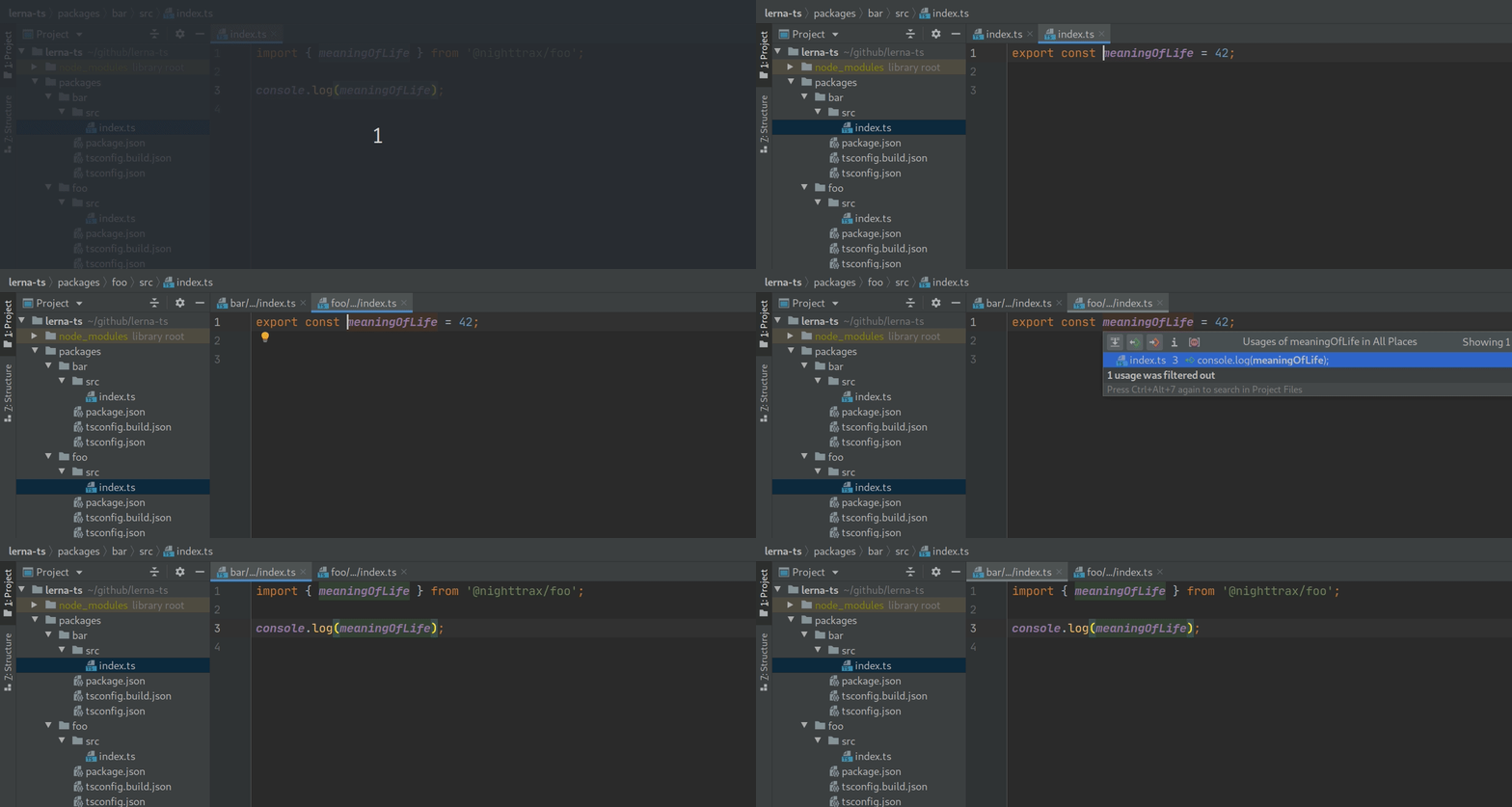
Go to definition功能毫无意外地工作,这意味着它将在新鲜克隆后起作用而无需构建项目。
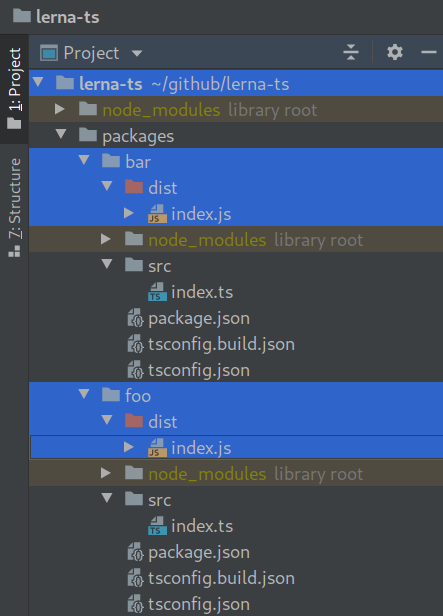
次要重点是在发布软件包时消除惊喜。设置了存储库,以便每个软件包获得干净的构建输出,而无需其他包装。
其他一切都保持在最低限度。除了我的个人ESLINT配置以保持代码清洁外,还没有包含其他工具 - 您可以在克隆后自由自定义此工具。汇编目标,模块系统,树木摇晃等都由您决定。
此存储库使用PNPM,但应在以下任何一个方面正常工作:
lerna bootstrap我强烈建议pnpm在其他解决方案上,不仅是因为它通常更快,而且因为它避免了吊装引起的依赖问题(请参阅https://github.com/nighttrax/nounttrax/ts-monorepo/commit/commit/d93139166b25fab15e95e95e95e95e95e95e95e9538df588aa7d06270b8466c996270b846c9966270b846c9。
 # Install pnpm with your preferred method: https://pnpm.io/installation.
npm i -g pnpm

# Install all dependencies.
pnpm i请参阅以下博客文章:
如果您正在寻找项目参考解决方案,请查看project-references分支。
此存储库包含两种类型的工作区:
packages :要发布到NPM并安装,apps :要执行。一个很好的说明区别的很好的例子是create-react-app :您不会将这样的应用发布给NPM,您将运行它,更具体地说,您会构建JS捆绑包,然后将其部署在某个地方。
对于软件包,您不想捆绑所有MonorePo依赖项,而是要单独发布它们。这就是为什么包裹具有单独的构建tsconfig.json ,将monorepo依赖性解析到node_modules 。
使用tsconfig paths在运行时解决路径别名:
{
  "scripts" : {
    "start" : " ts-node -r tsconfig-paths/register src/index.ts "
  }
}
请参阅此处的完整示例。
使用Babel-Plugin-Module-resolver解决路径别名:
 module . exports = {
  presets : [
    [ "@babel/preset-env" , { targets : { node : "current" } } ] ,
    "@babel/preset-typescript" ,
  ] ,

  plugins : [
    [
      "module-resolver" ,
      {
        alias : {
          "^@nighttrax/(.+)" : "../\1/src" ,
        } ,
      } ,
    ] ,
  ] ,
} ;
请参阅此处的完整示例。
使用tsconfig-paths-webpack-plugin解决路径别名:
 const TsconfigPathsPlugin = require ( "tsconfig-paths-webpack-plugin" ) ;

module . exports = {
  resolve : {
    plugins : [ new TsconfigPathsPlugin ( ) ]
  }
} ;
请参阅此处的完整示例。
如果您使用Babel ,请在上面的“ Babel”部分中查看此示例。
如果您使用TS-JEST,则可以使用其pathsToModuleNameMapper助手:
 const { pathsToModuleNameMapper } = require ( "ts-jest" ) ;
const { compilerOptions } = require ( "../../tsconfig.json" ) ;

module . exports = {
  preset : "ts-jest" ,

  moduleNameMapper : pathsToModuleNameMapper ( compilerOptions . paths , {
    // This has to match the baseUrl defined in tsconfig.json.
    prefix : "<rootDir>/../../" ,
  } ) ,
} ;
请参阅此处的完整示例。
使用craco或react-app-rewired来扩展CRA的WebPack配置并应用Tsconfig-paths-webpack-plugin:
 const TsconfigPathsPlugin = require ( "tsconfig-paths-webpack-plugin" ) ;

module . exports = ( config ) => {
  // Remove the ModuleScopePlugin which throws when we
  // try to import something outside of src/.
  config . resolve . plugins . pop ( ) ;

  // Resolve the path aliases.
  config . resolve . plugins . push ( new TsconfigPathsPlugin ( ) ) ;

  // Let Babel compile outside of src/.
  const oneOfRule = config . module . rules . find ( ( rule ) => rule . oneOf ) ;
    const tsRule = oneOfRule . oneOf . find ( ( rule ) =>
      rule . test . toString ( ) . includes ( "ts|tsx" )
    ) ;
  tsRule . include = undefined ;
  tsRule . exclude = / node_modules / ;

  return config ;
} ;
请参阅此处的完整示例。有关测试,请参见开玩笑的示例。
在Vite配置中使用Vite-Tsconfig-Paths:
 import { defineConfig } from "vite" ;
import react from "@vitejs/plugin-react" ;
import tsconfigPaths from "vite-tsconfig-paths" ;

export default defineConfig ( {
  plugins : [
    react ( ) ,
    tsconfigPaths ( )
  ] ,
} ) ;
请参阅此处的完整示例。
扩展Next的WebPack配置以启用MonorePo的编译包:
 module . exports = {
  webpack : ( config ) => {
    // Let Babel compile outside of src/.
    const tsRule = config . module . rules . find (
      ( rule ) => rule . test && rule . test . toString ( ) . includes ( "tsx|ts" )
    ) ;
    tsRule . include = undefined ;
    tsRule . exclude = / node_modules / ;

    return config ;
  } ,
} ;
请参阅此处的完整示例。
在tsconfig.json和tsconfig.build.json中包括路径别名,并告诉nestjs在哪里可以找到main.js文件:
{
  "collection" : " @nestjs/schematics " ,
  "sourceRoot" : " src " ,
  "entryFile" : " apps/nestjs/src/main "
}
请参阅此处的完整示例。
扩展Storybook的WebPack配置并应用TSCONFIG-PATHS-WEBPACK-PLUGIN:
 const TsconfigPathsPlugin = require ( 'tsconfig-paths-webpack-plugin' ) ;

module . exports = {
  webpackFinal : async ( config ) => {
    config . resolve . plugins = [
      ... ( config . resolve . plugins || [ ] ) ,
      new TsconfigPathsPlugin ( {
        extensions : config . resolve . extensions ,
      } ) ,
    ] ;
    return config ;
  } ,
} ;
请参阅此处的完整示例。







