ApplicationInspector
v1.9.30

Microsoft Application Inspector是一种软件源代码特征工具,可帮助识别基于众所周知的库/API调用的第一或第三方软件组件的编码功能,并有助于安全性和非安全用例。 It uses hundreds of rules and regex patterns to surface interesting characteristics of source code to aid in determining what the software is or what it does from what file operations it uses, encryption, shell operations, cloud API's, frameworks and more and has received industry attention as a new and valuable contribution to OSS on ZDNet, SecurityWeek , CSOOnline , Linux.com/news , HelpNetSecurity, Twitter and more and was first featured on Microsoft.com。
应用检查器与传统静态分析工具不同,因为它没有试图识别“好”或“坏”模式;它只是报告了针对特征检测的一组400多个规则模式所发现的内容,包括影响安全性的功能,例如使用加密术等等。这对于减少确定开源或其他组件所需的时间可能会非常有帮助,而不是直接检查源,而不是信任有限的文档或建议。
该工具支持扫描各种编程语言,包括C,C ++,C#,Java,JavaScript,HTML,Python,Python,Objective-C,GO,Ruby,Powershell等,并且可以使用混合语言文件扫描项目。它支持在HTML,JSON和文本输出格式中生成的结果,默认值为HTML报告类似于此处显示的报告。
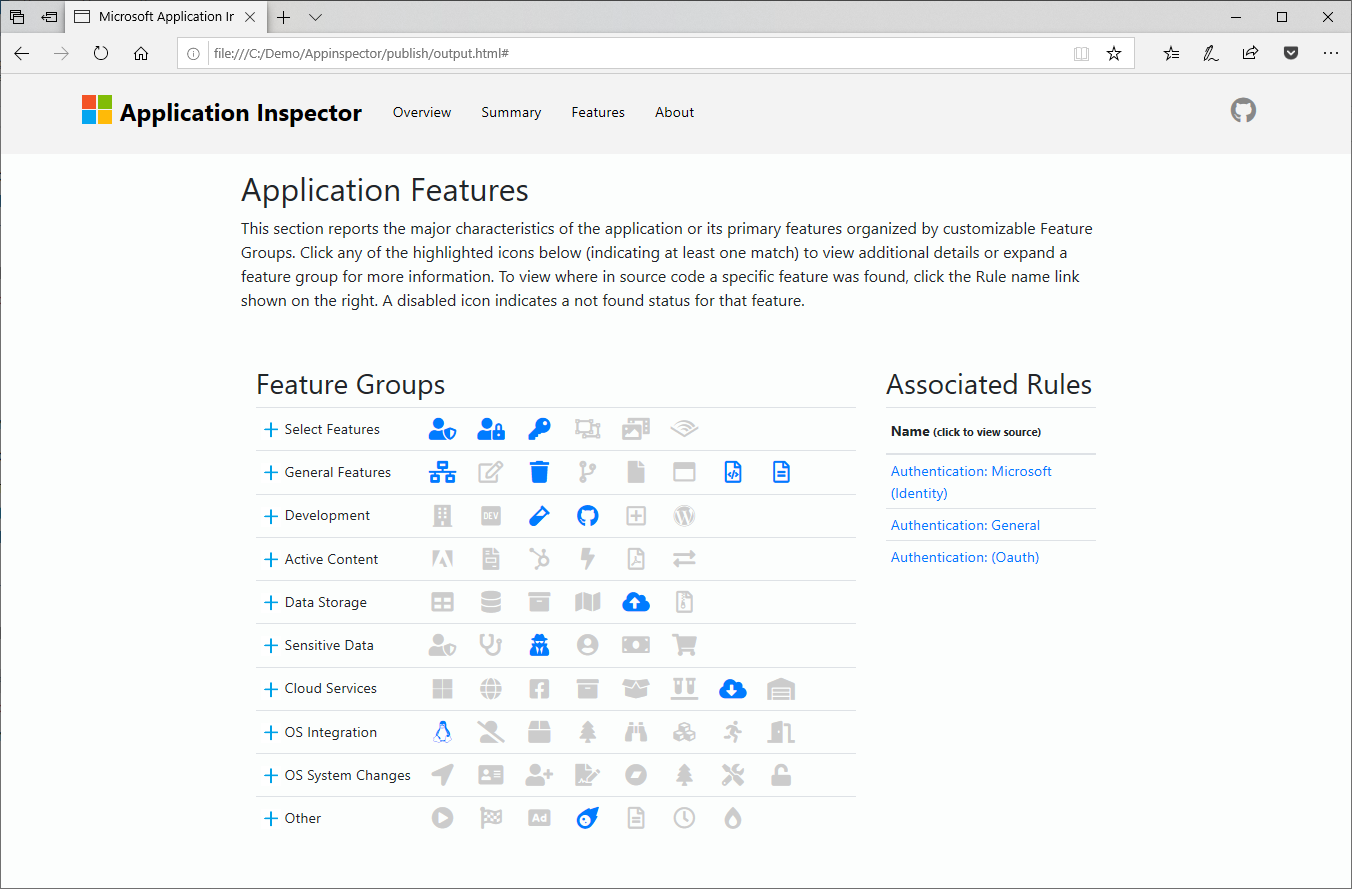
请务必查看我们完整的项目Wiki页面https://github.com/microsoft/applicationinspector/wiki,以获取更多信息和帮助。
dotnet tool install --global Microsoft.CST.ApplicationInspector.CLI在Wiki中看到更多
appinspector analyze -s path/to/src 。applicationinspector.cli.exe analyze -s path/to/srcMicrosoft Application Inspector可以帮助您从开始到部署。
设计选择- 使您可以选择哪些组件满足您的需求,并具有较小的不必要或未知功能的占地面积,以使应用程序攻击面积较小,并有助于验证预期的攻击,即仅行业标准加密货币。
识别特征三角洲- 检测组件版本之间的变化,这对于检测后门注入至关重要。
自动化安全性合规性检查- 用于识别具有需要对所有企业应用程序的元数据存储库的一部分,需要进行其他安全审查,批准或SDL合规性的功能。
我们有一个强大的默认起始基础来检测功能检测。但是,有许多功能识别模式尚待定义,我们邀请您提交有关您想要看到的内容或在定义几种方面进行破解的想法。这是一个从字面上影响开源生态系统的机会,帮助提供每个人都可以使用的工具。有关更多信息,请参见Wiki的规则部分。
应用程序检查员处于一般受众发布状态。您的反馈对我们很重要。如果您有兴趣贡献,请查看贡献。md。
应用程序Inspector可作为命令行工具或Nuget软件包可用,并且在Windows,Linux或MacOS上支持。
我们的GitHub版本页面上可以找到ApplicationSpector CLI的平台特定二进制文件。
C#库可在Nuget上以Microsoft.cst.applicationinspector.commands提供。
.NET全局工具可在Nuget上使用Microsoft.cst.applicationinspector.cli。
如果使用.NET Core版本,则需要安装.NET 6.0或更高版本。有关更多信息,请参见Justrunit.md或build.md文件。
 > appinspector --help
ApplicationInspector.CLI 1.8.4-beta+976ee3cdd1
c Microsoft Corporation. All rights reserved.

  analyze        Inspect source directory/file/compressed file (.tgz|zip)
                 against defined characteristics

  tagdiff        Compares unique tag values between two source paths

  exporttags     Export the list of tags associated with the specified rules.
                 Does not scan source code.

  verifyrules    Verify custom rules syntax is valid

  packrules      Combine multiple rule files into one file for ease in
                 distribution

  help           Display more information on a specific command.

  version        Display version information.
要获得特定命令运行appinspector <command> --help帮助。
分析命令是应用程序检查员的主力。
这将使用默认参数和规则在当前目录中产生输出。
appinspector analyze -s path/to/files
appinspector analyze -s path/to/files -f sarif -o output.sarif
这将创建一个名为data的JSON输出。当前目录中的分析的JSON,不包括test和.git文件夹中的所有文件。
appinspector analyze -s path/to/files -o data.json -f json -g **/tests/**,**/.git/**
有关使用控制台接口的其他帮助,请参阅CLI使用情况。
有关使用Nuget软件包的帮助,请参阅Nuget支持
请参阅build.md







