redukks
1.0.0

该库在Alpha中。 API大部分是完整的,不会改变,但是仍有工作要做以使其在所有平台上准备就绪。对于JVM和MultipLatform,该库可以供生产使用,但是对于iOS,JS和本机,它仍然不是完全设置的。如果您想提供帮助,请随时打开问题或公关。
Redukks是在Kotlin MultiPlatform上实现Uniflow和类似Redux的架构所需的一组简单类型的抽象。它简化了商店,还原器和动作的创建,并提供了一种简单的测试方法。
尽管Kotlin/Kotlin Multiplatform有许多Uniflow或Redux实现,但其中大多数要么太复杂,要么太简单了。要么命名过于“重新”,它们会迫使您进入一种做事的方式,或者抽象太复杂,无法写在常规上。尽管有一些符合这种风格的体系结构,但他们使用的命名对于Android和非Android开发人员感到困惑,因此很难与其他开发人员进行推理或讨论。
由于我发现自己多年来重复使用了相同的抽象集,因此我决定将它们置于图书馆,我可以重复使用并分享。
目的是为类似Redux的体系结构提供简单,类型和可测试的抽象,同时仍然没有将您完全绑定到单个模式,从而为您提供可以帮助您构建自己的解决方案的抽象。尽管大多数库都试图推动全面的redux模式,但还原器可能是某些简单情况下的开销,如果您愿意,您应该能够避免使用它们 - 这就是为什么Redukks不会强制执行Redux模式本身的原因。
有关为什么uniflow以及为什么Redux的更多推理,您可以查看构造体系结构的谈话(de)。
国家管理:Redukks提供了一种简单的方法来管理您的状态,以可预测的方式对其进行更新并倾听更改。您可以使用它来管理整个应用程序的状态,一个功能,在不同功能(屏幕)之间具有共享状态或一个屏幕的多个状态。
动作处理:Redukks提供了一种处理操作的简单方法,并以可预测的方式执行它们。您可以使用它来处理UI,网络调用或您可能需要的任何其他工作中的操作。图书馆的未开放性质使您可以实现特定于用户酶的操作处理程序 - 甚至可以通过实现向后信号来打破单纤维模式。
测试:通过Redukks,测试您的状态,还原和动作非常简单 - 既是由于API的性质和额外的编译安全性。您可以轻松地测试您的状态管理逻辑或操作处理逻辑,而无需进行复杂的测试API。
Uniflow架构基于一个简单的想法 - 您的应用程序是一个恒定的数据周期,该数据沿一个方向流动。状态及其更改是由UI驱动的,UI是由国家驱动的。这使您可以拥有一个真实的来源,并为您提供有关应用程序思考和理由的简单方法。
同时,Redux是一种帮助您管理状态的模式。它基于这样的想法,即您的状态是一个真实的来源,应该以可预测的方式对其进行更新。
Redukks是这两个想法的组合 - 它为您提供了实现Uniflow和基于Redux的架构的基本抽象,但并不迫使您进入一种做事的方式。
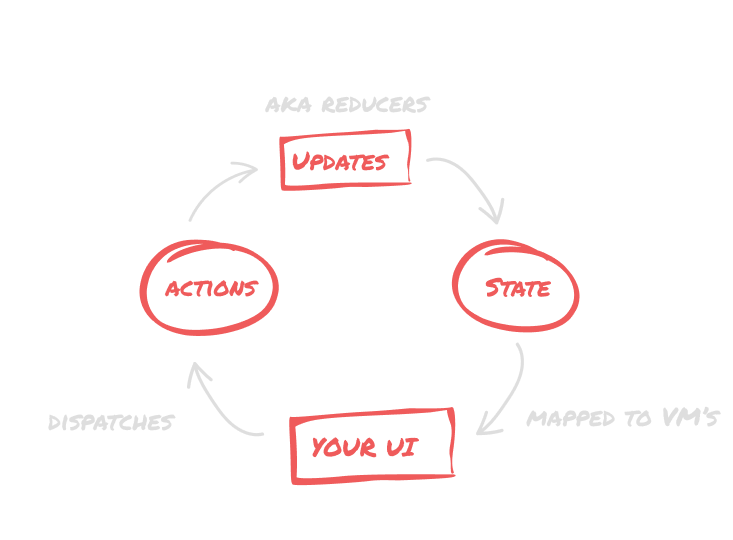
流本身非常简单 - 您有一个状态X,并且您有N方法可以更改它。改变它的方式被称为“还原器”,它们是改变该状态的唯一方法。因此,我们没有在任何地方从任何地方进行疯狂的更新,而是定义了一组可用于更新状态的“更新”。
但是,由于大多数应用程序比简单的计数器更为复杂,因此您也需要一种处理复杂工作的方法。这就是动作的进来。您“派遣”了一项操作并执行一些工作,在执行期间,它可以通过还原器更新状态或调用其他操作。
这使得可以轻松定义和测试状态更改的所有可能排列,并使其易于推理您的应用程序状态,并确信它的工作方式。
Gradle Groovy:
dependencies {
    implementation ' com.ianrumac.redukks:redukks:0.1.4 '
}
Gradle Kotlin:
implementation( " com.ianrumac.redukks:redukks:0.1.4 " ) data class CountState ( val total : Int )
sealed class Updates ( override val reduce : ( CountState ) -> CountState ) : Reducer<CountState> {
class Add ( val number : Int ) : Updates({
state.copy(state.total + number)
})
class Subtract ( val number : Int ) : Updates({
state.copy(state.total - number)
})
}FeatureContext类别类,其中包含您功能(或操作)的所有依赖项。 interface CountContext {
val client : CountingAPI
val store : Store < CountState >
}Actions sealed class Actions ( override val execute : suspend CountContext .() -> Unit ) : TypedAction<CountContext> {
class AddToClient ( val number : Int ) : Actions({
// here, we have access to all the CountContext properties that are captured during execution
// For example, we can access the store and update it with the result of the network call.
val result = client.add(number)
state.update( Updates . Add (result))
})
class SubtractFromClient ( val number : Int ) : Actions({
val result = client.subtract(number)
state.update( Updates . Subtract (result))
})
} data class CountWithAnAPI ( val scope : CoroutineScope ) : CountContext {
override val client = CountingAPI ()
override val store = reducedStore( CountState ( 0 ))
override val handler =
actionHandlerFor(scope, this ) // this is a coroutine scope that will be used to execute the actions
}
val context = CountWithAnAPI (scope)
// In a class that implements Dispatcher<Actions>
// This is actually a call to context.handler.dispatch(Actions.Add(1))
dispatch( Actions . Add ( 1 )) interface CountContext {
val client : CountingAPI
val store : Store < CountState >
val handler : ActionDispatcher < Actions >
 data class CountState ( val total : Int )

sealed class Updates ( override val reduce : ( CountState ) -> CountState ) : Reducer<CountState> {
    class Add ( val number : Int ) : Updates({
        state.copy(state.total + number)
    })
    class Subtract ( val number : Int ) : Updates({
        state.copy(state.total - number)
    })
}
 sealed class Actions ( override val execute : suspend CountContext .() -> Unit ) : TypedAction<CountContext> {
    class AddToClient ( val number : Int ) : Actions({
        // here, we have access to all the CountContext properties that are captured during execution
        // For example, we can access the store and update it with the result of the network call.
        val result = client.add(number)
        state.update( Updates . Add (result))
    })

    class SubtractFromClient ( val number : Int ) : Actions({
        val result = client.subtract(number)
        state.update( Updates . Subtract (result))
    })
}
} val context = CountWithAnAPI (scope)
val handler = context.handler
handler.dispatch( Actions . AddToClient ( 1 ))
context.store.listen().collectLatest { state ->
// do something with the state
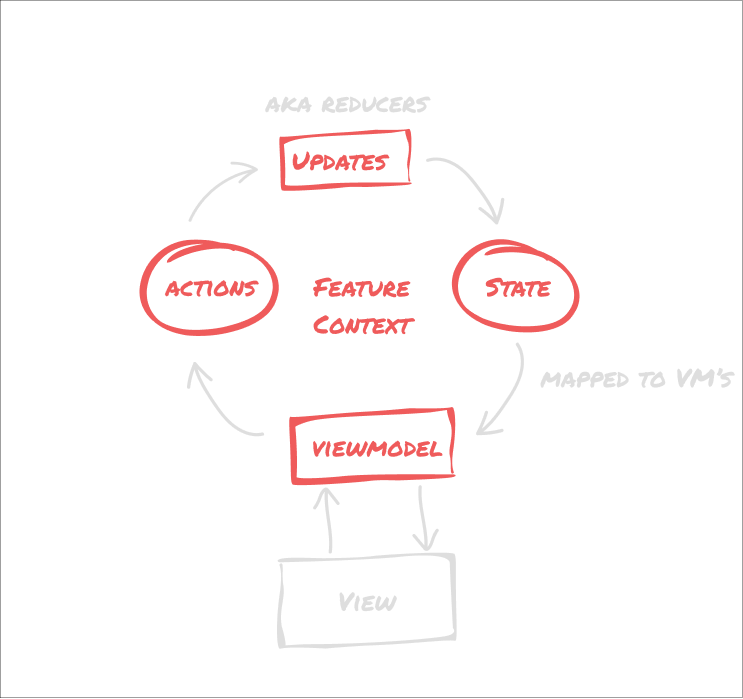
}您可以轻松地将Redukks与Android的ViewModel一起使用,并且非常适合JetPack组成(以及视图框架!)。只需将商店作为状态流收集或与Livedata一起使用。您的ViewModel还可以实现Dispatcher<Actions>因此您可以在上游派遣操作(将其委派给动作处理程序)。您还可以为此创建摘要,例如为您处理这些内容的ReduxViewModel 。
将其与ViewModel一起使用很简单:
@HiltViewModel
class CountViewModel @Inject constructor(
    val actionHandler : Dispatcher < CountContext . Actions >,
    val store : Store < CountContext . State >
) : ViewModel(), Dispatcher<Actions> by actionHandler {
    // Note: Not a real implementation, be careful where you collect and map your state
    val state = store.listen().map( this ::mapToViewModel)
        .stateIn(viewModelScope, SharingStarted . WhileSubscribed (), initialValue = CountVM ( 0 ))

    fun mapToViewModel ( it : CountContext . State ): CountVM {
        .. .
    }
}
现在,在您的UI中,您可以简单地做:
 val vm : CountViewModel by viewModels()
  .. .
 vm.dispatch( Actions . AddToClient ( 1 ))
您还可以通过在生命周期范围树中向上或向下吊起状态来控制状态的生命周期。例如,如果您需要共享一个州商店,则可以将其从IE片段范围移动到活动范围,然后将其向下传递给片段。这样,您可以在片段之间共享状态,但仍然只有一个状态存储。您甚至可以为操作提供多个商店,或者为UI提供多个商店以组合。
 typealias CountStore = Store < CountState >
typealias UserStore = Store < UserState >

interface CountContext {
    val countStore : CountStore
    val userStore : UserStore
}

class AuthenticatedCounterContext ( userStore : UserStore ) {
    override val userStore = userStore
    override val countStore = CountStore ( CountState ( 0 ))
}

// ...
class AddForUser : Actions ({
    val count = countStore.state.total
    countStore.update( Updates . Add (1))
    userStore.update( UpdateStateForUser (countStore.total))
})
这与JetPack组合非常合作,因为您可以轻松地从状态得出UI(请在这样做之前将其映射到ViewModel类中,不要混合您的核心模型和UI型号)。
由于Redukks是一组模块化的抽象集,因此您只能在所需的复杂度级别上使用所需的零件。 Redukks提供了一些抽象的默认实现,但是您可以轻松地创建自己的默认实现。
让我们从最简单的情况开始,一个简单的商店。我们将从简单的反实施开始,只有一个没有还原或操作的商店。通常,如果您不想编写还原器,则可以使用BasicStore类,这是一个简单的商店,它以封闭状态揭示update功能,该功能以当前状态为单位并返回新状态。
 data class CountState ( val total : Int )

val store = BasicStore ( CountState ( 0 ))

store.update {
    it.copy(it.total + 1 )
}

println (store.state.total) // prints 1

store.listen().collectLatest { state ->
    // do something with the state
}现在,我们还可以使用还原器以类型的方式定义状态更新。因此,让我们创建一个还原器。还原器只是实现Reducer<StateType>接口的对象,这意味着它们具有reduce闭合,该闭合处于当前状态并返回新状态。就像写作一样
 fun addNumber ( state : CountState , number : Int ) : CountState {
    return state.copy(state.total + number)
}
但是,有了更多类型的安全性,因此您可以确定所有可能的状态更改均已预定义和测试。
 sealed class Updates ( override val reduce : ( CountState ) -> CountState ) : Reducer<CountState> {
    class Add ( val number : Int ) : Updates({
        state.copy(state.total + number)
    })
    class Subtract ( val number : Int ) : Updates({
        state.copy(state.total - number)
    })
}现在,要使用此还原器,我们需要创建一个ReducedStore<StateType, ReducerType> 。这是只能通过定义的还原类型更新的商店。默认实现作为BasicReductsstore提供,但是您可以轻松地创建自己的实现。
 val basicStore = BasicStore ( CountState ( 0 ))
// you can either provide it with a store or the initial state to use a BasicStore
val store = BasicReducedStore < CountState , Updates >(basicStore)

// or use the helper function
val store = createReducedStore< CountState , Updates >( CountState ( 0 ))

store.update( Updates . Add ( 1 ))
store.listen().collectLatest { state ->
    // do something with the state
}操作是可以执行的异步代码。通常,它们用于执行副作用,例如网络调用或派遣其他操作和更新。例如,从服务器中获取项目列表,然后派遣操作以更新结果。
动作更为复杂,因为它们通常需要能够访问依赖项。为此,我们提供包含所有依赖项的<Context> ,然后创建以上下文作为接收器执行的操作, this意味着它们可以访问它。这样,我们可以将它们派遣到Dispatcher<ActionType> ,该>应处理操作。
默认情况下,根据TypedActionHandler实现了基本的基于Coroutine的操作处理程序,并且可以通过提供Dispatcher<ActionType>或AsyncDispatcher<ActionType>来轻松实现自定义一个,以进行更多执行控制(通过递延)。另外,提供的是一个AsyncAction类,可以简单地通过构造器传递闭合。
现在,让我们看看如何定义异步动作。
首先,我们需要一个可以执行这些操作的上下文。
对于简单的情况(即简单地更新商店),您只需使用Store<StateType> ,最好创建自定义上下文。这为您提供了一种访问依赖性,嘲笑他们,更换它们等的简便方法。此外,这是一个很好的做法,可以使操作紧密地耦合到它们,以便您可以轻松地看到哪些操作需要什么依赖性。
随着Kotlin的上下文接收器正在途中,将来代码可以更加干净,从而完全消除了对操作的需求,并且仅在接收器上实现简单的功能。但是,由于大多数代码库还没有上下文接收器,因此我们目前仅关注此实现。
首先,我们定义一个包含我们需要的依赖项的countContext接口:
 interface CountContext {
    val client : CountingAPI
    val store : Store < CountState >
    val handler : Dispatcher < Actions >
}然后,我们可以通过密封类定义动作,以实现TypedAction<CountContext> :
 sealed class Actions ( override val execute : suspend CountContext .() -> Unit ) : TypedAction<CountContext> {
    class Add ( val number : Int ) : Actions({
        // here, we have access to all the CountContext properties that are captured during execution
        // For example, we can access the store and update it with the result of the network call.
        val result = client.add(number)
        state.update( Updates . UpdateState (result))
    })

    class Subtract ( val number : Int ) : Actions({
        val result = client.subtract(number)
        state.update( Updates . UpdateState (result))
    })
}
现在,我们可以实现上下文并使用调度程序执行操作:
 data class CountWithAnAPI ( val scope : CoroutineScope ) : CountContext {
    override val client = CountingAPI ()
    override val store = BasicReducedStore < CountState , Updates >( CountState ( 0 ))
    override val handler = createActionHandler(scope, this )
}

// In a class that implements Dispatcher<Actions>, like a viewmodel that delegates it to the handler
// This is actually a call to context.handler.dispatch(Actions.Add(1))

dispatch( Actions . Add ( 1 ))
dispatch( Actions . Subtract ( 1 ))
对于还原和动作,测试非常容易。对于还原器,您可以简单地创建一个状态和一个还原器,即val state = CountState(0)和val reducer = Updates.Add(1) ,然后致电reducer.reduce(state) 。现在您可以断言结果是预期的。
@Test
fun `update the total count by adding 1` () {
    val state = CountState ( 0 )
    val reducer = Updates . Add ( 1 )
    val result = reducer.reduce(state)
    assertEquals( 1 , result.total)
}对于操作,您可以创建上下文和调度程序,即val context = CountWithAnAPI(TestCoroutineScope())和val action = Action.Add(1) ,然后call action.execute(context) 。这为您提供了一种简单的测试操作方法,因为您可以轻松模拟上下文并断言这些操作是按预期执行的,或使用模拟库(例如Mockk)来验证正确执行的模拟。
@Test
fun `update the total count and add from client` () = runTest {
        val context = CountWithAnAPI ( this )
        val action = Actions . Add ( 1 )
        action.execute(context)
        assertEquals( 1 , context.store.state.total)
}每个组件的编写方式可以轻松自定义,因此您可以轻松地创建自己的。意思是通过实现商店或调度员,您可以轻松拥有诸如API/插座/房间后备商店之类的东西,或者在完成后发出信号的操作或商店中的其他流量。不要害怕根据您的需求自定义模式 - 我们不是编写代码来满足模式,而是为自己,我们的队友和用户编写。
如果您有任何建议或改进,请随时开放问题或公关。





