PHP memcache dll
1.0.0

亲自使用(正常工作...) X64 AVX NTS版本
⏩请参阅memcache.ini配置文件
php -i | findstr Compiler
结果的例证:
Compiler => MSVC 19.31.30818
Compiler => 2022
VS17 = Visual C ++ 2022> MSVC19。3x & 19。4x >工具集14。3x & 14。4x
VS16 = Visual C ++ 2019> MSVC19。2X >工具集14。2x
VC15 = Visual C ++ 2017> MSVC19。1X >工具集14。1X
VC14 = Visual C ++ 2015> MSVC19。0x > Toolset14。0x
php -i | findstr Architecture
结果典型:
Architecture => x64
php -i | findstr Thread
结果典型:
Thread Safety => disabled
NTS =禁用
TS =启用
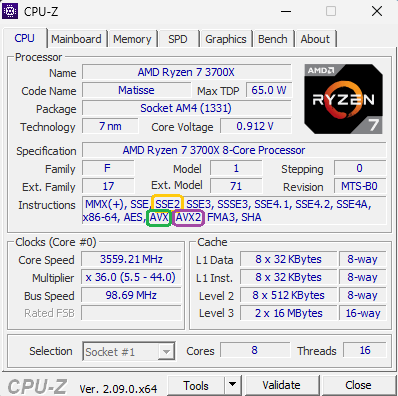
使用CPU-Z检查您的CPU支持说明
main⏩VC15 / VS16 / VS17
- 8.2补丁
php-8.2.x_memcache.dll带有PHP-SRC 8.2.13 (API 20220829)php-8.3.x_memcache.dll带有PHP-SRC 8.3.0 (API 20230831)php-8.4.x_memcache.dll带有PHP-SRC 8.4.0RC1 (API 20240924)vs16和vc17仅x64NON_BLOCKING_IO_php8⏩VC15 / VS16 / VS17
- 8.0补丁
php-8.1.x_memcache.dll带有PHP-SRC 8.1.10 (API 20210902)php-8.0.x_memcache.dll带有PHP-SRC 8.0.23 (API 20200930) NON_BLOCKING_IO_php8⏩VC15 / VS16
php-7.4.x_memcache.dll带有PHP-SRC 7.4.13 (API 20190902)php-7.3.x_memcache.dll带有PHP-SRC 7.3.25 (API 20180731)php-7.2.x_memcache.dll带有PHP-SRC 7.2.34 (API 20170718) NON_BLOCKING_IO_php7⏩VC15 / VS16
php-7.1.x_memcache.dll带有PHP-SRC 7.1.33 (API 20160303) ⏩VC14
php-7.1.x_memcache.dll带有PHP-SRC 7.1.0 (API 20160303)php-7.0.x_memcache.dll带有PHP-SRC 7.0.6 (API 20151012)在Windows Explorer中的DLL文件的详细信息中查找“产品名称” 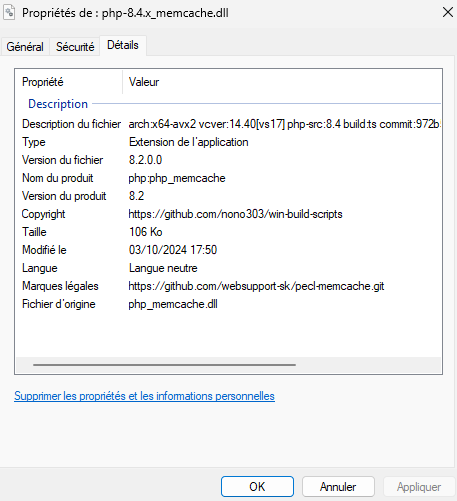
查看php_info() 
看看bininfo.csv
/O2 /GL /MD /Zi/LTCG /OPT:REF,ICF2016-05-18
实现memcache session时,我注意到2个错误
 session.save_handler = memcache
session.save_path = "tcp://127.0.0.1:11211"
memcache.protocol = ascii ,根据memcache.lock_timeout在session_start()上有一些随机锁定,因此我已经设置了memcache.lock_timeout = 1 ,但这并不能解决问题(只会使其不那么可见..)memcache.protocol = binary ,第一个错误似乎没有出现,但会话破坏失败了!所有测试都是用phpmyadmin进行的因此,您可以找到memcachesessionhandlerprepend.php a memcachesessionHandler实现sessionHandlerInterface以添加到您的php.ini中:
 session.save_handler = user
auto_prepend_file = c:/path/to/MemcacheSessionHandlerPrepend.php
; session.save_path =
请参阅第23期和stackoverflow上的刻痕