stanford openie python
1.0.0

支持最新的Corenlp库4.5.3(截至2023-03-10)。
开放信息提取(打开IE)是指从纯文本中提取结构化关系三元,因此这些关系的模式无需提前指定。例如,巴拉克·奥巴马(Barack Obama)出生于夏威夷,将创建一个三重(Barack Obama; was born in; Hawaii) ,对应于“出生于”的开放式领域关系。 Corenlp是本文所述的开放IE系统的Java实现:
更多信息可以在此处找到。 Openie库仅提供英文。
您需要安装Python3和Java(JRE)。 Java由Corenlp库使用。
确保首先安装Java。
java -version然后安装自由。
pip install stanford_openie from openie import StanfordOpenIE
# https://stanfordnlp.github.io/CoreNLP/openie.html#api
# Default value of openie.affinity_probability_cap was 1/3.
properties = {
'openie.affinity_probability_cap' : 2 / 3 ,
}
with StanfordOpenIE ( properties = properties ) as client :
text = 'Barack Obama was born in Hawaii. Richard Manning wrote this sentence.'
print ( 'Text: %s.' % text )
for triple in client . annotate ( text ):
print ( '|-' , triple )
graph_image = 'graph.png'
client . generate_graphviz_graph ( text , graph_image )
print ( 'Graph generated: %s.' % graph_image )
with open ( 'corpus/pg6130.txt' , encoding = 'utf8' ) as r :
corpus = r . read (). replace ( ' n ' , ' ' ). replace ( ' r ' , '' )
triples_corpus = client . annotate ( corpus [ 0 : 5000 ])
print ( 'Corpus: %s [...].' % corpus [ 0 : 80 ])
print ( 'Found %s triples in the corpus.' % len ( triples_corpus ))
for triple in triples_corpus [: 3 ]:
print ( '|-' , triple )
print ( '[...]' )预期输出
 |- {'subject': 'Barack Obama', 'relation': 'was', 'object': 'born'}
|- {'subject': 'Barack Obama', 'relation': 'was born in', 'object': 'Hawaii'}
|- {'subject': 'Richard Manning', 'relation': 'wrote', 'object': 'sentence'}
Graph generated: graph.png.
Corpus: According to this document, the city of Cumae in Ćolia, was, at an early period [...].
Found 1664 triples in the corpus.
|- {'subject': 'city', 'relation': 'is in', 'object': 'Ćolia'}
|- {'subject': 'Menapolus', 'relation': 'son of', 'object': 'Ithagenes'}
|- {'subject': 'Menapolus', 'relation': 'was Among', 'object': 'immigrants'}
它将在graph.png中生成一个graphViz点:
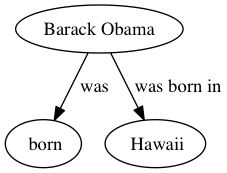
注意:确保事先安装了GraphViz。尝试运行dot命令以查看是否是这种情况。如果没有,如果您在Ubuntu上运行,请运行sudo apt-get install graphviz 。在MacOS上,它是brew install graphviz 。
 @misc{StanfordOpenIEWrapper,
  author = {Philippe Remy},
  title = {Python wrapper for Stanford OpenIE},
  year = {2020},
  publisher = {GitHub},
  journal = {GitHub repository},
  howpublished = {url{https://github.com/philipperemy/Stanford-OpenIE-Python}},
}





