wfc
1.0.0

C中的单文件波函数崩溃库,加上命令行工具
这是一个支持重叠WFC方法的早期版本。该方法采用一个小的输入图像,并生成较大的输出图像,该图像与输入图像局部相似。输入/输出对的一些示例:
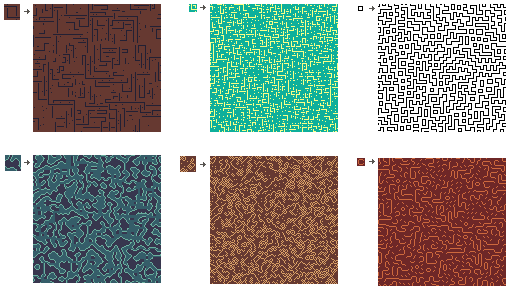
WFC通常用于程序地图生成,但不限于此用例。
该库非常表现,包括其他实现中找不到的许多优化。例如,在MacBook Air M1(2020)上的上述128x128图像(从3x3模式,翻转和旋转)的产生分别为:1.35、0.92、0.31、7.7、1.74和0.67秒。这包括图像加载/节省时间。
您的项目中的一个文件应像这样包括wfc.h :
        #define WFC_IMPLEMENTATION
#include "wfc.h"其他文件也可以包括并使用wfc.h ,但它们不应该定义WFC_IMPLEMENTATION宏。
另外,您可以使用make wfc.o构建传统的.O文件,并将wfc.h用作常规标头文件。
用法:
        struct wfc * wfc = wfc_overlapping (
            128 ,             // Output image width in pixels
            128 ,             // Output image height in pixels
            input_image ,     // Input image that will be cut into tiles
            3 ,               // Tile width in pixels
            3 ,               // Tile height in pixels
            1 ,               // Expand input image on the right and bottom
            1 ,               // Add horizontal flips of all tiles
            1 ,               // Add vertical flips of all tiles
            1                // Add n*90deg rotations of all tiles
        );

        wfc_run ( wfc , -1 );    // Run Wave Function Collapse
                             // -1 means no limit on iterations
        struct wfc_image * output_image = wfc_output_image ( wfc );
        wfc_destroy ( wfc );
        // use output_image->data
// wfc_img_destroy(output_image);默认情况下,您可以使用struct wfc_image用于输入和输出。
        struct wfc_image {
            unsigned char * data ;
            int component_cnt ;
            int width ;
            int height ;
} data紧紧填充而无需填充。每个像素由component_cnt组件组成(例如,RGBA格式的四个组件)。输出图像将具有与输入图像相同数量的组件。
如果找不到解决方案,则wfc_run将返回0。您可以再次尝试:
        wfc_init ( wfc );
wfc_run ( wfc , -1 );WFC可以选择使用STB_IMAGE.H和STB_IMAGE_WRITE.H,以提供直接与图像文件合作的便利功能。
您通常将stb_image.h和stb_image_write.h放置在与wfc.h同一目录中,并将其实现包括在一个项目文件中:
        #define STB_IMAGE_IMPLEMENTATION
        #define STB_IMAGE_WRITE_IMPLEMENTATION
        #include "stb_image.h"
#include "stb_image_write.h"此外,您将指示wfc.h使用STB:
        #define WFC_IMPLEMENTATION
        #define WFC_USE_STB
        #include "wfc.h"
用法:
        struct wfc_image * input_image = wfc_img_load ( "input.png" );
        struct wfc * wfc = wfc_overlapping (
            ...
            input_image ,
            ...
        );

        wfc_run ( wfc , -1 );    // Run Wave Function Collapse
                             // -1 means no restriction on number of iterations
        wfc_export ( wfc , "output.png" );
        wfc_img_destroy ( input_image );
        wfc_destroy ( wfc );
通过包含STB来启用额外功能:
        struct wfc_image * image = wfc_img_load ( "image.png" )
        wfc_img_save ( image , "image.png" )
        wfc_export ( wfc , "output.png" )
        wfc_export_tiles ( wfc , "directory" )
// don't forget to wfc_img_destroy(image) loaded images 命令行工具使用库并允许生成WFC图像。该工具取决于stb_image.h和stb_image_write.h。将两个文件都与wfctool.c相同的目录放置。
        make
        ./wfc
运行./wfc查看可用选项
基本用法:
./wfc -m overlapping samples/wrinkles.png output.png
感谢您使用WFC。如果您发现任何错误,有疑问或反馈,请告诉我。另外,如果您想分享自己的作品,这将非常感谢。
samp.krystian在gmail.com上





