libassert
Version 2.1.2


最过度设计的C ++断言库
图书馆理念:提供尽可能多的有用的诊断信息。
图书馆所做的一些很棒的事情:
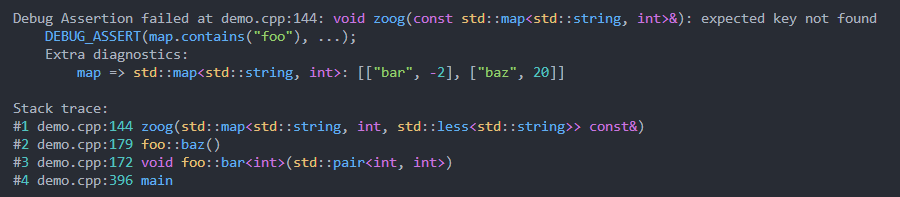
 void zoog ( const std::map<std::string, int >& map) {
    DEBUG_ASSERT (map. contains ( " foo " ), " expected key not found " , map);
}
ASSERT (vec.size() > min_items(), "vector doesn't have enough items", vec);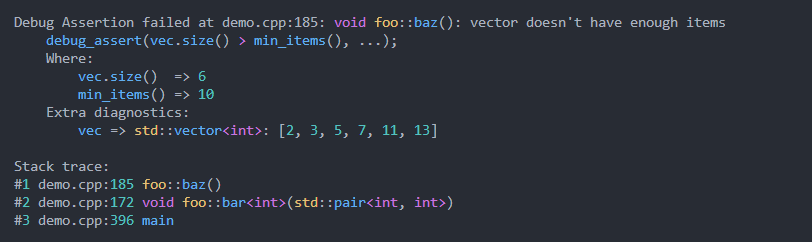
std::optional< float > get_param ();
float f = * ASSERT_VAL (get_param());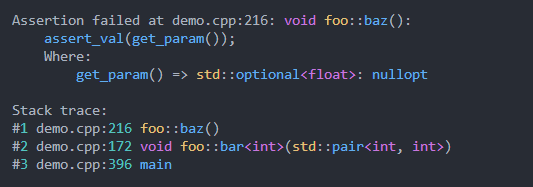
断言的类型:
有条件的断言:
DEBUG_ASSERT :在调试中检查,但在发行版中没有任何作用(类似于标准库的assert )ASSERT :在调试和发布中检查ASSUME :在调试中检查并用作发行版的优化提示无条件断言:
PANIC :在调试和释放中触发UNREACHABLE :在调试中触发,在发行中被标记为无法达到更喜欢Lowecase assert ?
您可以使用-DLIBASSERT_LOWERCASE启用小写debug_assert并assert别名。
特征摘要:
ASSERT_EQ等)的断言表达式的自动分解DEBUG_ASSERT_VAL和ASSERT_VAL变体返回一个值,以便可以将它们无缝集成到代码中,例如FILE* f = ASSERT_VAL(fopen(path, "r") != nullptr) include (FetchContent)
FetchContent_Declare(
libassert
GIT_REPOSITORY https://github.com/jeremy-rifkin/libassert.git
GIT_TAG v2.1.2 # <HASH or TAG>
)
FetchContent_MakeAvailable(libassert)
target_link_libraries (your_target libassert::assert)
# On windows copy libassert.dll to the same directory as the executable for your_target
if ( WIN32 )
add_custom_command (
TARGET your_target POST_BUILD
COMMAND ${CMAKE_COMMAND} -E copy_if_different
$<TARGET_FILE:libassert::assert>
$<TARGET_FILE_DIR:your_target>
)
endif ()请确保使用-DCMAKE_BUILD_TYPE=Debug或-DDCMAKE_BUILD_TYPE=RelWithDebInfo进行符号和行信息。
在MacOS上,建议生成.DSYM文件,请参见下面的平台物流。
有关使用库的其他方法,例如通过软件包管理人员或系统范围的安装,请参见下面的用法。
从根本上说,断言的作用是验证软件中的假设并确定违反其来源的违规行为。断言工具应优先为开发人员提供尽可能多的信息和上下文,以允许快速分类。不幸的是,现有的语言和图书馆工具提供了非常有限的分类信息。
例如,用stdlib断言一个assert(n <= 12);关于失败的原因,没有提供有关其失败或导致失败的原因的信息。提供堆栈痕迹和n Greatley的价值改善了分类和调试。理想情况下,断言失败应提供足够的诊断信息,使程序员不必重新运行调试器来查明问题。
该库的版本1是一项探索,研究了可以将多少有用的信息和功能包装到主张中,同时还为开发人员提供了快速简便的界面。
该库的版本2从版本1中汲取了教训,以创建一个我个人发现开发必不可少的工具。
该库支持的最重要功能是自动表达分解。无需ASSERT_LT或其他此类麻烦, assert(vec.size() > 10);如上所述,自动理解。
显示断言表达式所涉及的值。避免了冗余诊断,例如2 => 2 。
DEBUG_ASSERT (map.count( 1 ) == 2);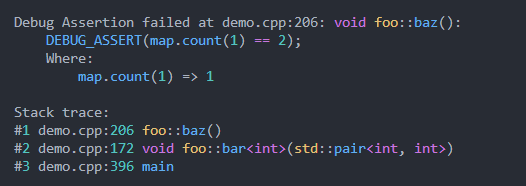
只能从宏调用中提取完整的断言表达式。表明表达式的哪些部分对应于哪些值需要一些基本的表达式解析。 C ++语法是模棱两可的,但大多数表达式可能会被歧义。
该库中的所有断言都支持可选的诊断消息以及任意其他诊断消息。
FILE* f = ASSERT_VAL(fopen(path, " r " ) != nullptr , " Internal error with foobars " , errno, path);为errno提供了特殊的处理,并自动调用Strerror。
注意:仅在断言的失败路径中评估额外的诊断。
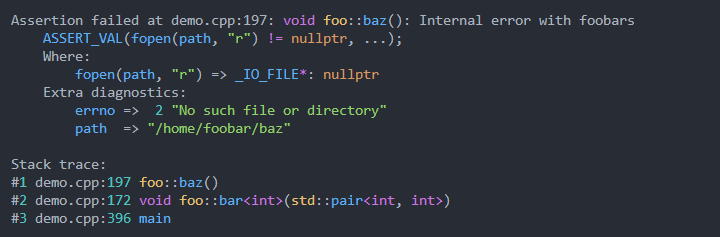
已经为生成漂亮的堆栈痕迹并尽可能地格式化了很多工作。 cpptrace用作stacktraces Pre-c ++ 23的便携式和独立的解决方案。可选配置可以在库的文档中找到。
值得注意的一项功能是,只有打印了区分路径所需的最小目录,而不是总是打印完整的路径。
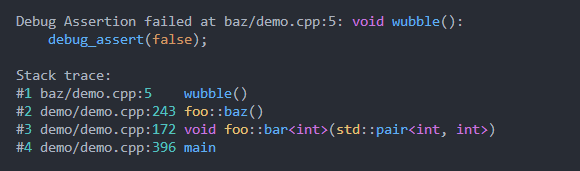
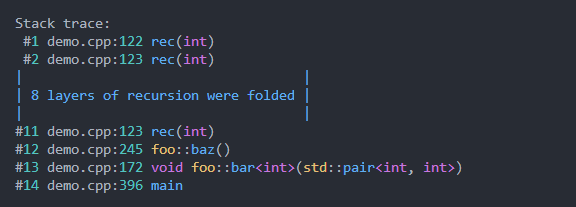
值得指出的另一个功能是,堆栈跟踪将折叠带有深层递归的轨迹:
主张处理程序在适当的地方应用语法突出显示,如上所述所有屏幕截图所示。这是为了提高可读性。
Libassert支持自定义断言失败处理程序:
 void handler (assert_type type, const assertion_info& assertion) {
    throw std::runtime_error ( " Assertion failed: n " + assertion. to_string ());
}

int main () {
    libassert::set_failure_handler (handler);
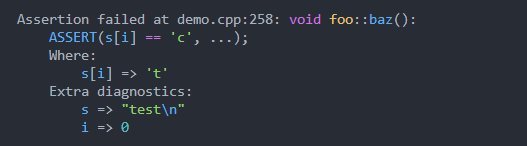
}尽可能有效地产生值的调试弦乐:字符串,字符,数字应按照您的期望打印。此外,容器,元组,std ::可选,智能指针等都被串制以显示尽可能多的信息。如果用户定义的类型Overloads operator<<(std::ostream& o, const S& s) ,该超载将被调用。否则将打印默认消息。此外,还提供了一个弦定定制点:
 template <> struct libassert ::stringifier<MyObject> {
    std::string stringify ( const MyObject& type) {
        return ...;
    }
};
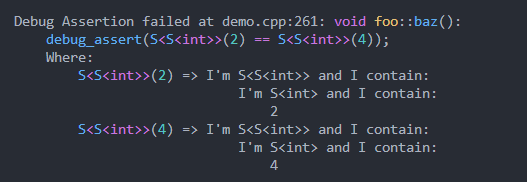
如果在断言表达的两侧使用十六进制/二进制,则在十六进制或二进制中打印断言值:
ASSERT (get_mask() == 0b00001101);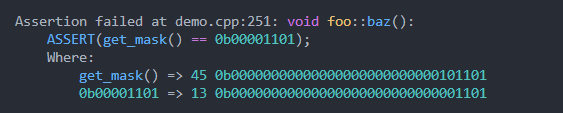
由于表达式已经自动分解,因此您可以选择使用符号安全进行签名的无分配比较,并使用-DLIBASSERT_SAFE_COMPARISONS :
ASSERT ( 18446744073709551606ULL == - 10 );
libassert提供两个标题<libassert/assert-catch2.hpp>和<libassert/assert-gtest.hpp>可与catch2和googletest一起使用。
GTEST的示例输出:
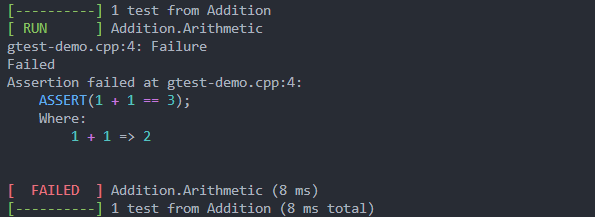
下面的更多信息。
Libassert提供了三种类型的断言,每种断言都略有不同,具体取决于应检查何时以及如何解释:
| 姓名 | 影响 |
|---|---|
DEBUG_ASSERT | 在调试中检查,发行中没有密码 |
ASSERT | 检查两个调试和发布版本 |
ASSUME | 在调试中检查, if(!(expr)) { __builtin_unreachable(); }在版本中 |
无条件断言
| 姓名 | 影响 |
|---|---|
PANIC | 在调试和释放中触发 |
UNREACHABLE | 在调试中触发,在发行中标记为无法到达。 |
对PANIC和UNREACHABLE ASSERT(false, ...)的好处是,编译器获取[[noreturn]]信息。
ASSUME故障路径标记为无法到达的发行中,并可能向优化器提供有用的信息。这并不是所有断言的默认行为,因为这样做的直接后果是-DNDEBUG中的断言失败可以导致UB,最好使这一明确的效果。
可以在表达式中使用的断言变体,例如FILE* file = ASSERT_VAL(fopen(path, "r"), "Failed to open file"); ,也可用:
| 姓名 | 影响 |
|---|---|
DEBUG_ASSERT_VAL | 在调试中进行检查,必须在调试和发布中进行评估 |
ASSERT_VAl | 检查两个调试和发布版本 |
ASSUME_VAL | 在调试中检查, if(!(expr)) { __builtin_unreachable(); }在版本中 |
注意:与DEBUG_ASSERT不同,即使在发行版中,仍必须评估DEBUG_ASSERT_VAL的表达式。当然,如果结果未使用并且没有产生任何副作用,它将被优化。
性能:就运行时性能而言,在-Og或更高的情况下,对呼叫的影响非常小。代码中的快速路径(即断言不会失败的地方)会很快。一旦发生断言失败,需要进行大量工作。但是,由于失败应该很少见,所以这无关紧要。
编译速度: ,与此库魔术所需的所有模板实例相关联的编译时间成本。
其他:
笔记
由于表达分解, ASSERT(1 = 2);编译。
所有断言功能都是宏。以下是一些与它们接口的伪删除:
 void DEBUG_ASSERT              (expression, [optional message], [optional extra diagnostics, ...]);
void ASSERT                    (expression, [optional message], [optional extra diagnostics, ...]);
void ASSUME                    (expression, [optional message], [optional extra diagnostics, ...]);
decltype ( auto ) DEBUG_ASSERT_VAL(expression, [optional message], [optional extra diagnostics, ...]);
decltype ( auto ) ASSERT_VAL      (expression, [optional message], [optional extra diagnostics, ...]);
decltype ( auto ) ASSUME_VAL      (expression, [optional message], [optional extra diagnostics, ...]);

void PANIC      ([optional message], [optional extra diagnostics, ...]);
void UNREACHABLE ([optional message], [optional extra diagnostics, ...]); -DLIBASSERT_PREFIX_ASSERTIONS可用于将这些宏与LIBASSERT_一起添加。这对于包装Libassert断言很有用。
-DLIBASSERT_LOWERCASE可用于启用debug_assert并assert DEBUG_ASSERT和ASSERT的别名。请参阅:更换<Cassert>。
expression该expression自动分解,因此可以提供诊断信息。所得类型必须可转换为布尔值。
表达树中顶级操作的左侧和右侧之间的操作由功能对象评估。
注意:布尔逻辑运算符( && and || )由于短路短而被默认分解。
assertion message可以提供可选的断言消息。如果断言表达式之后的第一个参数或恐慌/无法到达中的第一个参数是任何字符串类型,它将用作消息(如果您希望第一个参数(恰好是字符串)是一个额外的诊断值,而是首先传递一个空字符串,则首先传递一个空ASSERT(foo, "", str);
注意:断言信息表达仅在断言的失败路径中评估。
extra diagnostics可以提供任意数量的额外诊断值。如果检查失败,则这些显示在表达式诊断下方。
注意:仅在断言的失败路径中评估额外的诊断。
提供errno时会有特殊的处理:自动显示strerror的值。
为了促进易于集成到代码_VAL变体中,从断言表达式返回值。返回的值确定如下:
ASSERT_VAL(foo());或在断言表达式中ASSERT_VAL(false); ),则表达式的值只是返回。== , != , < , <= , > , >= , && , || ,或任何分配或复合分配,然后返回左手操作数的值。& | , ^ , << , >>或任何具有优先级的二进制运算符,然后返回整个表达式的值。即, ASSERT_VAL(foo() > 2);返回foo()和ASSERT_VAL(x & y);返回x & y的计算结果;
如果从选择返回的断言表达式中的值是LVALUE,则断言调用的类型将是LVALUE参考。如果从断言表达式的值是rvalue,则调用的类型将是rvalue。
 namespace libassert {
    [[nodiscard]] std::string stacktrace (
        int width = 0 ,
        const color_scheme& scheme = get_color_scheme(),
        std::size_t skip = 0
    );
    template < typename T> [[nodiscard]] std::string_view type_name () noexcept ;
    template < typename T> [[nodiscard]] std::string pretty_type_name () noexcept ;
    template < typename T> [[nodiscard]] std::string stringify ( const T& value);
}
stacktrace :生成堆栈跟踪,格式为给定宽度(0,无宽度格式)type_name :返回t的类型名称pretty_type_name :返回Tstringify :产生值的调试弦乐化 namespace libassert {
void enable_virtual_terminal_processing_if_needed ();
inline constexpr int stdin_fileno = 0 ;
inline constexpr int stdout_fileno = 1 ;
inline constexpr int stderr_fileno = 2 ;
bool isatty ( int fd);
[[nodiscard]] int terminal_width ( int fd);
}enable_virtual_terminal_processing_if_needed :启用Windows终端的ANSI逃生序列,颜色输出需要。isatty :如果文件描述符对应于终端,则返回trueterminal_width :返回由fd代表的终端的宽度或错误 namespace libassert {
// NOTE: string view underlying data should have static storage duration, or otherwise live as
// long as the scheme is in use
struct color_scheme {
std::string_view string, escape, keyword, named_literal, number, punctuation, operator_token,
call_identifier, scope_resolution_identifier, identifier, accent, unknown, reset;
static const color_scheme ansi_basic;
static const color_scheme ansi_rgb;
static const color_scheme blank;
};
void set_color_scheme ( const color_scheme&);
const color_scheme& get_color_scheme ();
}默认情况下,使用color_scheme::ansi_rgb 。要禁用颜色,请使用color_scheme::blank 。
set_color_scheme :在stderr为终端时设置默认断言处理程序的配色方案 namespace libassert {
void set_separator (std::string_view separator);
}set_separator :在断言诊断输出中的表达式和值之间设置分离器。默认值: => 。注意:不螺纹安全。 namespace libassert {
enum class literal_format_mode {
infer, // infer literal formats based on the assertion condition
no_variations, // don't do any literal format variations, just default
fixed_variations // always use a fixed set of formats (in addition to the default format)
};
void set_literal_format_mode (literal_format_mode);
enum class literal_format : unsigned {
// integers and floats are decimal by default, chars are of course chars, and everything
// else only has one format that makes sense
default_format = 0 ,
integer_hex = 1 ,
integer_octal = 2 ,
integer_binary = 4 ,
integer_character = 8 , // format integers as characters and characters as integers
float_hex = 16 ,
};
[[nodiscard]] constexpr literal_format operator |(literal_format a, literal_format b);
void set_fixed_literal_format (literal_format);
}set_literal_format_mode :设置库是否应显示字面变化或推断它们set_fixed_literal_format :设置固定的文字格式配置,会自动更改literal_format_mode;请注意,默认格式将始终与其他格式一起使用 namespace libassert {
enum class path_mode {
full, // full path is used
disambiguated, // only enough folders needed to disambiguate are provided
basename, // only the file name is used
};
LIBASSERT_EXPORT void set_path_mode (path_mode mode);
}set_path_mode :设置断言输出的路径缩短模式。默认值: path_mode::disambiguated 。 namespace libassert {
enum class assert_type {
debug_assertion,
assertion,
assumption,
panic,
unreachable
};
struct LIBASSERT_EXPORT binary_diagnostics_descriptor {
std::string left_expression;
std::string right_expression;
std::string left_stringification;
std::string right_stringification;
};
struct extra_diagnostic {
std::string_view expression;
std::string stringification;
};
struct LIBASSERT_EXPORT assertion_info {
std::string_view macro_name;
assert_type type;
std::string_view expression_string;
std::string_view file_name;
std:: uint32_t line;
std::string_view function;
std::optional<std::string> message;
std::optional<binary_diagnostics_descriptor> binary_diagnostics;
std::vector<extra_diagnostic> extra_diagnostics;
size_t n_args;
std::string_view action () const ;
const cpptrace::raw_trace& get_raw_trace () const ;
const cpptrace::stacktrace& get_stacktrace () const ;
[[nodiscard]] std::string header ( int width = 0 , const color_scheme& scheme = get_color_scheme()) const ;
[[nodiscard]] std::string tagline ( const color_scheme& scheme = get_color_scheme()) const ;
[[nodiscard]] std::string location () const ;
[[nodiscard]] std::string statement ( const color_scheme& scheme = get_color_scheme()) const ;
[[nodiscard]] std::string print_binary_diagnostics ( int width = 0 , const color_scheme& scheme = get_color_scheme()) const ;
[[nodiscard]] std::string print_extra_diagnostics ( int width = 0 , const color_scheme& scheme = get_color_scheme()) const ;
[[nodiscard]] std::string print_stacktrace ( int width = 0 , const color_scheme& scheme = get_color_scheme()) const ;
[[nodiscard]] std::string to_string ( int width = 0 , const color_scheme& scheme = get_color_scheme()) const ;
};
} Debug Assertion failed at demo.cpp:194: void foo::baz(): Internal error with foobars
debug_assert(open(path, 0) >= 0, ...);
Where:
open(path, 0) => -1
Extra diagnostics:
errno => 2 "No such file or directory"
path => "/home/foobar/baz"
Stack trace:
#1 demo.cpp:194 foo::baz()
#2 demo.cpp:172 void foo::bar<int>(std::pair<int, int>)
#3 demo.cpp:396 main
Debug Assertion failed : assertion_info.action()demo.cpp:194 : assertion_info.file_name and assertion_info.linevoid foo::baz() : assertion_info.pretty_functionInternal error with foobars : assertion_info.messagedebug_assert : assertion_info.macro_nameopen(path, 0) >= 0 : assertion_info.expression_string... :由assertion_info.n_args确定,该论点总数传递给了主张宏open(path, 0) : assertion_info.binary_diagnostics.left_expression-1 : assertion_info.binary_diagnostics.left_stringification0 => 0没有用)errno : assertion_info.extra_diagnostics[0].expression2 "No such file or directory" : assertion_info.extra_diagnostics[0].stringificationassertion_info.get_stacktrace()或assertion_info.get_raw_trace()获取跟踪而无需解决跟踪帮助者:
assertion_info.header() :
 Debug Assertion failed at demo.cpp:194: void foo::baz(): Internal error with foobars
    debug_assert(open(path, 0) >= 0, ...);
    Where:
        open(path, 0) => -1
    Extra diagnostics:
        errno =>  2 "No such file or directory"
        path  => "/home/foobar/baz"
assertion_info.tagline() :
Debug Assertion failed at demo.cpp:194: void foo::baz(): Internal error with foobars
assertion_info.location() :
笔记
路径处理将根据路径模式进行
demo.cpp:194
assertion_info.statement() :
debug_assert(open(path, 0) >= 0, ...);
assertion_info.print_binary_diagnostics() :
    Where:
        open(path, 0) => -1
assertion_info.print_extra_diagnostics() :
    Extra diagnostics:
        errno =>  2 "No such file or directory"
        path  => "/home/foobar/baz"
assertion_info.print_stacktrace() :
 Stack trace:
#1 demo.cpp:194 foo::baz()
#2 demo.cpp:172 void foo::bar<int>(std::pair<int, int>)
#3 demo.cpp:396 main
Libassert为用户定义类型提供了自定义点:
 template <> struct libassert ::stringifier<MyObject> {
    std::string stringify ( const MyObject& type) {
        return ...;
    }
};
默认情况下,任何类似容器的用户定义类型都将自动串起。
此外, LIBASSERT_USE_FMT可用于允许Libassert使用fmt::formatter s。
最后,可以将带有Ostream operator<< Overload的任何类型串起。
 namespace libassert {
    void set_failure_handler ( void (*handler)( const assertion_info&));
}
set_failure_handler :设置程序的断言处理程序。一个示例主张处理程序类似于默认处理程序:
 void libassert_default_failure_handler ( const assertion_info& info) {
    libassert::enable_virtual_terminal_processing_if_needed (); // for terminal colors on windows
    std::string message = info. to_string (
        libassert::terminal_width (libassert::stderr_fileno),
        libassert::isatty (libassert::stderr_fileno)
            ? libassert::get_color_scheme ()
            : libassert::color_scheme::blank
    );
    std::cerr << message << std::endl;
    switch (info. type ) {
        case libassert::assert_type::assertion:
        case libassert::assert_type::debug_assertion:
        case libassert::assert_type::assumption:
        case libassert::assert_type::panic:
        case libassert::assert_type::unreachable:
            ( void ) fflush (stderr);
            std::abort ();
            // Breaking here as debug CRT allows aborts to be ignored, if someone wants to make a
            // debug build of this library
            break ;
        default :
            std::cerr << " Critical error: Unknown libassert::assert_type " << std::endl;
            std::abort ( 1 );
    }
}
默认情况下,Libassert从所有断言类型中删除。但是,可能希望从某些或所有断言类型中提出一个例外,而不是流产。
重要的
故障处理程序不得返回assert_type::panic and assert_type::unreachable 。
Libassert支持关于断言未能使主张在断言线上闯入辩论的问题的程序断点,而不是在呼叫阶段深处的几层:

此功能当前选择加入,可以通过定义LIBASSERT_BREAK_ON_FAIL启用它。最好作为编译器标志完成: -DLIBASSERT_BREAK_ON_FAIL或/DLIBASSERT_BREAK_ON_FAIL 。
在内部,图书馆在执行指令以断开调试器之前检查了调试器的主题。默认情况下,该检查仅在第一个断言失败中执行一次。在某些情况下,可能需要配置此检查以始终执行,例如,如果您使用的是一个自定义主张处理程序,该处理程序会引发异常而不是中止,并且您可能可以从断言失败中恢复,以稍后允许额外的失败,并且您只能通过程序运行来附加辩论者。您可以使用libassert::set_debugger_check_mode来控制此检查的执行方式:
 namespace libassert {
    enum class debugger_check_mode {
        check_once,
        check_every_time,
    };
    void set_debugger_check_mode (debugger_check_mode mode) noexcept ;
}
该库还公开其内部实用程序,以设置断点并检查该程序是否被调试:
 namespace libassert {
    bool is_debugger_present () noexcept ;
}
# define LIBASSERT_BREAKPOINT () <...internals...>
# define LIBASSERT_BREAKPOINT_IF_DEBUGGING () <...internals...>
此API模拟了P2514的API,该API已被C ++ 26接受。
关于constexpr的注释:对于Clang和MSVC Libassert可以使用编译器内在,但是,对于GCC内联装配,需要使用编译器。 constexpr函数前C ++ 20中不允许内联汇编20,但是,GCC在GCC 10之后通过警告支持它,并且图书馆可以警告GCC 12。
定义:
LIBASSERT_USE_MAGIC_ENUM :使用魔术枚举来弦乐枚举值LIBASSERT_DECOMPOSE_BINARY_LOGICAL :分解&&和||LIBASSERT_SAFE_COMPARISONS :启用分解表达式的安全签名未分配的比较LIBASSERT_PREFIX_ASSERTIONS :前缀所有主张宏与LIBASSERT_LIBASSERT_USE_FMT :启用libfmt集成LIBASSERT_NO_STRINGIFY_SMART_POINTER_OBJECTS :禁用智能指针内容的字符串Cmake:
LIBASSERT_USE_EXTERNAL_CPPTRACE :使用externam cpptrace而不是用fetchContent启动库LIBASSERT_USE_EXTERNAL_MAGIC_ENUM :使用外部魔术枚举而不是用fitchcontent库存笔记
由于MSVC的不合格预处理器,没有简单的方法来提供断言包装器。为了使用测试库集成/Zc:preprocessor 。
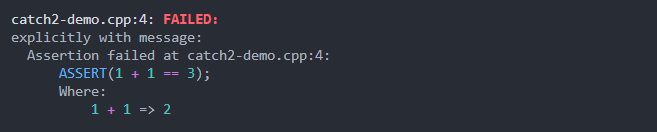
libassert在libassert/assert-catch2.hpp中提供了catch2集成:
# include < libassert/assert-catch2.hpp >

TEST_CASE ( " 1 + 1 is 2 " ) {
    ASSERT ( 1 + 1 == 3 );
}
目前,提供的唯一宏是ASSERT ,它将在内部执行REQUIRE 。
注意:v3.6.0 ANSI颜色代码在干扰Catch2的线条包装之前,因此在较旧版本上禁用了颜色。
libassert在libassert/assert-gtest.hpp中提供了gtest集成:
# include < libassert/assert-gtest.hpp >

TEST (Addition, Arithmetic) {
    ASSERT ( 1 + 1 == 3 );
}
目前,Libassert提供了ASSERT ,并EXPECT GTEST宏。
但是,这并不像我想要的那样漂亮,但是它可以完成工作。
该库的目标> = = C ++ 17,并支持所有主要编译器和所有主要平台(Linux,MacOS,Windows和Mingw)。
注意:该库确实依赖于某些编译器扩展程序和编译器特定功能,因此它与-pedantic不兼容。
与Cmake提取:
 include (FetchContent)
FetchContent_Declare(
  libassert
  GIT_REPOSITORY https://github.com/jeremy-rifkin/libassert.git
  GIT_TAG        v2.1.2 # <HASH or TAG>
)
FetchContent_MakeAvailable(libassert)
target_link_libraries (your_target libassert::assert)
注意:在Windows和MacOS上,建议一些额外的工作,请参见下面的平台物流。
请确保使用-DCMAKE_BUILD_TYPE=Debug或-DDCMAKE_BUILD_TYPE=RelWithDebInfo进行符号和行信息。
git clone https://github.com/jeremy-rifkin/libassert.git
git checkout v2.1.2
mkdir libassert/build
cd libassert/build
cmake .. -DCMAKE_BUILD_TYPE=Release
make -j
sudo make install
通过CMAKE:
 find_package (libassert REQUIRED)
target_link_libraries (<your target > libassert::assert)请确保使用-DCMAKE_BUILD_TYPE=Debug或-DDCMAKE_BUILD_TYPE=RelWithDebInfo进行符号和行信息。
或用-lassert编译:
g++ main.cpp -o main -g -Wall -lassert
./main
如果您沿着错误
error while loading shared libraries: libassert.so: cannot open shared object file: No such file or directory
您可能必须运行sudo /sbin/ldconfig才能创建任何必要的链接并更新缓存,以便系统可以找到libcpptrace.so(我必须在ubuntu上这样做)。仅在整个系统范围内安装时。通常,您的软件包经理在安装新库时为您做到这一点。
git clone https: // github.com / jeremy - rifkin / libassert.git
git checkout v2. 1.2
mkdir libassert / build
cd libassert / build
cmake . . - DCMAKE_BUILD_TYPE = Release
msbuild libassert.sln
msbuild INSTALL.vcxproj
注意:您需要在开发人员PowerShell中作为管理员运行,或使用Visual Studio分发的VCVARSALL.BAT来获取正确的环境变量设置。
仅适用于本地用户(或任何自定义前缀):
git clone https://github.com/jeremy-rifkin/libassert.git
git checkout v2.1.2
mkdir libassert/build
cd libassert/build
cmake .. -DCMAKE_BUILD_TYPE=Release -DCMAKE_INSTALL_PREFIX= $HOME /wherever
make -j
sudo make install
通过CMAKE:
 find_package (libassert REQUIRED PATHS $ENV{HOME} /wherever)
target_link_libraries (<your target > libassert::assert)
手动使用:
g++ main.cpp -o main -g -Wall -I$HOME/wherever/include -L$HOME/wherever/lib -lassert
首先使用CMAKE的库,请首先按照系统范围的安装,本地用户安装或软件包管理器进行安装说明。
使用以下参数与libassert进行编译:
| 编译器 | 平台 | 依赖性 |
|---|---|---|
| GCC,Clang,Intel,等。 | Linux/MacOS/UNIX | -libassert -I[path] [cpptrace args] |
| 明格 | 视窗 | -libassert -I[path] [cpptrace args] |
| MSVC | 视窗 | assert.lib /I[path] [cpptrace args] |
| 铛 | 视窗 | -libassert -I[path] [cpptrace args] |
对于-I[path]和/I[path]中的[path]路径]占位符,指定包含libassert/assert.hpp文件夹的路径。
如果要静态链接,则还需要指定-DLIBASSERT_STATIC_DEFINE 。
对于[cpptrace args]占位符,请参阅CPPTRACE文档。
Libassert可通过conan https://conan.io/center/recipes/libassert获得。
 [requires]
libassert/2.1.2
[generators]
CMakeDeps
CMakeToolchain
[layout]
cmake_layout
 # ...
find_package (libassert REQUIRED)
# ...
target_link_libraries (YOUR_TARGET libassert::assert)
vcpkg install libassert
 find_package (libassert CONFIG REQUIRED)
target_link_libraries (YOUR_TARGET PRIVATE libassert::assert)Windows和Macos需要一些额外的工作才能使所有内容都在正确的位置
在Windows上复制库.dll:
 # Copy the assert.dll on windows to the same directory as the executable for your_target.
# Not required if static linking.
if ( WIN32 )
  add_custom_command (
    TARGET your_target POST_BUILD
    COMMAND ${CMAKE_COMMAND} -E copy_if_different
    $<TARGET_FILE:libassert::assert>
    $<TARGET_FILE_DIR:your_target>
  )
endif ()
在MacOS上,建议生成一个包含您程序的调试信息的DSYM文件:
在Xcode cmake中,这可以完成
set_target_properties (your_target PROPERTIES XCODE_ATTRIBUTE_DEBUG_INFORMATION_FORMAT "dwarf-with-dsym" )外部XCode可以使用dsymutil yourbinary完成:
 # Create a .dSYM file on macos. Currently required, but hopefully not for long
if ( APPLE )
  add_custom_command (
    TARGET your_target
    POST_BUILD
    COMMAND dsymutil $<TARGET_FILE:your_target>
  )
endif ()该库不是<cassert>的替换。 -DLIBASSERT_LOWERCASE可用于为断言宏创建小写别名,但请注意,Libassert的ASSERT仍在释放中检查。要替换<cassert>用libassert使用,请用DEBUG_ASSERT替换assert或沿着以下几行创建一个别名:
# define assert (...) DEBUG_ASSERT(__VA_ARGS__)要注意的一件事是:从技术上讲,标准不允许使用Cassert的assert ,但这对于任何理智的编译器来说都不是一个问题。
不,还没有。
cpp-sort即使使用诸如assert_eq之类的结构,也经常缺乏断言诊断。例如,在生锈中显示左右值,但不显示表达式本身:
 fn main ( ) {
    let count = 4 ;
    assert_eq ! ( count , 2 ) ;
}
thread 'main' panicked at 'assertion failed: `(left == right)`
left: `4`,
right: `2`', /app/example.rs:3:5
note: run with `RUST_BACKTRACE=1` environment variable to display a backtrace
这没有可能的帮助。
功能其他语言 /其标准库提供:
| C/C ++ | 锈 | C# | 爪哇 | Python | JavaScript | libassert | |
|---|---|---|---|---|---|---|---|
| 表达式字符串 | ✔️ | ✔️ | |||||
| 地点 | ✔️ | ✔️ | ✔️ | ✔️ | ✔️ | ✔️ | ✔️ |
| 堆栈跟踪 | ✔️ | ✔️ | ✔️ | ✔️ | ✔️ | ✔️ | |
| 断言消息 | ** | ✔️ | ✔️ | ✔️ | ✔️ | ✔️ | ✔️ |
| 额外的诊断 | * | * | * | * | ✔️ | ||
| 二进制专业 | ✔️ | ✔️ | ✔️ | ||||
| 自动表达分解 | ✔️ | ||||||
| 亚表达字符串 | ✔️ |
* :通过字符串格式进行,但这是亚理想的。
** : assert(expression && "message")通常使用,但这是亚理想的,仅允许字符串文字消息。
Extras:
| C/C ++ | 锈 | C# | 爪哇 | Python | JavaScript | libassert | |
|---|---|---|---|---|---|---|---|
| 语法突出显示 | ? | ✔️ | |||||
| 字面格式的一致性 | ✔️ | ||||||
| 表达字符串和表达值无处不在 | ✔️ | ||||||
| 从断言中返回值,以允许断言被整合到表达式中 | ✔️ |







