ci6226 ira g14
1.0.0

描述:新加坡NTU的CI6226信息检索和分析分配。
小组:14
成员:Ke Xiangyu,Li Jinjin,Li Xihan,Zhou Shengsheng
项目主页:https://github.com/zhoushengsheng/ci6226-ira-g14
信息检索在我们的日常生活中起着巨大的作用。我们始终想搜索我们关心或想使用Google,Baidu,Bing等搜索引擎的信息。我们使用的应用程序,例如Twitter,YouTube或eBay向我们推荐,总会有新的朋友,电影或产品。这些服务都是基于信息检索的。在某个时候,在信息时代,人类很难在没有信息检索的情况下生活。 Stack Overflow是一个问答网站,它允许程序员搜索,询问,回答并就问题发表评论。我们的项目旨在提供搜索引擎系统,以使用户根据堆栈溢出数据的一部分快速搜索他们的问题。我们还构建了另外两个应用程序来分析数据。一种应用程序是检索2008年至2016年每种编程语言的受欢迎程度。另一个应用程序是根据其答案计数对用户进行排名。
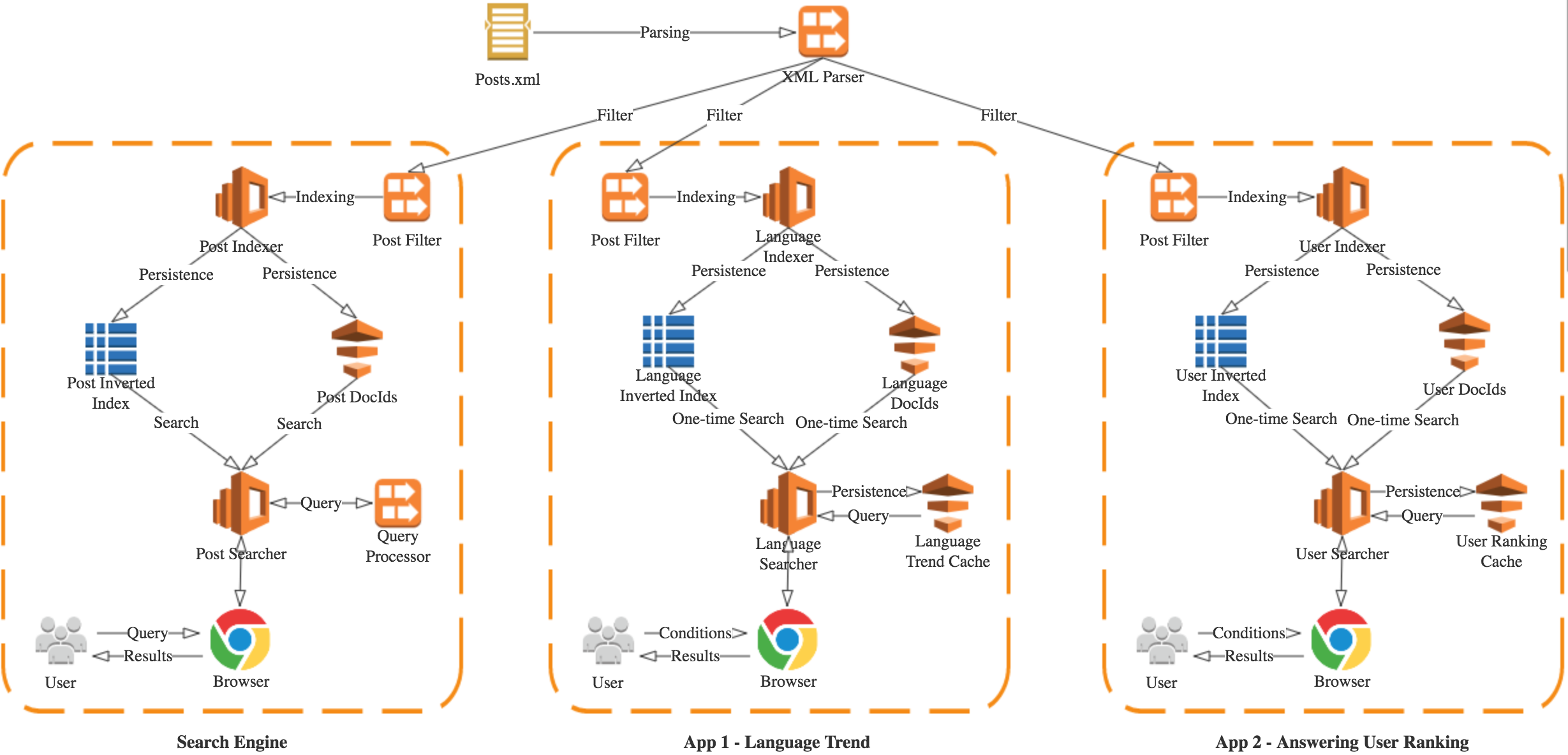

该项目是基于堆栈溢出帖子数据构建的。您可以在https://archive.org/download/stackexchange/stackoverflow.com-posts.7z上下载数据文件。它很大,大约10 GB。下载数据文件后,请取消压缩以获取posts.xml文件。该项目的应用程序在帖子之上构建其索引和文档。xml数据文件。
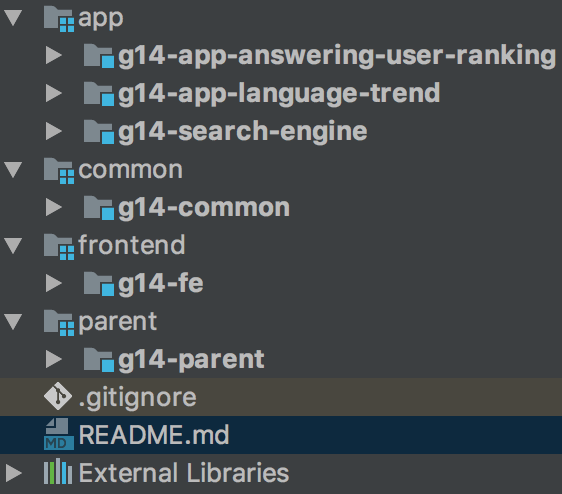
打开日食,选择[导入 - > Maven->现有的Maven项目] 。选择根目录作为CI6226-IRA-G14,然后在窗口中选择所有项目。单击完成以完成导入。
您可以在src/main/resources/application.yml文件中更改应用程序配置。例如,您可以更改端口,posts.xml路径和索引路径。有关配置参数的更多详细信息,请参阅特定的.yml文件。
每个项目都有相同的运行方式。让我们以搜索引擎为例:右键单击ci6226.ira.g14.search.engine的main.java,然后选择[运行为 - > spring boot应用程序] 。然后,搜索引擎将在9001端口上运行并收听。以下列表列出了所有主要类别,默认侦听项目的端口:
| 应用 | main.java软件包 | 港口 |
|---|---|---|
| 搜索引擎 | ci6226.ira.g14.search.engine.main.java | 9001 |
| 语言趋势 | ci6226.ira.g14.app.language.trend.main.java | 9002 |
| 回答用户排名 | ci6226.ira.g14.app.answering.user.ranking.main.java | 9003 |
| 前端 | ci6226.ira.g14.fe.main.java | 8000 |
打开Intellij,在“欢迎”页面中,选择[创建项目 - >空项目 - > NEXT->导航位置到CI6226 -IRA -G14->完成] 。
然后,在项目结构窗口中,将所有项目添加为模块,通过选择['+'符号 - >导入模块 - >选择G14 -Search -engine(或其他) - > open-> open-> open-> open->从外部模块 - > maven-> maven-> next ... - > binitive Import模块] 。
与第2.1节(2)节中所述相同。
右键单击main.java,然后选择“ main”运行。有关详细的main.java软件包和端口,请参阅第2.1节。(3)。
如果您的系统中没有安装Maven,请参阅MAVEN安装指南以安装Maven。安装指南在https://maven.apache.org/guides/getting-started/maven-in-five-minutes.html上。
与第2.1节(2)节中所述相同。
以搜索引擎为例:
输入搜索引擎项目的根目录:
$ cd /path/to/g14-search-engine
运行应用程序:
$ mvn spring-boot:run
搜索引擎应用程序将在9001端口上运行和收听。其他应用程序共享相同的程序以在终端运行。
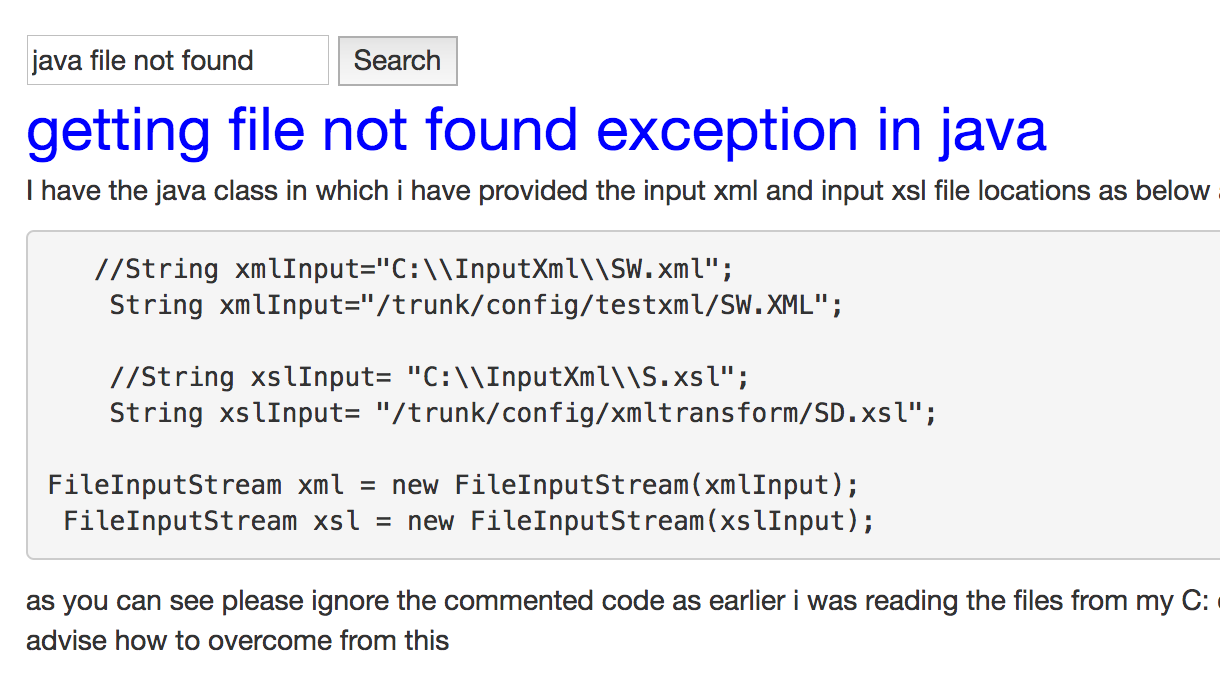
您可以使用Web浏览器访问http:// localhost:8000来访问前端的主要网页。搜索输入框位于网页的中心。您可以输入搜索关键字,然后选择要搜索的字段。然后单击搜索按钮,搜索结果将被渲染。如果您想进行另一个搜索,则可以简单地在左上角输入框中输入关键字,而回到主页。
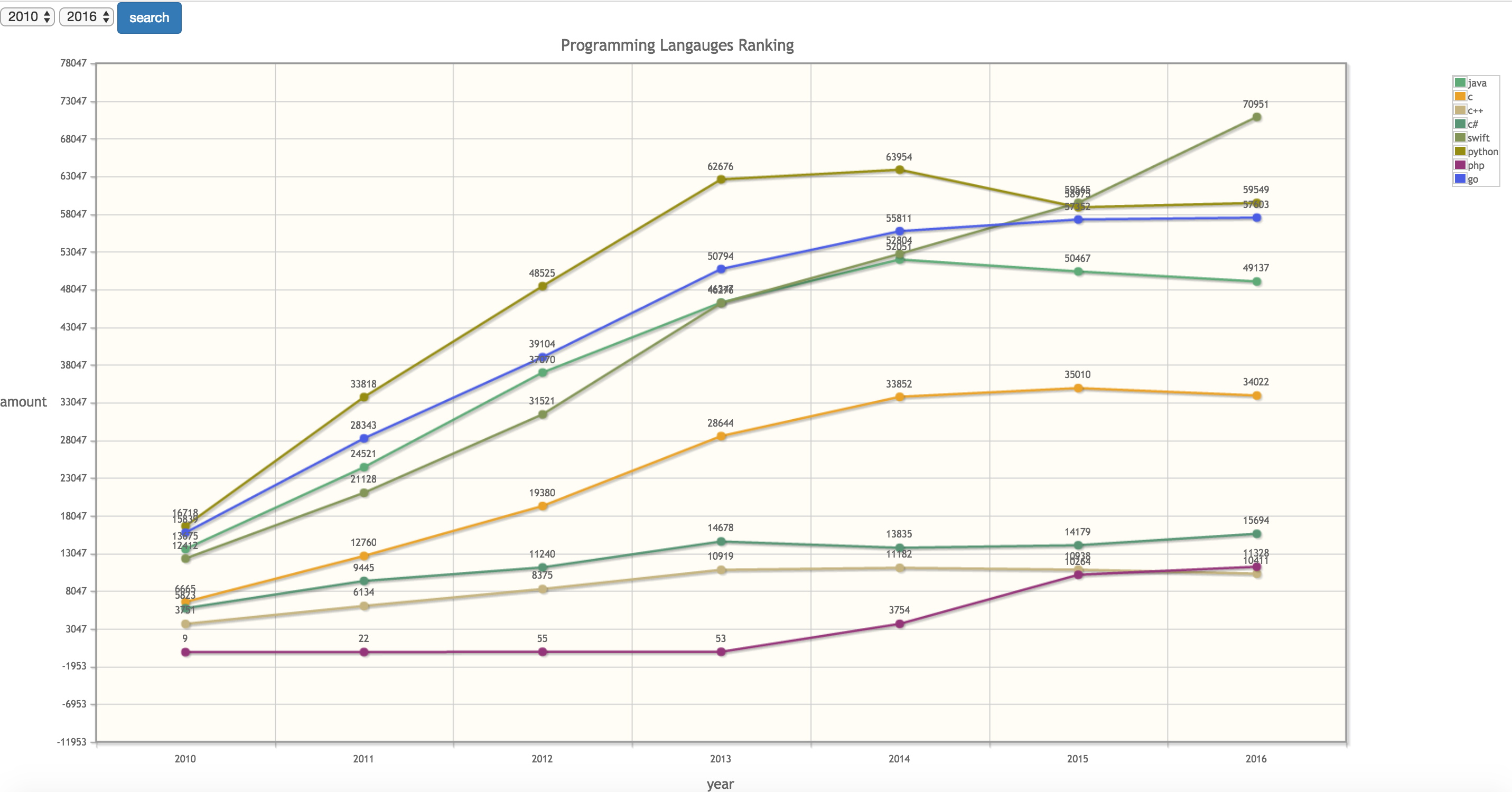
URL是http:// localhost:8000/语言。选择年结束的开始,然后单击搜索按钮。语言趋势结果将在图中呈现。
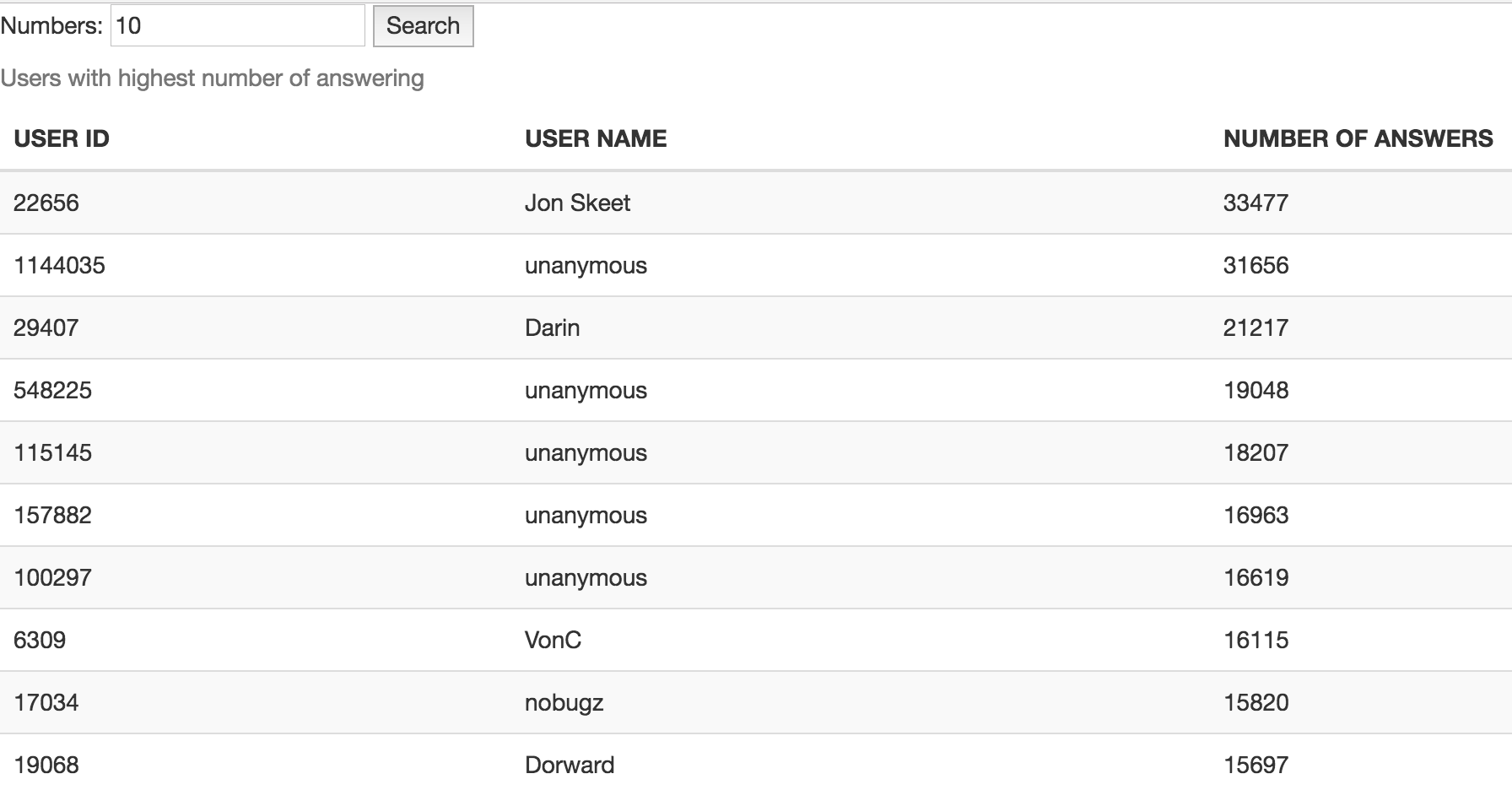
URL是http:// localhost:8000/用户。在左上方的框中输入最高数字用户,然后单击搜索按钮。结果将在下面的列表中渲染。
如果您想与没有网页的搜索引擎进行交互,则可以。搜索引擎公开了网页实际获取数据的API。
GET http://localhost:9000/api/search?field=all&keywords=python+convert+string+to+int&count=2
 field: title, body or all
keywords: query keywords (url encoded)
count: top N results
[
  {
    "title" : " converting string to int python " ,
    "body" : " <p>how can I convert a string to an int in python n say I have this array</p> nn <pre><code>['(111,11,12)','(12,34,56)'] to [(111,11,12),(12,34,56)] n </code></pre> nn <p>Any help will be appreciated thanks</p> n " ,
    "docId" : 582335 ,
    "score" : 30.801956
  },
  {
    "title" : " Python: Recursively convert int to binary string " ,
    "body" : " <p>I am trying to recursively convert int to binary string but I don't really understand how the whole positive int to binary string conversion works.</p> nn <p>Also found out that apparently each position is like a representation of the power of 2.</p> nn <p>Any explanation as to how to convert a positive int to a string representation as shown in the Googled example above is extremely helpful.</p> n " ,
    "docId" : 608825 ,
    "score" : 28.072052
  }
] GET http://localhost:9001/api/language_trend?rankLanguages=java%2Cc%2Cpython%2Cphp&startYear=2015&endYear=2016
 rankLanguages: programming languages that you want to get trend (url encoded)
startYear: star year
endYear: end year
{
  "2015" : [
    {
      "name" : " java " ,
      "popularity" : 50467
    },
    {
      "name" : " c " ,
      "popularity" : 35010
    },
    {
      "name" : " python " ,
      "popularity" : 59565
    },
    {
      "name" : " php " ,
      "popularity" : 58975
    }
  ],
  "2016" : [
    {
      "name" : " java " ,
      "popularity" : 49137
    },
    {
      "name" : " c " ,
      "popularity" : 34022
    },
    {
      "name" : " python " ,
      "popularity" : 70951
    },
    {
      "name" : " php " ,
      "popularity" : 59549
    }
  ]
} GET http://localhost:9002/api/user_ranking?userCount=3
userCount: top N users
[
  {
    "userID" : " 22656 " ,
    "username" : " Jon Skeet " ,
    "anwseredCount" : 33477
  },
  {
    "userID" : " 1144035 " ,
    "username" : null ,
    "anwseredCount" : 31656
  },
  {
    "userID" : " 29407 " ,
    "username" : " Darin " ,
    "anwseredCount" : 21217
  }
]我们提供了Shell脚本,以轻松将应用程序部署到远程服务器。请注意,这些脚本只能在Unix,Linux,Mac OS等类似Unix的系统中使用。它们不能用于Windows。
为了使用脚本进行部署,您需要配置远程服务器以通过SSH键登录。如果您的服务器没有以这种方式配置,请参阅本教程,以获取有关如何配置的指南:https://www.digitalocean.com/community/tutorials/how-to-conto-configure-shefure-ssh-key-sh--------------------------------------------------------------------------------------------------------
而且,您还需要配置防火墙以允许应用程序中使用的TCP端口。
脚本在每个项目的根目录中。例如,在搜索引擎项目中,脚本为:
下一步是修改deploy.sh以将用户和服务器设置为您的:
REMOTE_SERVER=your_server_address
REMOTE_USER=your_server_user并修改server.sh以配置Java环境:
export JAVA_HOME=/path/to/jdk最后,您可以运行deploy.sh以自动构建和部署项目到远程服务器:
$ ./deploy.sh




