react native complete flatlist
Accept all props for

React本机平面列表的扩展版本具有许多内置功能,例如搜索,拉刷新,如果空行,则无数据可用消息
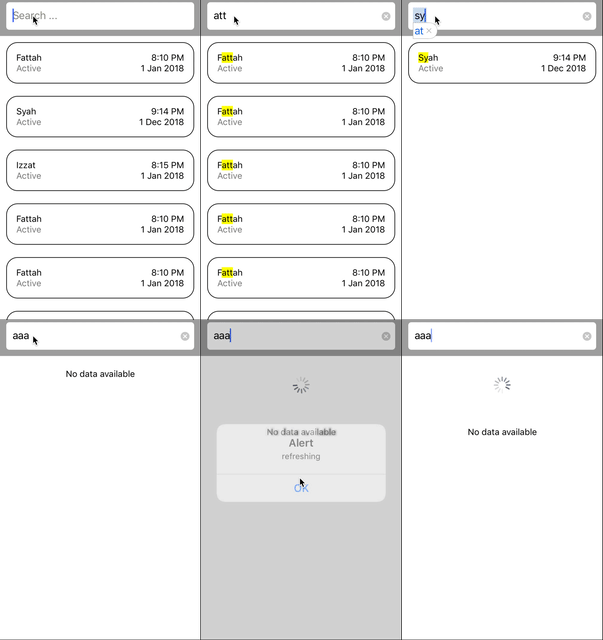
警告:
renderItem Props返回item和index参数item参数返回item数组中的一个元素。但是,如果搜索文本不是空的dan highlightColor道具设置为任何颜色, item参数将返回JSON对象的新结构(以在JSX中呈现突出显示的文本)。这可能会打破您的逻辑。因此,如果要访问数据的原始结构,它将在item.cleanData下进行。请记住, item.cleanData仅在highlightColor彩色道具和搜索文本字段不是空的时就存在(用户正在搜索)
用法 :
 import React, {useRef} from 'react';
import { Text, SafeAreaView, TouchableOpacity } from 'react-native';
import CompleteFlatList from 'react-native-complete-flatlist';

const list = [
  { name: 'Fattah', status: 'Active', time: '8:10 PM', date: '1 Jan 2018' },
  { name: 'Syah', status: 'Active', time: '9:14 PM', date: '1 Dec 2018' },
  { name: 'Izzat', status: 'Active', time: '8:15 PM', date: '1 Jan 2018' },
  { name: 'Ali', status: 'Active', time: '8:10 PM', date: '1 Jan 2018' },
  { name: 'Abu', status: 'Active', time: '8:11 PM', date: '1 Jan 2018' },
  { name: 'Fitri', status: 'Active', time: '8:20 PM', date: '1 Jan 2018' },
  { name: 'Armi', status: 'Active', time: '8:33 PM', date: '1 Jan 2018' },
  { name: 'Eidit', status: 'Active', time: '9:10 PM', date: '1 Jan 2018' },
  { name: 'Hamdan', status: 'Active', time: '10:10 PM', date: '1 Jan 2018' },
  {
    name: 'Muhyiddeen',
    status: 'Blocked',
    time: '10:10 PM',
    date: '9 Feb 2018',
  },
];

const App = () => {
  const ref = useRef();
  const renderItem = ({item, index}) => {
    const data = item.cleanData ? item.cleanData : item;

    console.log('item (if search bar is not empty and prop highlightColor is not empty, item will contains extra data to enable highlight feature)', item);
    console.log('cleanData (if search bar is not empty and prop highlightColor is not empty, cleanData will contain original data structure without extra data)', item.cleanData);


    console.log('this is index number : ' + index);

    console.log(data + ' this is original data');

    return <Text>{item.name}</Text>;
  };

  return (
    <SafeAreaView style={{ flex: 1 }}>
      <CompleteFlatList
        searchKey={['name', 'status', 'time', 'date']}
        pullToRefreshCallback={() => console.log('refreshing')}
        data={list}
        // renderSeparator={null}
        ref={ref}
        highlightColor="yellow"
        renderItem={renderItem}
      />
      <TouchableOpacity onPress={() => ref.current.clearSearch()} style={{ padding: 5 }}>
        <Text>Clear Search</Text>
      </TouchableOpacity>
    </SafeAreaView>
  );
};

export default App;
从renderItem={(data, index) => {} }到renderItem={({item, index, separators}) => {} } (类似于原始flatlist中的on)
所有Flatlist道具都应起作用以及下面提到的道具
| 支柱 | 类型 | 描述 | 默认 | 必需的 |
|---|---|---|---|---|
showSearch | 布尔 | 如果true (定义了searchKey Prop),将显示搜索栏。 | 真的 | 选修的 |
isJelly | 布尔 | 如果为true ,当用户滚动时,列表将扩展一个小点,当用户停止拖动时,列表将返回到原始大小(iMessage on iPhone样式) | 错误的 | 选修的 |
slide | 细绳 | 动画如何进入列表。可以是“无”,“左”或“右” | none | 选修的 |
data | 对象数组 | 列表中要渲染的数据 | [] | 需要(来吧,当然您需要数据) |
backgroundStyles | 样式对象 | 平面列表背景的风格 | 无效的 | 选修的 |
searchBarBackgroundStyles | 样式对象 | 搜索栏背景的样式 | 无效的 | 选修的 |
pullToRefreshCallback | 功能 | 当用户拉刷新时回调功能 | 无效的 | 可选(如果不提供,则将不可用 |
isLoading | 布尔 | 如果为true,则加载将显示在列表的顶部。 | 错误的 | 选修的 |
renderItem | 返回JSX元素的函数(就像RN的ListView和Flatlist一样) | 平面列表中的一排模板 | null(如果有人想为此制作默认模板,则为PR开放) | 需要(因为我还没有默认模板) |
renderSeparator | 返回将在行之间呈现的JSX元素的函数(就像RN的ListView和Flatlist一样) | 平面列表中的分离器模板 | () => <View style={{ height: 1, width: "80%", alignSelf: "center", backgroundColor: "#f2f2f2" }} /> | 选修的 |
placeholder | 细绳 | 搜索场的占位符 | “搜索 ...” | 选修的 |
searchTextInputStyle | 对象(React Native的TextInput组件的样式) | 搜索字段的样式 | 无效的 | 选修的 |
highlightColor | 颜色 | 匹配搜索关键字时,higlight词的颜色背景。如果使用此道具,请阅读谨慎的谨慎 | 黄色的 | 选修的 |
searchKey | 字符串数组 | 这应该是数据中可用于搜索的密钥的名称。如果未提供此道具,则不会渲染搜索文本输入。 **Warning: nested key not yet supported | [] | 可选(如果不提供,则不会出现搜索字段) |
elementBetweenSearchAndList | JSX元素 | 在搜索栏和列表之间渲染什么 | 无效的 | 选修的 |
refreshOnLoad | 布尔 | pullToRefreshCallback true ,如果可用 | 真的 | 选修的 |
onSearch | 可以替换pullToRefreshCallback功能 | 如果存在,则将撤回pullToRefreshCallback 。这不会在按键按下触发,而是按下返回键。如果搜索触发器由API产生,则将引入此道具。如果您只想本地搜索(从现有数组中搜索),则不需要此道具。 onSearch将自动获取keyword参数 | ()=> null | 选修的 |
loadNext | 功能 | 如果定义,当用户滚动flatlist到底部时,将调用此功能。用户酶是调用您的API的下一个分页。如果定义,将显示加载图标在列表的底部。要隐藏加载图标,请确保此道具未定义 | 不明确的 | 选修的 |
refreshControlProps | 目的 | 刷新控制的道具 | 不明确的 | 选修的 |
如果您对组件有ref ,
 const completeFlatList = useRef();
...
 <CompleteFlatList
   ...
    ref={completeFlatList}
   ...
 />
或基于组件的
<CompleteFlatList
   ...
   ref={c => this.completeFlatList = c}
   ...
/>
您可以使用下面的任何方法: completeFlatList.current.methodName()
或基于组件的
this.completeFlatList.methodName()
| 方法 | 描述 |
|---|---|
| ClearSearch | 以编程方式清除搜索输入 |





