laravel heyman
v11

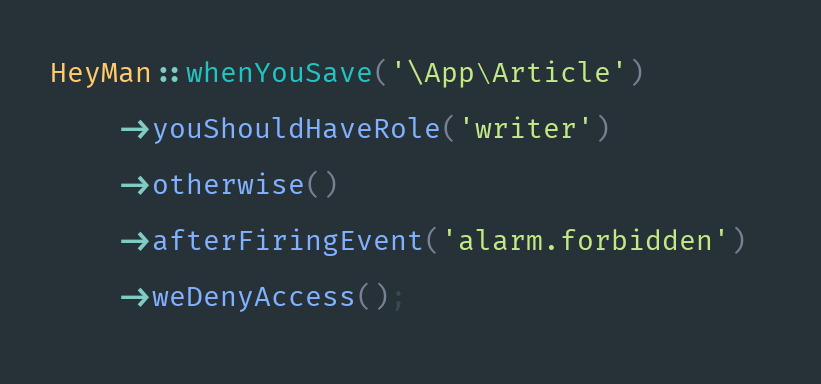


经过充分测试、优化并可投入生产!
我们在幕后解决了许多complexity ,为您提供了许多simplicity 。
与开箱即用的 laravel-debugbar 包集成:laravel debugbar
composer require imanghafoori/laravel-heyman
PHP v7.0 或以上版本
Laravel v5.1 或更高版本
您可以在此处看到一个很好的示例:
https://github.com/imanghafoori1/council
特别是这个文件:
https://github.com/imanghafoori1/council/blob/master/app/Providers/AuthServiceProvider.php
这是 laracasts.com 教程系列的结果的分支,重构为使用 Heyman 包。

僵尸 Http 请求 =>

<= 拉拉维尔·海曼
想象一下你的老板来找你并说:
 Hey man !!!

 When you visit the login form,

 You should be guest,

 Otherwise you get redirected to '/panel',
现在就为我编写代码...但是请记住,您不允许触摸当前代码。它非常敏感,我们不希望您对其进行篡改。你可能会打破它。
您可以在服务提供者boot方法中编写这样的代码来实现老板想要的东西。

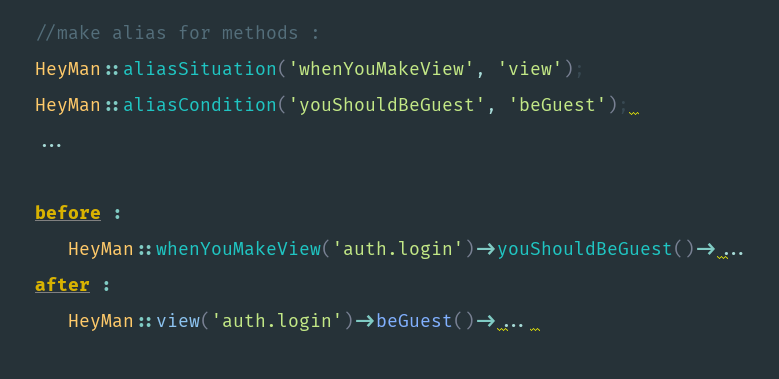
如果您不喜欢默认提供的太多详细语法,您可以为这样的方法添加别名。
别名情况(例如, whenYouMakeView to view )
别名条件(例如youShouldBeGuest到beGuest )
您应该在 boot 方法中执行此操作。
1-通过这种方式,您可以将授权和大量保护代码与应用程序代码的其余部分完全decouple ,并将其放在其他位置。因此,您的控制器和路由变得不那么拥挤,并且您将有一个中心位置,您可以在其中限制用户对应用程序的访问或执行请求验证。
2- 事实上,当您以这种方式编写代码时,您就遵守了著名的“ Tell don't ask principle.
您是在告诉框架在某些情况下要做什么,而不是获取信息并决定然后做什么。
Procedural code gets information then makes decisions. Object-oriented code tells objects to do things. — Alec Sharp
3-例如,当您编写需要 ACL 的包,但您希望允许包用户覆盖并将他们自己的 ACL(或验证)规则应用到包路由中时,此方法特别有用...
当您使用 laravel-HeyMan 进行 ACL 时,这一切就成为可能。用户可以轻松取消默认规则并在常规 ServiceProvider 中重写他们喜欢的 acl 或验证内容。
嘿伙计,那真是太神奇了!
// 这是写在包中并存在于供应商文件夹中的,所以我们不能碰它。HeyMan::whenYouHitRouteName('myPackageRoute')->youShouldHaveRole(....;为了覆盖它,我们在app/Providers/...中使用forget方法:
公共功能启动(){
    //取消当前规则
   HeyMan::forget()->aboutRoute('myPackageRoute');

       // 按包用户添加新规则。
   HeyMan::whenYouHitRouteName('myPackageRoute')-> ...

}您不需要任何备忘单。
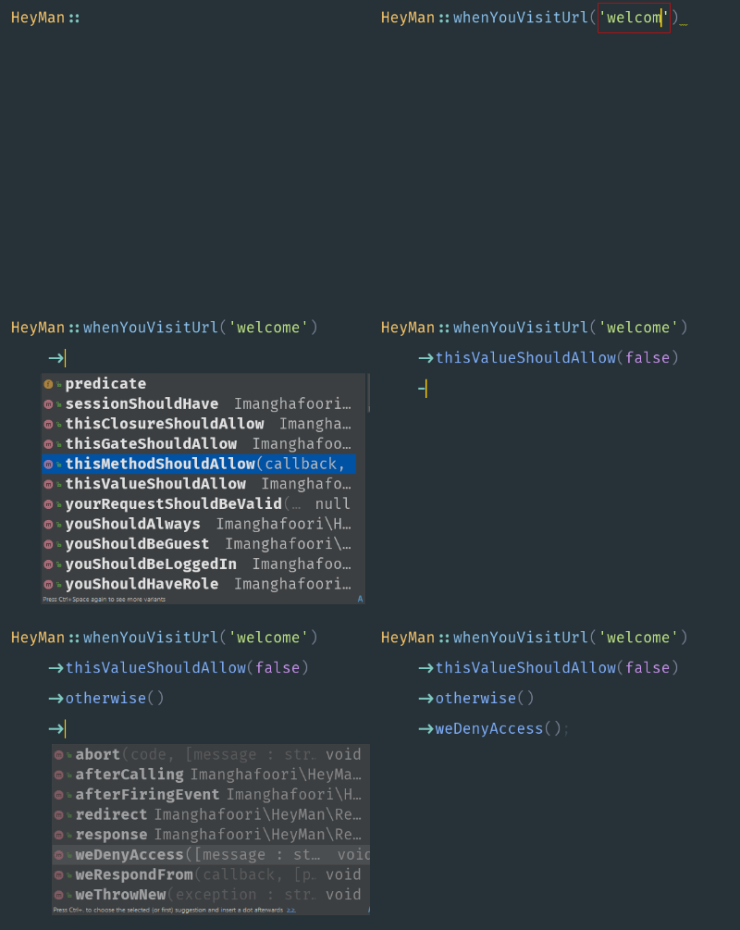
完全支持 IDE
Auto-completion。
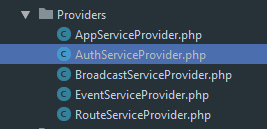
Heyman::电话放在哪里?您可以将它们放在
AuthServiceProvider.php(或任何其他服务提供商)boot方法中。
您应该调用 HeyMan Facade 类的以下方法。
use ImanghafooriHeyManFacadesHeyMan;// 或use HeyMan; // <--- 别名
我们再次建议访问此文件:
工作 Heyman 示例规则
HeyMan:: (情况) -> (条件) -> 否则() -> (反应) ;
HeyMan::whenYouVisitUrl(['/welcome', '/home'])->... // 您可以传递 ArrayHeyMan::whenYouVisitUrl('/admin/*')->... // 或通过以下方式匹配通配符HeyMan::whenYouSendPost('/article/store')-> ...
HeyMan::whenYouSendPatch('/article/edit')-> ...
HeyMan::whenYouSendPut('/article/edit')-> ...
HeyMan::whenYouSendDelete('/article/delete')-> ...HeyMan::whenYouHitRouteName('welcome.name')->... // 对于路线名称HeyMan::whenYouHitRouteName('welcome.*')->... // 或通过通配符匹配HeyMan::whenYouCallAction('HomeController@index')->...
HeyMan::whenYouCallAction('HomeController@*')->... // 或通过通配符匹配 HeyMan::whenYouMakeView('article.editForm')->... // 也接受数组
HeyMan::whenYouMakeView('article.*')->... // 可以观看一组视图实际上指的是view('article.editForm')执行的那一刻。
HeyMan::whenEventHappens('myEvent')->...实际上它指的是event('myEvent')执行的时刻。
HeyMan::whenYouSave(AppUser::class)->...
HeyMan::whenYouFetch(AppUser::class)->...
HeyMan::whenYouCreate(AppUser::class)->...
HeyMan::whenYouUpdate(AppUser::class)->...
HeyMan::whenYouDelete(AppUser::class)->...
实际上它指的是 eloquent 触发其内部事件的时刻,例如:(保存、删除、创建……)
HeyMan:: (情况) -> (条件) -> 否则() -> (反应) ;
说完情况,就该说条件了。
// 定义 GateGate::define('hasRole', function(){...});然后你就可以使用门了:
HeyMan::whenYouVisitUrl('/home')->thisGateShouldAllow('hasRole', 'editor')->otherwise()->...;将闭包作为门传递:
 $gate = function($user, $role) {// 某些逻辑返回 true;
}
HeyMan::whenYouVisitUrl('/home')->thisGateShouldAllow($gate, '编辑器')->otherwise()->...; HeyMan::whenYouVisitUrl('/home')-> youShouldBeGuest() ->otherwise()->...;
HeyMan::whenYouVisitUrl('/home')-> youShouldBeLoggedIn() ->otherwise()->...;Closure 、 Method或Value : HeyMan::whenYouVisitUrl('home')->thisMethodShouldAllow('someClass@someMethod', ['param1' => 'value1'])->otherwise()->...;
HeyMan::whenYouVisitUrl('home')->thisClosureShouldAllow( function($a) { ... }, ['param1'] ) ->otherwise()->...;
HeyMan::whenYouVisitUrl('home')->thisValueShouldAllow( $someValue )->otherwise()->...; HeyMan::whenYouHitRouteName('articles.store')->yourRequestShouldBeValid(['title' => '必填', 'body' => '必填',
]);您还可以通过调用beforeValidationModifyData()在验证之前修改数据。
 $modifier = function ($data) { // 在验证之前从“name”中删除“@”字符。
  $data['name'] = str_replace('@', '', $data['name']);  返回$数据;
}

HeyMan::whenYouHitRouteName('welcome.name')
        ->yourRequestShouldBeValid(['名称' => '必需'])
->beforeValidationModifyData($modifier);您还可以在应用程序代码中的某处声明一些检查点:
HeyMan::checkPoint('MyLane');并为其制定一些规则
HeyMan::whenYouReachCheckPoint('MyLane')->youShouldHaveRole('Zombie')-> ... HeyMan::whenYouVisitUrl('home')->always()-> ...
HeyMan::whenYouVisitUrl('home')->sessionShouldHave('key1')->...您还可以使用“ always ”和“ sessionShouldHave ”方法:
 HeyMan::whenYouVisitUrl('home')->always()-> ...
HeyMan::whenYouVisitUrl('home')->sessionShouldHave('key1')->...您可以扩展条件并向 Heyman API 引入新方法,如下所示:
 // 将此代码放入服务提供商的 `boot` 方法中HeyMan::condition('youShouldBeMan', function () { return function () { return auth()->user() && auth()-> user()->性别 === '男';
   };
});// 或 HeyMan::condition('youShouldBeMan', 'AppSomeWhereSomeClass@someMethod');
然后你可以像这样使用它:
HeyMan::whenYouVisitUrl('home')->youShouldBeMan()-> ...很好,不是吗?
HeyMan:: (情况) -> (条件) -> 否则() -> (反应) ;
HeyMan::whenSaving(AppUser::class)->thisGateShouldAllow('hasRole', 'editor')->otherwise()->weDenyAccess();如果需要,将抛出AuthorizationException
 HeyMan::whenYouVisitUrl('/login')-> ... ->otherwise()->redirect()->to(...)->with([...]);
HeyMan::whenYouVisitUrl('/login')-> ... ->otherwise()->redirect()->route(...) ->withErrors(...);
HeyMan::whenYouVisitUrl('/login')-> ... ->otherwise()->redirect()->action(...) ->withInput(...);
HeyMan::whenYouVisitUrl('/login')-> ... ->否则()->重定向()->预期(...);
HeyMan::whenYouVisitUrl('/login')-> ... ->否则()->重定向()->访客(...);
事实上,这里的重定向方法非常类似于 Laravel 的redirect()辅助函数。
 $msg = '我的消息';

HeyMan::whenYouVisitUrl('/login')
    ->youShouldBeGuest()
    ->否则()
->weThrowNew(AuthorizationException::class, $msg); HeyMan::whenYouVisitUrl('/login')-> ... ->otherwise()->abort(...);调用这些函数会生成与在response()辅助函数上调用它们完全相同的响应: return response()->json(...);
 HeyMan::whenYouVisitUrl('/login')-> ... ->otherwise()->response()->json(...);
HeyMan::whenYouVisitUrl('/login')-> ... ->otherwise()->response()->view(...);
HeyMan::whenYouVisitUrl('/login')-> ... ->otherwise()->response()->jsonp(...);
HeyMan::whenYouVisitUrl('/login')-> ... ->otherwise()->response()->make(...);
HeyMan::whenYouVisitUrl('/login')-> ... ->否则()->响应()->下载(...); HeyMan::whenYouVisitUrl('/login')->
...
->否则()
->weRespondFrom('AppHttpResponsesAuthentication@guestsOnly');命名空间 AppHttpResponses;类 Authentication
{公共函数guestOnly()
{if (request()->expectsJson()) {return response()->json(['error' => '未经身份验证。'], 401);
}返回重定向()->访客(路由('登录'));
}
}嘿伙计,你看到了吗?我们这里只有一个 Http 响应。因此,我们的管制员可以自由地处理正确的情况,而不必担心特殊情况。
嘿,伙计,您可能想在发回响应之前调用某些方法或触发一个事件。您可以通过afterCalling()和afterFiringEvent()方法来执行此操作。
 HeyMan::whenYouVisitUrl('/login')-> ... ->otherwise()->afterFiringEvent('explode')->response()->json(...);
HeyMan::whenYouVisitUrl('/login')-> ... ->otherwise()->afterCalling('someclass@method1')->response()->json(...);您可以像这样禁用 HeyMan 检查(在测试时很有用):
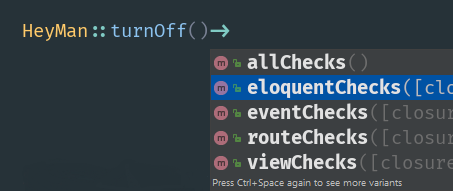
 HeyMan::turnOff()->eloquentChecks();.../// 您可以在这里保存一些 eloquent 模型.../// 不受 HeyMan 规则的限制...

HeyMan::turnOn()->eloquentChecks();
如果您发现问题,或者有更好的方法来做某事,请随时提出问题或拉取请求。
与往常一样,如果您发现这个包有用并且您想鼓励我们维护和处理它。只需按下星号按钮即可表明您的意愿。
一个最小但功能强大的包,为您的 Laravel 应用程序提供更好的结构和缓存机会。
https://github.com/imanghafoori1/laravel-widgetize
一个最小但功能强大的包,让您有机会重构您的控制器。
https://github.com/imanghafoori1/laravel-terminator
它仅允许您在本地环境中使用任何密码登录。
https://github.com/imanghafoori1/laravel-anypass
它会自动检查您的 Laravel 应用程序(新)
https://github.com/imanghafoori1/laravel-microscope
Great spirits have always encountered violent opposition from mediocre minds.

"Albert Einstein"








