
How to change the password of ChongChong Assistant? How to change the password of ChongChong Assistant ? So what is the method of changing the password? Let’s take a look below!
1. After entering the APP, first click "Me" in the lower right corner, and then click the "Avatar" button at the top;

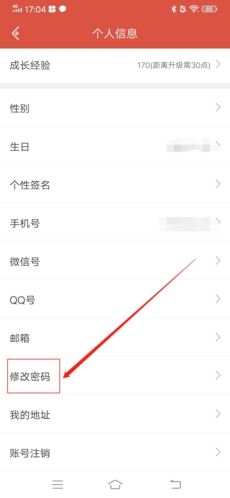
2. Pull the personal information page under *, find and click "Change Password";
3. Finally, enter the original password and new password, and click "Confirm" to successfully change the password.
