
"Tomato Novel" is a well-known mobile reading software. In this APP, you can find a large number of novel resources in a complete range. Whether it is classic masterpieces or modern and contemporary best-selling novels, you can find them here. Not only Broadening our horizons and increasing our knowledge can also allow us to find a moment of spiritual joy in the tedious life.
1. Open the Tomato Novel app, select the copied copy, click Share in the upper right corner, and copy the link.
2. Open WeChat We open WeChat and search for mini programs that are easy to parse.
3. Click Copy Analysis and then click Copy Download. Copy and paste by clicking Copy to Clipboard.

1. After opening Tomato Novel, click the bookshelf option at the bottom to enter the bookshelf interface.

2. In the bookshelf interface, click the three dots in the upper right corner, and then click the Import Books option in the pop-up options.

3. After clicking to import books, a pop-up window will appear at the bottom of the screen, prompting us which method to use to import books. At this time, we need to click to import local books.
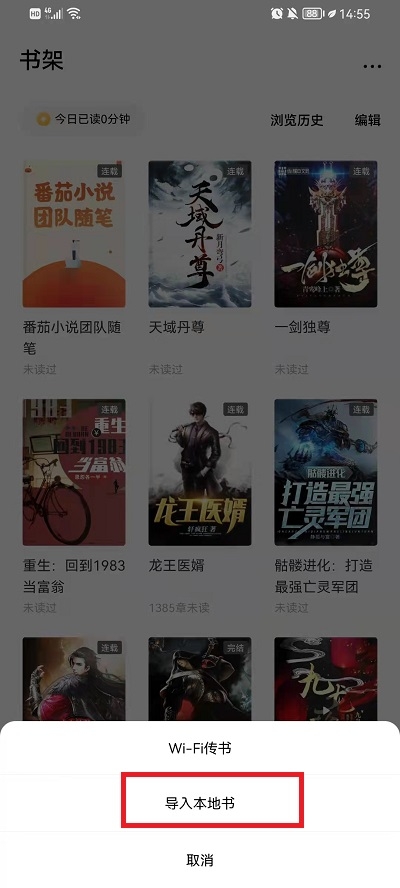
4. After entering the mobile phone folder interface, the user needs to find the novel he downloaded, or he can use smart recognition to identify the TXT file.

5. After finding the novel, just click to select it, and then click Add to Bookshelf below.

Source Code Network , a website that can provide you with high-quality content and massive software tutorials and information, allows you to swim in the paradise of games and brings you a relaxing and enjoyable reading experience!