
Microsoft's latest release of OmniParser V2.0 is a revolutionary parsing tool designed specifically to convert user interface (UI) screenshots into structured data formats. The core goal of this tool is to help users more efficiently understand and manipulate information on the screen by enhancing the performance of large language model (LLM)-driven UI agents. The launch of OmniParser marks a new stage in UI automation processing technology, providing users with a more intelligent interactive experience.
To ensure the efficiency and accuracy of OmniParser, Microsoft has carefully constructed two key datasets: the interactive icon detection dataset and the icon description dataset. The former extracts a large number of examples of clickable and actionable areas from popular web pages and annotates them with automated annotation technology; the latter focuses on matching each UI element with its functionality, providing a richer contextual information for parsing tools. . The construction of these datasets provides a solid foundation for training and optimization of OmniParser.
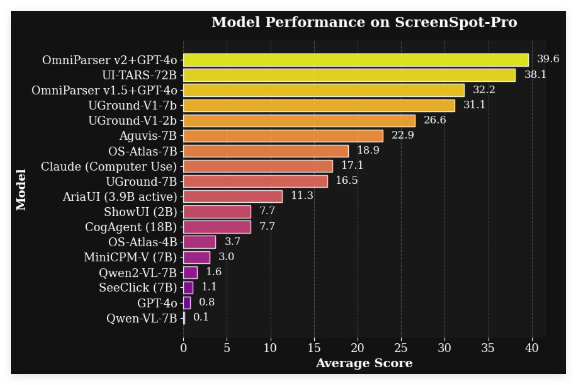
In V2.0, OmniParser achieved significant performance improvements. The updated data set is not only larger in scale, but also higher in quality, which increases the accuracy of icon description and positioning by 60%. In addition, this version has made a significant breakthrough in latency, with the average processing time on the A100 device being only 0.6 seconds/frame and 0.8 seconds/frame on a single 4090 graphics card. In the ScreenSpot Pro test, OmniParser's average accuracy rate reached 39.6%, demonstrating its strong analytical capabilities.
The seamless combination of OmniParser and OmniTool provides users with a more flexible operating experience. With OmniTool, users can easily control Windows 11 virtual machines and select appropriate visual models for parsing. Currently, OmniTool supports a variety of large language models, including multiple versions of OpenAI, DeepSeek (R1), Qwen (2.5VL), and Anthropic Computer Use, meeting the needs of different users.
The core function of OmniParser is to convert unstructured screenshot images into structured lists of elements, including the location of interactive areas and the description of potential functionalities of the icons. This tool is suitable for many types of screenshots, which can be processed efficiently, whether it is the PC interface or the mobile phone interface. However, users need to have certain analytical skills and critical thinking during use, because although OmniParser can extract information, the final judgment still needs to be made by the user.
Although OmniParser performs well in UI parsing, its limitations cannot be ignored. This tool does not integrate harmful content detection functions, so users should provide input with caution when using it to ensure that it does not contain any harmful information. Additionally, although OmniParser only converts screenshots into text, it can still be used to build actionable graphical user interface agents. Developers must strictly abide by safety standards and ethics when building and operating agents to ensure the responsible use of technology.
The release of OmniParser V2.0 not only provides powerful tools for UI automation, but also opens up new possibilities for developers to explore more application scenarios. Whether it is improving user experience or optimizing business processes, OmniParser has shown great potential. With the continuous iteration of technology, we look forward to seeing more innovative applications emerge and push UI analytics technology to a new height.