
Firefox browser latest version 135 brings the expected new feature - the sidebar of the AI chatbot. This feature allows users to access a variety of popular AIs directly in the browser, greatly improving the browsing experience. Whether it is daily use or professional needs, this function will bring more convenience to users.
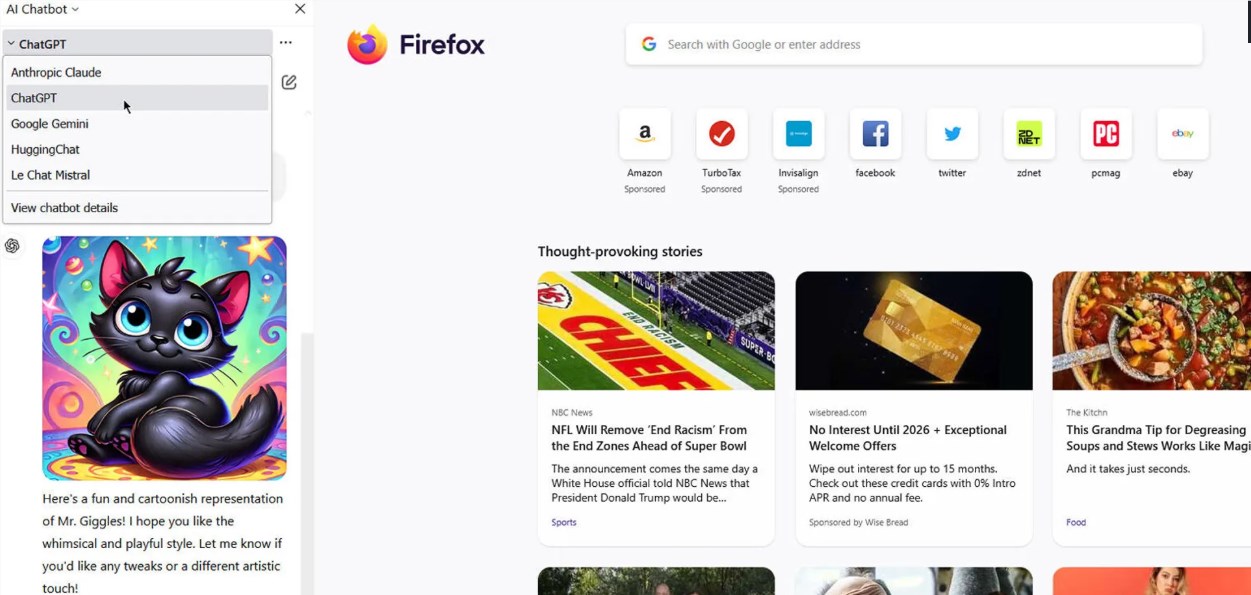
Firefox browser's latest version 135 officially opens an exciting new feature for all users - the sidebar of the AI chatbot. This feature enables users to access a variety of popular AIs directly in their browsers, including OpenAI's ChatGPT, Anthropic's Claude, Google's Gemini, Hugging Face's HuggingChat, and French AI Le Chat Mistral.
Firefox had an experimental test in version 130 back in September last year, but this update made it a formal feature that all users can use. Users who want to experience this new feature first need to make sure that their Firefox browser has been updated to the latest version. You can complete the update by clicking the three horizontal line icons in the upper right corner, selecting "Help" and clicking "About Firefox".
Once the update is complete, restart your browser and you can find the sidebar icon in the top toolbar. After clicking, the user will see a drop-down menu and select the "AI Chatbot" option to access these AIs. To open AI chat options faster, users can also use the shortcut keys Ctrl+Alt+X.
When using it for the first time, users need to log in to each AI service. To use these functions, they need to have an account with the corresponding service. Whether it's a free account or a paid subscription, it's easy to use its core features. For example, users using ChatGPT Plus account can select different models, submit prompts, generate images, and view chat history. Users using Google Gemini's premium account can use all available models and can voice input requests, upload images or other files for analysis. Even with the free plan of Anthropic's Claude, you can enjoy standard features.
In the sidebar, users can easily switch between different AIs, and the browser will also display detailed information of each chatbot to help users choose the right AI. Additionally, users can move the sidebar to the right according to their personal preferences, or close the sidebar by clicking the "X" button or the shortcut key Ctrl+Alt+X.
It should be noted that Co pilot is not included in Firefox's AI list, which is understandable because Mozilla competes with Microsoft in the browser market. Although Firefox's market share has declined in recent years, lagging behind Chrome, Edge and mobile Safari, Mozilla is still innovating to add new features to the browser and showing its potential for continued development.
Key points:
The AI chatbot function has been added to the sidebar of Firefox browser, so users can directly access multiple popular AIs.
Users need to log in to the corresponding AI account for the first time when using it, and core functions can be used in both free and paid versions.
The sidebar is movable and closed, and users can easily switch different AIs and view detailed information.
Firefox's AI chatbot sidebar feature not only enhances the user experience, but also demonstrates Mozilla's efforts in browser innovation. The launch of this feature will undoubtedly bring more convenience and choices to users.